
In the fast-paced urban hubs of the Philippines, condominium living offers great convenience but presents a clear spatial challenge. With studio and one-bedroom units typically measuring between 18 and 35 square meters, dedicating precious space to a permanent, bulky home office setup is rarely practical. A high-quality foldable table solves this issue, transforming any corner of your home into a highly productive workspace during the day and disappearing completely when your shift ends. This flexibility helps you maintain a healthy work-life boundary without sacrificing your limited living area to stationary furniture.
Why Foldable Tables Solve Small Condo WFH Challenges
Living in a compact condominium means every square meter must be highly functional. A stationary desk permanently occupies floor space, disrupting the visual flow of your room and limiting your ability to use the area for dining, exercise, or relaxation. A foldable table provides on-demand utility. When unfolded, it offers a dedicated surface that signals to your mind that it is time to focus; when folded, it easily slides under a bed or behind a wardrobe, instantly returning the room to its original residential purpose.
Beyond spatial advantages, using a temporary desk setup provides psychological benefits. When your workspace remains visible 24/7, mentally detaching from your job can be difficult, which often leads to stress and burnout. Packing away your desk acts as a physical ritual that concludes your workday, allowing you to transition fully into relaxation. This approach supports a multi-purpose room layout, enabling a single room to serve as a bedroom, a quiet office, and a living area without feeling cluttered.
Products mentioned in this guide
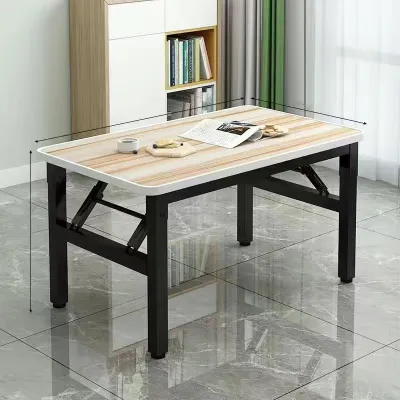

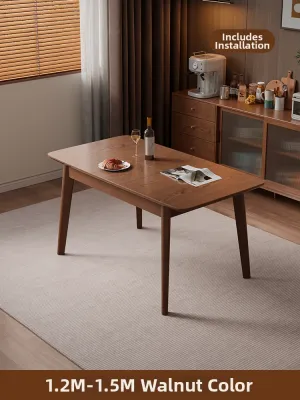
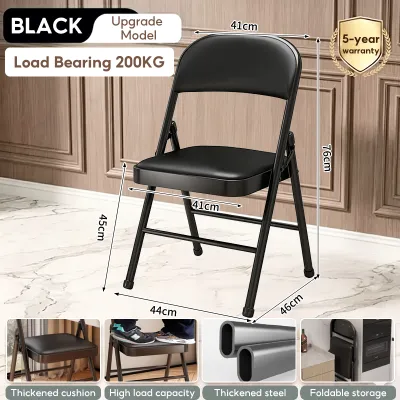
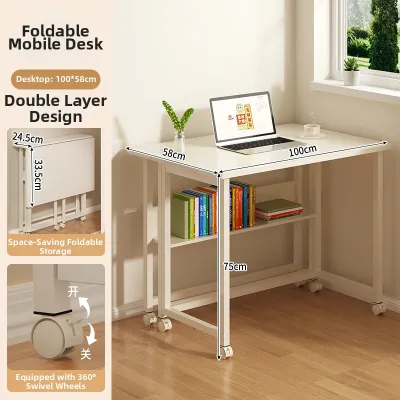
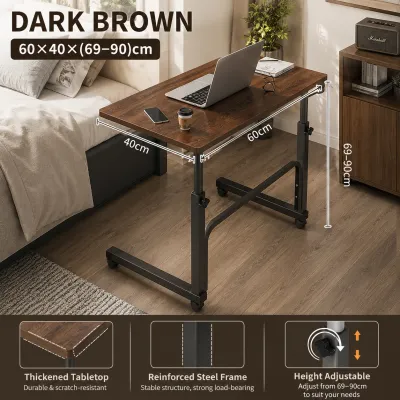
Prices are valid at publication and may change. Please refer to the product page for the latest price.
Essential Features to Evaluate Before Buying
Before purchasing a foldable table, look past aesthetic appeal and focus on structural and functional criteria that directly impact your daily comfort and productivity.

Surface Area and Depth The ideal dimensions of your table depend on your work equipment. If you work solely on a laptop, a compact surface with a depth of 40 to 50 centimeters is often sufficient. However, if you use an external monitor and a separate keyboard, you will need a minimum depth of 60 centimeters. This depth ensures your screen is positioned at a comfortable, ergonomically correct viewing distance to reduce eye strain. Before buying, physically measure your available floor space, keeping in mind the clearance required for your office chair and daily movement.
Stability and Wobble Resistance An unstable desk can be incredibly distracting, causing your screen to shake with every keystroke. When evaluating tables, prioritize those with a rigid steel or reinforced metal frame rather than lightweight plastic legs. Look for robust locking mechanisms, such as gravity locks or diagonal bracing bars, which secure the legs in their extended position. A wider base stance generally offers superior stability compared to narrow, top-heavy designs.
Folding Mechanism and Storage Different folding styles offer distinct storage advantages. Flat-fold tables collapse completely flat, making them ideal for sliding under a bed or leaning against a wall. Z-fold tables compress vertically and often feature built-in shelving that collapses alongside the frame. Drop-leaf models feature hinged panels that fold down, allowing the table to remain in place as a narrow console when not in use. Consider your daily routine and storage capacity, and choose a mechanism you can operate easily on your own.
Weight Capacity and Dimensions Always verify the manufacturer’s stated weight limit on the product label or specification sheet before purchasing. While a basic laptop may only weigh a few kilograms, adding a monitor, heavy books, and desk accessories can quickly approach the limit of lightweight models. Additionally, check the packaged dimensions before ordering. Ensure the boxed table can easily fit through your condo’s doorway, hallway corridors, and service lift or elevator access points during delivery.
Material and Finish Checks In the tropical climate of the Philippines, high humidity and temperature fluctuations can affect furniture longevity. Do not rely on material names alone to guarantee durability. Instead, check the manufacturer’s care instructions and verify if the tabletop has a moisture-resistant finish or laminate. This is particularly important to prevent wood swelling or warping from ambient humidity or the cold condensation dripping from your daily iced coffee. Inspect the joints and edge banding to ensure they are tightly sealed against moisture.
Best Foldable Table Designs for Tight Floor Plans
Finding the perfect foldable table involves matching the structural design of the furniture with your condo’s specific layout and your personal mobility needs. Because small spaces require creative solutions, the best option depends on whether you require a permanent wall fixture that folds away or a fully portable unit that can be moved from room to room.
Wall-Mounted and Drop-Leaf Desks
For ultra-compact studio apartments where floor space is at an absolute premium, wall-mounted folding desks offer an exceptional solution. These desks anchor directly to the wall and feature a hinged desktop that folds flat against the vertical surface when not in use, freeing up 100% of your floor space. Many models include shallow built-in shelving or organizer pockets that remain accessible even when the desk is closed, keeping your office supplies organized and out of sight.
Another excellent option is the drop-leaf table, which features a central fixed section and hinged panels that can be raised or lowered. This versatile design allows the table to serve multiple functions throughout the day. You can keep one leaf raised for a compact WFH setup, raise both leaves to host a quick dinner, or drop both leaves to transform the piece into a slim console table positioned against the wall.
Because wall-mounted desks bear weight through their attachment points, proper installation is critical for safety. In the Philippines, condo walls are typically constructed from solid concrete, hollow blocks, or drywall. You must use the appropriate wall anchors, heavy-duty screws, and brackets rated for your specific wall material. If you are unsure of your wall’s composition or do not own a hammer drill, consult a professional installer to ensure the desk is securely anchored and safe to use.
Freestanding Folding and Z-Desks
If you are renting your condominium and are not permitted to drill holes into the walls, freestanding folding tables are the ideal alternative. These self-supporting desks provide a traditional, spacious work surface without requiring permanent installation. Standard folding desks feature legs that fold flat against the underside of the desktop, allowing them to be stored in a closet, behind a wardrobe, or under a sofa when your workday is complete.
Z-desks are a modern variation that utilizes a sleek, Z-shaped metal frame. This design allows the desk to fold and unfold in one smooth, continuous motion without the need for complex assembly or loose parts. Many Z-desks also feature a small elevated shelf for your monitor, which helps keep your screen at eye level and frees up valuable space on the main desktop. When shopping for freestanding models, always check the fully folded dimensions to ensure the unit will fit comfortably inside your available storage spaces, including narrow condo closets or the gap beside your wardrobe.
Portable Lap Desks and Over-Bed Tables
For micro-spaces where even a compact freestanding desk is impractical, or for individuals who prefer a highly flexible work environment, portable lap desks and over-bed tables offer maximum mobility. Structured lap desks feature a flat, rigid top surface to support your laptop and a cushioned, contoured underside that rests comfortably on your lap, protecting your legs from the heat generated by your computer.
Over-bed tables feature a slim, low-profile base on wheels that easily slides under a bed or sofa, allowing the adjustable tabletop to hover directly over your lap. These options are incredibly convenient for quick tasks, checking emails in the morning, or working from the comfort of your couch. However, it is important to recognize their ergonomic limitations. Working from a bed or sofa for extended periods can lead to poor posture, back pain, and shoulder strain. Therefore, portable lap desks and over-bed tables are best utilized as secondary, occasional WFH solutions rather than your primary daily workspace.
Optimizing Your Multi-Purpose Room Layout
Successfully integrating a foldable table into a small condo requires more than just setting it up in an empty corner. To maximize your comfort, productivity, and overall well-being, you must carefully plan your room’s layout.
Lighting and Glare Proper lighting is essential for reducing eye strain and maintaining focus. Whenever possible, position your foldable table perpendicular to your windows. This orientation allows you to enjoy natural daylight without facing the window directly, which can cause discomforting contrast, or having the window directly behind you, which creates distracting screen glare. During the sunny afternoon hours typical of the tropical Philippine climate, use sheer curtains or adjustable blinds to soften the incoming light.
Power and Cable Management In a multi-purpose room where furniture is frequently moved, loose power cords can quickly become dangerous tripping hazards. Position your folding table as close as possible to existing wall outlets to minimize the length of exposed cables. Use adhesive cable clips, hook-and-loop wraps, or spiral cable sleeves to bundle your laptop charger, monitor cables, and phone cords neatly along the legs of the desk. This not only keeps your workspace looking clean but also makes it much faster and easier to pack up your desk at the end of the day.
Visual Separation Creating a psychological boundary between your work zone and your relaxation space is key to successful WFH living. You can establish this boundary by placing a small, dedicated area rug under your workspace to visually define the “office.” Alternatively, use a lightweight, folding room divider or position a tall potted plant, such as a snake plant or peace lily, to block your direct line of sight to the desk when you are resting on your sofa or bed. This simple visual cue helps your mind transition from “work mode” to “home mode.”
Safety Checks and Maintenance for Folding Hinges
Because foldable tables rely on moving parts to function, regular maintenance is essential to ensure they remain safe, stable, and easy to operate over the years.
Routine Inspections Every few weeks, take a few minutes to visually and physically inspect your table’s folding mechanisms. Check all hinges, locking pins, brackets, and joints for signs of wear, looseness, or accumulated dust. Tighten any loose screws or bolts using the appropriate screwdriver or hex key according to the manufacturer’s assembly manual. If you notice any bent metal parts or cracked joints, discontinue use immediately and contact the manufacturer for replacement parts.
Lubrication and Care The high humidity levels common in the Philippines can cause metal hinges and joints to stiffen, squeak, or rust over time. To prevent this, check the manufacturer’s care instructions before applying any lubricant or rust-prevention spray. Applying a small amount of a suitable silicone-based lubricant to the moving joints can keep the folding mechanism operating smoothly. Always wipe away any excess lubricant with a clean, dry microfiber cloth to prevent it from dripping onto your floor or attracting dust.
Safe Operation Always practice safe handling when setting up or collapsing your table. Keep your fingers, hands, and loose clothing clear of pinch points and hinge joints during operation. Before placing your laptop, monitor, or any other valuable equipment on the surface, physically double-check that all safety locks, gravity rings, and support braces are fully engaged and clicked into their designated positions.
Frequently Asked Questions (FAQ)
Can a standard foldable table support dual monitors?
Whether a foldable table can support dual monitors depends entirely on its rated weight capacity and structural design. Many lightweight, portable folding tables are engineered only for a single laptop and may buckle or tip over under the weight of two monitors. If you plan to use dual screens, verify that the table’s certified weight limit comfortably exceeds the combined weight of your monitors and mount. Additionally, only use clamp-on monitor arms if the desktop is made of solid wood or heavy-duty metal; hollow-core or thin plastic surfaces can easily crack under the concentrated pressure of a clamp.
How do I stop a freestanding folding desk from wobbling during typing?
To eliminate wobbles, first ensure that all leg locks and support braces are fully extended and clicked into place. Check that the table is resting on a completely level surface, as uneven condo tiles or deep grout lines can cause instability. If your desk features adjustable leveling feet, screw them in or out to compensate for the uneven floor. For models without built-in adjusters, placing a firm, non-slip stabilizing mat or a low-pile rug under the desk legs can absorb typing vibrations and prevent the desk from shifting. Finally, check and tighten any loose frame bolts according to the manufacturer’s assembly manual.
Community discussion
Share your experience or ask a question. Comments are reviewed before publication.