
Finding a reliable workspace in a compact home can be a major challenge for professionals and students alike. In the Philippines, where studio apartments and high-rise condominiums in bustling urban centers often feature highly constrained floor areas, a traditional heavy wooden desk is rarely a practical option. Adults working from home need a solution that balances functional surface area with the ability to pack up and store the furniture when the workday ends. A high-quality portable study table for adult users provides a dedicated, stable zone for laptops, notebooks, and digital accessories without permanently taking over valuable living space.
Selecting the ideal portable desk requires looking beyond simple aesthetics to evaluate structural stability, ergonomic suitability, and material durability. Because these tables are moved, folded, and adjusted frequently, their joints and locking mechanisms must withstand regular wear and tear. Additionally, the tropical climate in the Philippines introduces environmental factors like high humidity, which can affect the lifespan of wood composites and metal frames. By understanding the specific design features that contribute to a stable and long-lasting portable workspace, you can make an informed investment that protects your posture, your devices, and your home’s layout.
How to Choose a Portable Study Table for Compact Living
When living in a compact space, every piece of furniture must justify its footprint. A portable study table for adult users must offer enough surface area to accommodate your essential work tools—typically a laptop, a mouse, a notebook, and a beverage—while remaining small enough to tuck away into a closet, behind a sofa, or under a bed. Before purchasing, measure your primary work devices and map out how much space you genuinely need. A surface width of 60 to 80 centimeters is generally the sweet spot for adult tasks, providing ample room for a standard 15-inch laptop and an external mouse without feeling overly restrictive.
Products mentioned in this guide

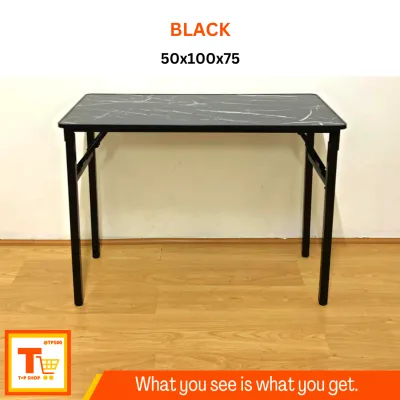
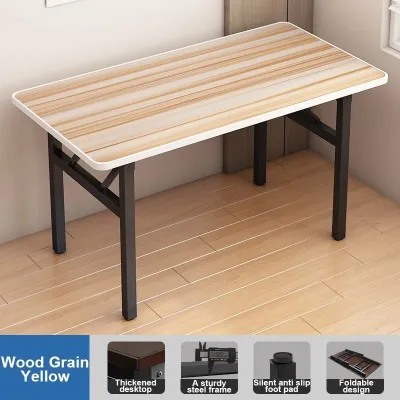
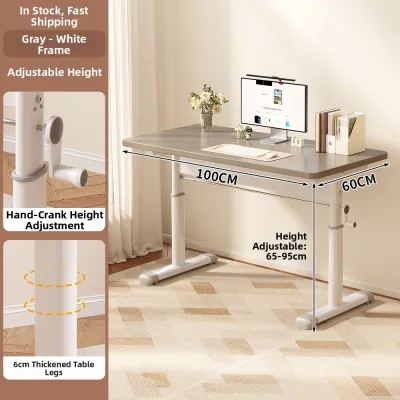

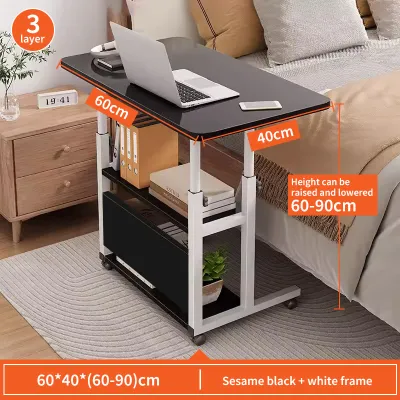
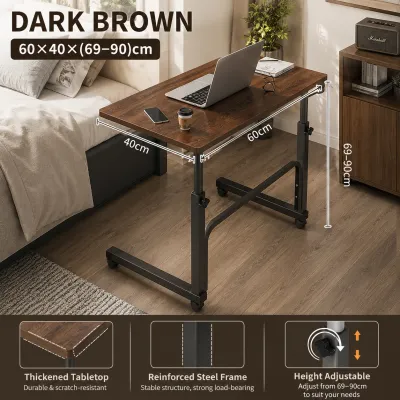
Prices are valid at publication and may change. Please refer to the product page for the latest price.
Stability and load capacity are critical features that separate low-quality tables from professional-grade portable workspaces. Because portable desks rely on folding legs, telescoping columns, or wheeled bases, they are inherently more prone to wobbling than fixed, four-legged wooden desks. When typing or writing, a shaking desk can cause eye strain, physical fatigue, and even damage to sensitive electronic devices. To ensure a stable experience, look for desks with verified weight capacities—ideally rated for at least 10 to 15 kilograms—and inspect the structural joints. Heavy-duty steel frames, reinforced crossbars, and positive-locking hinges are excellent indicators of a table that can handle the daily pressure of resting forearms and active typing.
Portability mechanisms dictate how easily you can transition your room from an office to a living area. Foldable hinges allow a desk to collapse completely flat, making them ideal for sliding under a bed or leaning against a wall. However, if you plan to move your workstation between different rooms throughout the day, a mobile desk equipped with lockable casters is often more convenient. When evaluating wheeled options, ensure the casters are made of non-marring materials like polyurethane to protect your floors, and verify that at least two of the wheels feature reliable, easy-to-operate locking tabs to prevent the desk from rolling away while you work.
Environmental durability is another essential consideration for furniture used in the Philippines. The combination of high ambient humidity and warm temperatures can quickly degrade poorly constructed materials. Engineered wood, such as medium-density fiberboard (MDF) or particleboard, is highly susceptible to swelling, warping, and peeling if it is not properly sealed. When browsing options, check for water-resistant melamine or laminate finishes that protect the wood core from spills and humidity. Additionally, ensure that any metal components, such as the legs, hinges, and screws, feature a powder-coated or rust-resistant finish to prevent corrosion over time.
Portable Desk Types That Maximize Small Spaces
To find the best portable study table for adult needs, it helps to categorize the available options by their structural design and intended use case. Each type of portable desk addresses a different spatial challenge, from working directly on a bed or sofa to creating a temporary standing desk in the corner of a living room. Evaluating these categories based on their physical requirements, ergonomic trade-offs, and storage capabilities will help you narrow down the best fit for your daily routine and home layout.

Foldable Lap and Bed Desks
Foldable lap and bed desks are the most compact and highly portable options available, designed specifically for users who prefer to work from the comfort of a bed, a deep sofa, or even a floor cushion. These low-profile desks feature short, foldable legs that rest directly on the mattress or upholstery, elevating your laptop to a more comfortable height and preventing the device’s heat from transferring to your lap.
When choosing a lap desk, leg clearance is the most critical dimension to verify. Ensure the distance between the legs is wide enough to comfortably clear your thighs while sitting cross-legged or straight. Look for models that feature adjustable leg heights and tilting surface panels, which allow you to customize the angle of your keyboard and screen to reduce neck strain. Built-in edge stoppers or safety ledges are also essential, as they prevent your laptop, tablet, or pens from sliding off the surface when the desk is tilted.
Despite their extreme portability, lap desks have notable limitations. Their surface area is typically restricted, leaving little to no room for an external keyboard, a mouse pad, or physical notebooks. Working from a bed or sofa for long periods can also lead to poor ergonomic posture, as these soft surfaces do not provide the spinal support necessary for eight-hour workdays. Therefore, lap desks are best used for shorter, focused tasks, casual browsing, or as a secondary workspace rather than a primary full-time desk.
Mobile C-Shaped and Side Tables
Mobile C-shaped tables feature an asymmetrical frame design where the support column is positioned on one side, allowing the flat base to slide underneath a sofa, armchair, or bed frame. This clever geometry brings the tabletop directly over your lap while you sit on standard home furniture, transforming any seat into an instant, elevated workstation without taking up dedicated floor space.
Before purchasing a C-shaped table, you must measure the clearance height beneath your sofa or bed. Most wheeled bases require a gap of at least 5 to 8 centimeters to slide underneath smoothly. Additionally, check the quality of the vertical adjustment mechanism; many C-shaped desks allow you to raise or lower the tabletop to match different seating heights, and some can even extend high enough to serve as a compact standing desk. Ensure the locking knobs or levers grip the column securely to prevent the table from slipping under pressure.
The primary limitation of C-shaped tables is their susceptibility to wobbling. Because the tabletop is supported by a single side column rather than four corner legs, any heavy downward pressure on the opposite edge can cause the desk to flex or tilt. To mitigate this risk, look for models with heavy steel bases, dual-column supports, or reinforced welding at the joints. These tables are ideal for moderate laptop work, taking notes, and holding a cup of coffee, but they are not suited for heavy equipment or vigorous typing.
Collapsible Floor and Low Tables
Collapsible floor tables, often inspired by traditional Japanese chabudai or Korean low tables, are designed for users who prefer sitting on the floor with cushions. These tables feature sturdy, full-length folding legs that collapse flat against the underside of the tabletop, allowing the entire unit to be stored in narrow gaps between wardrobes or under furniture when not in use.
When evaluating a collapsible low table, pay close attention to the folding leg mechanism. The hinges should operate smoothly but lock firmly into place when fully extended to prevent accidental collapse. High-quality edge banding is also critical; because these tables sit close to the floor, they are more exposed to dust, floor-cleaning moisture, and accidental kicks, so a durable, impact-resistant edge seal is necessary to protect the wood core.
While floor tables offer a generous, stable surface area that can often accommodate a laptop, mouse, and multiple notebooks, they present ergonomic challenges. Sitting on the floor for extended periods requires excellent core strength and hip flexibility. Users with back pain, knee issues, or mobility limitations may find this setup uncomfortable. To maximize comfort, pair a collapsible floor table with an ergonomic floor chair or a thick, supportive memory foam cushion to maintain proper spinal alignment.
Setup and Stability Tips for Portable Workspaces
Once you have selected the right portable study table for adult work, proper setup and regular maintenance are essential to maximize stability and extend the lifespan of your furniture. Because portable desks are lightweight and designed to fold or roll, they require a bit more care than heavy, static desks to remain safe and wobble-free.
Uneven flooring is a common issue in many homes, particularly in apartments with tiled or stone floors where grout lines create subtle height differences. If your portable desk wobbles, check if the legs feature adjustable screw-in glide feet, which can be rotated individually to level the table on uneven surfaces. If your desk does not have adjustable feet, placing a low-pile area rug, a large desk mat, or a silicone coaster under the legs can help absorb micro-vibrations and stabilize the workspace while protecting your floors.
Proper weight distribution is key to preventing tipping hazards, especially on lightweight or C-shaped tables. Always place your heaviest items, such as your laptop, external monitor, or heavy textbooks, directly over the main support legs or columns. Avoid placing heavy items on the outer edges or cantilevered sections of the desk. When using a wheeled desk, always engage the caster locks before you begin working, and avoid leaning your body weight heavily on the front edge of the table when standing up.
Routine maintenance of hinges, joints, and fasteners will prevent your desk from developing structural play over time. The constant folding, unfolding, and rolling of portable furniture can gradually loosen the screws and bolts that hold the frame together. Every month, take a few minutes to inspect the underside of your desk and tighten any loose hardware using a screwdriver or the hex key provided by the manufacturer. If you notice any squeaking or stiffness in the folding hinges, apply a small drop of silicone lubricant to keep the mechanism operating smoothly.
Finally, practice safe folding and storage habits to protect both yourself and the desk. When collapsing the legs, keep your fingers clear of the hinge pivot points to avoid painful pinches. Store the folded desk in a dry, well-ventilated area away from direct sunlight, which can fade the finish or degrade plastic components. Avoid stacking heavy boxes or other furniture on top of a folded desk, as constant pressure can warp the tabletop or bend the metal legs, permanently compromising its stability.
Frequently Asked Questions (FAQ)
Can a portable study table support a dual-monitor setup?
Most portable study tables are not designed to support dual-monitor setups. Portable desks typically have strict weight limits (often between 10 to 15 kilograms) and a lightweight, narrow footprint that makes them highly susceptible to tipping under top-heavy loads. Additionally, the clamping force of dual-monitor desk mounts can crack or warp thin engineered wood tabletops. For a safe and stable dual-monitor workstation, it is highly recommended to use a fixed, heavy-duty desk with a solid wood or thick steel frame.
How do I prevent a foldable desk from scratching my floor?
To protect your floors from scratches, apply heavy-duty adhesive felt pads to the bottom of stationary folding legs. For mobile desks with casters, ensure the wheels are made of soft polyurethane or rubber rather than hard plastic, which can scratch laminate, vinyl, or hardwood. Regularly clean the wheels or leg caps to remove trapped grit, hair, and dust, which act like sandpaper when the desk is moved across the floor. Alternatively, placing a dedicated chair mat or a low-pile rug under your workspace provides an effective protective barrier.
Are lap desks with built-in fans effective for laptops?
Lap desks with built-in USB-powered fans can help improve surface airflow around your laptop, which is particularly beneficial in warm, non-air-conditioned environments. However, these external fans only assist with heat dissipation on the chassis and cannot replace or fix a laptop’s failing internal cooling system. They also require a free USB port on your laptop or an external power bank to operate, which can drain your device’s battery faster. For optimal cooling, ensure your laptop’s built-in vents remain unobstructed by keeping the desk surface clean and flat.
Community discussion
Share your experience or ask a question. Comments are reviewed before publication.