
Working from home in a compact studio or one-bedroom condo in Metro Manila or other urban centers requires smart spatial planning. When floor space is limited, a standard, bulky office desk can quickly make your living room feel cramped and cluttered. Investing in a high-quality small foldable desk allows you to establish a dedicated, productive workspace during office hours and reclaim your living area once the laptop is shut. The ideal desk must balance ease of storage, structural stability, and resistance to local environmental factors like high humidity.
Assessing Your Space: How to Measure for a Foldable Desk in Compact Condos
Before browsing online marketplaces or visiting local furniture showrooms, you must take precise measurements of your designated work area. Start by mapping out the expanded footprint, which is the total width and depth the desk occupies when fully open. Do not just measure the desk itself; factor in the clearance required for your office chair to slide back smoothly. You will typically need an additional 60 to 75 centimeters of depth behind the desk to sit down, stand up, and move comfortably without bumping into walls, beds, or wardrobes.
Next, analyze the flow of traffic in your apartment to prevent walkway and door clearance bottlenecks. Condo layouts in the Philippines often feature narrow hallways and open-plan kitchen-to-living transitions where a misplaced piece of furniture can block essential pathways. Ensure that the desk, when fully set up, does not obstruct pathways to the bathroom, kitchen, balcony, or main entry door. A desk that forces you to squeeze past it every time you move around your home will quickly become a daily frustration.
Products mentioned in this guide
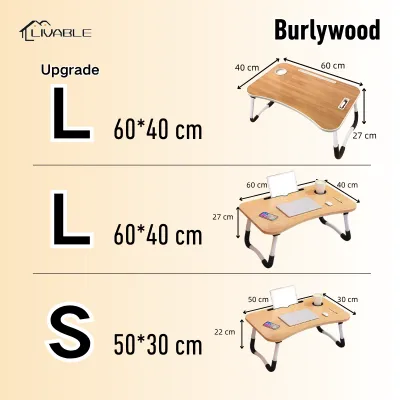

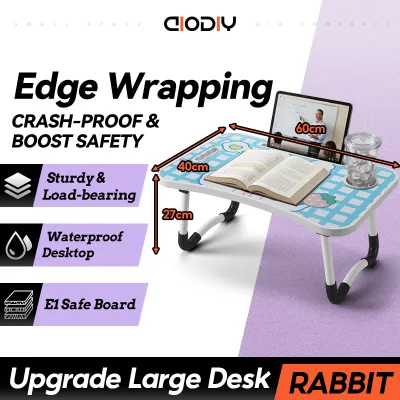

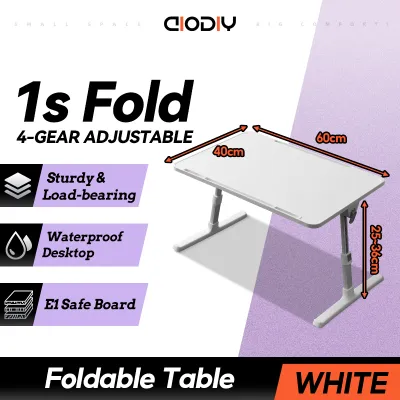

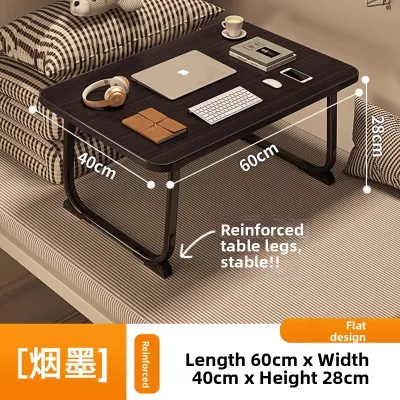
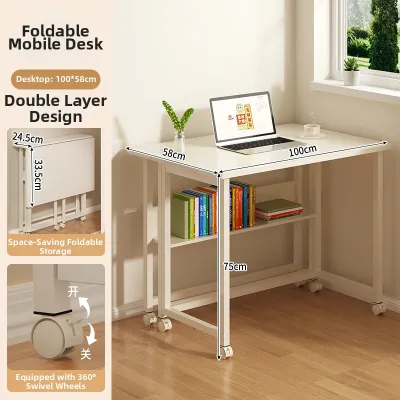
Prices are valid at publication and may change. Please refer to the product page for the latest price.
Equally important is measuring the folded dimensions of the desk to determine where it will live when your workday ends. Check the folded thickness or depth of the frame to see if it can slide flat into a narrow gap, such as behind a door, inside a utility closet, or underneath a sofa or bed frame. If you plan to store it vertically, verify that the folded height does not exceed the clearance of your closet shelves or storage alcoves.
Finally, do not overlook delivery and assembly access. Even if a desk folds down, it may arrive in a large, flat-packed box or as a pre-assembled unit. Measure the width of your condo unit’s front door, the clearance of any tight hallway corners, and the dimensions of your building’s service elevator. Ensuring the packaged desk can physically fit through these entry points prevents delivery day headaches and costly returns.
Best Foldable Desk Types for Compact WFH Setups
Freestanding Folding Desks (X-Frame or Z-Frame)
Freestanding folding desks utilizing an X-frame or Z-frame metal support system are highly popular for WFH setups. These models are particularly ideal for renters who cannot drill holes or make permanent structural alterations to their condo walls. Because they require zero wall mounting, you can easily relocate your workspace from the living room to the bedroom depending on where you find the best lighting or quietest background for virtual meetings.

When evaluating a freestanding model, pay close attention to leg stability and crossbar placement. Some cheaper X-frame designs place the intersecting metal bars directly in the center of the under-desk area, which severely restricts your knee clearance and prevents you from stretching your legs. Look for designs that position the bracing closer to the back of the frame to maximize your usable legroom and allow your chair to tuck in fully.
Safety is another critical factor when selecting a portable desk. Ensure the folding mechanism features reliable safety locks or tension knobs that secure the frame in its open position. This prevents accidental collapse if you lean heavily on the front edge or if a pet bumps into the legs while you are working.
Wall-Mounted Drop-Leaf and Floating Desks
For those living in ultra-compact studio apartments where floor space is exceptionally scarce, wall-mounted drop-leaf or floating desks offer an excellent alternative. These desks mount directly to the wall and feature a tabletop that folds down flat against the surface when not in use, completely clearing the floor area beneath it. This setup creates a highly streamlined look and allows you to utilize vertical wall space that would otherwise go wasted.
Installing a wall-mounted unit requires careful structural assessment. Many modern Philippine condominiums feature concrete, hollow block, or drywall partitions. You must verify your wall type and locate solid studs or use heavy-duty masonry anchors to secure the mounting brackets. Attempting to mount a heavy desk onto unreinforced drywall without proper anchors will inevitably lead to sagging, wall damage, or sudden structural failure.
Additionally, you must strictly adhere to the manufacturer’s specified weight capacity limits. Wall-mounted desks are highly sensitive to leverage; leaning your forearms on the outer edge of the desk multiplies the downward force exerted on the wall brackets. If you plan to use a heavy external monitor, a monitor arm, or multiple books, ensure the wall and the mounting hardware can safely support the combined weight.
Folding Desks with Built-in Storage or Wheels
If your daily WFH tasks require physical paperwork, notebooks, or external hard drives, a folding desk with integrated storage or locking caster wheels can help maintain organization. These hybrid models often feature small built-in shelves, folding side pockets, or overhead pegboards that collapse along with the main frame. They allow you to keep your essential work tools close at hand without needing a separate filing cabinet.
However, you must evaluate the trade-off between added storage and the physical bulk of the desk when folded. Shelves and drawers naturally add weight and thickness, which can make the folded desk harder to lift, carry, or slide into tight storage spaces. If portability is your primary goal, a minimalist folding desk combined with a separate mobile storage cart may be more practical than an all-in-one unit.
For mobile options equipped with wheels, check that the casters are made of high-quality materials that will not scratch your condo’s flooring, whether it is laminate, vinyl, or ceramic tile. The wheels must feature robust, independent locking mechanisms to ensure the desk remains rock-solid and stationary while you type. Furthermore, verify that any lower storage compartments or crossbars do not interfere with your chair’s armrests or restrict your natural seating posture.
Crucial Features for Stability and Humidity Resistance
When shopping for a WFH desk in the Philippines, you must look beyond basic aesthetics and prioritize build quality that can withstand daily wear and the local tropical climate. Weight capacity and wobble resistance are paramount. A flimsy desk that shakes every time you type or move your mouse will quickly cause eye strain and physical fatigue. Look for steel frames with thick tubing, reinforced joints, and rear cross-bracing (such as tension rods or solid metal plates) to minimize lateral sway.
Surface material selection is critical due to the high humidity levels experienced throughout the country, especially during the wet season. Untreated solid wood, cheap particleboard, or low-grade fiberboard can easily absorb moisture from the air, leading to swelling, warping, structural softening, or mold growth. To ensure longevity, prioritize desks featuring high-pressure laminate (HPL) surfaces, moisture-resistant medium-density fiberboard (MDF), or sealed melamine tops. Additionally, check that the edges are fully banded with PVC or ABS plastic to prevent moisture from penetrating the inner core. Metal components should feature a durable powder-coated finish to shield the steel from rust and corrosion.
Ergonomics should never be compromised for the sake of foldability. The standard desk height for comfortable typing and writing is generally between 73 and 75 centimeters. Before purchasing, verify that the desk height aligns properly with your office chair’s adjustable range. Your elbows should rest at a comfortable 90-degree angle when typing, and your feet should sit flat on the floor to prevent lower back strain during long work hours.
Lastly, efficient cable management is essential for keeping a small workspace organized and safe. Look for folding desks that incorporate built-in cable grommets, under-desk mesh trays, or magnetic routing channels along the metal legs. Keeping power bricks, laptop chargers, and monitor cables neatly tucked away prevents a cluttered look and ensures you do not accidentally pull down your equipment when folding the desk away at the end of the day.
Common Sizing and Placement Mistakes to Avoid
One of the most frequent errors when choosing a small foldable desk is ignoring the “open depth” of the unit. While a narrow desk width (such as 80 centimeters) might fit perfectly into a small alcove, a deep tabletop can protrude too far into your living space, blocking foot traffic or preventing you from fully backing out your chair. Always visualize the desk in its fully expanded state within your actual room layout before committing to a purchase.
Another common pitfall is overloading wall-mounted models. It is easy to underestimate the cumulative weight of a laptop, an external monitor, a mechanical keyboard, a desk mat, and your own hands pressing down as you type. Exceeding the manufacturer’s weight limit or failing to distribute the load evenly across the surface can pull the mounting anchors out of the wall, causing expensive damage to both your apartment and your computer equipment.
Poor environmental placement within your condo can also shorten the lifespan of your desk and degrade your working comfort. Avoid placing your desk in direct sunlight near windows, as intense UV rays and heat can cause laminate finishes to peel, colors to fade, and materials to warp unevenly. Similarly, placing the desk directly underneath or in the direct airflow path of an air-conditioning unit can expose the materials to rapid temperature fluctuations and condensation, accelerating wear and causing uncomfortable screen glare.
Finally, do not forget to plan for power outlet access. Placing your desk too far from an electrical socket forces you to run extension cords across walking paths, creating a serious tripping hazard in a compact apartment. Always position your workspace close to an outlet, or use flat, heavy-duty extension cables secured with cord covers to maintain a clean, safe environment.
Frequently Asked Questions (FAQ)
Can a foldable desk support a dual-monitor setup?
Whether a foldable desk can support a dual-monitor setup depends entirely on its structural design and rated weight capacity. Minimalist, lightweight X-frame desks are generally not engineered to handle the concentrated weight and leverage of two large monitors, especially if mounted on a single dual-monitor arm clamp. If you require a dual-monitor configuration, look for heavy-duty freestanding folding desks with thick steel frames and a weight capacity of at least 25 to 30 kilograms, or opt for a wall-mounted desk anchored securely into concrete walls using industrial-grade fasteners. Always calculate the combined weight of your monitors, stands, and mounts to ensure they fall well within the desk’s tested limits.
How do I prevent a folding desk from wobbling while typing?
To minimize wobble, start by checking if your folding desk is equipped with adjustable leveling foot pads. These threaded pads allow you to compensate for slightly uneven tile, wood, or concrete floors common in many apartments. If your desk is placed on a thick rug or carpet, the soft pile can introduce instability; consider placing a rigid, non-slip chair mat under the desk legs to provide a firm, flat foundation. Additionally, make it a habit to check and tighten all assembly screws, hinges, and locking pins every few months, as the physical action of folding and unfolding the desk can gradually loosen the hardware over time.
Community discussion
Share your experience or ask a question. Comments are reviewed before publication.