
Finding the right workspace for a compact home in the Philippines requires balancing physical floor space with daily work demands. If you are operating from a tight studio condo in Metro Manila or a shared family room, a standard office desk can quickly overwhelm the layout. The ideal solution depends on your work habits and spatial limits: a foldable desk offers unmatched flexibility for multi-purpose rooms; a standing desk provides ergonomic benefits within a fixed, compact footprint; and an L-shaped desk turns neglected corner areas into highly productive workstations.
When choosing a small table for your home office, the decision is not merely about style, but about how the piece interacts with your daily routine and physical environment. High humidity, tight corridors, and limited electrical outlets all play a role in determining which configuration will serve you best over the long term. By matching your workflow requirements to the specific mechanical and structural advantages of these three desk types, you can create an efficient workstation that does not compromise your living space.
Assess Your Space Constraints and Daily Workflow
Before browsing online marketplaces or visiting local furniture showrooms, you must conduct a thorough physical assessment of your room. Start by measuring the exact floor area where you plan to place the desk. Use a steel measuring tape rather than relying on visual estimation, as even a few centimeters of discrepancy can prevent a desk from fitting between a wall and a bed frame. Remember to account for baseboard depths, which can prevent a desk from sitting completely flush against the wall, and verify that the desk will not block the swing radius of doors, wardrobe panels, or windows.
Products mentioned in this guide

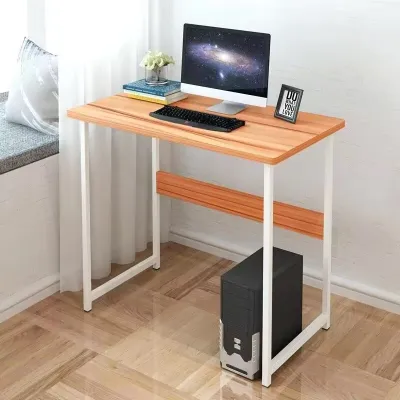
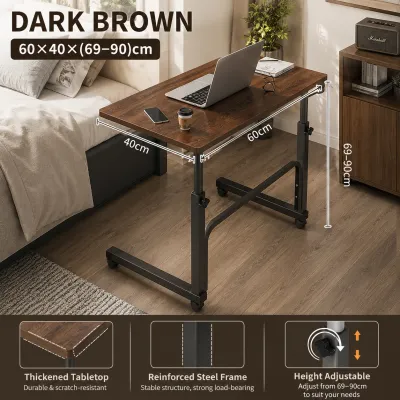
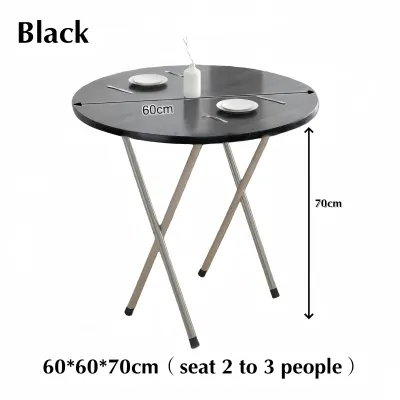
Prices are valid at publication and may change. Please refer to the product page for the latest price.
Equally important is verifying the delivery path from your building’s entrance to your room. In many Philippine condominiums and apartment complexes, service lifts and narrow stairwells present significant transport obstacles. Measure the height and width of your doorways, hallway corners, and elevator doors to ensure the packaged furniture can actually reach its destination. If you are purchasing a pre-assembled unit, these clearance checks are critical to avoiding costly return shipping fees or damaged walls.
The local climate is another vital consideration when evaluating furniture materials. High relative humidity throughout the year can cause untreated wood to warp, medium-density fiberboard (MDF) to swell, and cheap metal fasteners to rust. Instead of assuming a material is durable based solely on its name, check the manufacturer’s care instructions and look for protective finishes. Desks with powder-coated steel frames and water-resistant laminate or melamine surfaces tend to perform better in humid tropical environments, provided the edges are well-sealed against moisture intrusion.
Next, audit your daily workflow and the equipment you use. A professional who only needs a single lightweight laptop has vastly different structural requirements than a creative professional using dual monitors, a heavy desktop tower, and an external drawing tablet. Write down a complete list of your essential items, noting their approximate weights and dimensions. This audit will help you determine the minimum desktop surface area and weight capacity required to support your daily tasks without causing structural strain on the furniture.
Finally, define the primary function of the room where the desk will sit. If your workspace is integrated into a shared living area or a bedroom, you may want a desk that can be visually minimized or physically tucked away when the workday ends. A dedicated home office allows for a permanent setup, whereas a shared space benefits from furniture that helps maintain a healthy boundary between professional tasks and personal relaxation.
Foldable Desks: A Versatile Small Table for Multi-Purpose Rooms
For homes where every square meter must serve multiple purposes, a foldable small table is often the most practical choice. These desks are designed specifically for micro-apartments, shared bedrooms, or temporary work setups where a permanent workstation would disrupt the flow of the room. When the workday is complete, the desk can be collapsed and stored in a closet, behind a sofa, or flat against a wall, instantly reclaiming valuable floor space for evening activities.

The mechanisms used in foldable desks vary, each offering distinct spatial advantages. Drop-leaf models feature hinged side panels that fold down when not in use, leaving a narrow console table that can double as a decorative shelf. Standard folding-leg desks collapse completely flat for easy storage, while wall-mounted fold-down desks use heavy-duty brackets to secure a desktop panel directly to the wall, folding upward or downward to clear the floor entirely. Your choice should depend on whether you have available wall space for mounting or if you prefer a freestanding unit that can be moved from room to room.
However, these space-saving designs come with structural trade-offs that you must verify before purchasing. Folding joints, hinges, and locking pins are natural points of wear and can introduce a slight wobble, especially during vigorous typing or when supporting heavier equipment. Review the manufacturer’s specifications for maximum weight capacity, which is typically lower than that of fixed-frame desks. If you plan to use a foldable desk, prioritize models with reinforced metal brackets and secure locking mechanisms to ensure the surface remains stable and safe during use.
Safety is paramount when setting up and collapsing temporary furniture. Always check that the locking pins or safety hinges are fully engaged before placing any electronic equipment on the surface. If you choose a wall-mounted fold-down desk, you must verify the structural integrity of your wall; these units should only be anchored into solid concrete or structural wall studs, never into thin drywall or hollow partitions without proper heavy-duty anchors. Additionally, ensure that your laptop and peripheral cables are disconnected before folding the desk to prevent accidental cord snags or damage to your devices.
Standing Desks: Best for Ergonomics and Long Work Hours
If your daily routine involves sitting in front of a screen for eight hours or more, a standing desk offers significant ergonomic benefits that can improve your posture and physical comfort. By allowing you to alternate between sitting and standing positions throughout the day, these desks help reduce the physical strain associated with prolonged sedentary behavior. While standing desks are often associated with spacious corporate offices, compact variants are highly effective in limited residential spaces.
When integrating a standing desk into a small room, you must distinguish between the desktop surface area and the structural footprint of the frame. Even if you choose a compact model with a narrow desktop, the heavy metal legs and base require a fixed, permanent floor area. You must also account for vertical clearance; ensure there are no overhead shelves, low-hanging light fixtures, or wall-mounted air conditioning units that could obstruct the desk or your monitors when raised to their maximum height. Cable management is another critical factor, as power cords must have enough slack to move freely without pulling tight or knocking over items on the desk.
To find the right model, compare the operational mechanisms available within your budget. Motorized standing desks offer smooth, push-button adjustments, but they require proximity to an electrical outlet and contain electronic components that may be sensitive to voltage fluctuations or high humidity. Manual hand-crank models are more affordable, do not require electricity, and are highly reliable, though they require physical effort to adjust. Whichever mechanism you choose, verify the desk’s stability at its highest setting, as some two-leg frames can experience increased lateral sway when fully extended.
To maximize a standing desk in a tight room, look for models specifically designed with a shallow depth, such as 50 to 60 centimeters, rather than the standard 80 centimeters. This shallow profile keeps the desk closer to the wall, preserving walkway space while still providing ample room for a laptop and a compact external monitor. Utilizing a clamp-on monitor arm can also free up valuable desktop surface area, allowing you to maintain an organized, clutter-free workspace even on a smaller platform.
L-Shaped Desks: Best for Corner Setups and Heavy Workloads
An L-shaped desk is the premier choice for users who manage heavy workloads, use multiple monitors, or need to separate different types of daily tasks. The dual-surface design allows you to dedicate one side of the desk to computer work and the other to paperwork, drawing, or secondary devices. While an L-shaped desk has a larger absolute footprint than a simple rectangular desk, it is exceptionally efficient at utilizing dead corner space that would otherwise go unused.
Before choosing this style, you must carefully evaluate your room’s layout to ensure the desk will fit without blocking essential pathways. L-shaped desks are highly dependent on corner placement; placing one along a flat, linear wall can make the room feel cramped and disrupt traffic flow. Ensure the protruding wing of the desk does not block access to power outlets, light switches, or built-in wardrobe doors. It is also important to verify if the desk is reversible, meaning the longer wing can be assembled on either the left or the right side, giving you more flexibility if you decide to rearrange your room in the future.
When measuring for an L-shaped desk, treat both wings as independent dimensions and measure outward from the corner along both walls. Check the structural support of the corner joint, as this area experiences significant stress and can sag if not reinforced with a dedicated support leg or heavy-duty steel brackets. You should also review the assembly instructions beforehand; L-shaped desks often feature complex assembly processes with numerous components, requiring sufficient floor space in the room just to put the pieces together.
From an ergonomic perspective, the deep corner of an L-shaped desk can easily become a zone of unreachable dead space. To make this area functional, consider installing a corner-mounted monitor stand or using it to store items you do not need to reach constantly, such as a printer or a desktop storage organizer. Keeping your primary keyboard and mouse centered along one wing ensures you maintain a neutral typing posture, preventing the neck and shoulder strain that can occur if you constantly work at an awkward angle in the corner bend.
Final Decision Matrix: Compare Dimensions and Setup Needs
To help you finalize your decision, the matrix below summarizes how each small desk type performs across key spatial and operational dimensions. Use this comparison to align your physical room constraints with your daily work habits.
| Desk Type | Best For | Space Footprint | Workflow Capacity | Key Measurement to Check Before Buying |
|---|---|---|---|---|
| Foldable | Multi-purpose rooms and temporary workspaces | Minimal; can be stored flat or folded against the wall | Low; best for single laptops and light writing | Folded dimensions and wall anchor or hinge clearance |
| Standing | Long work hours, posture variation, and ergonomics | Fixed but compact; requires clear vertical space | Medium; supports laptops, monitors, and basic accessories | Maximum height clearance and cable slack length |
| L-Shaped | Heavy workloads, multi-monitor setups, and corner utilization | Large absolute footprint; requires dedicated corner space | High; separate surfaces for computer work and paperwork | Both wing lengths independently and corner joint clearance |
Before making your final purchase, always verify the manufacturer’s exact product dimensions against your physical measurements. A small discrepancy in height, depth, or width can significantly impact how comfortably the desk fits into your room and how safely it operates. Taking the time to measure your space, check delivery clearances, and assess your daily equipment needs will ensure you select a desk that enhances your productivity without overcrowding your home.
Frequently Asked Questions (FAQ)
Can I use a standing desk in a very small bedroom?
Yes, you can use a standing desk in a very small bedroom by choosing a compact model with a shallow depth, typically around 50 to 60 centimeters. Ensure you measure the vertical clearance to avoid overhead obstructions like shelves or wall-mounted air conditioners. Additionally, check that your power cords have enough slack to move freely as the desk rises, preventing cables from pulling tight and damaging your equipment.
Are foldable desks stable enough for dual monitors?
Most standard foldable desks are designed for lightweight setups, such as a single laptop or tablet, and may not offer the structural stability required for dual monitors. The weight of multiple screens, combined with the leverage of clamp-on monitor arms, can place excessive stress on folding joints and hinges, leading to wobbling or structural failure. If you require a dual-monitor setup, a fixed-frame standing or L-shaped desk is a much safer and more stable option.
How do I measure my space for an L-shaped desk?
To measure your space for an L-shaped desk, measure outward from the corner along both walls to determine the maximum allowable length for each wing. Ensure you account for baseboards, wall outlets, window sills, and light switches that might be covered. Finally, verify that the protruding wing leaves at least 70 to 80 centimeters of clear walkway space so you can move around the desk safely without blocking doors or drawers.
Community discussion
Share your experience or ask a question. Comments are reviewed before publication.