
Quick Answer: Which Laptop Table Should You Choose?
Choosing between a foldable and an adjustable-height laptop table for bed depends on whether you prioritize instant, space-saving storage or long-term ergonomic alignment. If you only need a quick, lightweight surface for casual browsing, watching movies, or occasional typing, a foldable table is the most practical and budget-friendly choice. These designs are highly portable, require zero setup time, and can be stored away in seconds, making them ideal for small living spaces or occasional use.
On the other hand, if you work from bed for hours, require precise typing angles, or struggle with neck and back strain, an adjustable-height table is essential. These models allow you to customize the height and tilt of your screen, helping to prevent physical fatigue during long sessions. Instead of declaring a single superior design, look at your daily habits and bedroom setup to determine which style aligns with your comfort requirements.
Foldable vs Adjustable Height: Key Differences at a Glance
While both furniture types aim to make bed-based computing more comfortable, they achieve this through entirely different engineering approaches. Reviewing their core operational traits can help clarify which style aligns with your physical space and daily routine.
Products mentioned in this guide
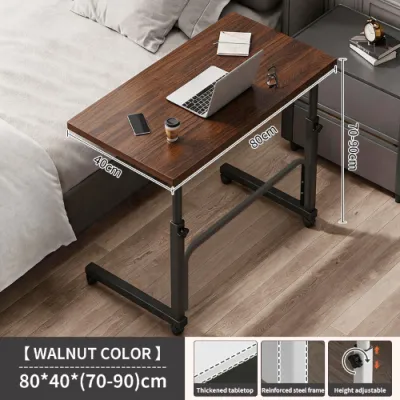



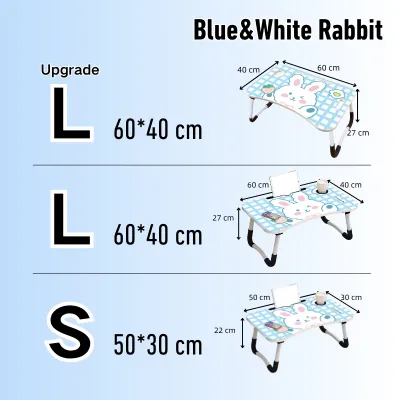
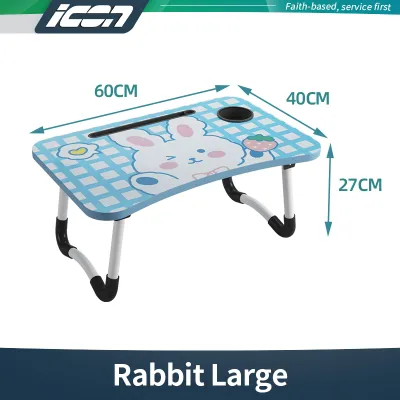

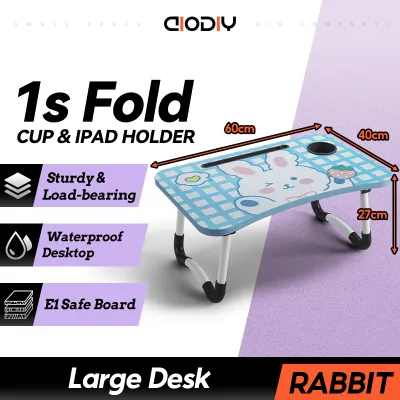
Prices are valid at publication and may change. Please refer to the product page for the latest price.

| Feature | Foldable Laptop Tables | Adjustable-Height Laptop Tables |
|---|---|---|
| Primary Advantage | Rapid setup and highly compact storage | Precise ergonomic customization and tilt options |
| Storage Footprint | Extremely flat; slides easily under low bed frames | Larger; may require dedicated closet or floor space |
| Ergonomic Flexibility | Fixed height and angle; limited posture adaptation | Multi-level height settings and variable tilt angles |
| Setup Time | Instant; typically requires unfolding two legs | Moderate; requires adjusting knobs, locks, or pins |
| Ideal User Profile | Casual users, movie watchers, and small-space residents | Remote workers, students, and ergonomic-focused users |
Keep in mind that individual product dimensions, joint designs, and weight capacities vary significantly across manufacturers. Always verify the physical specifications of a specific model before finalizing your purchase to ensure it matches your bed height and laptop size.
Portability and Storage: Evaluating Foldable Designs
Foldable laptop tables are engineered with a focus on spatial efficiency, making them a popular fixture in compact urban apartments, shared dormitories, and cozy bedrooms. The defining characteristic of these tables is their collapsible leg structure, which allows the entire unit to fold down to a thickness of just a few centimeters. This ultra-low profile means you can easily slide the table under a low-clearance bed frame, slip it into the gap beside a wardrobe, or stack it flat inside a closet when your workday ends.
However, the simplicity of a folding mechanism introduces specific structural trade-offs that you must carefully evaluate. Unlike fixed-leg desks or heavy-duty adjustable models, foldable tables rely heavily on the tension and friction of their hinges to remain upright. Cheaper models often feature basic friction hinges without positive locking mechanisms, which can loosen over time and cause the legs to fold inward unexpectedly under pressure.
To ensure your device remains safe, look for foldable designs that incorporate positive locking pins, spring-loaded brackets, or manual latching mechanisms. These hardware additions secure the legs firmly in the open position, preventing accidental collapse when you shift your weight or adjust your blankets. A robust hinge should operate smoothly without grinding, yet feel completely rigid once locked into place.
Before purchasing, measure the actual clearance under your bed or within your intended storage spot. Many modern bed frames in Philippine homes sit close to the floor, leaving only a narrow gap of 5 to 10 centimeters. Comparing these physical gaps with the manufacturer’s specified folded thickness prevents the frustration of buying a table that cannot be stored out of sight.
Furthermore, consider the weight of the table itself if you plan to move it frequently between rooms. Lightweight materials like aluminum or thin engineered wood are easy to carry but may compromise overall stability. A well-balanced foldable table should feel light enough for easy transport but substantial enough to sit securely on your lap or mattress without sliding around at the slightest movement.
Ergonomics and Comfort: The Adjustable Height Advantage
Working or studying from bed presents severe ergonomic challenges, as standard mattresses naturally encourage a slouched posture, rounded shoulders, and downward neck flexion. Fixed-height foldable tables often force you to look down at your screen, which places significant strain on your cervical spine over extended periods. Adjustable-height laptop tables directly address this pain point by allowing you to elevate the screen closer to your natural eye level.
By raising the laptop surface, you can maintain an upright head position, which significantly reduces the mechanical load on your neck and shoulder muscles. Many adjustable models also feature a tilting desktop panel, which is crucial for maintaining a neutral wrist position while typing. When you recline against your headboard, tilting the keyboard slightly upward prevents your wrists from bending at awkward angles, helping to stave off repetitive strain injuries during long typing sessions.
When shopping for an adjustable table, pay close attention to the lock and adjustment mechanisms. Common designs include telescopic legs with spring-loaded push buttons, manual twist-lock collars, or heavy-duty ratchet hinges. The ideal mechanism should allow you to make height and tilt adjustments easily, preferably with simple hand controls, while locking securely into place to prevent slipping under the weight of your hands and laptop.
It is important to note that this ergonomic flexibility comes with a physical trade-off. To maintain stability when fully extended, adjustable-height tables require a wider footprint and a heavier base to lower their center of gravity. This added weight and bulk make them less portable than their simpler foldable counterparts, meaning they will occupy more physical space in your bedroom even when adjusted to their lowest settings.
Additionally, consider the range of adjustment offered by the table. Some models only allow for minor height adjustments of a few centimeters, while others can transition from a low lap desk to a tall overbed table that sits on the floor. Understanding your preferred sitting posture—whether you prefer to sit cross-legged, recline slightly, or lie completely flat—will help you determine the exact height range your adjustable table needs to support.
Stability and Weight Capacity: What to Verify Before Buying
The primary challenge of using any laptop table in bed is the unstable, compressible nature of mattresses, pillows, and heavy blankets. Unlike a solid hardwood floor, a mattress shifts and deforms whenever you move, which can cause narrow or top-heavy tables to wobble, tilt, or tip over entirely. Understanding how different leg geometries interact with soft bedding is key to selecting a stable workspace.
Generally, tables featuring a continuous U-shaped leg design or a wide, flat sled base perform significantly better on soft mattresses than those with four independent straight legs. The continuous base distributes the weight of the table and your laptop across a wider surface area of the mattress, minimizing localized sinking and reducing wobbling. Some adjustable models utilize a heavy, low-profile steel plate or a wide H-bracket base that slides partially under the mattress or sits flush against it to anchor the unit.
Before committing to a purchase, always verify the manufacturer’s stated maximum weight capacity and compare it to your actual equipment load. Your total weight calculation should include not only your laptop but also any external keyboards, mice, tablets, smartphones, and the physical downward pressure of your hands as you type. Opting for a table with a weight rating that comfortably exceeds your calculated total ensures the joints and telescoping locks will not fail or slip during active use.
Additionally, check for the presence of non-slip silicone pads, rubberized grips, or adjustable leveling foot caps along the bottom of the table legs. In addition to protecting your bedsheets from snags and friction wear, these high-friction elements help grip the fabric of your bedding. This grip prevents the table from sliding forward or shifting out of alignment when you adjust your seating position or type vigorously.
Remember that material claims regarding stability can be misleading. A table advertised as “heavy-duty steel” may still wobble if the joint connections are loose or if the leg footprint is too narrow. Always look for reinforced crossbars or double-bolted joints in product descriptions to ensure the frame remains rigid under daily physical pressure.
Matching the Table to Your Primary Use Case
To make an investment that truly enhances your daily comfort, you must align the table’s design strengths with your primary activities. Different tasks require different levels of stability, surface area, and angle adjustment, making certain tables far better suited to specific habits than others.
Heavy Typing and Remote Work If your daily routine involves four or more hours of remote office work, academic writing, or coding from bed, an adjustable-height table with a tilting surface is highly recommended. The ability to fine-tune the height prevents back slouching, while a tilted keyboard tray keeps your wrists comfortable during prolonged typing. Look for models that offer separate panels—one that tilts for your laptop and a flat, stationary side panel to hold your mouse and a beverage securely.
Media Consumption and Casual Browsing For those who primarily use their laptop to watch streaming videos, scroll through social media, or read articles in bed, a simple foldable table is often the most practical choice. Because these activities do not require constant typing or precise wrist angles, the lack of height adjustment is rarely an issue. A lightweight, foldable model can be set up in seconds and easily set aside once you are ready to sleep.
Dining and Multi-purpose Use If you plan to use your bed table for enjoying weekend breakfasts, drinking coffee, or writing in a physical journal, a flat, non-tilting foldable table is highly superior. Adjustable tables with tilting segments or split tops introduce seams and moving parts where spilled liquids can easily penetrate and damage the internal mechanisms. A solid, single-piece flat surface is much easier to wipe clean and provides a completely stable foundation for plates, bowls, and mugs.
Reading and Tablet Use For avid book readers and tablet users, look for adjustable tables that feature integrated bookstands, tablet slots, or adjustable page clips. These specialized models allow you to prop up heavy textbooks or tablets at steep, hands-free viewing angles that are impossible to achieve on standard flat foldable tables. This setup lets you read comfortably while fully reclined without having to support the weight of the book with your hands.
Care and Maintenance in Tropical Climates
Operating and storing furniture in a tropical climate like the Philippines requires special attention to material care due to persistent high humidity, warm temperatures, and natural sweat. Whether your bedroom is cooled by an air conditioner or relies on natural ventilation, moisture in the air can quickly degrade both the metal hardware and the engineered wood surfaces of your laptop table.
To prevent premature wear, get into the habit of wiping down your table surfaces with a dry or slightly damp microfiber cloth after every use. Human skin oils and sweat are naturally acidic and can gradually corrode metal finishes or stain protective wood laminates if left unaddressed. Avoid using harsh chemical spray cleaners, which can strip away protective clear coats; a simple, clean microfiber cloth is usually sufficient for daily maintenance.
Periodically inspect the table’s moving parts, including hinges, folding brackets, and telescoping leg locks, for early signs of oxidation or rust. Applying a very light coat of a manufacturer-approved lubricant or anti-rust spray to these joints once or twice a year will keep the mechanisms operating smoothly and prevent annoying squeaks. Always wipe away any excess lubricant with a clean cloth to prevent it from transferring onto your bedsheets or clothing.
Many budget-friendly laptop tables utilize Medium-Density Fiberboard (MDF) or particleboard covered with a plastic laminate veneer. If you enjoy cold drinks while working, always use a coaster to prevent condensation from pooling on the surface. If water bypasses the laminate and seeps into the raw edges or seams of the MDF, the wood fibers will swell, warp, and cause the protective laminate to peel away permanently.
Finally, store your laptop table in a dry, well-ventilated area of your bedroom when it is not in use. Avoid leaning foldable tables directly against damp concrete walls or storing them on tiled floors that are prone to moisture condensation during heavy rainstorms. Elevating the stored table slightly or keeping it inside a dry closet will significantly extend its operational lifespan.
Final Decision Framework: Choose Foldable or Adjustable?
To finalize your decision, take a moment to evaluate your physical environment and daily comfort priorities against the structural realities of each table design. This straightforward framework will help you identify the correct path before heading to checkout.
Choose a Foldable Laptop Table if:
- Your bedroom has limited storage space, and you need a table that can quickly slide under low furniture or fit into tight closet gaps.
- You primarily use your laptop for casual tasks like watching movies, reading, or light browsing where precise ergonomics are not critical.
- You want a highly portable, lightweight accessory that you can easily carry between the bedroom, living room, and balcony.
- You prefer a straightforward, budget-friendly solution that requires zero assembly or adjustment steps.
Choose an Adjustable-Height Laptop Table if:
- You work or study from bed for consecutive hours and require precise ergonomic elevation to prevent neck, shoulder, and back strain.
- You need to alternate between different postures, such as sitting upright, reclining, or lying down, while maintaining a comfortable typing angle.
- Your bedroom has sufficient floor or closet space to accommodate a heavier, slightly bulkier piece of furniture.
- You use heavy laptops or multiple accessories that require a highly stable, robust support frame.
Verify First if:
- You are uncertain about the firmness of your mattress. Highly adjustable tables extended to their maximum height have an elevated center of gravity, which can make them unstable on very soft or plush mattresses. If your bed is exceptionally soft, a lower-profile foldable table with a wide, continuous U-shaped base will provide a much safer and more stable workspace.
Before making your final selection, take a few minutes to measure your laptop’s width, your bed’s height, and the clearance space under your bed frame. Comparing these real-world measurements against the product specifications listed by sellers on online marketplaces will ensure your new laptop table fits seamlessly into your daily routine and living space.
Frequently Asked Questions (FAQ)
Can I use a laptop table for bed on a very soft mattress without it tipping?
Yes, but you must select the correct leg design and manage the table’s height carefully. Soft mattresses, such as those made of plush memory foam, compress unevenly when weight is applied, which can cause narrow-legged or top-heavy tables to tilt. To prevent tipping, choose a table with a wide, continuous U-shaped base or a sled-style platform, which distributes the weight across a larger surface area. Additionally, keep the table’s height adjustment as low as possible to maintain a low center of gravity, and avoid placing heavy items near the edges of the table surface.
How do I clean spills on an MDF laptop table surface without damaging it?
If you spill liquids on an MDF table, act immediately by blotting the spill with a dry, highly absorbent microfiber cloth. Do not wipe or spread the liquid, as this can push moisture into the seams and edges where the protective laminate meets the wood core. For sticky residues, wipe gently with a slightly damp cloth containing a drop of mild, non-abrasive dish soap, and immediately follow with a dry cloth to remove any remaining moisture. Never use harsh chemical solvents, abrasive scrubbing pads, or excessive water, as these will compromise the laminate seal and cause the MDF to swell and warp.
Community discussion
Share your experience or ask a question. Comments are reviewed before publication.