
Finding the right folding table for laptop use requires balancing portability with solid structural support. A good folding laptop table must match your physical workspace, support your device’s weight, and provide ergonomic comfort to prevent strain. Whether you are setting up a temporary desk in a Manila condominium or working from a bed on a rainy afternoon, choosing the correct features ensures your productivity remains high and your electronics stay safe.
Define Your Workspace and Usage Goals
Before looking at technical specifications, clarify where and how you plan to use the table. Are you looking for a lap desk to use while sitting on your bed, a low floor table for a living room setup, or a height-adjustable desktop converter that lets you stand at an existing table? Each scenario demands a completely different design.
Next, measure your physical space. If you live in a compact urban apartment, storage is a premium consideration. Check the folded dimensions of the table to ensure it can slide under a sofa, fit inside a wardrobe, or stand neatly in a corner when not in use. Some models fold completely flat to a thickness of under 5 centimeters, while others with complex leg assemblies remain bulky even when collapsed.
Products mentioned in this guide
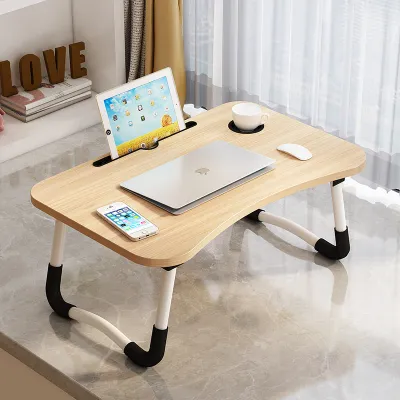
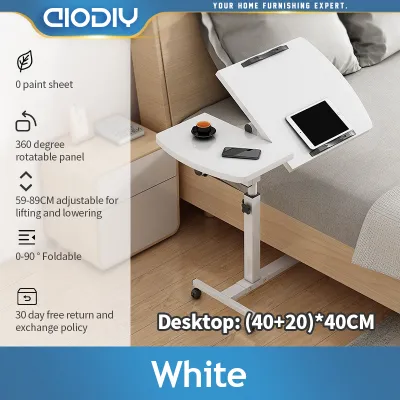
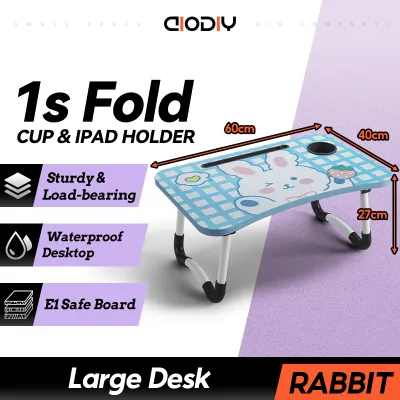

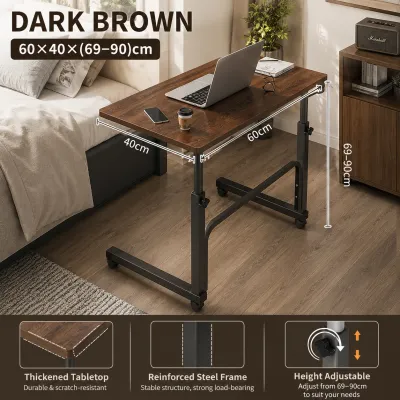
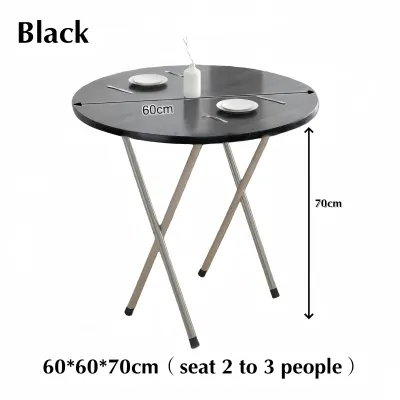
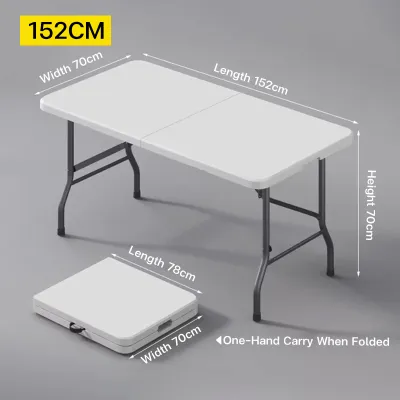
Prices are valid at publication and may change. Please refer to the product page for the latest price.
Portability is another key factor. If you plan to move your workspace from the bedroom to the balcony to catch a breeze, look for a lightweight table with integrated carrying handles. However, if the table will remain in one dedicated spot for weeks at a time, you can prioritize a heavier, more robust frame over extreme portability.
Evaluate Surface Dimensions and Edge Design
The surface area of your folding table for laptop use must comfortably accommodate your specific device. Measure your laptop diagonally and check its footprint. A standard 13-inch laptop fits on almost any compact tray, but a larger 15.6-inch or 17-inch workstation requires a wider platform. Ensure there is enough margin on either side for your wrists to rest comfortably.

If you prefer using an external mouse instead of a trackpad, look for a table that offers at least 15 to 20 centimeters of extra lateral space. Some tables feature dedicated side mouse pads or split-top designs where only the laptop section tilts, leaving the mouse area flat. If you use a cooling pad, calculate its added width and height to ensure it does not overhang the edges.
Edge design plays a critical role in keeping your devices safe. When a table is placed on an uneven surface like a bed or a couch, a raised front lip or a removable stopper is essential to prevent your laptop from sliding off. Look for soft, rounded stoppers that do not dig into your wrists while typing.
Many modern folding tables come with integrated features such as built-in cup holders, tablet slots, or small drawers. While these add convenience, they also reduce the usable flat workspace. Consider whether a cup holder is truly necessary, especially if a sudden bump to the table could spill liquids directly onto your keyboard. If you choose a model with a tablet slot, verify that its depth and angle actually support your specific tablet model with its protective case on.
Verify Weight Capacity and Structural Stability
A folding table must be stable enough to support your expensive electronics without wobbling or collapsing. Always start by checking the manufacturer’s weight limit, which is typically printed on the packaging, user manual, or online product specifications. These limits usually range from 5 kilograms to 20 kilograms or more.
To determine your required weight capacity, calculate the total load you plan to place on the table. This includes the weight of your laptop (typically 1.2 to 2.5 kilograms), an external keyboard, a mouse, a smartphone, a full water bottle or mug, and any notebooks or reference materials. Do not forget to account for the weight of your hands and forearms resting on the edge of the table as you type, which can easily add several kilograms of downward pressure.
Leg design is the primary factor in physical stability. Tables with a continuous U-shaped base or sled-style legs distribute weight more evenly across soft surfaces like mattresses, carpets, or sofas. Conversely, tables with four independent legs are better suited for flat, hard floors but can sink unevenly into soft cushions. Look for legs equipped with non-slip silicone, rubber, or foam pads. These pads prevent the table from sliding on slick tiled floors and protect wooden surfaces or delicate bed linens from friction damage.
When shopping in a physical store or unboxing a delivered item, perform a gentle manual pressure test. Open the table fully, place it on a flat surface, and apply light downward and lateral pressure with your hands. If the frame wobbles, the joints creak, or the legs flex visibly, the table may not be stable enough to support your laptop safely. In such cases, it is best to halt use and seek a more rigid alternative.
Compare Height and Angle Adjustment Mechanisms
Ergonomic comfort is vital for preventing neck, shoulder, and back strain during long working hours. A quality folding table for laptop use should allow you to align your screen with your eye level and position your wrists at a neutral angle.
Height Adjustability for Different Seating Positions
Fixed-height folding tables are simple and durable, but they force you to adapt your posture to the table. Adjustable-height models offer much greater flexibility. Check the minimum and maximum height ranges specified by the manufacturer to ensure they match your seating arrangements. For example, if you plan to use the table while sitting on a low sofa, the table legs must adjust down far enough so you do not have to raise your shoulders to type.
Pay close attention to the locking mechanisms used to secure the height. Common designs include spring-loaded push-button pins, rotary twist-locks, or clamp levers. Push-button pins offer discrete height steps and are highly secure, provided they click fully into their designated holes. Twist-locks allow for continuous, infinite adjustment but must be tightened firmly to prevent one leg from slowly slipping under weight, which can tilt the table and cause your laptop to slide off.
Tilt Features for Typing and Viewing
An adjustable tilt feature allows you to angle the tabletop toward you, reducing glare on your screen and allowing your wrists to rest at a more natural typing angle. Look for tables that offer multiple tilt angles, usually ranging from 0 to 36 degrees, secured by robust locking hinges or support bars.
When the tabletop is tilted, gravity will pull your laptop downward. Therefore, you must verify the presence of a reliable bottom stopper or protective ledge. The stopper should be tall enough to catch the front edge of your laptop but low enough that it does not interfere with your typing hands. If you use a thick gaming laptop, check if the stopper is deep enough to hold the chassis securely.
Inspect Materials, Finish, and Portability
The materials used in a folding laptop table affect its durability, weight, and how well it handles daily wear. Tabletop surfaces are commonly made from engineered wood, medium-density fiberboard (MDF), or high-density plastics. Look for a smooth, non-porous finish. A textured surface might look appealing, but it can interfere with optical mouse tracking, requiring you to carry an extra mouse pad. The surface should also be easy to wipe clean of dust, sweat, or accidental spills.
For the frame and legs, manufacturers often use aluminum alloys or steel tubing. Aluminum is lightweight and highly portable, making it excellent for tables that are moved frequently. Steel provides superior rigidity and weight capacity but makes the table heavier to carry. Balance these factors based on your daily routine. If you commute or travel with your table, a lightweight aluminum model is preferable; if it stays home, a heavier steel frame offers more stability. In the local market, basic plastic models often start under ₱500, while premium adjustable tables with aluminum alloy frames can exceed ₱2,500.
In humid tropical climates, such as in the Philippines, moisture management is essential to prevent premature deterioration. High humidity can cause untreated MDF to swell or warp, and low-grade steel frames to rust at the joints. Rather than assuming a material is naturally waterproof or rust-resistant based on its name, always check the manufacturer’s specific care and storage instructions. Keep the table in a well-ventilated area, wipe away any condensation or sweat immediately, and avoid storing it in damp corners.
Perform a Pre-Use Stability and Safety Check
Before placing your expensive laptop or tablet on a newly purchased folding table, perform a quick safety inspection. This simple routine helps identify any manufacturing defects or assembly errors before they cause damage.
First, unfold the table completely on a hard, flat surface. Visually inspect the legs to ensure they have extended to their maximum angle and that all locking pins, clamps, or hinges have engaged with an audible click. Apply gentle downward pressure on the center of the tabletop, followed by light lateral pressure from side to side, to verify that the legs do not wobble or fold unexpectedly.
Next, test the tilt mechanism. Before placing your laptop on the tilted surface, use a heavy book or an object of similar weight to test the stability of the stopper and the strength of the angle locks. Ensure the support bar or hinge holds the weight without slipping or bending.
Run your fingers carefully along the edges, joints, and underside of the table. Check for any sharp plastic burrs, rough metal edges, or potential pinching hazards near the folding hinges. If you notice that the joints feel loose, the frame bends under minimal pressure, or the locking mechanisms fail to hold securely, do not use the table. Stop immediately and contact the retailer or manufacturer to arrange for a replacement or repair.
Frequently Asked Questions (FAQ)
Can I use a folding laptop table on a soft mattress?
Using a folding table on a soft mattress can be unstable because the mattress compresses unevenly under weight, which can cause the table to tip and your laptop to slide off. If you plan to work in bed, select a table with a wide, continuous U-shaped base or flat sled legs that distribute weight evenly. Always test the stability of the table on your mattress with a heavy book or a closed laptop before opening your screen and typing.
How do I clean and maintain the tabletop surface?
To preserve the finish and structural integrity of your folding table, always check the manufacturer’s care label or instructions first. For routine cleaning, use a slightly damp, lint-free microfiber cloth to wipe away dust, oils, and sweat. Avoid using harsh chemical cleaners, abrasive scrubbing pads, or excessive amounts of water, especially near joints, hinges, and raw MDF edges, as moisture can cause swelling, warping, or rust over time.
Community discussion
Share your experience or ask a question. Comments are reviewed before publication.