
Finding a reliable workspace solution on a budget is a common challenge for students and remote workers in the Philippines. When space is limited and you need to set up a workstation on a bed, sofa, or dining table, a foldable laptop table is an excellent, cost-effective choice. With a budget of ₱1,500, you can easily find a functional, portable desk. However, navigating the sea of online listings requires a careful eye to ensure you do not end up with a flimsy, wobbly stand that risks dropping your expensive devices. This guide will help you identify the most stable designs, verify critical specifications, and make an informed purchase that fits your daily workflow.
Setting Realistic Expectations for a ₱1,500 Laptop Table Budget
At the ₱1,500 price point, understanding what you are paying for is the first step to a successful purchase. Most options in this bracket fall into two main categories: basic flat-fold lap desks and multi-adjustable jointed stands. Flat-fold desks feature a solid tabletop with legs that fold flat against the underside, offering straightforward setup but limited height customization. Multi-adjustable stands, often made of aluminum alloys or plastic, feature segmented legs with rotating joints that allow you to adjust both the height and the tilt angle of the tray.
Material composition is highly standardized in this budget range. Table surfaces are typically constructed from Medium-Density Board (MDF) or engineered wood particles wrapped in a protective laminate veneer. The legs are usually made of hollow steel tubes or lightweight aluminum alloys. While these materials keep the table affordable and lightweight, they generally support a maximum weight capacity of 5 to 10 kilograms. This is more than enough for a standard laptop, but it requires careful handling.
Products mentioned in this guide


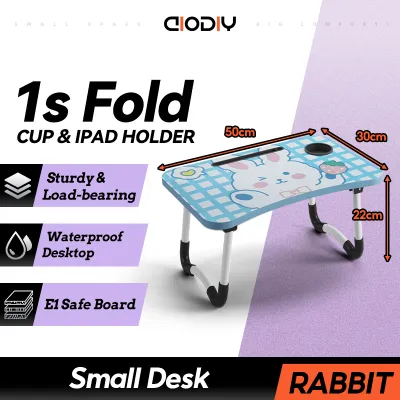



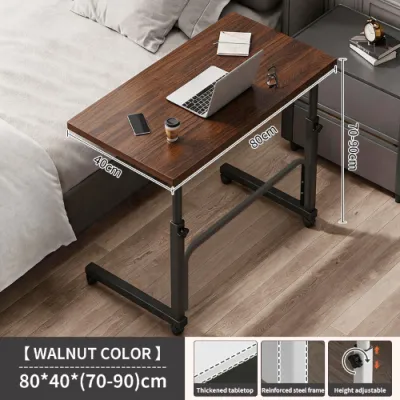
Prices are valid at publication and may change. Please refer to the product page for the latest price.
It is equally important to recognize what is typically excluded from a sub-₱1,500 price tag. Premium features such as solid hardwood tops, heavy-duty gas-spring height adjusters, or high-grade silent cooling fans with advanced USB hubs are rarely found here. Focus instead on simple, robust designs that prioritize basic stability over flashy extras.
Additionally, the tropical climate of the Philippines introduces environmental factors that affect budget furniture. High humidity levels can cause poorly sealed MDF or engineered wood to absorb moisture, leading to swelling, warping, or peeling laminate over time. When shopping within this budget, look for tables with fully sealed edges and water-resistant surface coatings to ensure your investment survives the humid seasons without losing its structural shape.
Prioritizing Stability vs. Portability for Your Workspace
Choosing the right foldable laptop table requires balancing how easily you can carry it around against how steady it remains while you type. If your table wobbles every time you strike a key, it will quickly become a source of frustration and physical fatigue. The stability of a foldable desk depends heavily on its leg geometry and the surface you place it on.

Leg designs generally fall into U-shaped sled bases or individual straight legs. U-shaped legs, which form a continuous metal loop on each side, are highly recommended if you plan to work primarily on soft surfaces like a mattress, a thick comforter, or a sofa cushion. The continuous bar distributes weight more evenly, preventing the legs from sinking unevenly into the fabric. Conversely, tables with four individual straight legs or X-cross folding mechanisms perform better on flat, hard surfaces like dining tables or tiled floors, where they can establish firm, level contact.
The trade-off between weight and stability is a physical reality you must navigate. A very lightweight table made of thin plastic or ultra-thin aluminum is incredibly easy to slip into a backpack or carry around a boarding house, but it is also highly susceptible to tipping if you bump into it. If you use a heavier, larger laptop (such as a 15.6-inch gaming or workstation model), a slightly heavier table with a dense MDF top and steel legs will provide the necessary counterweight to keep your setup secure.
Safety details are crucial when evaluating stability. Always check for non-slip protective sleeves on the legs, usually made of rubber, silicone, or dense foam. These sleeves prevent the table from sliding on smooth tiles or polished wooden desks, and they protect your bedsheets from snagging. Furthermore, if you choose a table with a tilting surface, ensure it includes a built-in edge stopper or baffle. This raised lip prevents your laptop, tablet, or pen from sliding off the edge when the table is angled.
Key Specifications to Verify on Product Listings
Before clicking the buy button on any online marketplace, you must verify the physical dimensions and weight limits listed in the product description. Relying solely on promotional photos can be misleading, as sellers often use digital rendering to make tables appear larger or sturdier than they are in reality.
Start by measuring your laptop and mapping out your required surface area. A standard 13-inch laptop fits comfortably on almost any budget table, but if you use a 15.6-inch or 17-inch device, you will need a tabletop that is at least 60 centimeters wide and 40 centimeters deep. This size ensures you have enough room to place your laptop without blocking the mouse area. If you like to keep a notebook, a smartphone, or a coffee mug nearby, look for models that feature built-in cup holders or tablet slots, which help keep your essentials organized and prevent accidental spills on your keyboard.
Next, check the folded thickness of the table. One of the primary benefits of a foldable desk is its ability to disappear when not in use. A table that folds down to a thickness of 5 centimeters or less can easily slide under a bed frame, fit behind a bedroom door, or stand upright inside a narrow closet. If you live in a compact studio apartment or a shared dormitory in Manila, saving these few centimeters of floor space is essential for maintaining an uncluttered living area.
Finally, cross-reference the manufacturer’s stated weight capacity with your actual equipment. While a typical modern laptop weighs between 1.5 and 2.5 kilograms, you must also account for the downward pressure of your hands resting on the palm rests as you type. A table rated for a maximum load of 10 kilograms provides a safe buffer, ensuring the folding joints and locking pins will not buckle under the combined weight of your device and your natural typing posture.
Navigating Online Marketplaces and Avoiding Hidden Costs
Shopping for furniture online in the Philippines requires a strategic approach to filter out low-quality products and avoid unexpected expenses. Because you cannot physically touch or shake the table before buying, you must rely on smart filtering and critical reading of customer feedback.
When browsing e-commerce platforms, do not rely solely on the overall star rating. Instead, navigate directly to the one-star and two-star reviews, and look for verified buyer photos and videos. These real-world uploads are invaluable for checking if the laminate surface is peeling at the corners, if the hinges arrive rusted, or if the legs are uneven. Pay close attention to comments mentioning “wobble,” “flimsy joints,” or “damaged on arrival,” as these indicate recurring quality control issues with that specific seller or batch.
Another critical factor is the total cost of delivery. Foldable tables, while compact when folded, are still classified as bulky items due to their flat surface area. Shipping fees from major hubs to provincial areas can sometimes add several hundred pesos to the final bill, potentially pushing a ₱1,200 table past your ₱1,500 budget limit. Always check the shipping calculation at checkout and look for platform vouchers, free shipping promotions, or local sellers within your region to keep the total cost within your target budget.
Lastly, review the seller’s return policy and warranty terms. Since budget tables rely on mechanical joints and hinges, there is always a small risk of receiving a unit with a defective locking mechanism or missing assembly hardware. Opt for established sellers who offer a clear return window and responsive customer service, allowing you to easily request a replacement or refund if the table arrives with structural defects.
Safe Setup and Daily Maintenance Practices
Once your foldable laptop table arrives, proper handling and regular maintenance will significantly extend its lifespan and protect your devices. Even a budget-friendly table can last for years if you treat its joints and surfaces with care.
When unfolding the table for the first time, carefully follow the manufacturer’s instructions. If your model features adjustable legs with push-button locks or rotating gears, ensure each joint clicks securely into place before placing any weight on the surface. Avoid forcing the joints past their natural stopping points, as this can strip the plastic gears or bend the aluminum locking pins, permanently compromising the table’s stability. Be mindful of your fingers during setup to avoid painful pinches.
Protecting the tabletop from moisture is vital, especially in humid tropical environments. Since most budget tables use engineered wood or MDF cores, any liquid that seeps into the seams can cause the wood fibers to swell and ruin the flat surface. Always use a coaster for cold drinks to catch condensation, and wipe away any spills immediately with a dry microfiber cloth. Avoid using harsh chemical cleaners that can degrade the protective laminate coating; a slightly damp cloth followed by a dry wipe is sufficient for daily cleaning.
Finally, perform a quick structural check every few weeks. With regular folding and unfolding, the screws and bolts holding the hinges to the tabletop can gradually work themselves loose. Keep a small screwdriver handy to gently tighten these fasteners whenever you notice a slight increase in wobble. This simple habit prevents premature wear on the screw holes and keeps your workspace feeling solid and secure.
Frequently Asked Questions (FAQ)
Can a foldable laptop table under ₱1,500 support a dual-monitor setup?
No, budget foldable tables under ₱1,500 are not designed to support a dual-monitor setup. These tables are engineered specifically for a single laptop, a tablet, and light accessories. Placing multiple heavy monitors on a lightweight folding frame exceeds the typical weight capacity and creates an uneven center of gravity. This imbalance significantly increases the risk of structural failure, causing the table to collapse or tip over, which can damage your expensive equipment and void any seller warranties. If you require a dual-monitor workspace, it is safer to invest in a dedicated, non-folding study desk.
Is it safe to use a foldable laptop table on a bed for long hours?
While using a foldable table on a bed is convenient for short tasks, doing so for long hours is not recommended for your posture or your device’s ventilation. Soft mattresses allow the table legs to shift, which can compromise stability. Furthermore, working from a bed often leads to poor ergonomic alignment, causing neck, shoulder, and back strain over time. If you must work from bed, ensure the table legs have adequate clearance so you do not pinch your legs, choose a firm mattress surface, and take regular breaks every 30 to 45 minutes to stretch and adjust your posture.
How do I fix a wobbly foldable table after a few months of use?
If your table becomes wobbly after a few months, start by inspecting the underside to locate any loose screws or bolts connecting the legs to the tabletop. Gently tightening these fasteners with a screwdriver often resolves the issue. Next, check the rubber or silicone foot pads on the legs; if they have worn down or slipped off, replacing them or adding adhesive felt pads can restore balance. However, if the wobble is caused by a cracked plastic joint or a bent metal locking mechanism, stop using the table immediately, as these structural damages cannot be safely repaired.
Community discussion
Share your experience or ask a question. Comments are reviewed before publication.