
A clean, clutter-free entertainment center relies on two design elements: keeping unsightly cords out of sight and securing personal items in a discreet location. A cabinet with a secret drawer offers a dual-purpose solution, combining hidden storage with integrated cable management to streamline your living room. Achieving this seamless look requires evaluating how a console handles power strips, media players, and concealed compartments under real-world conditions.
In tropical climates where high humidity and dust are constant factors, choosing the right furniture construction is essential. Moisture can cause poorly sealed drawers to swell and stick, while trapped heat inside unventilated compartments can shorten the lifespan of your gaming consoles and streaming devices. By focusing on structural integrity, smart routing paths, and robust hardware, you can find an entertainment unit that keeps your electronics running cool and your valuables safely tucked away.
Core Features to Look for in a Cabinet With a Secret Drawer
When searching for a cabinet with a secret drawer, the first step is evaluating the mechanical design of the hidden compartment. Push-to-open hardware relies on spring-loaded latches that release when pressure is applied to a specific spot on the panel, eliminating the need for visible handles or pulls. Magnetic locks use a detached magnetic key to release an internal latch, offering a higher level of concealment since the drawer remains locked even if someone presses on the face. False-bottom designs utilize a secondary floor within a standard drawer, creating a shallow, hidden compartment underneath that is virtually undetectable to anyone casually opening the unit.
Products mentioned in this guide
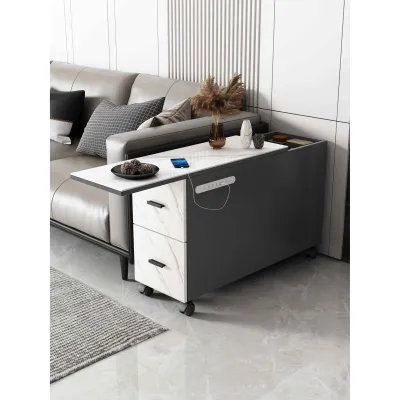
Prices are valid at publication and may change. Please refer to the product page for the latest price.
Verifying the weight capacity and structural integrity of the secret drawer is critical to prevent sagging over time. Hidden drawers often carry dense items like documents, backup drives, or personal valuables, which can put significant stress on the cabinet’s frame. Look for heavy-duty, full-extension ball-bearing drawer slides rated for the intended load. Check the joinery of the drawer box; dovetail or doweled joints offer superior resistance to sagging compared to simple glued or stapled seams. In humid environments, engineered wood with high-pressure laminate or solid wood treated with moisture-resistant sealants prevents warping, which could otherwise jam the secret mechanism.
Consider how often you will need to access the hidden compartment when choosing a design. If you plan to store daily-use items like spare keys or immediate-use media accessories, a quick-release push-to-open mechanism is highly practical. For long-term storage of sensitive documents or emergency funds, a more complex magnetic lock or a false-bottom design that requires removing the main drawer is preferable. Ensure the mechanism operates smoothly without requiring excessive force, which could shake the entire cabinet and disturb delicate electronics sitting on top.
How to Evaluate Built-In Cable Management Systems
A well-designed cable management system starts with strategically positioned grommets or cable pass-through holes. These openings should be wide enough to accommodate bulky power plugs, HDMI connectors, and multiple cords simultaneously without pinching. Look for adjustable or removable plastic or silicone grommet covers that protect cables from sharp wood or metal edges. Ideally, pass-through holes should align perfectly between shelves and lead directly to the rear of the cabinet, allowing you to route cables vertically and horizontally without exposing them to view.

High-quality media consoles feature dedicated internal channels, clips, or under-shelf trays to organize cables behind closed doors. Keeping power cables separated from data and audio-visual lines is crucial for minimizing electromagnetic interference, which can degrade signal quality or cause annoying hums in your sound system. Look for units that include built-in hook-and-loop straps or routing clips along the back panel, allowing you to bundle excess cord length neatly and keep power strips elevated off the cabinet floor.
Enclosing media devices like gaming consoles, cable boxes, and streaming players inside a cabinet generates significant heat. Without adequate airflow, this trapped heat can cause devices to throttle performance or fail prematurely. Evaluate the cabinet’s ventilation features, such as open back panels, slatted door designs, or dedicated cooling vents near the shelves. If you plan to run high-powered electronics inside a closed compartment, ensure there is at least a two-inch clearance around all sides of the device and check if the cabinet design allows for the installation of small, quiet USB-powered cooling fans if needed.
Condition-Based Shortlist: Matching Cabinet Styles to Your Setup
If your entertainment setup includes multiple gaming consoles, physical media discs, heavy audio receivers, and subwoofers, structural strength is your primary concern. Look for robust consoles constructed from solid hardwoods or high-density engineered wood with reinforced center support legs. The hidden compartments in these units should be located in the lower section of the cabinet to maintain a low center of gravity. Ensure the drawer slides are rated for heavy loads, allowing you to store dense collections of media or equipment without risking drawer misalignment or structural sagging over time.
For a sleek, modern aesthetic, a low-profile floating console or a legged minimalist stand is the ideal choice. Floating units mount directly to the wall, creating an illusion of spaciousness and making floor cleaning effortless. These designs should feature integrated rear cable trays that run along the back of the unit, keeping all cords completely hidden from every angle. Look for seamless, handle-free doors with push-to-open mechanisms that conceal the secret compartments, maintaining the clean lines of your living space while providing discreet storage for remotes, controllers, and personal items.
Maximizing floor space in smaller rooms often requires placing the TV in a corner. Specialized corner TV cabinets feature angled backs that fit snugly into 90-degree walls, eliminating wasted dead space behind the furniture. When evaluating these units, look for designs with centralized cord routing channels that guide all cables down the corner intersection directly to the wall outlet. The secret compartments in corner units are often cleverly integrated into the triangular side panels or behind false backboards, utilizing the deep, hard-to-reach areas of the cabinet for secure, out-of-sight storage.
Essential Space and Installation Checks Before Buying
Before purchasing any large furniture piece, precise measurements are critical to avoid delivery and installation headaches. Measure the designated floor area, taking into account baseboards, door frames, and window clearances. Do not forget to measure the path the delivery team must take, including narrow hallways, tight stairwells, and elevator doors. If you live in a high-rise condominium or a multi-story home, verifying these clearance dimensions ensures the fully assembled cabinet can actually reach your living room without damage.
If your chosen TV cabinet features an integrated mounting bracket or if you plan to rest a heavy television directly on the top surface, you must verify the manufacturer’s specified weight limits. Placing a TV that exceeds these limits can cause the top panel to bow, which can jam the secret drawers and compromise the entire cabinet’s structural integrity. If using an integrated bracket, check the VESA pattern compatibility to ensure your television’s mounting holes align perfectly with the bracket’s configuration.
Map out the location of your wall outlets relative to where the cabinet will stand. Ideally, the cabinet should sit directly in front of the main power outlet, allowing you to plug in a high-quality surge protector inside the cabinet without running cords along the floor. If the outlet is slightly to the side, plan how the power cord will exit the cabinet’s cable management system. Minimizing the use of external extension cords not only improves the visual appeal of your setup but also reduces tripping hazards and electrical risks in your home.
Safety, Maintenance, and Longevity
Safety should always be a priority, particularly with furniture that features heavy drawers or moving parts. When a large hidden drawer is fully extended, the center of gravity shifts forward, increasing the risk of the cabinet tipping over. This hazard is amplified if a heavy television rests on top. Secure the cabinet to the wall using heavy-duty anti-tip straps or brackets anchored into wall studs or concrete walls. This simple step prevents accidental tipping, protecting your expensive electronics, your furniture, and your household members.
Cable management systems require periodic inspection to ensure long-term safety and performance. Dust and pet hair tend to accumulate in enclosed cable trays and behind media devices, which can block ventilation vents and create a fire hazard. Every few months, unplug your devices, clear out any dust buildup using a can of compressed air or a soft brush, and inspect all power cords for signs of wear, fraying, or heat discoloration. Ensure that cables are not bent at sharp angles, which can damage the internal copper wiring over time.
To preserve the appearance and functionality of your TV cabinet, follow the manufacturer’s specific cleaning instructions. Avoid using harsh chemical cleaners or excessive water, especially on engineered wood or veneer surfaces, as moisture can seep into the seams and cause swelling that jams the secret drawer mechanisms. Use a slightly damp microfiber cloth to wipe down surfaces, followed immediately by a dry cloth. Periodically check the hidden drawer hardware, applying a dry silicone lubricant to the drawer slides if they begin to stick or squeak, ensuring the secret compartment remains smooth and silent.
Frequently Asked Questions (FAQ)
Can I add cable management to a TV cabinet that lacks built-in features?
Yes, you can retrofit an existing TV cabinet with aftermarket cable management tools, though it requires careful planning. Adhesive cable clips, under-desk cable trays, and neoprene sleeves are excellent for bundling and routing cords along the back of the furniture. If you need to create new pass-through holes, you can use a power drill equipped with a hole saw attachment to cut clean circles in the back panel. However, exercise extreme caution when drilling into engineered wood or hollow-core panels, as you risk splintering the finish or compromising the structural support of the cabinet.
Are secret drawers in TV stands secure enough for valuables?
Secret drawers in standard TV stands provide excellent visual concealment, but they should not be treated as a substitute for a certified, fireproof home safe. These hidden compartments are designed to keep everyday valuables, spare keys, or personal items out of plain sight from casual visitors or opportunistic intruders. Because they are constructed from wood or standard furniture materials, they do not offer physical resistance to forced entry or protection against fire and water damage. For highly sensitive documents, expensive jewelry, or large amounts of cash, always rely on a dedicated security safe anchored to the floor or wall.
Community discussion
Share your experience or ask a question. Comments are reviewed before publication.