
Finding the right printer table for your home office requires balancing physical dimensions, structural strength, and functional storage. A printer is often one of the heaviest and most active peripherals in a workspace, meaning a standard side table or flimsy shelf rarely suffices. To make an informed purchase, you must evaluate how the table fits your specific printer model, handles operational vibrations, and integrates into your room’s layout.
By focusing on key criteria such as load capacity, material stability, and cable routing, you can prevent common issues like sagging shelves, excessive noise, and cluttered cords. Taking the time to assess these factors ensures your equipment remains safe, accessible, and positioned at an ergonomic height for daily tasks.
Measure Your Printer and Workspace Dimensions
Start by measuring the physical footprint of your printer. Use a tape measure to record the absolute width, depth, and height of the machine when it is completely closed. This baseline measurement represents the minimum surface area your new table must provide to support the printer’s base securely.
Products mentioned in this guide
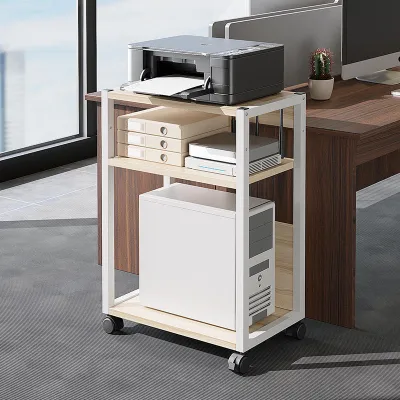
32 Lazada user ratings
This product fits for our needs. saktong sakto sa maliit na space ng bahay namin. kasyang kasya yong printer ng anak ko katabi ng home desk …Read full reviewShow less
This product fits for our needs. saktong sakto sa maliit na space ng bahay namin. kasyang kasya yong printer ng anak ko katabi ng home desk ko as a wfh employee. Thank you kasi walang damage nung dumating. Thank you seller and rider for the quick delivery.
Serves its purpose. Not recommended for carrying heavy items to avoid deformation. Had to insert something at the bottom para di madeform ag…Read full reviewShow less
Serves its purpose. Not recommended for carrying heavy items to avoid deformation. Had to insert something at the bottom para di madeform agad.
This product is really not a disappointment. It is exactly the same as described, easy to use, and is a good item worth buying.
High-quality wooden construction, Space-saving CPU stand, looks durable, it is alright for the price.
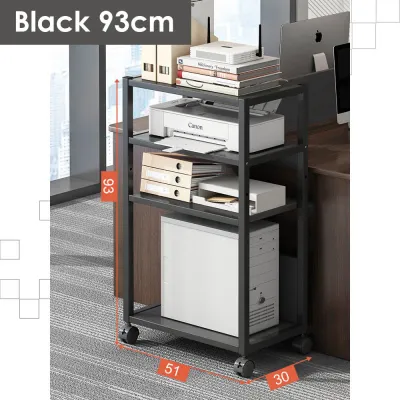
121 Lazada user ratings
Sleek and modern look, Provides ample storage space, Stylish and functional design, Stylish and functional design, Durable and sturdy constr…Read full reviewShow less
Sleek and modern look, Provides ample storage space, Stylish and functional design, Stylish and functional design, Durable and sturdy construction, Efficiently organizes your printer and accessories, Efficiently organizes your printer and accessories, Easy to assemble and use,
Mukhang matibay naman siya at kaya yung medyo mabigat at malapad na printer namin. Correct din ang color na naideliver and complete lahat ng…Read full reviewShow less
Mukhang matibay naman siya at kaya yung medyo mabigat at malapad na printer namin. Correct din ang color na naideliver and complete lahat ng screw. Thank you seller.
Provides ample storage space, Perfect for organizing your workspace, Stylish and functional design, Stylish and functional design,
Sleek and modern look, Perfect for organizing your workspace, Great addition to any room, Convenient and space-saving,
Looks decent and manageable. However, looks thinner than what it looks like in the image. But overall, it's a-okay.
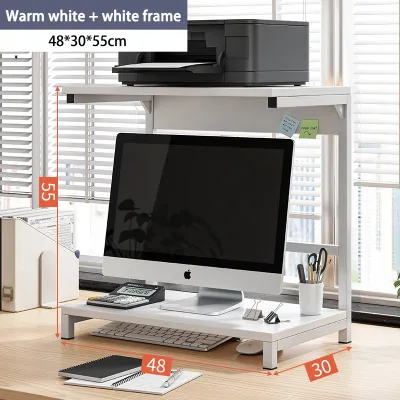
81 Lazada user ratings
OK naman build quality. pasok sa price. lower.rating lang kasi.hinde naman 100% smooth assembly, hinde pantay na pantay mga butas. konting p…Read full reviewShow less
OK naman build quality. pasok sa price. lower.rating lang kasi.hinde naman 100% smooth assembly, hinde pantay na pantay mga butas. konting pihit para lumapat. ang masakit lang, yung isang tornilyo maigsi, as seen sa pic. hinde ko na nagamit
Size: Exact size as indicated Design: medyo naiba lang ang design as you can see sa photo. May rubber boots na pwede ma adjust ang height Du…Read full reviewShow less
Size: Exact size as indicated Design: medyo naiba lang ang design as you can see sa photo. May rubber boots na pwede ma adjust ang height Durability: looks sturdy maganda ang quality
Materials are good quality though damaged. Easy to understand instructions. The rubber feet were difficult to insert; didn't use force in ca…Read full reviewShow less
Materials are good quality though damaged. Easy to understand instructions. The rubber feet were difficult to insert; didn't use force in case it breaks.
Look sturdy and fits well with my pc monitor and 24 inch printer at the top, hopefully it will last
Modern wooden desk design, Ideal for office workspace,
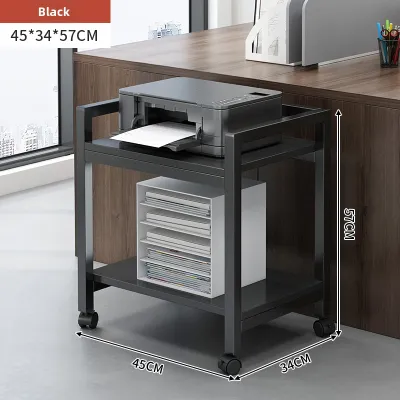
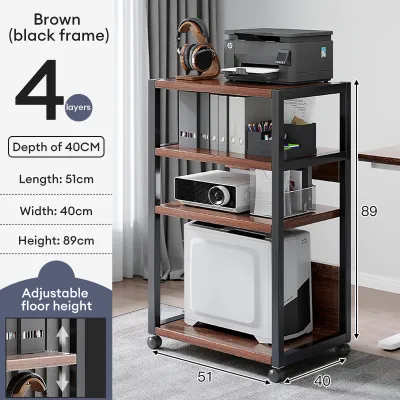
32 Lazada user ratings
unfortunately hinde kasya ang unit so hinde na namin inilagay pa ang middle shelf. sayang wala kasing measurement para sa lower shelf sa inf…Read full reviewShow less
unfortunately hinde kasya ang unit so hinde na namin inilagay pa ang middle shelf. sayang wala kasing measurement para sa lower shelf sa info, ying total height lang. but matibay ang wood and steeln then complete din ang mga screws.
🎨Design:nice 🔨Durability:seems stuedy 💾Storage Capacity:wish it could be more wider to store and orgamize more stuff.
Easy to assemble. It's fine to put a printer on it. The cost-performance ratio is good.
🎨Design:Great 🔨Durability:Looks and feels sturdy 💾Storage Capacity:Very good
Prices are valid at publication and may change. Please refer to the product page for the latest price.
Next, account for the printer’s operational clearance. Many printers feature paper input trays that extend upward or outward, output trays that slide forward, and scanner lids that swing open. Measure the machine with all these components fully extended to determine the actual space required during active use. Failing to do this can result in a table that is technically wide enough for the base but too small to allow paper loading or scanning.
Beyond the equipment itself, evaluate the designated floor space in your home office. Mark out the proposed dimensions of the table on your floor using masking tape to visualize how much room it will occupy. Ensure that the table does not block walkways, prevent nearby cabinet drawers from opening, or interfere with your office chair’s range of motion.
Finally, plan the delivery and installation route. Measure the width of your home’s doorways, hallways, and any tight stairwells the table must pass through. Whether you purchase a fully assembled unit or a flat-pack model that you assemble in place, ensuring the packaging or the finished piece can navigate these entry points prevents frustrating delivery bottlenecks.
Calculate the Required Weight Capacity
To ensure structural safety, you must determine the exact weight of your printer. Avoid guessing the weight based on visual size alone, as internal glass components, motors, and metal frames can make printers deceptively heavy. Refer to the user manual or the manufacturer’s official specification sheet to find the precise net weight of your specific model.

Next, calculate the weight of the accessories and supplies you plan to store on or within the table. A single standard ream of paper can weigh over two kilograms, and storing multiple reams quickly adds up. Factor in the weight of spare ink cartridges, toner units, external hard drives, or laminators that will share the table to establish a realistic total daily load.
Compare your calculated total weight against the table’s certified weight capacity, which is typically listed on the product label or specification sheet. It is wise to choose a table with a weight capacity that exceeds your total calculated load by at least twenty to thirty percent. This safety margin prevents the shelves from bowing over time and protects your expensive equipment from structural failure.
Keep in mind that different printer types require different levels of structural support. Heavy-duty laser printers and multi-function office copiers generate significant downward force and require robust, reinforced frames. Conversely, compact inkjet printers are relatively lightweight and can safely sit on lighter, more streamlined tables without risking structural damage.
Inspect Material Durability and Stability
The construction of the table’s frame and joints directly determines its long-term stability. Look for tables built with heavy-duty steel frames or thick engineered wood panels joined by sturdy metal brackets and bolts. Avoid models that rely solely on basic plastic cam locks or thin dowels, as these connections can loosen over time under the weight and movement of an active printer.
Examine the quality of the surface finish and edge banding. Printers are prone to occasional ink leaks, toner spills, and physical wear from sliding paper trays. A high-pressure laminate or a water-resistant melamine finish provides excellent protection against scratches and moisture, allowing you to wipe away spills easily without damaging the underlying material.
Stability is critical for preventing operational wobble, especially during high-speed printing cycles. Look for a printer table equipped with adjustable leveling feet. These feet allow you to compensate for uneven flooring, such as tile grout lines or slightly sloped wooden floors, ensuring the table remains perfectly level and firmly planted.
Consider the environmental conditions of your home office when selecting materials. Solid wood and low-grade particle boards can warp or swell in areas with high humidity or frequent temperature fluctuations. Reviewing the manufacturer’s care and maintenance instructions will help you confirm whether the table’s materials are suitable for your specific indoor climate.
Evaluate Cable Management and Storage Options
A dedicated printer table should help keep your workspace organized and free of safety hazards. Look for designs that feature built-in cable management solutions, such as grommet holes, rear routing slots, or under-desk wire trays. These features allow you to route power cords and USB data cables neatly, preventing a tangled mess behind the table.
Assess the storage configuration to ensure it meets your daily workflow needs. Open shelving provides quick access to frequently used paper sizes and envelopes, while closed drawers or cabinets keep spare toner cartridges and maintenance kits dust-free and out of sight. Ensure the shelves are spaced widely enough to accommodate standard paper storage boxes.
Pay close attention to the placement of shelves in relation to your printer’s ventilation vents. Printers generate heat during operation and require adequate airflow to prevent overheating. Ensure that any enclosed compartments or lower shelves do not block the printer’s intake or exhaust vents, and leave a few inches of open space around the machine’s perimeter.
Mobility is another valuable feature to consider, especially in smaller home offices. A printer table equipped with heavy-duty caster wheels allows you to easily roll the unit away from the wall to access rear cable ports or perform routine maintenance. Ensure that at least two of the casters feature reliable locking mechanisms to keep the table securely in place during printing.
Finalize Your Printer Table Shortlist
Once you have gathered your measurements, weight requirements, and preferred features, compare them against your shortlisted options. Eliminate any tables that do not meet your minimum dimensions or weight capacities, even if they are aesthetically pleasing. Prioritizing structural compatibility ensures your home office remains safe and functional.
Establish a realistic budget in Philippine Pesos (₱) for your purchase. When comparing prices on online marketplaces or local furniture stores, remember to factor in additional costs such as shipping fees, delivery handling, or professional assembly services within the Philippines. A lower initial price tag can sometimes be offset by high delivery charges for bulky furniture items.
Carefully review the warranty terms and return policies provided by the manufacturer or retailer. Ensure the warranty covers structural defects, damaged finishes, or missing hardware upon delivery. Knowing the return process is straightforward gives you peace of mind in case the table arrives with transit damage or manufacturing flaws.
Finally, ensure the chosen table complements the existing design of your home office. Select a color scheme, material finish, and overall style that matches your current desk and shelving units. A cohesive aesthetic creates a professional and calming work environment, helping you stay focused and productive throughout the day.
Frequently Asked Questions (FAQ)
Can I use a standard desk instead of a dedicated printer table?
While you can place a printer on a standard desk, it is often not the most ergonomic or space-efficient choice. Standard desks are designed for writing and computer use, placing the surface at a height that may make loading paper or clearing jams awkward. A dedicated printer table is typically lower, positioning the printer’s controls and paper trays at a more comfortable, accessible level.
Additionally, keeping a printer on your primary desk exposes you to operational noise, heat, and vibrations while you work. Moving the printer to a dedicated stand frees up valuable desk real estate for your keyboard, monitor, and documents. This separation creates a more organized, quiet, and productive primary workspace.
How do I prevent my printer table from vibrating during operation?
To minimize vibrations, start by checking all the structural connections on your printer table. Use the tools provided in the assembly kit to ensure every screw, bolt, and joint is fully tightened according to the manufacturer’s manual. Loose hardware is the primary cause of structural sway and excessive noise during active printing cycles.
If the table still vibrates, place anti-vibration pads or a dense rubber mat beneath the printer’s feet to absorb the kinetic energy. Additionally, ensure that the table’s adjustable leveling feet are firmly adjusted so that the unit does not rock on the floor. Placing the table against a solid wall can also provide extra lateral support and reduce movement.

Community discussion
Share your experience or ask a question. Comments are reviewed before publication.