
Choosing the right desk for your work-from-home (WFH) setup often comes down to a trade-off between physical comfort and available floor space. If you are struggling to balance a productive workspace with a crowded living area, a foldable working table can offer a highly flexible solution. This type of furniture allows you to establish a dedicated workstation during business hours and completely reclaim your floor space once your shift ends.
In urban areas across the Philippines, where studio apartments and shared family homes are common, space is at a premium. A temporary desk can prevent your living room or bedroom from feeling like a permanent corporate office. Yet, before purchasing, you must evaluate if the convenience of folding outweighs the potential trade-offs in stability, ergonomics, and daily preparation time. Whether this setup is truly practical for your daily routine depends on your specific equipment, your home’s layout, and how much setup friction you are willing to tolerate.
Quick Diagnostic: Is a Foldable Working Table Right for You?
Before diving into the details, use this rapid self-assessment to determine if your primary constraints align with a foldable working table.
Products mentioned in this guide
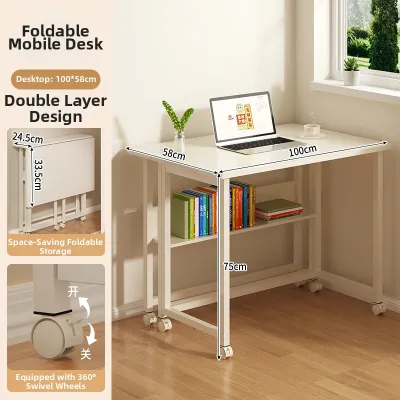
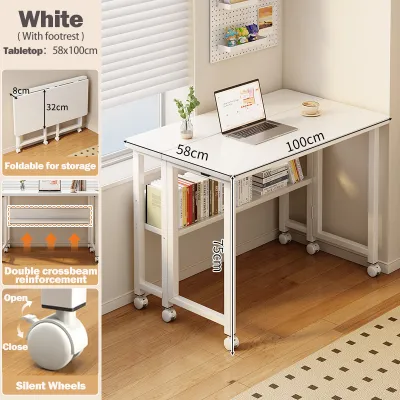
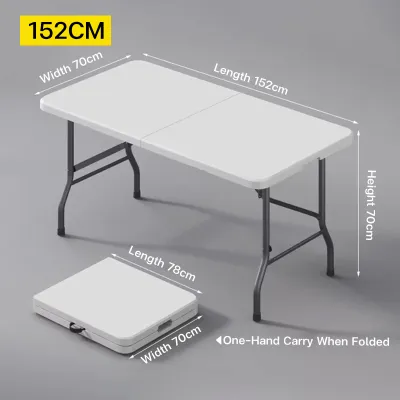
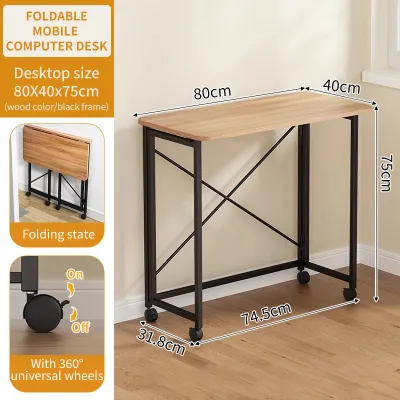
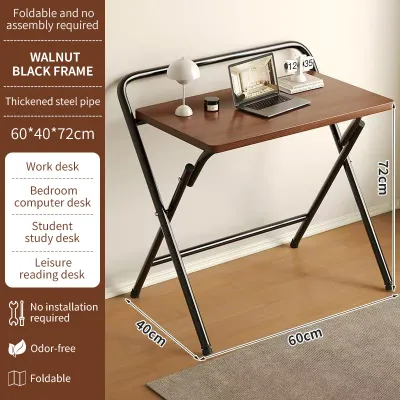
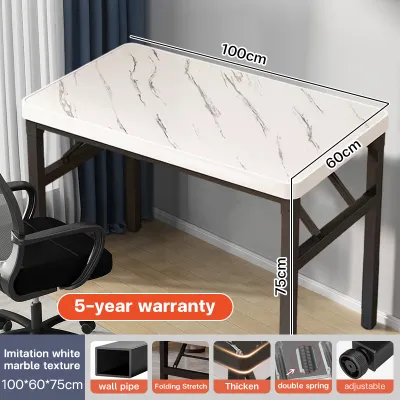

Prices are valid at publication and may change. Please refer to the product page for the latest price.
When to Choose a Foldable Desk (Yes Indicators):
- Shared Living Areas: You work in a dining room, bedroom, or living area that must return to its original family function after hours.
- Hybrid Work Schedules: You only work from home a few days a week and do not need a permanent desk cluttering your living space.
- Frequent Relocation: You live in a rental property or condo and prefer lightweight, highly portable furniture that is easy to transport.
- Minimalist Gear: Your daily work requires only a lightweight laptop, a mouse, and a single notepad.
When to Avoid a Foldable Desk (No Indicators):
- Heavy Desktop Equipment: You use multiple large monitors, heavy PC towers, or sensitive drawing tablets that require permanent cable management.
- Under-Desk Storage Needs: You require physical filing cabinets, drawers, or heavy reference books within arm's reach.
- Advanced Ergonomic Requirements: You suffer from chronic back or neck strain and require a motorized sit-stand desk or highly adjustable keyboard trays.
- Dedicated Office Space: You have a spare room solely dedicated to your work, where a fixed desk would provide superior stability and surface area.
Evaluating Your Space and Layout Constraints
A foldable table is only as useful as the space it saves. To ensure it genuinely solves your spatial issues without creating new obstacles, you must systematically evaluate your home’s physical layout and daily traffic patterns.

Measuring Clearances and Pathways
Before committing to a foldable working table, you must measure both its open footprint and its collapsed dimensions to ensure it fits your home’s physical flow. Begin by measuring the exact floor area where you plan to work. You need to account not just for the table’s width and depth, but also for the clearance required for your office chair. A standard office chair requires at least 75 to 90 centimeters of depth behind the desk to allow you to sit down, roll back, and stand up comfortably.
Next, evaluate how the table will travel through your home. If you plan to store the desk in a closet, utility room, or behind a sofa when folded, measure the width of your doorways, hallway corners, and any tight stairwells. In many compact high-rise condominiums in the Philippines, narrow doorways and small service lifts can make moving even folded furniture surprisingly difficult. Ensure the folded height and thickness of the table can easily clear these structural bottlenecks without scraping your walls or pinching your fingers.
Multi-Purpose Room Dynamics
Integrating a workspace into a shared living area or bedroom introduces both physical and psychological challenges. When your desk is constantly visible, your brain struggles to transition from professional focus to evening relaxation. A freestanding foldable working table solves this by allowing you to pack your office away, effectively removing the visual reminder of your professional responsibilities.
When choosing between a freestanding folding table and a wall-mounted drop-leaf desk, consider the long-term impact on your walls and floor space. Wall-mounted options are highly space-efficient because they leave the floor completely clear when folded. However, they require permanent installation, which may not be permitted in rental properties, and they demand secure anchoring into concrete walls or wooden wall studs. Freestanding folding tables, on the other hand, require no installation but must have a slim folded profile—ideally under 10 to 15 centimeters in thickness—so they can slide under a bed or stand flat against a wall without protruding into high-traffic walkways.
Assessing Your Workflow and Daily Usage
Your daily work habits and equipment load will ultimately determine whether a foldable desk is a convenient tool or a source of constant frustration.
Equipment Load and Setup Time
The practicality of a temporary desk is heavily dictated by the complexity of your computer setup. If your daily workflow relies solely on a lightweight laptop, a mouse, and a single notepad, setting up and tearing down your workstation takes less than two minutes. This minimal friction makes a foldable table highly practical.
However, if your job requires a dual-monitor setup, an external keyboard, a docking station, a drawing tablet, or multiple charging cables, the daily setup process becomes a significant chore. Packing away these peripherals, wrapping cords, and safely storing sensitive monitors every evening can quickly lead to frustration. Over time, most users with complex setups stop folding the table altogether, defeating its primary purpose. If you cannot work efficiently without extensive peripheral gear, a small fixed desk with integrated cable management is almost always a better choice.
Work Frequency and Posture Needs
Your physical comfort during working hours depends on how many hours you spend at the desk. If you are a full-time remote employee working 40 hours a week, physical support is your highest priority. Many basic foldable tables are designed for occasional use; they often feature thin, non-ergonomic tabletops with sharp edges that can press uncomfortably into your wrists and forearms during long typing sessions.
Furthermore, because folding desks prioritize portability, they rarely offer height adjustability. If the fixed height of the table does not align with your chair and your natural elbow height, you risk developing shoulder, neck, or wrist strain. If you choose a foldable working table for full-time work, you must be prepared to supplement it with ergonomic accessories. This might include a height-adjustable office chair, a separate laptop stand to bring your screen to eye level, and an external keyboard and mouse to keep your elbows bent at a healthy 90-degree angle.
Verifying Stability, Ergonomics, and Safety Limits of a Foldable Working Table
Before purchasing any folding desk, you must carefully inspect its physical specifications to ensure it can safely support your equipment and provide a stable working environment.
Checking Weight Capacity and Wobble
To ensure your equipment remains safe, you must carefully verify the manufacturer’s specified load limits and the structural integrity of the folding joints. Never assume a table can support heavy gear just because it looks sturdy. Always check the product label or the manufacturer’s manual for the maximum weight rating, which typically ranges from 15 to 50 kilograms depending on the frame design.
Lateral stability is another critical factor. Because foldable tables rely on hinges, pins, or folding leg brackets, they are inherently more prone to shaking than fixed-leg desks. A table that wobbles every time you type or lean on the edge will quickly cause eye strain and distraction. Before purchasing, inspect the locking mechanisms on the legs. Look for heavy-duty metal brackets that lock securely into place with a positive click or a manual safety pin. In humid tropical climates like the Philippines, cheap metal joints can rust over time if not properly coated, which can compromise the locking mechanism and lead to accidental collapse. Look for powder-coated steel frames to resist moisture-induced corrosion.
Ergonomic Adjustability and Surface Area
When evaluating a folding desk, do not compromise on surface area. A desk that is too shallow will force you to sit too close to your screen, leading to eye fatigue. Ideally, your table should have a minimum depth of 50 to 60 centimeters. This provides enough space to position your laptop or monitor at a comfortable viewing distance while leaving room for your keyboard and wrists.
Pay close attention to the edge profile of the tabletop. Thin, laminated particle board or MDF tables often have sharp, square edges that restrict blood circulation in your wrists during long typing sessions. Look for tables with rounded or beveled edges, or plan to use a padded desk mat to cushion your arms. Additionally, check the underside of the table. Some folding mechanisms feature crossbeams or diagonal support bars that can obstruct your knees or prevent you from pulling your chair all the way in. Ensure there is clear legroom beneath the desk when it is fully deployed.
Alternative Desk Options If Folding Isn't the Best Fit
If your self-assessment reveals that a foldable working table cannot support your equipment or causes too much daily setup friction, several compact alternatives can fit tight spaces without compromising stability.
For small rooms where stability is paramount, a compact fixed desk with a footprint of around 80 by 50 centimeters offers a sturdy, wobble-free surface while still fitting into tight corners. If storage is your main concern, a ladder desk or a small writing desk with built-in vertical shelving utilizes wall space efficiently, allowing you to store books and office supplies upward rather than outward. Alternatively, if you need to work in a shared living room but want to hide your work at night, a secretary desk with a pull-down or roll-top lid allows you to close up your workspace instantly without moving a single cable or monitor. Always choose the option that directly solves your primary bottleneck—whether that is physical floor space, structural stability, or daily setup convenience.
Frequently Asked Questions (FAQ)
Can I use a monitor arm with a foldable working table?
Using a clamp-on monitor arm with a foldable working table requires extreme caution. Most folding tables are constructed with thin, lightweight materials such as hollow-core MDF, particle board, or thin plastic to keep the unit portable. Clamping a heavy monitor arm to these surfaces concentrates a massive amount of torque on a very small area, which can crack, bend, or crush the tabletop. Additionally, the added top-heavy weight can make a lightweight folding frame highly unstable and prone to tipping. If you must use an external monitor on a folding desk, it is much safer to use a wide, freestanding monitor stand that distributes weight evenly across the tabletop, and always check the manufacturer’s weight limit before adding any heavy accessories.
Are wall-mounted foldable desks safer than freestanding ones?
The safety and weight capacity of a wall-mounted foldable desk depend entirely on the quality of its installation and the structural integrity of your wall. Wall-mounted desks must be anchored securely into wooden wall studs or, in typical Philippine concrete hollow block walls, using heavy-duty masonry anchors and screws. If installed incorrectly, a wall-mounted desk can pull out of the wall under load, causing severe damage to your equipment and your home. Freestanding folding tables do not require DIY installation and rely on built-in leg bracing and flat floor contact for stability. If you rent your home, lack DIY tools, or have weak drywall partitions, a freestanding folding table is a much safer and more reliable choice.
Community discussion
Share your experience or ask a question. Comments are reviewed before publication.