
Choosing the right desk shape is the foundation of a productive home office, especially when trying to optimize a corner. The decision between an L-shaped desk and a triangular corner desk ultimately depends on your available floor area, the complexity of your work equipment, and your daily physical movement patterns. While both styles utilize underused corner space, they serve entirely different spatial and functional needs. An L-shaped desk provides expansive, dual-zone surface areas suitable for multi-monitor setups but demands significant wall clearance along two sides. In contrast, a triangular desk acts as a compact, space-saving hub that fits snugly into tight corners, making it ideal for minimalist setups or smaller rooms where floor space is at a premium.
Spatial Efficiency and Room Layout Fit
Evaluating how a desk interacts with your room’s physical footprint is crucial before making a purchase. An L-shaped desk requires two distinct, relatively long wall segments to sit flush. This configuration makes it highly compatible with rectangular rooms or open-plan living spaces where one side of the desk can act as a subtle room divider. However, because it extends outward along two walls, it can easily overwhelm a small bedroom or crowd a narrow walkway.
Triangular corner desks are designed specifically to maximize tight 90-degree corners. By cutting diagonally across the corner, they project less distance into the center of the room, leaving more open floor space. This makes them highly effective for small square rooms, studio apartments, or awkward architectural nooks. In tropical climates like the Philippines, where maintaining open pathways is essential for natural air circulation, a triangular desk helps keep the room feeling breezy and uncluttered.
Products mentioned in this guide
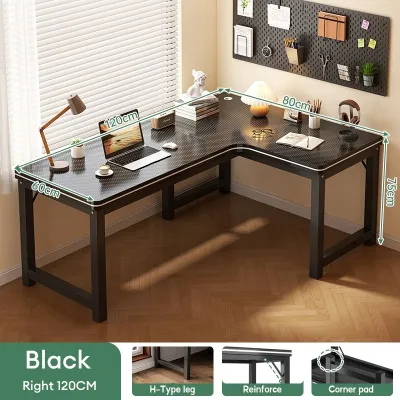
83 Lazada user ratings
fast delivery..nice product!!
Super nice and sturdy⭐️⭐️⭐️⭐️⭐️
🎨Design:superb design.
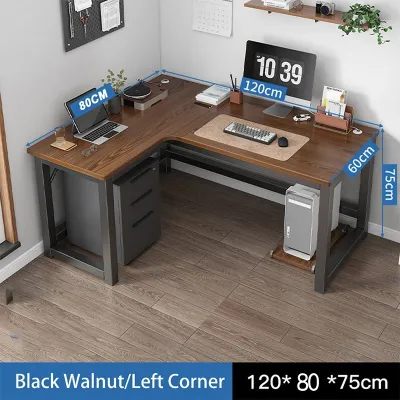
65 Lazada user ratings
BUYER BEWARE there were missing parts that made it difficult to build. instruction was difficult to understand, but we managed. some holes d…Read full reviewShow less
BUYER BEWARE there were missing parts that made it difficult to build. instruction was difficult to understand, but we managed. some holes did not align, particularly underneath the wood to be screwed to the table frame so we didnt put some of the screws anymore. we were missing a couple of screw sizes as well, so we weren't able to put up one of the supporting structure/bar below. same goes for the supporting angle bar, we're missing one piece so we no longer attached it. there were some minor defects on the wood itself, at least its usable i guess. the packaging was flimsy and haphazardly done. kung di ko lang kailangan yung table agad I would've returned this in its entirety. honestly, just buy somewhere else
A solid wood tabletop with thick angle iron legs, sturdy. The quality is beyond doubt, the nuts are all excellent
Spacious surface area for work,
bali po ang table
Prices are valid at publication and may change. Please refer to the product page for the latest price.
Before choosing either option, calculate the clearance requirements for your chair and daily movement. A desk might physically fit into a corner, but you still need at least 75 to 90 centimeters of unobstructed space behind the desk for your office chair to glide, swivel, and push back comfortably. If your workspace is situated in a high-traffic area, ensure that the desk’s outer edges do not block walking paths or interfere with nearby wardrobe doors.
Surface Area and Equipment Placement
The physical geometry of your desk directly dictates how you organize your daily workflow and position your hardware. An L-shaped desk excels at offering distinct, separated linear zones. You can easily dedicate one wing of the desk to your primary computer setup—such as a desktop tower, dual monitors, and keyboard—while keeping the adjacent wing completely clear for analog tasks, document review, sketching, or notebook writing. This clear division of labor helps reduce mental clutter and keeps your primary workspace organized.

Triangular desks offer a centralized focal point but present clear limitations when it comes to peripheral space. Because the desktop tapers sharply toward the sides, the usable surface area is concentrated directly in front of you. The angled side edges are often too narrow to support secondary monitors, large printers, or extensive document spreads. If you attempt to place a standard dual-monitor setup on a triangular desk, you may find the screens overlapping or hanging precariously over the edges.
To avoid purchasing a desk that cannot support your workflow, map your equipment against the physical dimensions of each shape. Take a physical inventory of your essential items: measure the base of your laptop stand, the width of your monitors, your desk mat, and any external peripherals like drawing tablets. If your setup requires multiple screens or heavy desktop accessories, the expansive surface of an L-shaped desk is almost always necessary. If you primarily work from a single laptop, a triangular desk provides more than enough centralized space without wasting room.
Ergonomics and Daily Workflow
Your physical comfort during long working hours depends heavily on how your desk shape supports natural posture and movement. An L-shaped desk encourages a dynamic workflow that requires swiveling or sliding your chair between the two workspace wings. This movement can be highly beneficial, as it prompts minor postural shifts throughout the day and physically separates your focused digital tasks from collaborative or creative analog work. However, it requires a high-quality swivel chair with smooth casters to prevent repetitive twisting strains on your lower back.
Triangular desks promote a highly centralized ergonomic setup where all your essential tools remain within a tight, comfortable arm’s reach. This layout minimizes the need for lateral reaching, reducing shoulder and upper back fatigue. The trade-off, however, lies in the depth of the corner. If the triangular desk is too shallow, you may be forced to sit too close to your monitor, leading to eye strain. Conversely, if the desk is exceptionally deep, pushing the monitor all the way into the rear corner can make text difficult to read, forcing you to lean forward and compromise your spinal alignment.
Monitor placement and viewing angles require careful adjustment on both desk types. On an L-shaped desk, placing your primary monitor directly in the inner corner joint can sometimes create an awkward viewing angle if the joint is not curved. On a triangular desk, you must ensure the rear corner has enough depth to position your screen at a safe viewing distance—typically arm’s length—while keeping your keyboard and mouse at a height that allows your elbows to rest at a comfortable 90-degree angle.
Decision Framework: Which Shape Fits Your Setup?
To finalize your decision, compare your spatial constraints and equipment needs against this practical framework.
Choose an L-shaped desk if you utilize a multi-monitor setup, a large desktop PC tower, or heavy peripheral equipment. This shape is also ideal if your daily work involves distinct digital and analog tasks that benefit from separate physical zones, or if you are placing the desk in a medium-to-large rectangular room with ample floor clearance to accommodate a wider footprint and a rolling swivel chair.
Choose a triangular corner desk if you are setting up a workspace in a compact bedroom, studio condo, or a tight, underutilized corner. This option is perfect if your daily workflow is minimalist, relying primarily on a single laptop, tablet, or small monitor, and you want to maximize open floor space to maintain room traffic and natural ventilation.
Keep in mind that neither shape may be suitable if your chosen corner features structural obstructions. If your room has thick, decorative baseboards, wall-mounted electrical outlets that must remain accessible, or low window sills, a flush corner placement may be impossible. Always verify these structural details before committing to a specific desk model.
Pre-Purchase Checklist: Measuring Your Space
Before purchasing your desk, take precise measurements to ensure a seamless delivery and installation process.
First, measure the corner angle. Do not assume your walls meet at a perfect 90-degree angle. Older homes, custom renovations, or settling structures often have slightly warped corners. Use a corner angle finder or a simple cardboard template to check for squareness, as even a slight deviation can prevent a rigid desk from sitting flush against both walls.
Next, identify wall obstructions. Inspect the walls for protruding baseboards, electrical outlets, internet ports, light switches, window sills, or wall-mounted air conditioning units. Ensure the desk’s height and depth will not block access to essential plugs or interfere with the airflow of your cooling systems.
Then, verify door and pathway clearances. Measure the swing path of bedroom doors, closet doors, and nearby cabinets. Ensure that when you are seated at the desk, your chair and body do not block the main walking paths through the room.
Finally, check assembly and delivery access. Review the manufacturer’s packaging dimensions to ensure the boxed desk can easily fit through your front door, hallways, and elevator doors. Cross-reference the desk’s rated weight capacity against the combined weight of your monitors, computer tower, and desk accessories to ensure long-term stability.
Frequently Asked Questions (FAQ)
Can I use a monitor arm on a triangular corner desk?
Yes, but compatibility depends heavily on the desk’s construction, edge thickness, and material strength. Many triangular desks are made of lightweight particleboard or have decorative privacy panels underneath that can obstruct standard C-clamps. Before purchasing a monitor arm, measure the thickness of the desktop and ensure the material can withstand the concentrated downward pressure of a clamped arm. If the desk is made of thin or hollow-core material, using a freestanding monitor stand is often a safer choice to prevent cracking or warping the surface.
Which desk shape is better for gaming setups?
An L-shaped desk is generally superior for gaming setups. Gaming hardware—such as wide ultrawide monitors, dual-screen configurations, large mousepads for low-sensitivity aiming, and heavy desktop PC towers—requires substantial surface area and structural stability. An L-shaped desk provides the necessary depth and length to spread out this equipment comfortably. While a triangular desk can host a casual gaming setup with a single console or laptop, it quickly becomes cramped and unstable if you try to mount multiple screens or heavy audio gear.
How do I handle cable management in a corner desk?
Corner desks naturally create a hidden triangular void directly behind the rear corner, which serves as an excellent central hub for cable routing. To keep your cables organized, look for desks with built-in grommet holes or under-desk wire management trays. Use adhesive cable clips to route power strips and cords along the underside of the desk frame rather than letting them dangle. Because corner desks often sit further away from wall outlets, measure your power cables beforehand to ensure they can comfortably reach the nearest socket without being pulled taut.

Community discussion
Share your experience or ask a question. Comments are reviewed before publication.