
Choosing the right work-from-home (WFH) desk in the Philippines depends on your floor space, daily workflow, and the weight of your computer setup. If you are balancing a laptop in a shared condo space, your needs differ vastly from someone setting up a dedicated home office with multiple monitors and desktop towers. Selecting the wrong desk type can lead to physical discomfort, cluttered spaces, or even structural damage to your walls and equipment.
To make an informed decision, you must evaluate how each desk type aligns with your physical space and daily tasks. Standing desks, foldable desks, and L-shaped desks each serve distinct purposes, offering unique trade-offs in terms of stability, footprint, and ergonomic benefits.
Quick Answer: Which WFH Desk Type Fits Your Needs?
To identify the best desk type for your specific work-from-home situation, consider three core decision criteria: available floor space, daily workflow, and equipment load.
Products mentioned in this guide
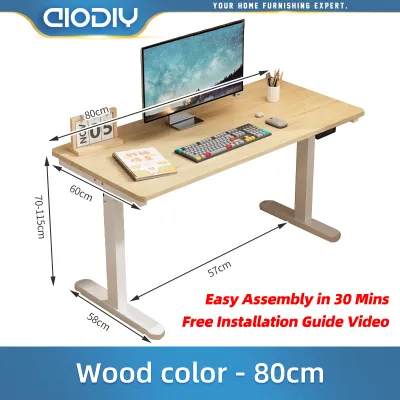
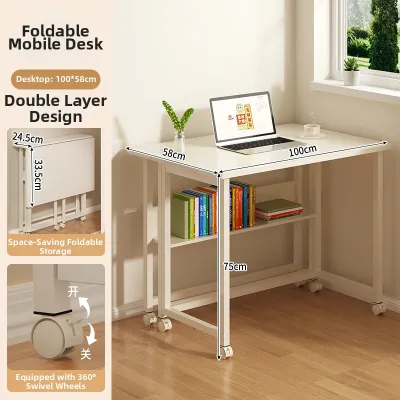
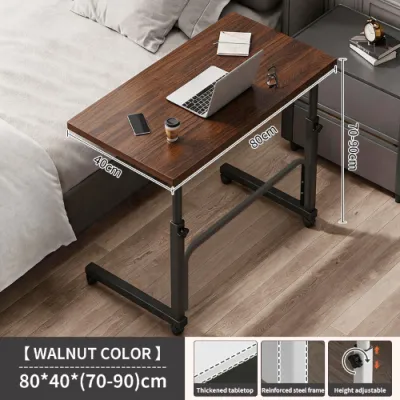
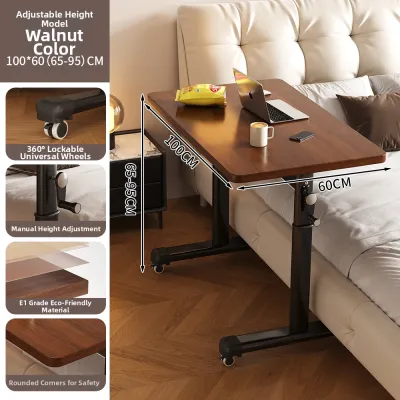
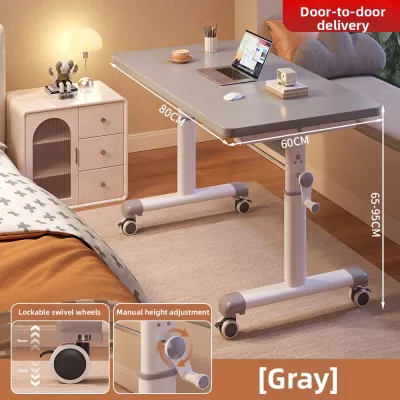

Prices are valid at publication and may change. Please refer to the product page for the latest price.
- Choose a Standing Desk if: You want to alternate between sitting and standing throughout long workdays, have a dedicated rectangular footprint, and can manage moving cables safely.
- Choose a Foldable Desk if: You live in a compact studio apartment, need to reclaim your living space after office hours, or require a highly portable, temporary workstation.
- Choose an L-Shaped Desk if: You operate multiple monitors, need distinct physical zones for different tasks (such as computer work and manual paperwork), and have an empty corner to maximize.
Below is a qualitative comparison summarizing the best use case, space requirement, and primary limitation for each desk type to help you make an immediate assessment.
| Desk Type | Best Use Case | Space Requirement | Primary Limitation |
|---|---|---|---|
| Standing Desk | Alternating posture, active working | Moderate, dedicated rectangular footprint | Requires active cable management and power access |
| Foldable Desk | Multi-purpose rooms, compact living | Low, highly compact or storable | Limited weight capacity and surface depth |
| L-Shaped Desk | Multi-monitor setups, distinct task zones | High, requires corner or large wall clearance | Difficult to move and assemble in tight spaces |
Evaluating Your Space: Clearance, Layout, and Delivery Access
Before purchasing any large furniture piece, you must measure the physical footprint of the desk and account for the clearance required to pull out your office chair comfortably. A standard office chair requires at least 75 to 90 centimeters of unobstructed space behind the desk edge to glide back and turn. If your workspace is in a high-traffic hallway or a shared bedroom, a desk that is too deep can block pathways and create a cramped, stressful environment.

Logistics in Philippine residential buildings require careful planning. If you reside in a high-rise condominium in Metro Manila or a multi-story townhouse, check the dimensions of your building’s service elevator, narrow stairwells, and doorways before ordering a large L-shaped desk or a heavy, motorized standing desk. Many delivery services will only bring items to the ground floor or lobby if the package cannot fit into the elevator or turn around tight stairwell corners. Measure your entryways and any tight corridors to ensure the flat-packs or assembled frames can physically reach your designated room.
For standing desks, vertical clearance is just as critical as floor space. Ensure there are no overhead obstructions such as low-hanging shelves, wall-mounted air conditioning units, or ceiling fans within the path of the desk’s maximum height. Standard motorized standing desks can rise up to 120 centimeters or more. If you have monitors mounted on arms, they will extend even higher, risking a collision with overhead fixtures if you do not plan the vertical path carefully.
If you are considering a wall-mounted drop-leaf or foldable desk to save floor space, the structural integrity of your wall is paramount. In the Philippines, residential walls are commonly constructed from concrete hollow blocks (CHB) finished with plaster, or lightweight fiber cement boards on metal studs. Never mount a load-bearing folding desk directly into drywall or hollow plaster without proper support. For concrete walls, you must use high-quality masonry anchors and a hammer drill to secure the mounting brackets. If you are renting or have hollow partition walls, a freestanding foldable desk is a much safer alternative to avoid structural failure.
Matching Your Workflow: Equipment, Posture, and Daily Tasks
Your daily workflow and the specific hardware you use should heavily influence your choice of desk. A professional who only uses a lightweight laptop has vastly different structural requirements than a software engineer, graphic designer, or financial analyst who relies on dual monitors, heavy desktop towers, external hard drives, and document trays.
L-shaped desks excel in accommodating heavy, multi-monitor setups because their corner configuration provides exceptional depth. This depth allows you to position large monitors at an ergonomically safe viewing distance (typically arm’s length) while utilizing monitor arms that clamp securely to the thick rear edges. In contrast, foldable desks often lack the surface depth and structural rigidity needed for clamping heavy monitor arms. Placing multiple heavy screens on a lightweight folding desk can cause the surface to bow or make the entire unit top-heavy and prone to tipping.
Ergonomics and posture play a significant role in long-term productivity and physical well-being. Adjustable standing desks offer the distinct benefit of reducing prolonged sedentary behavior, which is linked to back pain and fatigue. However, a standing desk is only effective if you actively use its height-adjustment features. If you tend to stay seated all day regardless of your desk’s capabilities, the premium cost of a motorized frame may not be justified.
Task zoning is another critical workflow consideration. If your job involves a mix of digital work and analog tasks—such as reviewing physical blueprints, sketching, signing documents, or crafting—an L-shaped desk provides the perfect layout. You can dedicate the primary side of the “L” to your computer and keyboard, while keeping the shorter return side completely clear for writing, reading, or organizing physical files. This separation helps maintain mental focus and keeps your digital workspace free from physical clutter.
Before finalizing your desk choice, calculate the total weight of all your equipment, including monitors, computer towers, UPS power backups, keyboard, mouse, and desk accessories. Compare this total weight against the manufacturer’s specified weight limits. For motorized standing desks, pay close attention to the “dynamic” weight capacity, which refers to the maximum load the motor can safely lift while in motion, as opposed to the “static” weight capacity when the desk is stationary. Overloading a motorized frame can burn out the motor, while overloading a foldable desk can cause the hinges or locking pins to fail suddenly.
Deep Dive: Standing, Foldable, and L-Shaped Desk Features
Standing Desks: Movement, Motors, and Stability
When evaluating height-adjustable standing desks, the motor configuration is a primary differentiator. Single-motor systems are generally more budget-friendly but tend to have slower lift speeds, louder operation, and lower weight capacities. Dual-motor systems, which place a dedicated motor in each leg column, offer faster, smoother, and quieter transitions, along with a higher load capacity. Always verify the manufacturer’s specifications for decibel levels and lifting speeds, as cheap, noisy motors can be highly disruptive in a quiet home office or during virtual meetings.
A common issue with standing desks is the “wobble factor” at higher elevations. As the desk columns extend to their maximum height, the center of gravity rises, making the frame more susceptible to lateral sway and front-to-back shaking. To minimize this instability, look for desks constructed with heavy steel frames, thick lifting columns (ideally with the wider stage at the bottom), and structural reinforcements such as crossbars or wide wedge gussets where the legs meet the desktop.
Cable management is a unique challenge for standing desks because the cables must travel up and down with the desk surface. If your cables are too short or tightly bound, lifting the desk can rip plugs out of their sockets, damage ports, or even pull equipment off the desk. You must plan for adequate slack in your power strips and monitor cables, utilizing flexible cable spines or under-desk cable trays to keep everything organized and safe from pinching within the moving frame joints.
Foldable Desks: Space-Saving Mechanisms and Mounting
Foldable desks generally fall into two categories: freestanding folding tables and wall-mounted drop-leaf desks. Freestanding models feature legs that fold flat against the underside of the desktop, allowing you to slide the entire unit under a bed or behind a wardrobe when not in use. Wall-mounted drop-leaf desks are permanently anchored to the wall, with a hinged surface that folds down or up to save floor space when your workday ends.
The durability and safety of a foldable desk rely almost entirely on the quality of its hinges, brackets, and locking mechanisms. Cheap folding desks often use thin plastic locking clips or low-grade metal hinges that can warp, rust, or snap under pressure. When shopping, prioritize desks with heavy-duty steel brackets, spring-loaded locking pins, or automatic locking hinges that click securely into place.
You must also be cautious about weight distribution on foldable surfaces. Because these desks rely on hinges rather than four solid, vertical legs for support, they are highly sensitive to lateral forces and uneven loading. Leaning your forearms heavily on the front edge of a folding desk or placing a heavy object on one side can strain the locking mechanisms, potentially causing the desk to collapse. Avoid using heavy clamp-on accessories like dual-monitor arms on thin, collapsible wood or plastic surfaces.
L-Shaped Desks: Corner Footprints and Multitasking Zones
L-shaped desks are designed to maximize corner spaces, but they come in different configurations that affect how they fit into your room. A true corner desk is symmetrical, with both sides of the “L” being equal in length, designed to tuck tightly into a 90-degree corner. A standard L-shaped desk, however, features a longer primary desk surface and a shorter secondary surface, known as the “return.”
When choosing an L-shaped desk, you must consider its “handedness”—whether it has a left-facing or right-facing return. Some models are reversible, allowing you to assemble the return on either side during installation, while others are fixed. Choosing the wrong orientation can block windows, obstruct door openings, or force you to work with your non-dominant hand facing the shorter side, which can disrupt your natural workflow and physical comfort.
The structural weak point of any L-shaped desk is the corner joint where the two desktop sections meet. If this joint is poorly supported, the two surfaces can sag, separate, or create an uneven seam that catches your mouse pad or paperwork. Inspect the desk’s underframe to ensure the joint is reinforced with heavy-duty overlapping steel brackets, interlocking bolts, or a dedicated support leg positioned directly beneath the corner to distribute weight evenly.
Assembly, Wobble, and Long-Term Durability
Assembling and maintaining your WFH desk correctly is essential for preventing wobble and ensuring it lasts for years. Even the most expensive desk will shake and feel unstable if it is placed on an uneven floor. Most high-quality desks feature adjustable leveling feet (glide pads) on the bottom of the legs. Take the time during assembly to screw these feet in or out until the desk is perfectly level, checking your progress with a spirit level tool. This step is particularly vital for tall standing desks and rigid L-shaped frames, where even a millimeter of floor unevenness can translate into significant sway at the desktop level.
In the tropical, humid climate of the Philippines, material selection and surface care are critical. Many budget-friendly desks are made of engineered wood, such as medium-density fiberboard (MDF) or particleboard, finished with a laminate or veneer. While these materials are cost-effective, they are highly susceptible to moisture absorption. If the protective edge banding on your desk peels or cracks, high humidity or spilled liquids can seep into the core, causing the wood fibers to swell, bubble, and permanently lose structural integrity. To prevent this, check that the edge banding is seamless and securely glued, and avoid placing cold drinks directly on the surface without a coaster. Bamboo and solid wood are more resilient but still require protective finishes and regular cleaning to prevent mold and mildew growth in humid conditions.
Create a routine maintenance schedule to preserve your desk’s structural integrity. Over time, the vibrations from typing, leaning, and moving parts can cause assembly bolts and screws to loosen slightly. Periodically check and tighten all structural fasteners—especially on motorized standing desk frames and the hinges of foldable desks. For foldable models, apply a small amount of silicone lubricant to metal hinges and locking pins once or twice a year to prevent rust and ensure smooth operation. For motorized desks, inspect the power cables for signs of wear or pinching, and ensure the lifting columns remain free of dust and debris.
Always retain your desk’s original assembly manual, spare hardware, and warranty documentation in a safe place. If you ever need to disassemble the desk for a move or replace a faulty component, having the manual will prevent costly mistakes. Finally, prioritize safety: if you notice any structural components bending, wood cracking around critical joints, or if a motorized desk displays persistent error codes or uneven lifting, stop using the desk immediately and consult the manufacturer or a qualified professional before attempting any repairs.
Frequently Asked Questions (FAQ)
Can I convert a regular L-shaped desk into a standing desk?
Placing a tabletop desk converter on one side of an L-shaped desk is a straightforward way to add standing functionality. However, trying to convert a standard, fixed L-shaped desk into a full standing desk by replacing its legs with aftermarket motorized frames is highly complex. The unique weight distribution and the weak corner joint of an L-shaped surface require a specialized, synchronized three-leg motorized frame. Attempting a DIY conversion without the proper frame can lead to sagging, motor strain, or complete structural failure, and will almost certainly void your warranties.
Are foldable desks stable enough for dual monitors?
Most standard, lightweight foldable desks are not stable or deep enough to safely support dual monitors, especially if you plan to use a clamp-on dual-monitor arm. The concentrated weight of two screens on a single clamp can warp or crack thin foldable surfaces, and the lateral force can compromise the folding hinges. If your WFH setup requires dual monitors, it is highly recommended to choose a heavy-duty, wall-anchored drop-leaf desk with reinforced steel brackets, or opt for a compact, fixed-leg desk that provides reliable structural stability.
How do I manage cables on an adjustable standing desk?
Managing cables on a height-adjustable desk requires careful planning to prevent wires from snagging or pulling loose when the desk rises. Start by mounting a heavy-duty power strip directly to the underside of your desktop using a cable management tray or brackets. This ensures that only one main power cable needs to travel from the desk to the wall outlet. Encase this main power cable, along with any internet lines, in a flexible cable spine or mesh sleeve, leaving enough slack at the bottom so the cables can stretch fully when the desk is at its maximum height without any tension.
Community discussion
Share your experience or ask a question. Comments are reviewed before publication.