
Choosing the right work-from-home table is the single most important decision you will make for your home office. The right desk does more than hold your computer; it dictates your posture, influences your productivity, and determines how much of your living space is swallowed up by your professional life. With standing desks, foldable tables, and L-shaped workstations dominating the market, finding the perfect match requires balancing your daily workflow, your physical comfort, and the realities of your floor plan.
To make the right investment, you must look past aesthetic appeal and focus on structural compatibility. A desk that looks beautiful in an online listing can quickly become a daily frustration if it wobbles during typing, fails to clear your doorway during delivery, or leaves you with chronic shoulder pain. By evaluating your primary constraints first, you can narrow down your options and select a table type that seamlessly integrates into your daily routine.
Quick Diagnosis: Match Your Primary Constraint to a Desk Type
When choosing a home office table, your decision usually comes down to one absolute priority: space, physical health, or multitasking capacity. Identifying which of these factors is your non-negotiable constraint will instantly point you toward the correct category.
Products mentioned in this guide
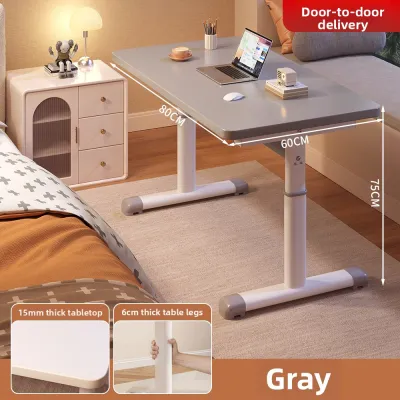
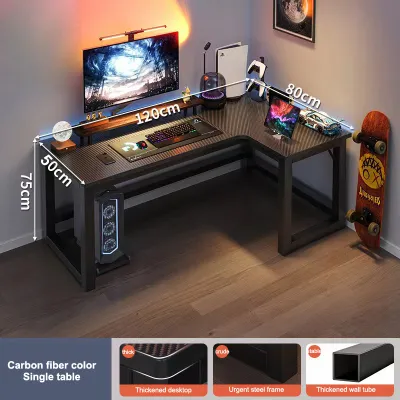
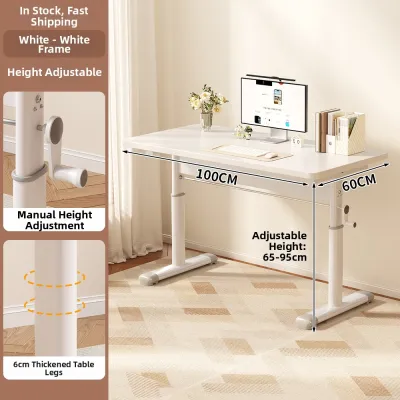
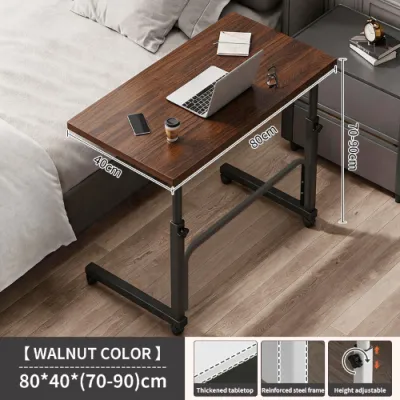

Prices are valid at publication and may change. Please refer to the product page for the latest price.
- The Standing Desk (The Health & Posture Optimizer): Choose this type if your primary goal is to combat a sedentary lifestyle, reduce lower back strain, and maintain high energy levels through movement. It is ideal for professionals who spend eight or more hours a day at their computers and want the flexibility to transition between sitting and standing.
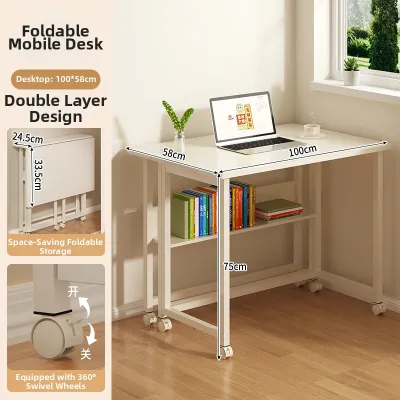
- The Foldable Desk (The Space-Saving Minimalist): Choose this type if you live in a compact condominium, rent a shared room, or must use a multi-purpose living area as a temporary office. It is designed for those who need a functional workspace during the day but require the ability to pack it away completely to reclaim their living space after hours.
- The L-Shaped Desk (The Heavy-Duty Multitasker): Choose this type if your daily workflow involves extensive physical gear, multiple monitors, paperwork, or creative tools. It is the ultimate choice for those who have a dedicated corner in a permanent home office and need distinct zones for different professional tasks.
Assess Your Space: Measuring for Delivery and Daily Use
Before browsing online catalogs, you must conduct a rigorous spatial assessment of your home. A common mistake is measuring only the floor space where the table will sit, while ignoring the logistical pathway required to get the furniture into your room. In many Philippine urban areas, high-rise condominiums, apartment complexes, and multi-story townhouses feature tight entryways, narrow staircases, and compact passenger elevators.

Start by measuring the absolute clearance of your delivery route. Write down the width and height of your front door, any hallway corners, and elevator doors. If you are ordering a large L-shaped desk or a heavy, one-piece standing desk frame, these dimensions will dictate whether the package can physically enter your home. For tight spaces, look for flat-packed models that can be assembled directly inside the target room rather than pre-assembled units.
Next, evaluate your room’s layout to determine which desk footprint is viable. A flat wall can accommodate almost any linear standing or foldable desk, but an L-shaped desk demands a dedicated, permanent corner. When planning the layout, do not just measure the desk’s physical depth; you must also factor in the clearance zone behind it. Ensure there is at least 80 to 100 centimeters of open space behind the table to allow your office chair to roll back comfortably without hitting walls, wardrobes, or electrical outlets.
Foldable desks offer unmatched flexibility for tight spaces because they do not require a permanent footprint. You can set them up in front of a window or in the middle of a living room, and then fold them flat to store under a bed or inside a closet when your shift ends. Conversely, an L-shaped desk is a permanent commitment that anchors the room, making it difficult to rearrange your layout once the heavy structure is assembled and positioned.
Map Your Workflow: Gear, Screens, and Surface Area
Your daily tasks and the physical gear you use should directly dictate the surface area of your new table. A software engineer using dual 27-inch monitors requires a vastly different setup than a freelance writer working solely on a lightweight laptop. Take a detailed inventory of everything that must live on your desk, including laptops, external monitors, keyboard trays, drawing tablets, desk pads, and physical notebooks.
If your setup involves multiple screens or heavy desktop towers, an L-shaped desk provides the ultimate layout. Its unique design allows you to establish a dual-zone workflow. You can dedicate one side of the “L” to your digital setup—such as your monitors and keyboard—while keeping the other side entirely clear for analog tasks like sketching, reviewing printed documents, or taking handwritten notes. This physical separation prevents clutter from building up and helps segment your focus throughout the day.
In contrast, standard standing desks and foldable tables offer a single, linear plane. While some premium standing desks are wide enough to support dual monitors, their depth is often limited to 60 or 70 centimeters to maintain stability. This linear constraint requires a highly disciplined, minimalist approach to your gear. If you choose a foldable desk, your setup must be even more streamlined; because these tables must be cleared and folded away regularly, they are best suited for single-screen or laptop-only setups that can be packed into a laptop bag in under two minutes.
Check Your Physical Needs: Posture and Movement
Working from home for extended periods can take a toll on your body, especially in tropical climates where physical fatigue can set in quickly during hot afternoon hours. If you regularly experience lower back pain, tight shoulders, neck strain, or a post-lunch energy crash, your table’s ergonomic capabilities should be your top priority.
Standing desks are specifically engineered to address these physical pain points by encouraging active movement. Alternating between sitting and standing every 45 to 60 minutes stimulates blood circulation, engages your core muscles, and relieves pressure on your lumbar spine. This dynamic adjustment is highly effective at reducing the physical fatigue associated with prolonged sitting, making it a powerful tool for long-term health.
Fixed-height tables, such as standard foldable and L-shaped desks, do not offer this built-in adjustability. If you select a fixed desk, you must be prepared to make secondary ergonomic investments to protect your posture. This includes purchasing a highly adjustable ergonomic office chair with robust lumbar support, adding a separate monitor riser or adjustable monitor arms to keep your screens at eye level, and using a footrest to ensure your knees remain at a comfortable 90-degree angle. Without these adjustments, a fixed-height desk can easily lock you into a slouching posture that leads to chronic discomfort.
Desk Profiles: What to Expect from Each Table Type
Understanding the mechanical features, structural limitations, and maintenance requirements of each desk category will help you avoid buyer’s remorse.
Standing Desks: For Posture and Movement
Height-adjustable standing desks generally fall into two categories: manual crank models and electric single- or dual-motor systems. Manual crank desks are budget-friendly and do not require proximity to an electrical outlet, but the physical effort of cranking the desk up and down can discourage users from changing positions as often as they should. Electric models offer effortless transitions at the press of a button, with premium versions featuring programmable memory presets that save your exact sitting and standing heights.
When shopping for a standing desk, stability is the most critical factor to verify. Cheap or poorly engineered frames can experience severe monitor wobble when extended to their maximum standing heights. Look for heavy steel T-style or C-style leg frames, and check user reviews specifically for stability feedback at heights above 100 centimeters.
Additionally, you must plan your cable management carefully. Because the desktop moves up and down, your power strips and device cables must have enough slack to stretch to their highest point without tension. If a cable is too short, rising the desk can rip plugs out of wall outlets or damage your device ports. Using an under-desk cable management tray that moves with the desktop is highly recommended.
Foldable Desks: For Flexibility and Small Footprints
Foldable desks are prized for their convenience, light weight, and affordability, but they come with distinct structural trade-offs. Most foldable tables have significantly lower weight capacities than their permanent counterparts, often limited to 30 to 50 kilograms. Exceeding this limit can cause the center of the tabletop to bow or cause the folding leg joints to fail.
Stability is another common concern. Because the legs are designed to fold on hinges, these tables are inherently more prone to lateral wobble during heavy typing or rapid mouse movements. To minimize this, look for models featuring sturdy metal locking braces that secure the legs firmly in place when open. Avoid cheap plastic joints, which can wear down and crack over time, especially in high-humidity environments.
Because foldable tables are frequently moved and stored, pay close attention to the tabletop finish. A high-quality, water-resistant melamine or laminate finish is essential to protect the core material from moisture, accidental spills, and scratches during transport. Avoid raw or poorly sealed particle board, which can swell and degrade if exposed to humidity or condensation from cold drinks.
L-Shaped Desks: For Multitasking and Corner Zones
L-shaped desks excel at maximizing corner space, turning an underutilized part of a room into a highly functional “command center.” By wrapping around your seating position, they keep a massive amount of surface area within arm’s reach without requiring you to stretch or stand up. This layout is incredibly efficient for complex workflows that require physical separation of tasks.
However, their massive footprint makes them exceptionally difficult to move once assembled. They are not ideal for renters who anticipate moving homes frequently, as disassembling and reassembling the complex joint systems can weaken the screw holes and compromise the desk’s overall stability.
Furthermore, reaching items placed in the deep, innermost corner of the “L” can be physically awkward. This deep corner zone is best utilized for semi-permanent items that do not require frequent handling, such as a desktop computer tower, a printer, a desk lamp, or decorative items. Before purchasing, check whether the desk features a reversible configuration. A reversible design allows you to install the longer return wing on either the left or right side, ensuring the desk can adapt to different room layouts if you move or rearrange your office.
Final Pre-Purchase Checks: Avoiding Delivery and Assembly Surprises
Before finalizing your purchase on any online marketplace or local furniture store, run through this comprehensive checklist to ensure a seamless delivery and setup experience:
- Verify Finished Dimensions: Double-check the exact width, depth, and height of the fully assembled desk against your measured room space. Ensure there is adequate clearance for your office chair, nearby doors, and wardrobe drawers to open fully without obstruction.
- Confirm Weight Capacities: Calculate the total weight of your monitors, computer tower, laptop, monitor arms, and desk accessories. Compare this total against the manufacturer's stated weight limit. For standing desks, ensure the motor's lifting capacity comfortably exceeds your gear's weight.
- Check Assembly Requirements: Determine if the desk arrives fully flat-packed and what tools are required for assembly. Some heavy standing desks and complex L-shaped desks require a power drill and at least two people to lift and flip the frame safely during setup. If you are not comfortable with DIY assembly, look for sellers that offer professional on-site installation services.
- Inspect Material Finishes and Joints: In humid climates, cheap, unsealed engineered wood can absorb moisture and warp. Look for tables with robust powder-coated steel frames and tabletop surfaces finished with high-pressure laminate (HPL) or melamine. Check that all joint connections use metal-to-metal inserts rather than wood screws, which strip easily during reassembly.
- Review Return and Warranty Policies: Large furniture items are expensive to ship and difficult to package for returns. Confirm the seller's return policy for transit damage or manufacturing defects, and ensure electric standing desks come with a reliable warranty on the motor and control box.
Frequently Asked Questions (FAQ)
Can I use a monitor arm clamp on a foldable or glass desk?
You should exercise extreme caution when clamping heavy monitor arms onto foldable or glass surfaces. Glass tabletops are highly susceptible to localized stress concentration and can shatter under the pressure of a tightened clamp. Many foldable tables feature hollow-core construction (such as honeycomb paper filling wrapped in thin veneer), which can easily crush or puncture under the weight of a dual-monitor setup. If you must use a monitor arm, ensure your desk is made of solid wood, thick MDF, or heavy-duty plastic, and use a steel reinforcement plate to distribute the clamp’s pressure evenly across the surface.
How do I manage cables effectively on an L-shaped desk?
Because L-shaped desks feature a massive surface area and often host multiple electronic devices, cable management can quickly become chaotic. Start by mounting a heavy-duty power strip directly to the underside of the desk using strong adhesive strips or mounting screws; this keeps all your primary device plugs off the floor and moves them closer to your gear. Use under-desk wire trays or J-channel cable raceways to route cords neatly along the inner frame of the desk. For a clean look, bundle loose cables using velcro ties and run them down the back of the desk legs, keeping them completely hidden from view.
Community discussion
Share your experience or ask a question. Comments are reviewed before publication.