
Finding the right desktop computer table for your work-from-home (WFH) setup is a balancing act between your physical room constraints, your hardware requirements, and your daily working habits. The ideal choice depends on whether you prioritize space-saving flexibility, ergonomic movement, or expansive surface area for multiple screens. By analyzing your specific workspace limitations and equipment weight, you can select a desk type that enhances your productivity without cluttering your home.
Quick Diagnosis: Matching Your WFH Constraints to a Desk Type
Before diving into specific product listings, a quick self-assessment can help narrow down your options based on your most pressing workspace constraints.
- Limited Floor Space and Multi-Purpose Rooms: If your workspace doubles as a bedroom, living room, or dining area, a foldable table offers the flexibility to reclaim your living space at the end of the workday.
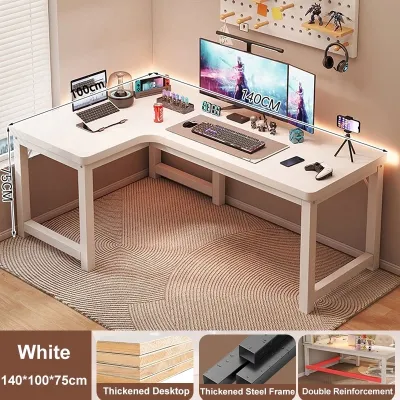
- Multi-Monitor Arrays and Heavy Hardware: If you operate a multi-screen setup, use a heavy desktop PC tower, or require dedicated space for physical documents, an L-shaped desk provides the necessary surface area and structural stability.
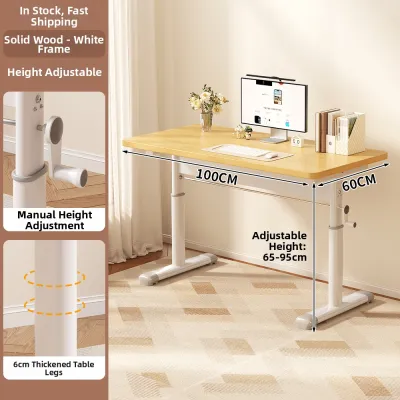
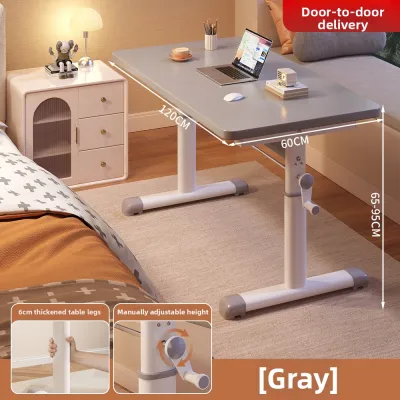
- Sedentary Fatigue and Active Workflows: If you experience physical discomfort from sitting for extended periods or prefer to stay active during long calls, a height-adjustable standing desk allows you to transition smoothly between sitting and standing postures.
Step 1: Assess Your Space, Equipment, and Daily Habits
Selecting a desktop computer table requires a clear understanding of your physical environment and your hardware footprint. Many WFH professionals make the mistake of purchasing a desk based solely on online photos, only to find that it blocks walkways or cannot support their equipment.
Products mentioned in this guide


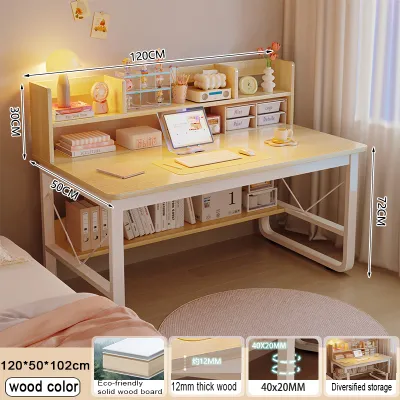
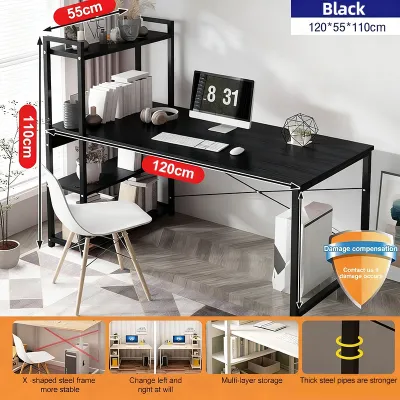
Prices are valid at publication and may change. Please refer to the product page for the latest price.

Start by measuring your available floor space with a tape measure. Mark the footprint of the prospective desk on your floor using masking tape to visualize how much room remains for your chair and daily movement. Additionally, measure the width of your doorways, hallways, and stairwells. In many residential layouts, particularly compact condominiums or multi-story townhouses, tight corners can make delivering and maneuvering large, pre-assembled furniture pieces exceptionally difficult.
Next, calculate the total weight and physical footprint of your computer equipment. A standard desktop setup—consisting of a tower, dual monitors, a keyboard, and an uninterruptible power supply (UPS)—can easily exceed 20 kilograms. Check the manufacturer’s specifications for both the overall weight capacity of the desk and the concentrated load limits of the tabletop material.
Finally, evaluate your daily working habits. If you spend eight to ten hours at your desk in a warm, humid tropical climate, consider how the desk design affects air circulation and legroom. Desks with built-in drawers or thick modesty panels can restrict leg movement and trap heat, whereas open-frame designs promote better airflow and comfort.
Step 2A: Is a Standing Desk Right for Your Workflow?
Height-adjustable standing desks have become a staple of modern WFH setups, offering a dynamic way to combat sedentary fatigue. However, choosing the right model requires evaluating the adjustment mechanism and structural integrity.
Motorized vs. Manual Crank Mechanisms
Motorized standing desks utilize electric motors to raise and lower the work surface at the push of a button. This convenience encourages frequent posture changes throughout the day, but these desks require a reliable power source and involve more complex mechanical components. Manual crank desks, on the other hand, are highly reliable, independent of power outages, and generally more budget-friendly. The trade-off is the physical effort required to turn the crank, which may discourage you from adjusting the height as often as you should.
Verifying Weight Capacity and Stability
A standing desk must remain stable even when fully extended to its maximum height. When checking product specifications, look for heavy-duty steel frames and wide leg columns. Verify that the motor or manual crank’s lifting capacity comfortably exceeds the combined weight of your desktop PC tower, monitors, and mounting arms. An overloaded frame can strain the motor, leading to jerky movements or premature mechanical failure.
Cable Management for Moving Parts
Because a standing desk moves up and down, your cable management system must accommodate this motion. Standard power strips and monitor cables can easily snag, stretch, or unplug during height transitions. Look for desks that feature integrated under-desk cable trays, or plan to install a flexible cable spine that guides cords safely from the moving desktop to the wall outlet without tension.
Step 2B: Is a Foldable Table Right for Your Space?
For those living in compact apartments or shared spaces, a foldable desktop computer table provides a practical, temporary workspace that can be tucked away when the workday ends.
Stability and Locking Mechanisms
The primary concern with foldable tables is lateral stability. Typing on a mechanical keyboard or moving a mouse can cause a flimsy table to wobble, which quickly becomes frustrating. When evaluating foldable options, inspect the leg bracing design and locking mechanisms. Look for tables that feature double-braced legs, gravity locks, or spring-loaded pins that secure the frame firmly in place when deployed.
Storage Footprint and Portability
A foldable desk is only useful if it is easy to store. Measure the folded thickness of the table to ensure it can slide under your bed, fit inside a wardrobe, or stand flat behind a door. Additionally, check the total weight of the table itself; it should be light enough for you to carry and set up daily without straining your back, yet heavy enough to remain planted on the floor during use.
Material Durability Against Humidity and Wear
Frequent folding and unfolding subjects the table joints and edges to constant wear. In tropical climates with high relative humidity, poorly sealed engineered wood can absorb moisture, leading to swelling, warping, or peeling edge bands. Prioritize tables with moisture-resistant melamine coatings, powder-coated steel frames, and impact-resistant edge banding to ensure the desk withstands daily handling.
Step 2C: Is an L-Shaped Desk Right for Your Setup?
If you require an expansive workspace to manage multiple tasks, an L-shaped desk utilizes corner areas efficiently while providing ample surface area.
Corner Placement and Room Flow
L-shaped desks are designed to fit snugly into corners, making them excellent for maximizing floor space in larger rooms. However, you must measure your corner angles and wall clearances carefully. Ensure the desk does not block electrical outlets, light switches, window access, or room walkways. Many L-shaped models feature a reversible configuration, allowing you to assemble the longer return on either the left or right side to match your room’s layout.
Task Zoning and Ergonomics
The unique shape of an L-shaped desk allows you to divide your workspace into distinct functional zones. You can place your primary desktop computer and keyboard on the main side of the desk, keeping your body aligned with the screen. The adjacent return side can then be dedicated to secondary tasks, such as writing, reviewing printed documents, or housing a secondary laptop or printer. This zoning keeps your primary workspace clutter-free and reduces the need to constantly shift your chair.
Structural Support and Assembly
Because of their size, L-shaped desks require robust structural support, especially at the corner joint where the two desktop sections meet. Check for heavy-duty metal support beams running underneath the entire desktop surface. If you plan to place a heavy desktop PC tower on the desk, ensure the weight is distributed near the vertical leg supports rather than in the middle of a span to prevent the tabletop from sagging over time.
Final Pre-Purchase Verification Checklist
Before finalizing your purchase on any online marketplace or furniture retailer, run through this verification checklist to avoid delivery headaches or product mismatches.
- Dimension Verification: Double-check the desk's depth, width, and height against your office chair's armrests and your physical room measurements. Ensure there is at least 80 centimeters of clearance behind the desk for your chair to slide out comfortably.
- Equipment Weight Check: Sum the weight of your PC tower, monitors, UPS, and accessories. Compare this total to the desk's rated load capacity, keeping a safety margin of at least 15 percent.
- Delivery and Access Logistics: Confirm if the delivery service includes door-to-door transport, especially if you live on an upper floor of a building without a service elevator. Bulky L-shaped desks or heavy motorized standing desk frames may require two people to carry.
- Assembly Requirements: Review the product listing to see if assembly tools are included. Some desks require a power drill or specific screwdrivers that may not be provided in the box.
- Warranty and Return Policies: Check the warranty terms for structural components and moving parts. Motorized standing desks should ideally come with a multi-year warranty on the motor and controller, while foldable tables should have clear return policies in case of shipping damage.
Community discussion
Share your experience or ask a question. Comments are reviewed before publication.