
Working from home in the Philippines presents a unique set of spatial and environmental challenges. Many professionals operate from compact condominiums in Metro Manila or shared family homes where a single room must serve as a bedroom, living space, and office. As remote work becomes a permanent fixture, finding the right adjustable computer table is essential for maintaining both physical health and productivity. The choice between a dedicated standing desk and a space-saving foldable adjustable desk often comes down to a fundamental trade-off: permanent ergonomic stability versus immediate spatial flexibility.
For professionals with a dedicated home office, heavy equipment setups, and a commitment to active movement throughout the day, a traditional standing desk is the superior option. These desks provide the robust weight capacity and continuous height adjustments necessary to transition seamlessly between sitting and standing. Conversely, for those living in studio apartments, renting temporary spaces, or working with lightweight laptops, a foldable adjustable desk offers the ability to completely reclaim floor space after working hours. The ideal choice depends on your specific daily workflow, the weight of your equipment, and the physical constraints of your living space.
Defining the Contenders: What Are You Actually Comparing?
To make an informed decision, it is important to understand the structural and operational differences between these two categories of adjustable tables. While both aim to improve your working posture, they target entirely different user needs and room configurations.
Products mentioned in this guide
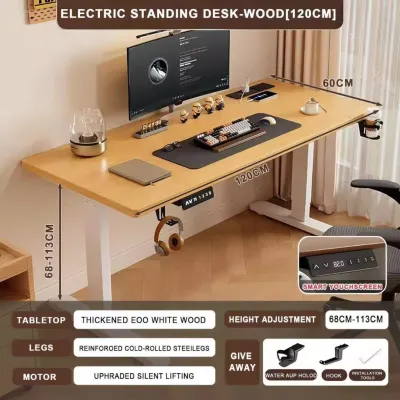
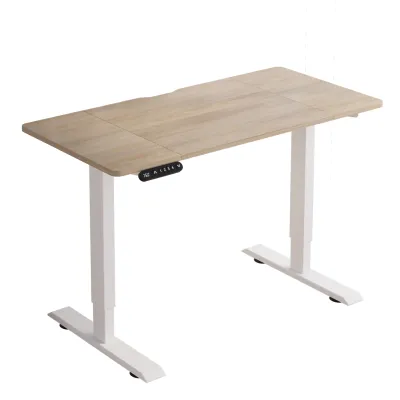
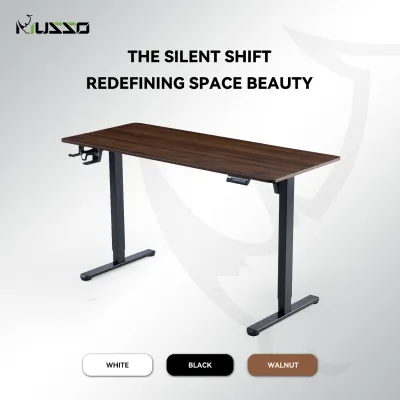
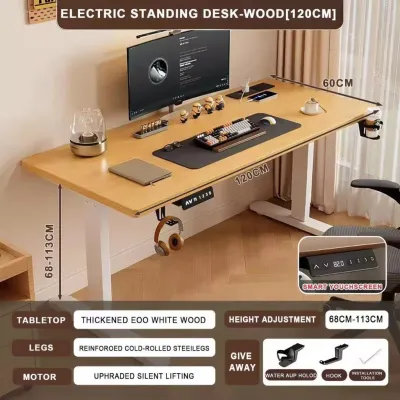

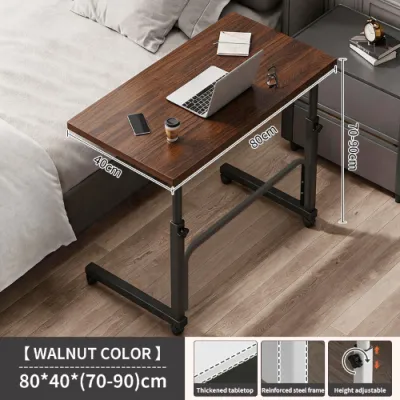
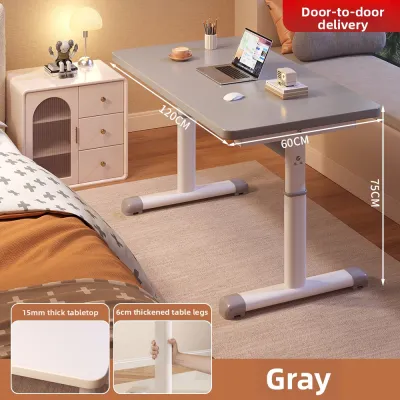
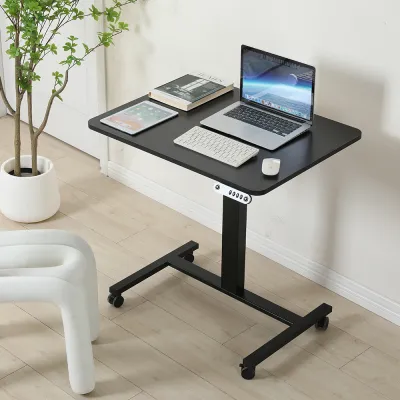
Prices are valid at publication and may change. Please refer to the product page for the latest price.
Standing Desks (Sit-Stand Workstations)
Traditional standing desks, often referred to as sit-stand workstations, are heavy-duty, permanent furniture pieces designed to transition smoothly between sitting and standing heights. These desks typically feature a solid wooden, MDF, or composite tabletop supported by a motorized or manual crank steel frame. They are engineered to remain in a fixed location within your home, acting as the permanent anchor of your workspace.
Because they are built for continuous use, standing desks focus heavily on structural stability and micro-adjustability. Motorized versions utilize electric lifting columns controlled by a keypad, allowing you to adjust the desk height to the exact millimeter. These frames are built to support substantial weight, including heavy desktop computers, multiple monitor mounts, and various desktop accessories, without compromising stability during height transitions.
Foldable Adjustable Desks (Space-Saving Alternatives)
Foldable adjustable desks are lightweight, collapsible tables designed for maximum portability and easy storage. These desks feature frames made from thinner steel or aluminum tubing, coupled with compact tabletops that can be folded flat when not in use. Some models use telescopic legs with manual pin-lock mechanisms, while others rely on scissor-style folding joints or gas-spring assists to adjust height.
Unlike traditional standing desks, “adjustability” in the foldable category often refers to a selection of fixed, manual height tiers rather than a continuous range of movement. These tables are optimized for quick deployment and teardown, making them ideal for multi-purpose rooms. They are designed to be carried easily from room to room or tucked away under a bed, behind a sofa, or inside a closet once the workday ends.
Head-to-Head Comparison: Space, Ergonomics, and Daily Use
Choosing the right adjustable computer table requires a detailed look at how each option performs across several critical dimensions of daily use. Evaluating these factors will help you determine which desk aligns with your home layout and physical well-being.

Space Efficiency and Room Layout
In urban Philippine households, where living space is often limited, physical footprint is a primary consideration. A traditional standing desk requires a dedicated, permanent zone. Once assembled, a standard 120x60cm standing desk cannot be easily moved or hidden. You must ensure you have adequate floor space not only for the desk itself but also for the clearance of your ergonomic chair and the movement of the lifting mechanism. In a small studio unit, a permanent desk can dominate the room’s visual aesthetic, keeping your mind anchored to work even during your off-hours.
Foldable adjustable desks solve this visual and spatial clutter by disappearing entirely. When folded flat, many models compress to a thickness of under 10 centimeters, allowing them to slide into narrow gaps. This makes them highly suitable for shared living areas or bedrooms where you want to restore a relaxing environment after logging off. However, this space-saving benefit is only realized if you actually fold the desk down. If left open permanently due to the hassle of clearing your equipment, a foldable desk simply acts as a less stable permanent desk.
Before purchasing, measure your room’s walkways and entryways. If you choose a permanent standing desk, verify that your doorway or elevator access can accommodate the delivery of large, heavy boxes. For foldable desks, identify exactly where the unit will be stored when collapsed, ensuring it will not block ventilation pathways or high-traffic areas in your home.
Ergonomics and Health Goals
True ergonomic comfort relies on precise alignment. Your desk should allow your elbows to rest at a 90-degree angle while typing, and your screen should sit at eye level to prevent neck strain. Motorized standing desks excel in this area because they offer continuous, millimeter-precise height adjustments. You can fine-tune the height to match your exact physical proportions, whether you are sitting in an ergonomic chair or standing on an anti-fatigue mat. This continuous adjustment is particularly beneficial if multiple family members share the same workstation.
Foldable adjustable desks, by contrast, often rely on manual pin-lock or preset slot mechanisms. This means you are limited to three, five, or eight pre-determined height levels. If your ideal ergonomic height falls between two presets, you may have to compromise, leading to minor posturing adjustments that can cause discomfort over long working sessions. Additionally, the manual effort required to change heights on a foldable desk—which often involves removing your laptop, releasing pins, and physically lifting the frame—can discourage you from changing positions as often as you should.
Furthermore, ergonomic accessories like clamp-on keyboard trays, under-desk cable organizers, and adjustable monitor arms require a solid, thick desktop to mount securely. Traditional standing desks easily accommodate these additions, whereas the thinner, lightweight tops of foldable desks may warp, crack, or lack the necessary edge clearance to support clamp-on accessories safely.
Stability, Weight Capacity, and Equipment Support
Structural integrity is a critical safety factor when supporting expensive computer equipment. Traditional standing desks feature heavy steel legs, wide feet, and solid crossbars that provide a low center of gravity. This design minimizes the “wobble factor”—the lateral sway that can occur when typing or writing, especially when the desk is extended to its maximum standing height. A stable desk ensures your monitors do not shake with every keystroke, reducing eye strain and distraction.
Foldable desks are inherently more prone to wobbling. Because they utilize multiple folding joints, hinges, and lightweight telescopic legs to achieve portability, they have more moving parts where minor play can develop. When extended to standing heights, this lateral movement can become pronounced. Typing energetically or leaning on the edge of a foldable desk can cause noticeable shaking, which may feel insecure if you are using a heavy laptop or an external monitor.
Weight capacity is another area of stark contrast. A typical motorized standing desk can support anywhere from 70 to 120 kilograms, allowing you to place multiple monitors, desktop towers, books, and desk organizers on the surface without strain. A foldable adjustable desk typically supports a much lower limit, often ranging from 15 to 30 kilograms. Overloading a foldable desk not only risks damaging the folding mechanisms but can also lead to catastrophic structural failure if the locking pins slip.
Assembly, Portability, and Daily Convenience
Evaluating the daily convenience of your setup is essential for long-term satisfaction. A traditional standing desk requires a significant initial investment of time and effort to assemble. The packages are heavy, often requiring two people to lift and maneuver. You must carefully route cables, mount control boxes, and align heavy steel frames. Once assembled, however, the daily convenience is unmatched. With the press of a button, the desk transitions between heights in seconds, and your entire cable management system moves dynamically with the frame, keeping your workspace neat and safe.
Foldable desks require almost no initial assembly, often arriving fully put together or requiring only a few simple steps. However, they introduce a repetitive daily friction. Every morning, you must retrieve the desk from storage, unfold the legs, lock the height mechanism, set up your laptop, and plug in your chargers. At the end of the day, you must reverse this entire process, packing away your gear before collapsing the frame. If you value a “ready-to-work” environment where you can sit down and begin immediately, the daily setup routine of a foldable desk may quickly become tiresome.
Additionally, consider the local climate. In the Philippines, high relative humidity can affect materials over time. Traditional standing desks often use thick, heavy desktops with high-quality edge-banding to protect the inner core from moisture absorption. Foldable desks, designed to be lightweight, may use thinner composite materials or unsealed edges that are more susceptible to swelling or warping if exposed to humid air or accidental spills. Always check the quality of the desktop finish and joints before making your selection.
Quick Specification Checklist: What to Verify Before Buying
When browsing online listings or visiting local furniture showrooms, use this quick checklist to compare the technical specifications of both desk types. Ensure you verify these details against your actual equipment and space constraints.
| Feature | Standing Desk | Foldable Adjustable Desk | What to Verify |
|---|---|---|---|
| Height Adjustment Mechanism | Motorized (Single/Dual Motor) or Manual Hand Crank | Manual Pin-Lock, Spring Button, or Gas-Spring Assist | Check the exact minimum and maximum height range to ensure it fits your sitting and standing eye levels. |
| Weight Capacity | High (typically 70kg to 120kg) | Low to Moderate (typically 15kg to 30kg) | Weigh your laptop, monitor, keyboard, and accessories to ensure they do not exceed the desk's limit. |
| Physical Footprint | Permanent (requires dedicated floor space and clearance) | Collapsible (folds flat for storage under beds or in closets) | Measure your available floor space and compare it to the desk's fully assembled and folded dimensions. |
| Monitor Arm Compatibility | Excellent (supports heavy C-clamp and grommet mounts) | Poor to Moderate (thin tops and folding frames limit clamp use) | Verify desktop thickness and frame clearance underneath if you plan to use a clamp-on monitor arm. |
| Power Requirements | Requires proximity to a wall outlet (for motorized models) | No power required (completely manual operation) | Ensure you have a nearby power strip with surge protection to protect motorized frames from local power fluctuations. |
| Ideal User Profile | Users with dedicated offices, heavy multi-monitor setups, and high daily usage | Users in small condos, those using lightweight laptops, and those needing multi-use rooms | Match your daily workflow and space constraints to the correct profile before purchasing. |
The Final Verdict: Matching the Desk to Your Lifestyle
To make your final decision, evaluate your daily habits, your living arrangement, and your long-term health goals. Use the following framework to identify which adjustable computer table aligns with your lifestyle.
Choose a Standing Desk if:
- You have a dedicated workspace: You have a specific room or a permanent corner in your home that does not need to be repurposed for other activities after hours.
- You use heavy or complex equipment: Your setup includes a desktop PC tower, multiple monitors, heavy studio speakers, or clamped accessories that are difficult to dismantle daily.
- You prioritize seamless transitions: You want to change your working posture multiple times a day at the press of a button, without interrupting your workflow or clearing your desktop.
- You require maximum stability: You are sensitive to desk wobble and want a solid, heavy-duty workstation that remains rock-solid even at maximum standing heights.
Choose a Foldable Desk if:
- You live in a compact or shared space: You work from a studio condo, a shared bedroom, or a dining area, and you need to reclaim your living space once the workday is complete.
- Your setup is highly minimalist: You work exclusively on a lightweight laptop or a single portable tablet that can be packed away in a backpack in under a minute.
- You are on a flexible budget or renting temporarily: You want an affordable, highly portable option that is easy to transport during house moves without requiring heavy lifting or disassembly.
- You do not mind a daily setup routine: You find value in the physical ritual of setting up your workspace in the morning and packing it away at night to establish a clear boundary between work and personal life.
Verify First Before Purchasing:
If you are renting your home, check your lease agreement or consult your condo administration before purchasing. Heavy standing desks can leave permanent indentations on soft vinyl or laminate flooring; consider using rubber floor protectors or high-quality caster wheels to distribute the weight safely. If you are considering a wall-mounted foldable drop-leaf table, ensure you have permission to drill into the walls and verify that the wall structure can support both the desk and your equipment. Finally, if you use an ergonomic office chair with fixed armrests, measure the clearance beneath the desk frame—especially on foldable models, where low-hanging crossbars or folding joints can obstruct your chair, forcing you to sit too far back from your workspace.
Ultimately, the best adjustable computer table is the one that fits naturally into your daily routine. By carefully balancing your spatial constraints against your ergonomic needs, you can create a productive, comfortable, and healthy work-from-home setup that serves you well for years to come.
Frequently Asked Questions (FAQ)
Can I use a monitor arm with a foldable adjustable desk?
It is generally not recommended to use standard C-clamp monitor arms with foldable adjustable desks. Most foldable desks feature thin, lightweight tabletops made of hollow-core wood, thin plastic, or light composite materials that cannot withstand the concentrated clamping force of a heavy monitor arm. Additionally, clamping a heavy monitor to the edge of a lightweight folding desk shifts the center of gravity significantly, making the entire table highly unstable and prone to tipping over. If you need to raise your screen on a foldable desk, it is safer to use a lightweight, freestanding laptop riser or a small, independent table-top monitor stand that distributes the weight evenly across the center of the desk surface.
Are manual crank standing desks better than motorized ones for small spaces?
Manual crank standing desks can be an excellent middle-ground option for smaller spaces or homes with limited access to power outlets. Because they do not require an electrical connection, you can place a manual crank desk anywhere in a room without worrying about cable routing or proximity to a wall plug. They are also slightly lighter than motorized desks because they lack heavy electric motors and control boxes, making them easier to reposition if needed. However, keep in mind that manually cranking a desk up and down requires physical effort and time, which can create a psychological barrier to changing your posture. If you want to transition between sitting and standing frequently throughout the day, a motorized desk with memory presets offers a much more convenient experience, provided you have a stable power source with surge protection.
Community discussion
Share your experience or ask a question. Comments are reviewed before publication.