
Setting up a functional home office in the Philippines requires balancing productivity with the realities of local living spaces. Whether you are working from a high-rise condo in Bonifacio Global City, a shared apartment in Quezon City, or a spacious suburban house in Cavite, your choice of workspace foundation dictates your daily physical comfort and focus. The decision typically comes down to three popular configurations: the active standing desk, the space-saving foldable desk, and the expansive L-shaped desk.
The ideal choice is not about finding a universally superior design, but rather identifying which desk aligns with your floor plan, budget, and daily tasks. A standing desk is the premier choice for professionals seeking ergonomics, movement, and physical relief during long, continuous working hours. A foldable desk serves as a highly practical, budget-friendly solution for tight spaces, studio units, and multi-purpose rooms where the workspace must disappear after hours. An L-shaped desk acts as a productivity command center, offering maximum surface area and corner efficiency for heavy multitaskers, creative professionals, and those utilizing multiple monitors.
Space and Layout: Fitting Each Desk Into Your Room
Evaluating how each desk type interacts with your physical room layout is a critical first step, especially in the Philippines where urban apartment and condominium spaces are often compact. A typical studio or one-bedroom unit in Metro Manila may offer limited floor area, meaning every square meter must be carefully optimized. Before purchasing any furniture, you must assess both the horizontal footprint and the vertical clearance of your intended workspace.
Products mentioned in this guide
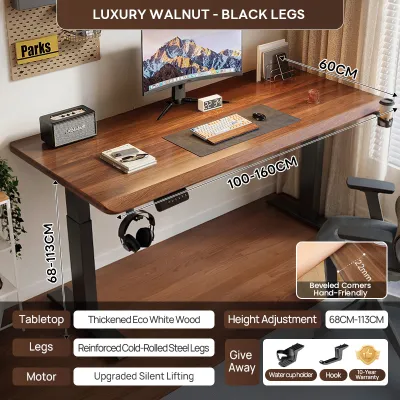
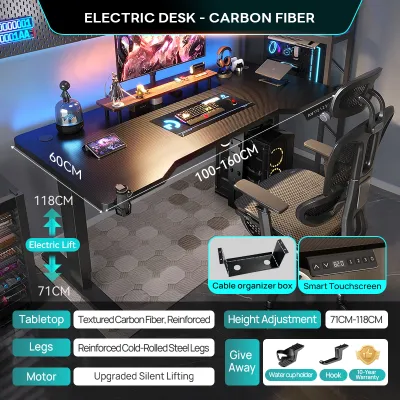
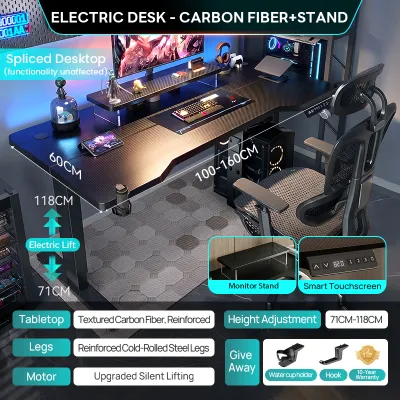
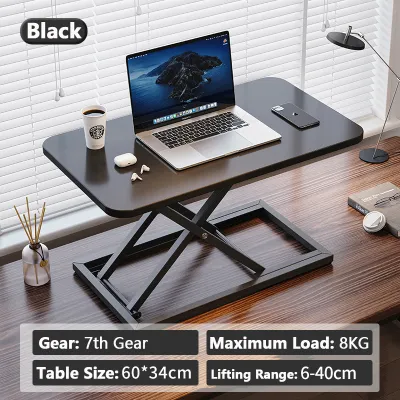
Prices are valid at publication and may change. Please refer to the product page for the latest price.
Foldable desks are designed specifically to minimize spatial impact when not in use. When collapsed, many models fold down to a depth of less than 10 centimeters, allowing them to be slipped behind a door, under a bed, or inside a closet. When expanded, they provide just enough surface area for a laptop, notebook, and mouse. If you are considering a wall-mounted folding desk, you must verify the structural integrity of your wall—concrete block walls common in Philippine homes require heavy-duty masonry anchors, while drywall partitions require finding the internal studs. Always check your lease agreement if you are renting, as drilling deep anchor holes into walls may violate your contract.
Standing desks occupy a constant floor footprint, but they introduce unique vertical space requirements. When setting up a standing desk, you must ensure that no low-hanging light fixtures, split-type air conditioning units, wall-mounted shelves, or ceiling fans block the desk or your equipment at its maximum raised height. Furthermore, cable management becomes a critical safety and operational factor. Because the desktop moves vertically, you must ensure that all power strips, monitor cables, and charger wires have enough slack to stretch to the maximum height without pulling on ports or creating a tripping hazard.
L-shaped desks are unmatched in their ability to turn dead corner space into highly functional work areas. However, they require a substantial, continuous floor area and are far less forgiving in tight rooms. When measuring for an L-shaped desk, pay close attention to the “return”—the shorter side of the L. You must ensure this return does not block walkways, entryways, built-in wardrobe doors, or access to your balcony. Additionally, because L-shaped desks are bulky and typically ship in multiple large, heavy boxes, you must verify that the packaged boxes can fit through your building’s elevator, narrow stairwells, and doorways during delivery.
To avoid costly layout mistakes, use painter’s tape or laid-out newspapers to map the exact dimensions of the desk on your floor. Do not just measure the desk itself; factor in the clearance needed for your office chair. A standard ergonomic chair requires at least 80 to 100 centimeters of open space behind the desk to allow you to push back, sit down, and stand up comfortably without hitting walls or other furniture.
Workflow and Ergonomics: Matching a Standing Desk or Worksurface to Your Style
Your daily work style, the complexity of your equipment setup, and your physical comfort should dictate the structural design of your desk. Different configurations support different levels of physical activity, weight capacities, and organizational habits.

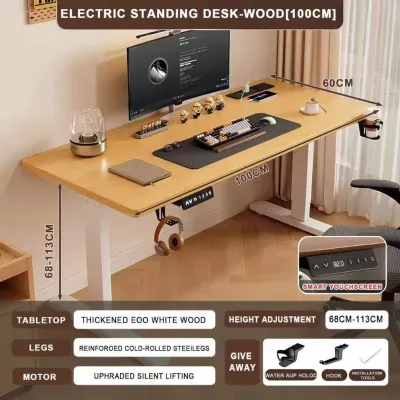
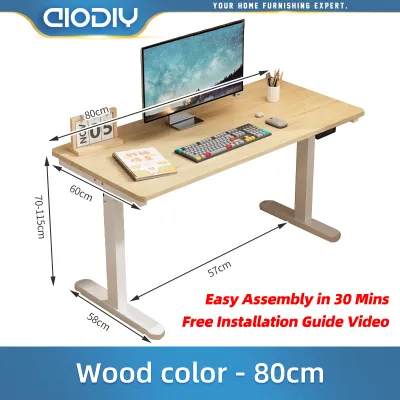
Standing desks are built around the concept of active working, allowing you to seamlessly transition between sitting and standing throughout the day. This frequent movement helps reduce muscle fatigue, improves circulation, and prevents the physical stiffness associated with sitting for eight to ten hours. When evaluating a standing desk, pay close attention to the weight capacity and stability of the lifting mechanism. Single-motor standing desks are generally more affordable but have lower weight capacities (typically around 70 to 80 kilograms) and slower, louder adjustment speeds. Dual-motor standing desks offer superior lifting capacity (often exceeding 100 to 120 kilograms), smoother transitions, and greater stability at maximum height. Always calculate the combined weight of your computer tower, multiple monitors, heavy-duty monitor arms, and desk accessories to ensure you do not overload the motor.
L-shaped desks excel at multitasking and task zoning, creating a “command center” environment. The dual-surface design allows you to divide your work into distinct physical zones. For example, you can dedicate the primary side of the desk to your computer, monitors, and keyboard, while utilizing the return wing for analog tasks like sketching, reviewing printed documents, or housing a printer and scanner. Ergonomically, the L-shape keeps all your work tools within your natural reach zone—the semi-circular area you can access simply by sweeping your arms outward. This minimizes the need to stretch, lean, or twist your torso, reducing strain on your lower back and shoulders over a long workday.
Foldable desks, while highly convenient, have inherent structural and stability limitations. Because they rely on folding joints, hinges, and lightweight frames, they are not designed to support heavy equipment setups. Placing multiple large monitors, heavy desktop PCs, or clamp-on monitor arms on a foldable desk can cause significant wobbling when typing and may even risk structural failure. These desks are best suited for lightweight setups, such as a single laptop, a tablet, and a notebook. Always check the manufacturer’s specified load limit, which is often restricted to 15 to 30 kilograms, and avoid placing off-center loads near the edges.
Regardless of which desk type you select, maintaining proper ergonomic alignment is essential for your neck, back, and wrist health. Your monitor should be positioned directly in front of you with the top of the screen at or slightly below eye level, preventing you from tilting your head forward. Your keyboard and mouse should be at a height that allows your elbows to rest at a 90-degree angle, with your wrists remaining straight and relaxed. If your desk height is not adjustable, you must rely on an adjustable office chair and a footrest to achieve this optimal alignment.
Budget, Assembly, and Long-Term Value
Investing in a home office desk requires balancing your immediate budget with the long-term durability of the furniture, especially when factoring in assembly effort and local environmental conditions.
The initial cost of these desk types falls into distinct price tiers. Foldable desks represent the most budget-friendly option, with many basic models available for under ₱3,000. L-shaped desks span a wide mid-to-high price range, starting around ₱4,000 for basic engineered wood models and climbing significantly higher for solid wood or steel-framed configurations. Motorized standing desks sit at the premium end of the market, typically starting around ₱10,000 and reaching upwards of ₱30,000 for high-end dual-motor systems with programmable memory keypads and collision-detection sensors.
Assembly complexity and future relocation logistics are often overlooked during the buying process. Foldable desks require virtually no assembly, making them the easiest to set up and move between rooms or rental properties. L-shaped desks are heavy, arrive in multiple flat-pack boxes, and require extensive assembly with numerous screws, dowels, and cam locks. Disassembling an L-shaped desk for a move is highly tedious and can permanently weaken the joint connections, particularly if the desktop is made of low-density particle board. Standing desks require careful, precise assembly of the steel frame, lifting columns, transmission rod (for single-motor or manual crank models), and electronic control box. Proper cable routing during assembly is essential to prevent wires from catching in the moving parts.
When assessing long-term value, look closely at the materials and construction quality. For standing desks, verify the warranty coverage on the electronic components and motor, as these are the most common points of failure over time. Look for frames constructed from heavy-duty, powder-coated steel rather than thin-gauge aluminum. For all desk types, check the quality of the joints, the thickness of the desktop panel, and the presence of adjustable leveling feet, which help stabilize the desk on uneven floors.
In the tropical climate of the Philippines, high relative humidity and seasonal heat can severely impact furniture lifespan. Cheap, unsealed particle board easily absorbs moisture from the air, causing the wood fibers to swell, sag, and eventually crumble under weight. To prevent this, prioritize desk surfaces finished with high-pressure laminate (HPL) or melamine, which provide a protective, moisture-resistant barrier. Additionally, ensure that all metal frames are thoroughly powder-coated rather than simply painted, as powder coating offers superior protection against rust and corrosion in humid coastal or urban environments.
The Decision Framework: Choose Your Home Office Desk
To finalize your decision, evaluate your specific working conditions, spatial constraints, and hardware requirements against this practical selection framework.
Choose a Standing Desk if:
- You experience physical stiffness, lower back pain, or fatigue from sitting for multiple hours.
- You have a dedicated, permanent workspace with sufficient vertical clearance and no overhead obstructions.
- Your budget allows for a high-quality motorized or manual crank frame with a reliable warranty.
- You want to actively integrate physical movement and postural changes into your daily professional routine.
Choose a Foldable Desk if:
- You live in a compact studio condo, share a bedroom, or work in a multi-purpose living area.
- You need the ability to quickly pack away your workspace to reclaim floor space after your working hours.
- Your daily setup is highly streamlined, consisting primarily of a laptop, tablet, or single lightweight monitor.
- You are seeking a highly economical, entry-level desk that requires minimal setup effort and is easy to transport.
Choose an L-Shaped Desk if:
- Your daily workflow involves heavy multitasking, requiring multiple monitors, a laptop, and peripheral devices.
- You need distinct physical zones to separate digital tasks from analog work like writing, sketching, or organizing paperwork.
- You have a dedicated, unused corner in your room that can accommodate a large, permanent furniture footprint.
- You prioritize maximum desktop surface area and want to keep all your essential tools within a comfortable arm's reach.
Before making your final purchase, perform these essential verification checks:
- Check your flooring: If your home has uneven tile work or warped wood flooring, ensure the desk frame features adjustable leveling feet to prevent wobbling.
- Check your lease rules: If you are renting and considering a wall-mounted folding desk, confirm whether your landlord permits drilling into concrete or drywall.
- Check monitor arm compatibility: If you plan to use clamp-on monitor arms, verify that the desk surface is thick enough (typically at least 2 to 3 centimeters) and made of solid wood or high-density MDF to withstand the concentrated clamping pressure.
- Check power stability: If you opt for a motorized standing desk, protect the sensitive electronic control box and motor from local power fluctuations and brownouts by plugging it into a high-quality surge protector or an automatic voltage regulator (AVR).
Frequently Asked Questions (FAQ)
Can I put a standing desk on a carpet?
Yes, you can place a standing desk on a carpeted floor, but thick or plush carpeting can introduce minor stability issues, especially when the desk is raised to its maximum height. To ensure smooth operation and prevent the heavy steel frame from sinking unevenly into the fibers, adjust the leveling feet on the bottom of the desk legs until the desktop is perfectly level. For maximum stability and to protect your carpet from permanent indentation, place a hard, flat polycarbonate chair mat or a solid wood floor protector under the desk base.
Are L-shaped desks hard to move or disassemble?
L-shaped desks are significantly more challenging to move than standard straight desks due to their bulky footprint, heavy weight, and complex joint configurations. Most L-shaped desks are constructed from two or three separate desktop panels joined by metal brackets underneath, which must be disconnected before transport. If you plan to relocate the desk, it is highly recommended to keep the original assembly manual and hardware. Take care when disassembling joints made of engineered wood or particle board, as repeated screwing and unscrewing can strip the pre-drilled holes and permanently compromise the desk’s structural stability.
Do foldable desks wobble when typing?
Some degree of minor movement or wobble is common in foldable desks due to their lightweight frames and reliance on moving hinges rather than rigid, welded joints. However, the severity of the wobble depends heavily on the desk’s frame design, metal gauge, and the presence of stability features like cross-bracing or locking pins. To minimize wobbling, avoid placing heavy, off-center equipment on the desk, ensure all locking mechanisms are fully engaged, and place the desk on a completely flat, even floor surface.
Community discussion
Share your experience or ask a question. Comments are reviewed before publication.