
Setting up a productive home office requires selecting a desk that aligns with your daily work habits, physical space, and comfort requirements. The right desk does more than hold a computer; it directly influences your posture, productivity, and overall physical health during long working hours. With several distinct desk configurations available on the market, choosing between a standing desk, a foldable desk, or an L-shaped desk can feel overwhelming. Each type addresses a specific set of spatial and operational needs.
To make an informed decision, you must evaluate how you work, the weight of your equipment, and the physical constraints of your room. A standing desk prioritizes ergonomic movement and active workflows, allowing you to alternate between sitting and standing throughout the day. A foldable desk offers unmatched flexibility for multi-purpose rooms, temporary workspaces, or rental properties where saving floor space is paramount. An L-shaped desk provides an expansive, multi-zone surface area that caters to heavy multitaskers, creative professionals, and those with dedicated corners to spare. Before purchasing, measuring your actual floor space and listing your daily equipment needs are critical steps to avoid buying a desk that does not fit your room or support your gear.
Standing Desks: Best for Active Workflows and Ergonomics
Standing desks are designed to combat the physical strain of prolonged sitting by encouraging regular movement. Transitioning between sitting and standing positions helps distribute physical load across different muscle groups, reducing lower back fatigue and improving circulation. However, transitioning to a standing desk requires a commitment to active posture management. Simply standing all day can cause lower-limb fatigue and joint strain; the key is alternating positions every 45 to 60 minutes.
Products mentioned in this guide
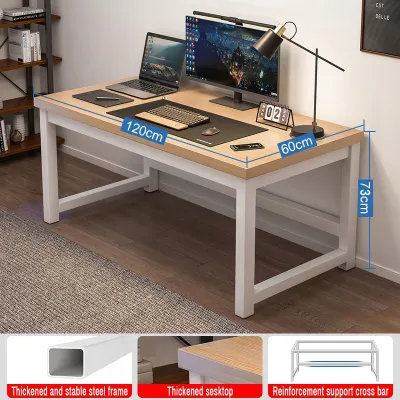

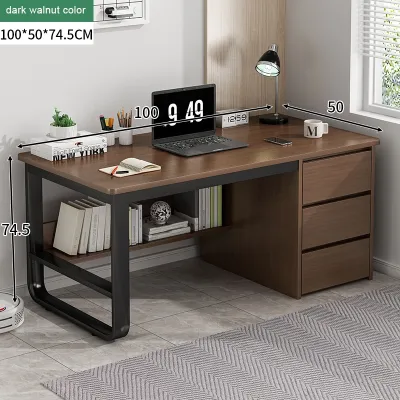
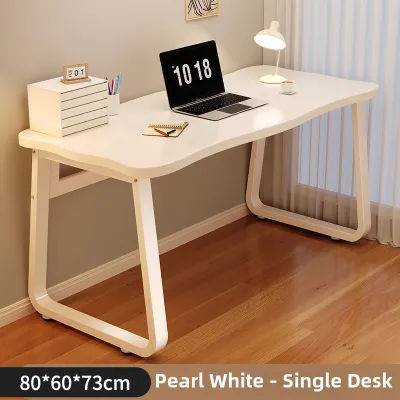
Prices are valid at publication and may change. Please refer to the product page for the latest price.
Before investing in a standing desk, you must verify the lifting mechanism and structural specifications. Motorized standing desks offer smooth, push-button adjustments but require proximity to a power outlet and have electrical parts that can wear out over time. Manual crank desks are highly reliable and independent of power sources, but they require physical effort to adjust, which may discourage frequent height changes. You must check the manufacturer’s specified maximum weight capacity against your actual setup. A dual-monitor mount, a heavy desktop tower, studio monitors, and desk accessories can easily exceed 40 kilograms. Ensure the lifting motor or crank mechanism is rated well above your total equipment weight to prevent motor burnout or jerky movements.
Frame stability at maximum height is a critical safety and usability factor. When a standing desk is extended to its highest point, the center of gravity shifts upward, making the structure more susceptible to front-to-back and lateral wobble. To prevent your monitors from shaking while typing, look for desks constructed with heavy-duty steel frames, thick lifting columns (preferably three-stage columns for a wider height range), and long, stable footpads.
Spatial and environmental considerations are equally vital. Because the desktop moves vertically, you must ensure your cable management system has enough slack. Cables that are too tight can pull on ports, damage equipment, or unplug during height transitions. Use flexible cable spines or under-desk cable trays to secure your cords. Additionally, measure your seated and standing elbow heights to ensure the desk’s physical range accommodates your body ergonomically. Your elbows should rest at a 90-degree angle in both positions.
In tropical environments with high relative humidity, such as the Philippines, material selection requires careful inspection. If the desktop is made of engineered wood like MDF or particle board, verify that it has a high-quality, fully sealed melamine or water-resistant laminate finish. Unsealed edges can absorb moisture from the air, causing the wood fibers to swell, warp, and split over time. Ensure the steel frame features a durable powder-coated, rust-resistant finish to prevent corrosion from humidity or sweat.
Foldable Desks: Ideal for Small Spaces and Flexible Setups
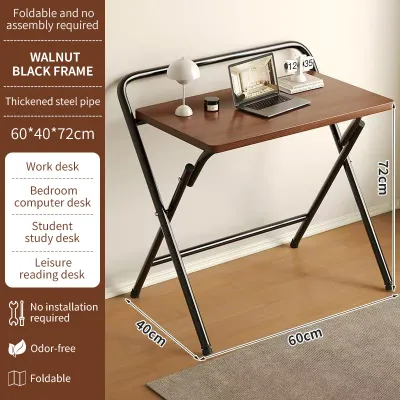
Foldable desks are engineered for high spatial efficiency, making them an excellent choice for studio apartments, shared living spaces, or temporary work-from-home setups. The primary advantage of a foldable desk is its ability to collapse flat, allowing you to reclaim valuable floor space when your workday ends. This flexibility is highly beneficial in dense urban areas where dedicated office space is a luxury and rooms must serve multiple functions, acting as a bedroom by night and an office by day.

However, the space-saving benefits of a foldable desk come with distinct structural trade-offs. These desks generally have a lower weight capacity, often limited to 15 to 25 kilograms. They are not designed to support heavy desktop computers, multiple clamped monitor arms, or bulky office equipment. The surface area is also compact, typically providing just enough room for a single laptop, a mouse, and a notepad. Vigorous typing or writing can cause minor structural wobble because these desks rely on folding joints rather than rigid, fixed frames.
When shopping for a foldable desk, you must inspect the locking mechanisms and structural joints. Look for desks equipped with heavy-duty spring locks, safety pins, or physical latching bars that securely lock the legs in the open position. Avoid designs that rely purely on friction or gravity to stay upright, as these can collapse if accidentally bumped. Examine the thickness of the metal legs; steel tubing with a thicker wall profile offers significantly better lateral stability than thin, lightweight aluminum legs.
Before purchasing, measure the desk’s fully folded dimensions. Compare these measurements against your planned storage area to ensure the desk will actually fit under your bed frame, inside a closet, or behind a door. If you plan to move the desk daily, check its total weight to ensure you can lift and carry it comfortably without straining your back.
Furthermore, pay close attention to the desktop material and edge banding. Because foldable desks are frequently handled, moved, and stored, they are highly prone to edge impacts. Look for impact-resistant PVC edge banding that is securely glued to the desktop. This prevents the edges from chipping or peeling, which would expose the inner core to moisture and humidity.
L-Shaped Desks: Perfect for Multitasking and Dedicated Corners
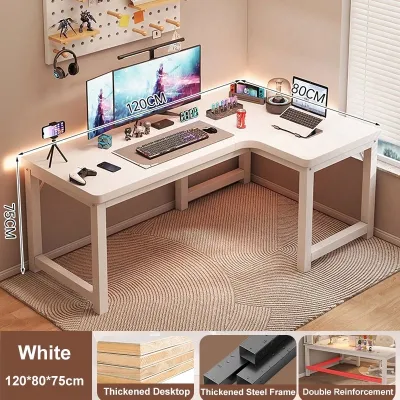
L-shaped desks are the gold standard for professionals who require an expansive workspace and have a dedicated area for their home office. The primary workflow benefit of an L-shaped desk is its dual-zone configuration. You can designate one wing of the desk strictly for digital work, housing your computer, monitors, and keyboard, while utilizing the other wing for analog tasks like reviewing printed documents, writing, sketching, or managing physical paperwork. This physical separation helps organize daily workflows and reduces desktop clutter.
This expansive workspace easily accommodates complex equipment setups. If you use dual or triple monitors, a large graphics tablet, or heavy studio equipment, an L-shaped desk provides the depth and structural stability required to mount multiple monitor arms securely. Because the weight is distributed across a wider footprint, these desks offer excellent stability and minimal wobble, even under heavy loads.
Despite these benefits, L-shaped desks present significant logistical and spatial challenges. They are heavy, bulky, and require a permanent, dedicated corner or a large open wall to function without disrupting room traffic. Before ordering, you must measure the exact dimensions of your room’s corner, taking into account the location of electrical outlets, light switches, baseboard heaters, and window clearances. Ensure the desk wings do not block doors, closets, or walkways.
Delivery and assembly require careful planning. Due to their size, L-shaped desks are shipped in large, heavy boxes that can be difficult to maneuver through narrow corridors, tight stairwells, or small residential elevators. Verify the dimensions of your building’s entryways before placing an order. Assembly is typically complex and often requires two people to align the desktop panels and frame components correctly.
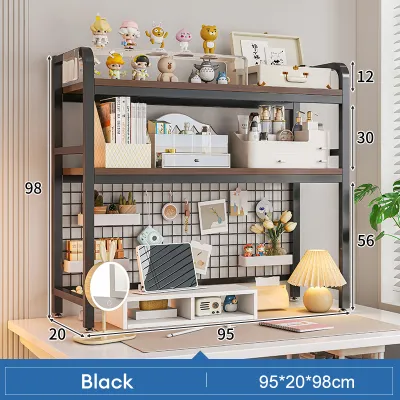
Additionally, you must evaluate the desk’s legroom and wing depth. Ensure the inner corner of the desk has a recessed leg design or sufficient clearance so your knees do not bump into support columns when you swivel from one wing to the other. A wing depth of at least 60 centimeters is recommended to maintain a healthy viewing distance from your monitors. Because of the concentrated weight of the desk and heavy equipment, use floor protection pads under the desk feet to prevent permanent indentations on vinyl, laminate, or hardwood floors. If the desk features a tall, integrated hutch or shelving unit, verify if the manufacturer recommends wall anchoring to prevent tipping, and check your rental agreement before drilling into concrete walls.
Key Comparison Dimensions for Your Home Office
To choose the right desk, you must compare these three configurations across the specific dimensions that affect your daily comfort and room layout. The table below outlines the core differences in structural performance, spatial footprint, and ease of use.
| Feature | Standing Desk | Foldable Desk | L-Shaped Desk |
|---|---|---|---|
| Primary Benefit | Ergonomic movement & posture variety | Space-saving flexibility & portability | Expansive dual-zone surface area |
| Space Footprint | Moderate vertical & floor footprint | Minimal; reclaimable floor space | Large, fixed corner footprint |
| Typical Weight Capacity | 40 to 120 kg (varies by motor) | 15 to 25 kg | 50 to 150 kg |
| Stability & Wobble | Moderate; can wobble at full height | Low; prone to lateral movement | High; highly rigid and stable |
| Assembly Complexity | Moderate; requires motor/frame setup | Low to none; usually pre-assembled | High; requires multi-panel alignment |
| Best Suited For | Active professionals & ergonomic focus | Renters, small rooms, & light laptop use | Heavy multitaskers & multi-monitor users |
Space & Layout Requirements
Standing desks require vertical clearance to operate safely. You must ensure there are no wall-mounted shelves, low hanging lights, or artwork that could obstruct the desk or your monitors as they rise. Foldable desks require a clear storage pathway; you need a convenient spot nearby to slide the desk away when it is folded. L-shaped desks demand a permanent commitment of floor space. They cannot be easily rearranged, meaning your room layout will be locked around the desk’s position.
Stability & Wobble
Stability is directly tied to the desk’s frame design and contact points with the floor. L-shaped desks distribute weight across multiple legs and a wide corner frame, making them incredibly stable and highly resistant to shaking. Standing desks rely on two lifting columns; while stable at sitting heights, lower-end models can experience noticeable wobble when extended above 100 centimeters. Foldable desks have multiple hinge joints, which naturally introduce small amounts of play, leading to minor movement during active typing.
Assembly & Mobility
If you move frequently or rent your home, mobility is a major factor. Foldable desks excel here, as they require virtually no assembly and can be transported in the back of a standard vehicle. Standing desks are moderately heavy due to their steel frames and motors; while they can be disassembled, doing so takes time and care to protect the electrical components. L-shaped desks are difficult to move once assembled. They often require partial or complete disassembly to fit through standard door frames (typically 80 to 90 centimeters wide) or down narrow stairwells.
Surface Area & Equipment Load
An L-shaped desk provides the maximum surface area, allowing you to keep your computer setup, paperwork, and reference materials within arm’s reach simultaneously. Standing desks offer a standard rectangular surface, which can accommodate a dual-monitor setup if you choose a model with a width of 120 centimeters or more. Foldable desks are strictly limited to lightweight, minimalist setups; placing heavy desktop towers or clamping multiple monitor arms to a foldable desk can compromise the structural integrity of the folding joints.
Final Decision Framework: Match Your Desk to Your Work Style
Selecting the ideal desk type comes down to matching your physical space with your daily operational habits. Use the following framework to guide your final purchase decision.
Choose a Standing Desk if:
- You prioritize physical health and posture: You experience lower back stiffness, neck pain, or fatigue from sitting for long hours and want to actively alternate between sitting and standing.
- You have a dedicated, permanent workspace: You have a set area in your home with vertical clearance, easy access to grounded power outlets, and space to run clean cable management lines.
- You use a standard computer setup: Your equipment consists of a laptop, one or two monitors, and standard peripherals that fit within a standard rectangular footprint.
Choose a Foldable Desk if:
- Your space is highly constrained: You live in a studio apartment, a shared room, or a compact condo where the floor space must be cleared for other activities outside of work hours.
- You are a renter or move frequently: You want lightweight furniture that requires zero assembly, is easy to pack, and can be transported without professional moving assistance.
- You maintain a minimalist digital workflow: Your daily work requires only a laptop, a tablet, or a notebook, without the need for heavy external monitors or bulky desktop towers.
Choose an L-Shaped Desk if:
- You are a heavy multitasker: You need separate physical zones for different tasks, such as digital work on one side and physical paperwork, drawing, or hardware testing on the other.
- You use extensive hardware: You have a multi-monitor array, large desktop speakers, a heavy PC tower, or creative equipment that requires a high weight capacity and a deep desktop surface.
- You have an underutilized room corner: You have a spacious, dedicated corner in your home office that can accommodate a large, permanent furniture footprint without blocking natural foot traffic.
Verify First Before Buying:
- Check your lease agreement: If you choose an L-shaped desk with a hutch or a heavy standing desk that might require wall anchoring for safety, ensure your landlord allows drilling into the walls.
- Measure your entryways: Before ordering a large L-shaped or standing desk, measure your front door, hallway corners, stairwells, and elevator doors to ensure the delivery boxes can physically reach your room.
- Test your current chair: Ensure your existing office chair's armrests and seat height are compatible with the minimum height of your chosen desk so you can sit ergonomically without straining your shoulders.
Community discussion
Share your experience or ask a question. Comments are reviewed before publication.