
Setting up a highly productive work-from-home (WFH) space requires balancing physical comfort, available room, and daily work habits. Choosing the right home office desks can significantly influence your productivity, physical health, and overall comfort during long working hours. The ideal desk type is not a one-size-fits-all solution; instead, it depends entirely on your specific spatial constraints, budget, and daily workflow.
Quick Answer: Matching Your WFH Habits to the Right Desk
To find your ideal match, consider this direct decision framework:
- Choose a standing desk if you prioritize physical movement, experience back pain or stiffness from prolonged sitting, and have a dedicated workspace with easy access to power outlets.
- Choose a foldable desk if you work in a multi-purpose room, live in a compact studio apartment, or need to quickly reclaim your living space at the end of the workday.
- Choose an L-shaped desk if you manage a heavy multitasking setup with multiple monitors, require expansive surface area for physical documents, and have an unused 90-degree corner in a dedicated home office.
Ultimately, the best choice depends on your physical room layout and daily workflow, as each design offers distinct trade-offs in stability, space efficiency, and ergonomic support.
Products mentioned in this guide
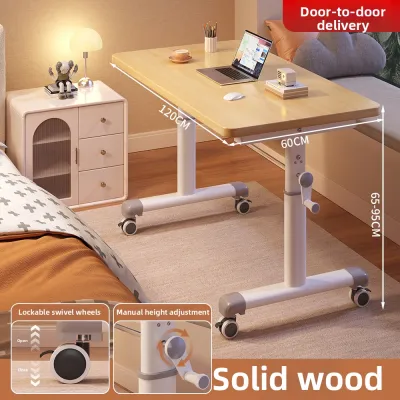
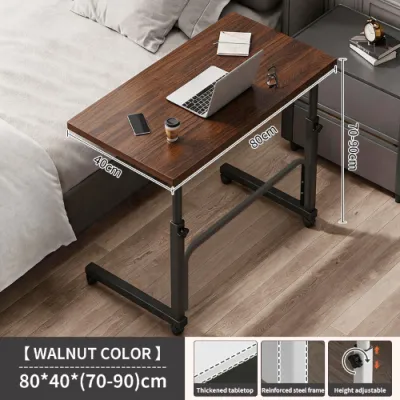
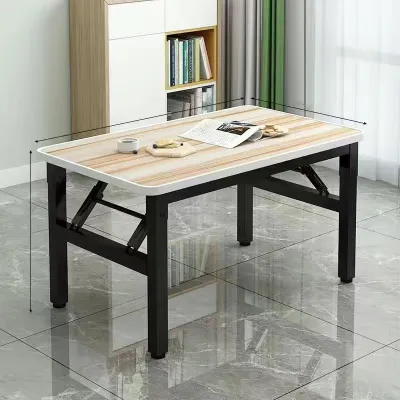
Prices are valid at publication and may change. Please refer to the product page for the latest price.
Standing Desks: Ergonomics and Active Workstyles
As remote work becomes a permanent fixture, standing desks have surged in popularity due to their focus on physical well-being. These height-adjustable platforms allow you to transition seamlessly between sitting and standing positions throughout the day, breaking the cycle of sedentary behavior.

Key Benefits and Limitations
The primary benefit of a standing desk lies in its ergonomic versatility. Alternating your posture helps distribute physical stress across different muscle groups, which can alleviate lower back discomfort, neck strain, and shoulder fatigue. By encouraging micro-movements, these desks help keep your energy levels consistent and reduce the physical sluggishness that often sets in during long afternoon meetings.
However, standing desks come with distinct limitations. Motorized models are heavy, often requiring two people for safe assembly and a very stable floor surface to minimize movement. At their maximum height extensions, some models can experience a slight wobble, particularly when typing aggressively or using heavy monitor arms. They also require a continuous, reliable power supply to operate their electric motors. In the Philippines, where tropical storms can cause frequent power fluctuations, using a high-quality surge protector is highly recommended to safeguard the desk’s electronic control box and motors from electrical damage.
Before purchasing, always check the manufacturer’s specified weight capacity and the lift mechanism, comparing the ease of manual hand cranks against the convenience of single or dual electric motors.
Ideal User Profile and Space Requirements
Standing desks are ideal for professionals who spend eight or more hours a day at their computers and are prone to postural fatigue or chronic back pain. They are also well-suited for active individuals who prefer standing during virtual calls or creative brainstorming sessions.
In terms of spatial requirements, a standing desk has a moderate footprint, but it demands careful planning. You must ensure there is sufficient vertical clearance above the desk so that monitors do not strike wall-mounted shelves, artwork, or air conditioning units when raised. Furthermore, cable management requires careful attention. All power cords, monitor cables, and peripheral wires must have enough slack to stretch safely to their full height without pulling on wall outlets or tensioning your valuable equipment.
Foldable Desks: Space-Saving and Flexible Layouts
For many remote professionals, dedicating an entire room to a home office is not a realistic option. Foldable desks offer a highly flexible, space-saving alternative that allows you to establish a temporary workstation without permanently sacrificing your living area.
Key Benefits and Limitations
The outstanding benefit of a foldable desk is its unmatched spatial efficiency. Once your workday is complete, you can fold the frame flat and slide it under a bed, behind a sofa, or inside a closet. This capability is incredibly valuable in dense urban areas, such as condominiums in Metro Manila, where a single room must serve as a bedroom, living room, and office.
The trade-off for this extreme portability is a compromise in stability and surface area. Foldable desks typically have much lower weight capacities than their fixed counterparts. They are prone to noticeable vibration during heavy typing, and their lightweight frames may flex under pressure. The desktop surface is generally compact, leaving little room for large dual-monitor setups, heavy desktop PC towers, or extensive paperwork. Additionally, the folding hinges and joints can be susceptible to wear over time. In highly humid tropical environments, cheap metal hinges may rust if not properly treated, so it is wise to look for powder-coated steel frames and high-quality locking latches.
Ideal User Profile and Space Requirements
This desk type is best suited for renters, students, or hybrid workers who only need a desk for a few hours a day. It is also an excellent choice for those who work on a single laptop and do not require heavy peripheral equipment.
When planning your space, you must measure the clearance required to unfold and set up the desk safely. Ensure that nearby furniture, doors, or walls do not block the folding mechanism or pinch your fingers during assembly. The desk should also be lightweight enough for you to lift and carry comfortably without risking physical strain.
L-Shaped Desks: Multitasking and Dedicated Work Zones
If your work requires a massive amount of physical desktop space and a highly organized layout, an L-shaped desk is often the most practical solution. These desks are designed to maximize corner spaces while providing an expansive, wrap-around work surface.
Key Benefits and Limitations
The main advantage of an L-shaped desk is the ability to create distinct, dedicated work zones. You can position your primary computer and monitors on one side of the “L” while keeping the other side completely clear for writing, reviewing physical documents, or managing secondary devices like tablets and test rigs. This layout is incredibly stable, supported by a broad, multi-legged frame that easily handles the weight of multiple heavy screens, studio speakers, and desktop PC towers.
On the downside, L-shaped desks have a massive physical footprint. They are heavy, exceptionally difficult to move once assembled, and require a significant amount of floor space. Reconfiguring your room layout becomes a major chore once an L-shaped desk is in place. Additionally, the deep inner corner of the desk can become a hard-to-reach “dead zone” where items are easily forgotten or difficult to grab without stretching uncomfortably.
Ideal User Profile and Space Requirements
L-shaped desks are the gold standard for software developers, graphic designers, financial analysts, and gamers who rely on multi-monitor setups and need to spread out their gear. They are also highly beneficial for professionals who handle a mix of digital and physical paperwork throughout the day.
These desks require a dedicated home office room or a spacious bedroom with a clear, unobstructed 90-degree corner. Before purchasing, it is critical to verify if the desk is reversible—meaning the longer side can be assembled on either the left or the right—so you can adapt it to your room’s specific layout. Keep in mind that wall baseboards can prevent the desk from sitting completely flush against the walls, which might leave small gaps where pens or cables can fall.
Head-to-Head Comparison: Evaluating Home Office Desks for Space, Budget, and Stability
To help you synthesize these options and make an informed decision, the table below compares standing, foldable, and L-shaped desks across key practical dimensions.
| Desk Type | Best For | Space Footprint | Stability for Typing | Assembly Effort | Relative Cost Tier |
|---|---|---|---|---|---|
| Standing Desk | Ergonomic movement & active workstyles | Moderate (requires vertical & cable clearance) | Moderate to High (can wobble at max height) | Moderate to High (electrical components) | Premium to Mid-range |
| Foldable Desk | Small rooms, renters & temporary setups | Low (folds flat for easy storage) | Low to Moderate (susceptible to vibration) | Minimal (often comes pre-assembled) | Budget-friendly |
| L-Shaped Desk | Multi-monitor setups & dual-zone work | High (requires dedicated corner space) | High (very stable, heavy-duty frame) | High (requires multi-step assembly) | Mid-range to Premium |
Balancing Budget Against Longevity
When choosing among these home office desks, it is essential to weigh the initial financial layout against long-term durability. Foldable desks are highly budget-friendly and serve as excellent short-term or temporary solutions, but their hinges and lightweight materials may wear out faster under daily, heavy-duty use.
In contrast, investing in a sturdy, motorized standing desk or a solid L-shaped desk represents a higher upfront cost but offers significantly better long-term value. These robust structures are built to withstand years of constant use. If you work from home full-time, prioritizing a desk with high structural stability and a durable, moisture-resistant desktop finish will save you the cost and hassle of premature replacements.
As an actionable rule, prioritize structural stability and expansive surface area if you use heavy desktop equipment; prioritize flexibility and compact dimensions if your workspace must double as a living room or bedroom.
Pre-Purchase Checklist: Measuring Space and Delivery Access
Before finalizing your purchase, take these practical steps to ensure your chosen desk fits your home environment and can be delivered without issue:
- Measure Floor Space and Baseboards: Do not rely solely on wall-to-wall measurements. Check for skirting boards, baseboards, or wall trim that might prevent a large L-shaped desk from sitting flush in a corner.
- Verify Vertical and Cable Clearance: For standing desks, ensure there are no low-hanging wall shelves, picture frames, or air conditioning units that your monitors might hit when the desk is fully raised. Check that your device cables and power strips have enough slack to accommodate the full range of vertical motion.
- Assess Delivery and Access Routes: Large L-shaped desktops and heavy steel standing desk frames are shipped in bulky, heavy boxes. Measure the width of your doorways, hallway corners, stairwells, and condominium elevator doors to ensure the delivery team can physically transport the packages to your room.
- Check Power Outlet Proximity: Motorized standing desks require a continuous electrical connection. Position your desk close to a wall outlet, and use a high-quality surge protector to safeguard the desk's control box from local voltage fluctuations.
- Inspect Desktop Material and Finish: In high-humidity climates, verify that the desktop material is properly sealed. Look for moisture-resistant finishes on engineered wood (like MDF or particle board) or opt for solid wood and powder-coated steel frames to prevent warping and rust.
Frequently Asked Questions (FAQ)
Can I convert a regular foldable desk into a standing desk?
While you can purchase desktop risers or converter units, placing them on a standard foldable desk is generally not recommended. Foldable desks are designed with lightweight frames and lower weight capacities. Adding a heavy riser, along with monitors and accessories, can easily exceed the desk’s weight limit and compromise its structural stability, increasing the risk of a tip-over or collapse. Always check the manufacturer’s weight capacity before adding any heavy accessories.
Are L-shaped desks suitable for small apartments?
L-shaped desks can work in smaller apartments, but only under specific conditions. Because they require a dedicated 90-degree corner, that corner must be completely free of obstacles such as doors, windows, floor vents, or high-traffic walkways. If your apartment has limited floor space, a large L-shaped desk can make the room feel cramped and restrict movement. Measure your available clear floor space carefully before committing to this layout.
What weight capacity should I look for in a motorized standing desk?
To determine the right weight capacity, calculate the combined weight of your monitors, monitor arms, laptop, desktop PC tower (if it sits on the desktop), keyboard, mouse, and any desk organizers. Choose a motorized standing desk with a rated weight capacity that exceeds this total by a safe margin (typically at least 15% to 20% higher). This prevents unnecessary strain on the electric motor, ensuring smoother height adjustments and extending the overall lifespan of the lifting mechanism.
Community discussion
Share your experience or ask a question. Comments are reviewed before publication.