
Choosing the right office table for your home office is a decision that directly impacts your daily productivity, physical comfort, and overall room layout. With the rise of remote work, the market has expanded to offer specialized designs tailored to different working styles and spatial constraints. The three most popular configurations—standing desks, foldable desks, and L-shaped desks—each serve distinct purposes. A standing desk focuses on ergonomic movement, a foldable desk prioritizes space-saving versatility, and an L-shaped desk maximizes surface area for heavy multitasking. Finding the right match requires balancing your physical room dimensions, your daily work habits, and your equipment requirements. By understanding the unique advantages and trade-offs of each type, you can transform your workspace into a highly efficient, comfortable environment that supports your professional goals.
Assessing Your Workspace and Daily Workflow
Before browsing any online marketplace for a new office table, you must accurately assess the physical space available in your home. Start by using a physical tape measure to map out the footprint of your proposed work area. It is not enough to simply measure the length and width of the desk itself; you must also account for the clearance needed for your office chair to glide backward and sideways comfortably. Additionally, ensure that the desk placement does not obstruct high-traffic walking paths, doorways, or wardrobe doors within the room.
Another critical spatial consideration is the delivery and installation path. Many homeowners purchase large furniture pieces only to find they cannot clear tight apartment corridors, narrow stairwells, or condominium elevator doors. If you are opting for a heavy, pre-assembled frame or a large single-piece desktop, verify these clearance points beforehand to avoid delivery day complications.
Products mentioned in this guide


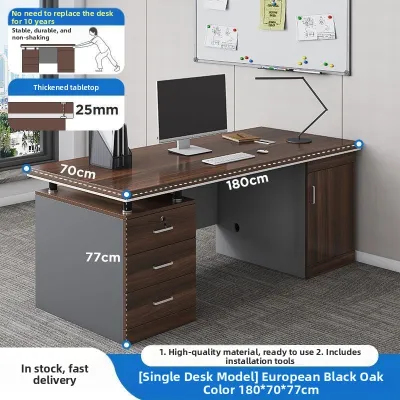
Prices are valid at publication and may change. Please refer to the product page for the latest price.
Your daily workflow and equipment setup should dictate the size and style of the desk surface. If your tasks are entirely digital and performed on a single compact laptop, a shallow desk with minimal surface area will keep your room feeling open and uncluttered. However, if your daily routine involves multiple large monitors, external keyboard setups, document signing, or physical sketching, you will require a deeper and wider surface to prevent your workspace from feeling cramped and disorganized.
Finally, evaluate your personal comfort and storage requirements. If you find yourself experiencing lower back stiffness or fatigue after sitting for long periods, a desk that facilitates movement might be a priority. Conversely, if you have a large collection of physical files, reference books, and office supplies, you will need to prioritize a setup that accommodates under-desk drawer units or integrated shelving without sacrificing your legroom.
Standing Desks: Ergonomics and Movement
Standing desks have gained immense popularity due to their focus on ergonomics and active movement throughout the workday. The primary benefit of a height-adjustable office table is the ability to easily alternate between sitting and standing positions. This transition helps distribute physical strain across different muscle groups, encourages better posture, and can help reduce the fatigue associated with prolonged sitting.

When evaluating a standing desk, the frame construction and lifting mechanism are the most critical components to inspect. Motorized models typically feature either a single-motor or a dual-motor system housed within the legs. Dual-motor frames generally offer smoother, quieter transitions and a higher weight capacity, making them more suitable for setups with heavy desktop computers and multiple monitor arms. It is essential to check the manufacturer’s specified weight limits to ensure the motors can lift your entire equipment setup without straining.
Stability is another vital factor to verify, particularly when the desk is raised to its maximum height. Some budget-friendly standing desks can experience a slight wobble when fully extended, which can cause your monitors to shake while typing. To ensure a stable working experience, look for frames constructed from heavy-duty steel with wide, substantial feet. Checking user feedback regarding stability at maximum height can provide valuable insights before you make a purchase.
In tropical climates where humidity levels can run high, electronic components require extra care. If you choose a motorized standing desk, ensure the control panel and motor housing are positioned away from open windows where rain or direct sunlight might cause damage. Additionally, high humidity can affect certain desktop materials, so verifying that the desktop has a moisture-resistant finish is a practical step to prevent warping over time.
Foldable Desks: Flexibility and Space-Saving
For professionals living in studio apartments, shared bedrooms, or multi-purpose spaces, a foldable office table offers an exceptionally practical solution. These desks are designed to be set up quickly when your shift begins and folded completely flat when your workday ends. This flexibility allows you to reclaim your living space in the evenings, helping to maintain a healthy boundary between your professional and personal life.
Despite their space-saving convenience, foldable desks come with inherent trade-offs in terms of surface area and storage. Because these tables must remain lightweight and portable, they rarely feature built-in drawers, keyboard trays, or cable management systems. You will need to adopt a minimalist setup or rely on external storage solutions, such as rolling utility carts or nearby shelving, to keep your work essentials organized.
Structural stability is also a key consideration for any folding furniture. Because these desks rely on hinges, joints, and folding legs, they may not feel as rigid as solid, permanent wooden tables. Before purchasing, examine the locking mechanisms to ensure they secure the legs firmly in place during use. A loose or poorly designed hinge can lead to distracting vibrations while you type or, in worst-case scenarios, accidental collapse.
If you are considering a wall-mounted folding desk, also known as a drop-leaf desk, proper installation is paramount. These space-savers must be anchored securely to your wall to handle both the weight of the desk and the pressure of your arms while working. Solid concrete or brick walls provide the most secure foundation, whereas installation on drywall requires locating structural studs to prevent the anchors from pulling out. Always follow the manufacturer’s mounting instructions carefully to ensure safety.
L-Shaped Desks: Maximum Surface and Multitasking
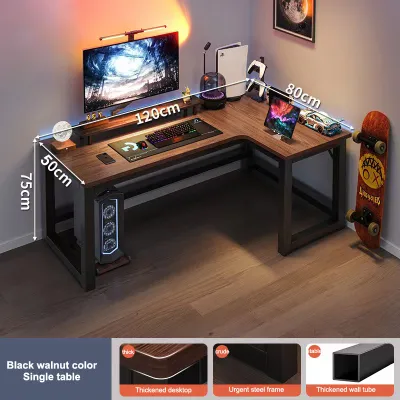
For those who require a spacious, permanent command center, an L-shaped office table is often the ideal choice. The unique perpendicular design provides two distinct work surfaces within arm’s reach. This layout is highly beneficial for professionals who need to separate their digital tasks from physical paperwork, or for creative individuals who use secondary devices like drawing tablets alongside their main computer monitors.
L-shaped desks are exceptionally efficient at utilizing corner spaces that might otherwise go unused in a room. By tucking the desk into a corner, you can maximize your usable floor area while keeping the center of the room open. Alternatively, in larger rooms, an L-shaped desk can be positioned to act as a stylish room divider, clearly defining the boundaries of your home office within a shared living room or bedroom.
However, the generous surface area of an L-shaped desk comes with a significant physical footprint. These desks are heavy, complex to assemble, and difficult to move once put together. You must be certain of your room layout before committing to this style, as rearranging the furniture later can be a labor-intensive process. Additionally, ensure the desk depth is sufficient to allow a comfortable viewing distance from your monitors.
Cable management is another common challenge with large L-shaped setups, as the increased surface area often invites more electronic devices. Without proper organization, a web of power cords and display cables can quickly clutter your under-desk space. Look for L-shaped models that feature built-in cable grommets, under-desk wire baskets, or magnetic cord covers to keep your workspace looking clean and professional.
Pre-Purchase Specification Checklist
To ensure your chosen office table meets your expectations, it is crucial to verify several physical and structural specifications before finalizing your order. First, compare the exact dimensions of the desk against your measured room space. Pay close attention to the desk height; if the desk is not adjustable, ensure it allows your elbows to rest at a comfortable 90-degree angle while typing, and check that your office chair’s armrests can slide underneath the tabletop when not in use.
Next, carefully review the manufacturer’s weight capacity ratings. While a basic laptop setup requires minimal support, a configuration with multiple monitors, heavy monitor arms, external speakers, and a desktop tower can easily exceed the limits of lighter foldable or standing desks. Overloading a desk can strain motors, bend frames, or compromise the stability of folding joints.
The quality of the surface material and edge banding is another critical factor, particularly in warm, humid climates. Low-quality particle board with poorly sealed edges can absorb moisture from the air, causing the wood fibers to swell and the laminate surface to peel or bubble. To prevent this, look for desktops made from high-density fiberboard (HDF), high-pressure laminate (HPL), or solid wood, and ensure the edge banding is seamlessly applied and moisture-resistant.
Finally, check the assembly requirements and included hardware. Some desks arrive flat-packed with dozens of small parts, requiring a significant time investment and basic tools to assemble. Reading through the manufacturer’s assembly guide or checking customer feedback regarding the clarity of the instructions can help you prepare for the setup process or decide if you need to arrange for professional assembly services.
Decision Framework: Matching the Desk to Your Needs
Choosing between these three desk types ultimately comes down to identifying your primary constraint and matching it to the right design. If your budget allows and your main priority is physical comfort, posture, and long-term ergonomic health, a standing desk is an excellent investment. It provides the flexibility to keep you moving throughout the day, which is highly beneficial for long hours of computer work.
If your available floor space is severely limited and you need a temporary workspace that can be easily tucked away, a foldable office table is the most practical choice. This option is ideal for lightweight tasks, laptop users, and those who value a clear, uncluttered living area when the workday is done. Just be sure to verify the locking mechanisms and weight limits to ensure a safe setup.
If you require a large, permanent workspace to handle multiple monitors, extensive paperwork, or creative projects, and you have a dedicated corner to spare, an L-shaped desk is the clear winner. It offers unmatched surface area and organization potential, allowing you to create a highly productive and structured home office environment.
Before making your final selection on any online marketplace, always double-check your room measurements, verify the weight capacity of the desk, and ensure the materials are suited to your local climate. Taking the time to match these specifications to your personal workflow will ensure you select an office table that supports your productivity and comfort for years to come.
Frequently Asked Questions (FAQ)
Can I convert a standard desk into a standing desk?
Yes, you can convert a standard office table into a height-adjustable workspace by using a desktop standing desk converter. These units sit directly on top of your existing desk and feature a gas spring or manual lever mechanism that allows you to raise and lower your monitor and keyboard.
However, before purchasing a converter, you must verify the weight capacity of your current desk. Desktop converters can be quite heavy on their own, and when loaded with monitors and accessories, they can place significant stress on a lightweight or budget-friendly table, potentially causing it to bow or wobble.
How much weight can a typical foldable desk support?
The weight capacity of a foldable desk varies widely depending on its design, frame material, and whether it is free-standing or wall-mounted. Lightweight, highly portable folding tables may only support between 15 to 25 kilograms, which is suitable for a laptop, notebook, and a cup of coffee.
To avoid structural damage or accidents, always check the manufacturer’s product label or manual for the exact weight threshold. Avoid placing heavy desktop computer towers or clamping heavy monitor arms onto foldable desks, as the concentrated weight can strain the hinges and compromise the stability of the entire unit.
Community discussion
Share your experience or ask a question. Comments are reviewed before publication.