
Finding the perfect lamesa for your work-from-home (WFH) setup in the Philippines depends heavily on your daily work habits, physical comfort, and available floor space. With hybrid work arrangements becoming a permanent fixture for many professionals in Metro Manila and other urban hubs, investing in the right workspace foundation is crucial for long-term productivity. If your priority is staying active and managing posture during long shifts, a standing desk is your best option, provided you have a dedicated, stable floor area. For those living in compact studio apartments or shared spaces where the room must serve multiple purposes, a foldable desk allows you to reclaim your living space once the workday ends. If your workflow involves multitasking with multiple monitors, handling physical documents alongside a computer, or requiring distinct zones for different tasks, an L-shaped desk offers the expansive surface area you need. Ultimately, the final decision depends on verifying your specific room dimensions, the weight capacity of the frame, and the assembly requirements before making a purchase.
Standing Desks: Ideal for Active Workflows and Posture Management
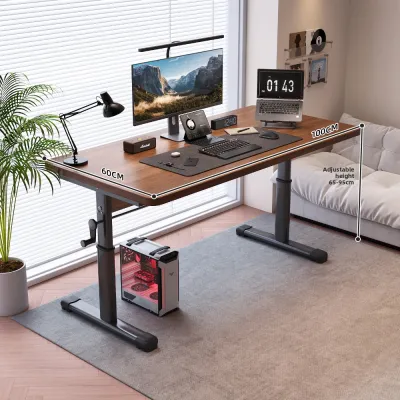
Alternating between sitting and standing throughout a long shift can significantly improve your physical comfort and energy levels. In a typical WFH setup, spending eight or more hours in a static seated position often leads to slouching, shoulder tension, and lower back discomfort. A height-adjustable standing desk allows you to transition smoothly between positions, keeping your circulation active and encouraging subtle movement. This ergonomic flexibility is particularly valuable during afternoon slumps when a quick transition to standing can help restore focus and reduce physical fatigue.
However, the utility of a standing desk relies heavily on its structural stability. When extended to its maximum height, any inherent instability in the frame becomes magnified, which can lead to distracting monitor wobble while typing. It is essential to check the manufacturer’s specifications for frame weight limits, especially if you plan to mount heavy dual-monitor arms or place a heavy desktop tower on the surface. Motorized models require a reliable power source, so you must also plan for cable management that accommodates the desk’s full range of motion without pulling on plugs or straining cords.
Products mentioned in this guide

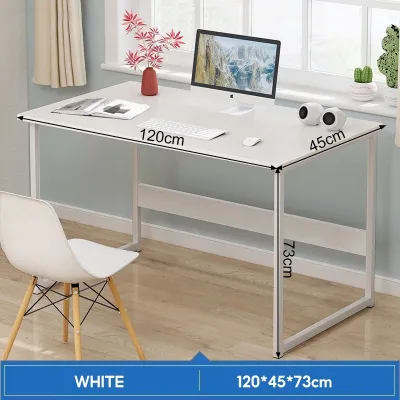
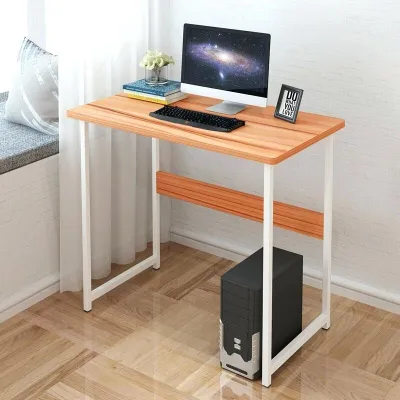
Prices are valid at publication and may change. Please refer to the product page for the latest price.
Because a standing desk must move freely up and down, it requires a dedicated, unobstructed floor space. You cannot place items directly under or immediately adjacent to the desk where they might obstruct the lifting mechanism or get crushed during descent. Additionally, managing the bundle of cables from your computer, monitors, and peripherals requires careful routing using flexible cable spines or under-desk trays to prevent tension during height adjustments.
While highly beneficial, standing desks do come with practical trade-offs. They generally require a higher initial investment and involve more complex assembly, particularly for motorized dual-motor frames. To fully realize their ergonomic benefits, you will likely need to pair them with a supportive ergonomic chair and a high-quality anti-fatigue mat to cushion your feet and joints while standing on hard tile or concrete floors common in Philippine homes.
Foldable Desks: Ideal for Compact Spaces and Flexible Layouts
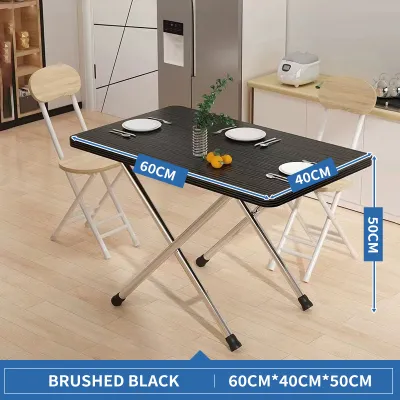
For remote professionals living in cozy condominiums or shared family homes, space is a premium commodity. A foldable desk offers the ultimate spatial flexibility by allowing you to set up a functional workspace during office hours and completely clear the floor once your shift is complete. This ability to pack away your workspace helps establish a healthy psychological boundary between professional hours and personal life, preventing your living room or bedroom from feeling permanently like an office.

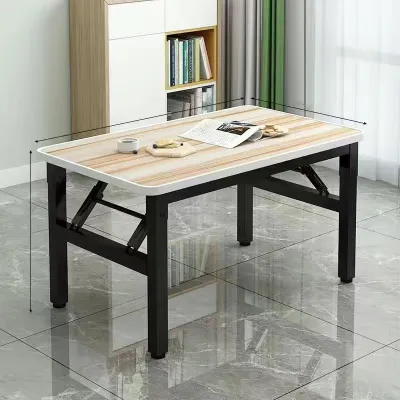
Despite their space-saving convenience, foldable desks require careful evaluation regarding structural stability. Because these tables rely on folding joints, hinges, and locking pins rather than solid, fixed joints, they are naturally more prone to lateral movement and vibration. Heavy typing, resting your forearms on the edge, or using clamp-on monitor arms can cause noticeable shaking, which may not be suitable for those who use multiple screens or require a perfectly still writing surface.
When selecting a foldable lamesa, pay close attention to the folding mechanism and hinge durability. High humidity levels in tropical climates can affect metal joints over time, making smooth operation and rust resistance key factors to verify. You should also measure the folded dimensions of the desk to ensure it fits easily into your intended storage area, whether that is inside a closet, behind a sofa, or flat against a wall.
Furthermore, foldable desks present distinct limitations regarding cable management and load capacity. Because the desk must fold flat, you cannot easily mount permanent cable trays, power strips, or heavy accessories underneath the tabletop. Every transition requires unplugging your equipment and clearing the surface entirely, meaning this desk type is best suited for laptop-centric workflows rather than complex desktop setups with multiple peripherals.
L-Shaped Desks: Ideal for Multitasking and Dedicated Work Corners
An L-shaped desk is the traditional powerhouse of productivity, designed specifically for professionals who manage complex, multi-faceted workflows. The primary advantage of this layout is the ability to create distinct, specialized zones within arm’s reach. You can dedicate one wing of the desk entirely to your computer, monitors, and keyboard, while utilizing the adjacent wing for analog tasks such as reviewing printed documents, sketching, or taking handwritten notes.
This expansive surface area does, however, demand a significant spatial commitment. Before choosing an L-shaped lamesa, you must verify the total footprint of the unit, ensuring you have sufficient clearance not just for the desk itself, but also for your office chair to roll and rotate freely. The corner where the two wings meet must be clear of obstructions, and you should plan your room layout to ensure the desk does not block natural light sources, electrical outlets, or air conditioning airflow.
Assembly and structural integrity are critical considerations for L-shaped configurations. These desks often feature multiple support legs or a reinforced steel frame to handle the weight of the extended wing. It is vital to check the assembly instructions to determine if the desk is reversible—meaning the longer wing can be installed on either the left or right side—to ensure it fits your specific room layout. Proper weight distribution is also essential, as placing too much heavy equipment on the outer edges of the secondary wing can strain the joints over time.
Fitting an L-shaped desk into a room that lacks a clear, open corner can be highly challenging. Placing an L-shaped desk in the center of a room or along a straight wall can disrupt the natural flow of foot traffic and make a small room feel cramped. If your WFH space doubles as a guest room or bedroom, the permanent presence of a large L-shaped desk can dominate the aesthetic, making it less suitable for multi-purpose environments.
Head-to-Head Comparison: Space, Ergonomics, and Daily Workflow
To choose the right lamesa for your home office, it helps to compare how these three desk types perform across key operational categories. While standing desks prioritize physical movement, foldable desks focus on spatial economy, and L-shaped desks maximize surface area and multitasking capability.
In terms of spatial footprint, foldable desks require the least permanent space, transitioning to near-zero footprint when stored. Standing desks occupy a moderate, fixed footprint but require vertical clearance, while L-shaped desks demand a large, permanent corner area. Ergonomically, standing desks offer the highest adaptability by allowing active height adjustments, whereas foldable and L-shaped desks typically feature fixed heights that require you to adjust your chair or use external accessories like monitor risers to achieve proper alignment.
Stability and weight capacity also vary significantly. L-shaped desks generally offer the highest weight capacity and structural stability due to their multi-leg configurations, making them ideal for heavy desktop setups. Standing desks offer robust stability when lowered but may experience minor sway at maximum heights, while foldable desks are best reserved for lightweight laptop setups due to their flexible joints.
| Desk Type | Ideal User Profile | Primary Workspace Constraint | Key Advantage |
|---|---|---|---|
| Standing Desk | Active professionals seeking posture variety | Dedicated floor space with vertical clearance | Dynamic height adjustment |
| Foldable Desk | Laptop users in multi-purpose rooms | Limited floor space requiring storage | Easy storage and portability |
| L-Shaped Desk | Multitaskers with multiple monitors | Large, dedicated corner or room space | Expansive dual-zone surface |
How to Finalize Your Desk Choice: A Pre-Purchase Checklist
Before finalizing your purchase from an online marketplace or local furniture retailer, taking precise measurements is the most critical step to avoid delivery and installation headaches. Begin by measuring your available floor space, keeping in mind the clearance needed for walkways and the rolling radius of your office chair. Ensure that the desk will not block doorways, built-in wardrobe doors, or electrical outlets that you need to access daily.
Next, calculate the total weight of your existing WFH equipment, including your computer tower, monitors, keyboard, mouse, and any desk organizers. Compare this total weight against the manufacturer’s stated load capacity for the desk. For standing desks, ensure the motor capacity can handle this weight smoothly, and for foldable desks, verify that the center point of the table can support your primary typing pressure without bowing.
Consider the logistics of delivery and assembly. Many WFH desks are delivered flat-packed, requiring self-assembly. Check the packaged dimensions to ensure they can fit through your front door, up narrow stairwells, or inside your building’s elevator. Verify what tools are required for assembly and whether they are included in the package, as some heavy-duty desks may require a drill or specific socket wrenches.
Finally, carefully review the manufacturer’s warranty and return policy. Look specifically for coverage regarding structural defects, frame warping, and, in the case of motorized standing desks, the warranty period for the motor and control box. Understanding these terms beforehand ensures that your investment in a new lamesa remains protected against unexpected mechanical or material failures.
Frequently Asked Questions (FAQ)
Can I convert a standard foldable desk into a standing desk?
Adding makeshift risers or desk converters to a standard foldable desk is generally not recommended due to significant stability risks. Foldable frames are engineered for specific weight distributions and lack the rigid structural joints of fixed desks. Placing heavy equipment on top of risers on a foldable surface can make the setup top-heavy, increasing the risk of tipping or joint collapse. Always check the manufacturer’s guidelines regarding modifications before altering your desk’s structure.
Is an L-shaped desk better than two separate straight desks?
An L-shaped desk provides a seamless, continuous corner transition and unified cable management, which makes it highly efficient for a single, cohesive workstation. However, using two separate straight desks offers greater flexibility, as you can easily rearrange them, move them to different rooms, or separate them if your household needs change. If you prioritize a clean, integrated corner aesthetic, the L-shaped desk is superior, but if you value long-term layout versatility, two straight desks may serve you better.
Community discussion
Share your experience or ask a question. Comments are reviewed before publication.