
Choosing between a standing drafting table and a traditional tilting drafting table is not a matter of finding a universally superior workspace; instead, it is about aligning your physical environment with your specific architectural medium and daily workflow. When selecting a drafting table, architecture professionals must balance ergonomic comfort with technical precision. Your choice will dictate how you interact with your drawings, how long you can work without physical fatigue, and how effectively you can integrate digital tools with manual drafting techniques.
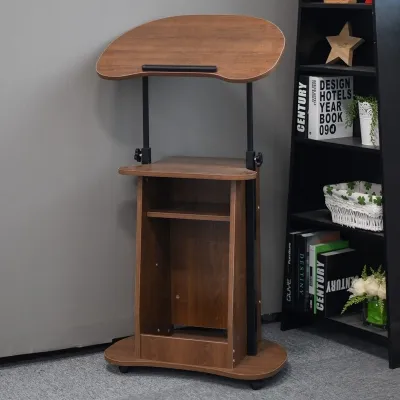
Standing drafting tables are ideal for dynamic, hybrid workflows where you frequently transition between reviewing large-format printed blueprints, sketching conceptual ideas, and working on a computer. Traditional tilting tables remain the gold standard for meticulous, long-duration hand drafting, precise ink work, and the use of mechanical parallel rules. The rest of this guide breaks down the ergonomic, mechanical, and spatial differences between these two configurations to help you make an informed decision for your studio.
Ergonomics and Posture: Standing vs. Seated Tilting
Working long hours on architectural plans requires a workspace that supports your body and minimizes physical strain. Standing drafting tables promote active movement throughout the workday, which helps reduce the spinal compression and sluggish circulation associated with prolonged sitting. By allowing you to stand while sketching or reviewing plans, these tables encourage micro-movements that keep your core engaged and your energy levels consistent. However, standing for an entire eight-hour shift of intense drafting can lead to lower limb fatigue, foot soreness, and joint strain. To make a standing setup viable, you must pair the table with a high-quality anti-fatigue mat and consider a height-adjustable drafting stool that lets you transition to a seated position when needed.
Products mentioned in this guide

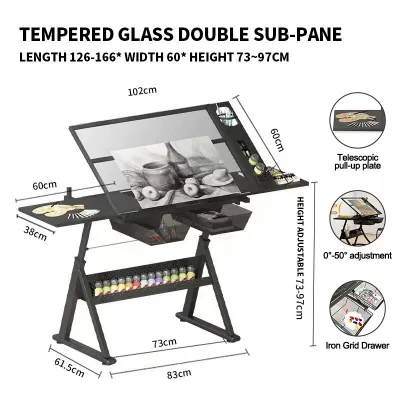
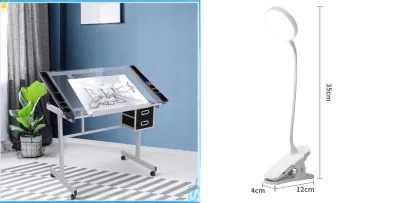
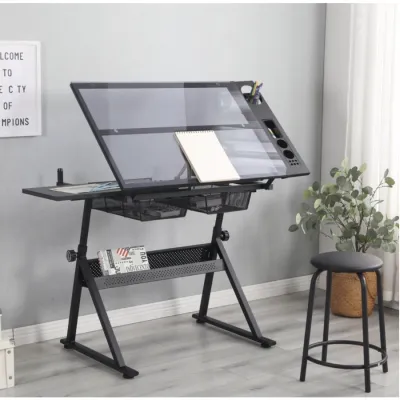
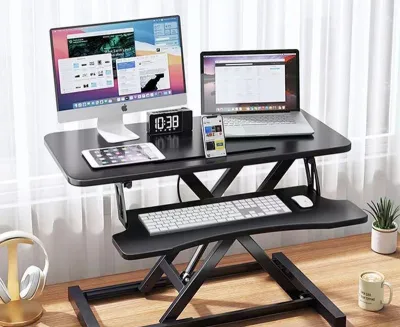
Prices are valid at publication and may change. Please refer to the product page for the latest price.
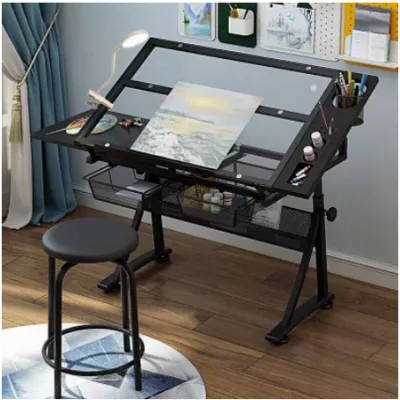
Traditional tilting tables address ergonomic strain through a completely different mechanical approach. Instead of requiring you to stand, these tables bring the work surface closer to your eye level by tilting the drawing board, typically from 0 to over 45 degrees. This angle significantly reduces neck flexion and shoulder strain because you do not have to hunch over a flat surface to see fine details. When paired with a professional drafting chair featuring adjustable lumbar support and an integrated foot ring, a tilting table allows you to maintain a relaxed, supported posture during highly detailed, hours-long drawing sessions.
In tropical environments like the Philippines, where heat and high humidity can amplify physical discomfort during long studio sessions, posture and air circulation become even more critical. Sitting statically in a poorly ventilated room can lead to localized heat buildup and discomfort, whereas a standing setup may encourage slightly better airflow around the body. Conversely, standing for long periods in humid conditions can accelerate physical fatigue and cause mild swelling in the feet. For either setup, selecting breathable mesh seating or using a supportive, ventilated standing mat is essential to maintaining focus and comfort throughout the day.
Drawing Precision and Media Compatibility for a Drafting Table in Architecture
The medium you use to express your architectural designs is the most critical factor in choosing a table style. Traditional tilting tables are engineered specifically for manual drafting media, such as vellum, tracing paper, and Mylar. The adjustable angle of the board is not merely an ergonomic feature; it is a functional requirement for gravity-assisted ink flow. When using technical pens, a tilted surface ensures that ink flows smoothly and consistently onto the page without pooling or skipping. Furthermore, the incline prevents round pencils, scale rulers, and drafting markers from rolling off the workspace, and it keeps your hands and sleeves elevated off the paper, reducing the risk of smudging delicate graphite or wet ink lines.

Traditional boards are also designed to accommodate manual drafting tools like T-squares, parallel straightedges, and mechanical drafting arms. These tools rely on the straight, rigid edges of a dedicated drafting board to slide smoothly and maintain perfect parallel lines. Attempting to mount a parallel rule on a modern standing desk can be highly problematic, as standing desks often lack the necessary side-channel clearances or under-table mounting points required for the pulley cables.
Standing drafting tables, which typically feature flat or only slightly inclinable surfaces, are far better suited for modern, digital-heavy workflows. If your daily tasks involve operating a large pen display, a laptop, or multiple monitors alongside occasional sketching, a flat standing surface provides the stability and space required for these electronic devices. Leaning over a flat standing desk is highly efficient for marking up large-format printed blueprints, assembling physical scale models, or collaborating with colleagues who gather around your desk. However, if you attempt to perform high-precision manual drafting on a completely flat standing desk, you will quickly find that the lack of a tilted surface forces you to bend your neck excessively, leading to rapid physical fatigue and a higher likelihood of smudging your work.
Stability, Footprint, and Studio Layout
Architectural drafting demands an exceptionally stable work surface, as even the slightest vibration can ruin a precise ink line or misalign a critical measurement. Traditional tilting drafting tables are built with heavy, low-center-of-gravity frames, often constructed from cast iron or heavy-gauge tubular steel. These dense bases are designed to absorb lateral forces, ensuring the table remains rock-solid when you apply firm pressure while erasing, cutting materials, or sliding a heavy parallel rule. The joints on these tables are typically secured with heavy-duty bolts and locking knobs that prevent any shifting once the board is set at your preferred height and angle.
Standing desks, particularly motorized models with telescoping legs, are inherently more susceptible to lateral sway and vibration, especially when extended to their maximum height. When you are standing and working at a height of 110 centimeters or more, the leverage applied to the top of the desk can cause minor wobbles during vigorous erasing or heavy hand pressure. If your workflow relies on absolute precision with manual pens, this minor movement can be a source of constant frustration. To mitigate this, look for standing desks with dual-motor systems, heavy steel crossbars, and wide, stable footpads.
Space planning is another critical consideration, particularly in urban residential settings or compact home offices in Metro Manila, where floor space is often limited. Traditional tilting tables require a unique footprint; you must allow for rear clearance because the drawing board projects backward when tilted at steep angles. You also need to ensure that the heavy frame can pass through narrow doorways, tight corridors, and condominium elevators during delivery. Because traditional drafting tables are often delivered partially or fully assembled, verifying the finished dimensions and access points of your building is a vital first step.
Motorized standing desks generally have a more predictable, vertical footprint, but they introduce complex cable management challenges. Because the desk moves up and down, all power cables for your monitors, computer, and chargers must have sufficient slack and be organized within a cable tray to prevent them from catching, pulling, or disconnecting during height adjustments. Additionally, high humidity levels can affect the longevity of your table’s materials. Unprotected wooden drawing boards or cheap particle-board tops can warp over time as they absorb moisture from the air. When choosing either style of table, verify that the drawing surface features a high-pressure laminate finish or a moisture-resistant sealant, and ensure all metal joints and frames are treated with an anti-rust powder coating to prevent corrosion.
Feature Comparison at a Glance
The following table summarizes the primary structural and functional differences between standing drafting tables and traditional tilting drafting tables, based on standard design principles.
| Feature | Standing Drafting Table | Traditional Tilting Drafting Table |
|---|---|---|
| Primary Posture | Dynamic standing or high-stool sitting | Dedicated seated posture with specialized drafting stool |
| Surface Angle Adjustability | Typically flat (0°) or very limited tilt (up to 10°–15°) | Wide range of tilt adjustments (0° to 45° or more) |
| Best For (Media/Task) | CAD, digital pen displays, blueprint review, model building | Manual ink drafting, pencil sketching, parallel rule work |
| Stability Under Pressure | Moderate; prone to slight lateral sway at maximum height | High; heavy steel or cast-iron base minimizes vibrations |
| Space & Clearance | Vertical movement; requires careful cable management | Requires rear clearance for board tilt; heavy base footprint |
| Humidity Vulnerability | Motorized components require dry environments; check top finish | Wooden boards must be sealed against warping; check frame coating |
How to Decide: The Architecture Workflow Framework
To make a definitive choice between these two table styles, you must analyze your daily tasks, your physical comfort requirements, and the constraints of your physical workspace.
Choose a Standing Drafting Table if:
- Your workflow is primarily digital: You spend the majority of your day using CAD software, 3D modeling programs, or a large pen display tablet, and only occasionally sketch or review printed plans.
- You prioritize physical movement: You experience lower back pain or lethargy from sitting for long hours and want the flexibility to stand, stretch, and move while working.
- You collaborate frequently: Your role involves reviewing large-format printed blueprints with clients or team members who gather around your desk to make quick markups.
- You build physical models: You need a spacious, flat, and easily accessible surface for cutting materials, assembling foam boards, and viewing models from multiple standing angles.
Choose a Traditional Tilting Table if:
- You perform high-precision manual drafting: Your work relies heavily on technical pens, pencils, vellum, and the absolute precision of a parallel straightedge or drafting machine.
- You work in long, focused sessions: You prefer to sit and focus on intricate line work, watercolor rendering, or detailed hand lettering for several hours at a time without interruption.
- You require absolute stability: You cannot tolerate any lateral sway or vibration while drawing, and you need a solid base that remains completely stationary under heavy hand pressure.
- You want to reduce neck and shoulder strain: You need a workspace that tilts the paper up to your eye level, allowing you to maintain a healthy, upright head position while working on fine details.
Verify First Before Purchasing
If you find that your workflow is highly mixed—requiring both long hours of digital CAD work and precise manual drafting—you do not necessarily have to choose one over the other. Consider investing in a heavy-duty standing desk and pairing it with a portable, desktop tilting drafting board that can be placed on top of the desk when you need to sketch at an angle and stored away when you need a flat surface. Alternatively, you can pair a traditional tilting table with a high-quality, height-adjustable ergonomic drafting stool that features a foot ring, allowing you to vary your seating height and posture throughout the day.
Before finalizing your purchase, always measure your available studio space carefully. Check the finished dimensions of the table, including its maximum height and tilt clearances, and compare them against your room layout. If you live in a high-rise building or a home with narrow stairwells, verify the delivery conditions and assembly requirements. Ensure that the table frame can be disassembled for transport or that it fits comfortably within your building’s lift. Finally, check the manufacturer’s specified weight capacity to ensure the table can safely support your monitors, heavy drafting arms, reference books, and other essential equipment without compromising its structural stability.
Frequently Asked Questions (FAQ)
Can I use a standing desk for traditional hand drafting?
While you can use a flat standing desk for hand drafting, it is generally not recommended for long, high-precision manual drawing sessions. A completely flat surface forces you to hunch over your work, which quickly leads to severe neck, shoulder, and upper back strain. Additionally, flat surfaces make it difficult to use traditional parallel rules or T-squares effectively, as there are no specialized side channels to guide them, and your pencils and scaling rulers will constantly roll off the desk. If you want to draft on a standing desk, you should place a portable, adjustable desktop drafting board on top of the desk. This hybrid setup allows you to stand while maintaining the angled drawing surface necessary for proper ergonomics and tool management.
What is the ideal tilt angle for architectural drawing?
The ideal tilt angle depends entirely on the specific task you are performing and your personal ergonomic comfort. For general reading, conceptual sketching, and reviewing blueprints, a shallow tilt of 10 to 15 degrees is usually sufficient to reduce glare and bring the work slightly closer to your eyes. For high-precision technical drafting, manual inking, and detailed line work, a steeper angle of 30 to 45 degrees is highly recommended. This steeper incline brings the entire drawing surface directly into your line of sight, preventing you from bending your neck forward and helping to maintain a healthy, upright posture. You should regularly adjust the angle throughout the day based on your task and your chair height to prevent muscle fatigue.
Community discussion
Share your experience or ask a question. Comments are reviewed before publication.