
Finding the right bed table for laptop use in a small bedroom requires balancing physical stability with space-saving design. In compact living spaces, every square inch of floor and bed space matters. The ideal solution must fold flat for quick storage, provide enough surface area for your device and accessories, and remain stable on a soft mattress.
By focusing on key dimensions, hinge quality, and ergonomic design, you can transform your bed into a highly productive workspace without cluttering your room. Selecting a model that matches your specific workflow ensures that your remote work or study sessions remain comfortable and efficient.
Measuring Your Bed and Clearance for Proper Fit
Before purchasing any bed table for laptop use, taking precise measurements of your sleeping area and your own seated posture is essential. A table that is too narrow will pinch your hips, while one that is too wide might slip off the edges of a single or semi-double mattress. Start by measuring your hip width while sitting cross-legged or in your preferred working position on the bed.
Products mentioned in this guide
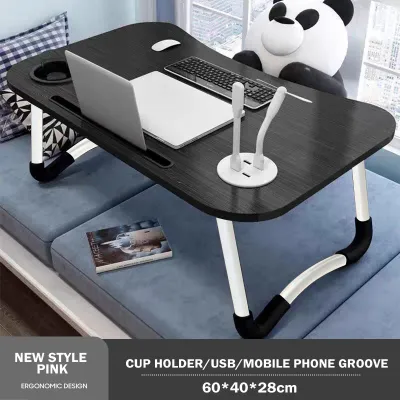
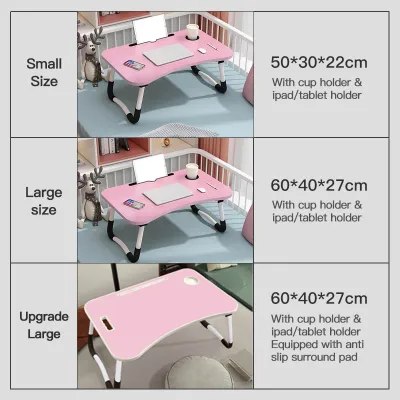
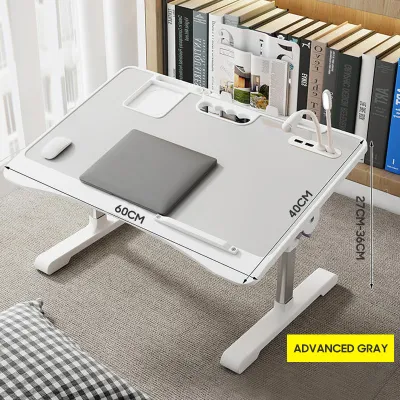
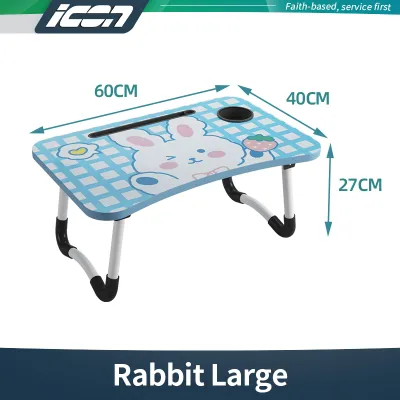




Prices are valid at publication and may change. Please refer to the product page for the latest price.
The inner leg span of the folding table must exceed this measurement by at least several centimeters on each side. This extra space allows for comfortable movement and prevents the legs from pressing into your thighs. If the legs are too close together, you will feel restricted, which can lead to poor posture and discomfort during extended working sessions.
Next, consider the vertical clearance. Measure the distance from the top of your mattress to the top of your thighs when you are sitting upright. The height of the table legs must provide enough clearance so that you can slide your legs underneath without lifting the table. If the table is too low, it will rest directly on your lap, transferring the weight and heat of the laptop to your body.
Conversely, a table that is too high will force you to raise your shoulders and elbows, leading to rapid fatigue and muscle strain during long typing sessions. Some models offer adjustable leg heights, which can be highly beneficial if multiple people of different heights plan to use the same table.
Finally, evaluate the storage potential within your small bedroom. When folded, the table should be slim enough to slide into the narrow gaps typical of compact rooms. Measure the clearance under your bed frame or the space between your wardrobe and the wall. Many standard folding tables collapse to a thickness of around 4 to 5 centimeters.
Verifying these dimensions beforehand ensures that the table can be tucked away completely out of sight when your workday ends. This helps keep your sleeping environment free of visual clutter, which is vital for maintaining a relaxing atmosphere in a small bedroom.
Recommended Foldable Bed Table Designs for Laptop Use
When browsing online furniture stores or local marketplaces, you will encounter several distinct structural designs for laptop bed tables. Each design caters to different working styles, device sizes, and storage needs. Choosing the right one involves weighing the benefits of adjustable angles against the absolute stability of a flat surface.

Additionally, you must consider how your daily workflow dictates the need for specific built-in accessories. While budget-friendly options under ₱1,000 are widely available, checking product labels for weight capacity limits before purchasing is essential to protect your expensive devices.
Adjustable Tilt Tables with Cooling Vents
Adjustable tilt tables are designed specifically for users who want to optimize their viewing angles and reduce neck strain. These tables feature a split or fully tilting surface that can be angled upward, allowing your laptop screen to sit closer to eye level. This design is highly beneficial for reading, video calls, or using a trackpad, as it prevents you from constantly looking downward.
Furthermore, many tilting models incorporate built-in cooling vents or cutouts in the tabletop. These vents help dissipate heat from your laptop, which is a crucial feature in warm, humid tropical climates where devices can easily overheat. By improving airflow beneath the device, you can help maintain optimal performance and extend the lifespan of your laptop’s internal components.
However, tilting designs have distinct limitations when it comes to active typing and mouse usage. When the surface is angled, using an external mouse becomes difficult as it will constantly slide downward unless a separate flat mouse pad area is provided. You must also rely heavily on a raised edge stopper at the bottom of the tilt section to prevent your laptop from sliding off.
When selecting this style, carefully inspect the tilt hinge mechanism in the product photos or descriptions. Look for secure locking pins or notched brackets that hold the surface firmly in place. Weak hinges can slip under the weight of your hands while typing, which can be highly disruptive to your workflow.
Flat-Surface Folding Trays with Edge Stoppers
For those who rely on heavy typing, external mice, and a traditional desk feel, a flat-surface folding tray is often a highly reliable choice. These tables offer a single, continuous flat surface that provides maximum stability. Because there are no moving segments or hinges on the tabletop itself, the surface remains completely rigid, minimizing wobble when you type vigorously.
A flat, untextured surface is also ideal for smooth mouse tracking, eliminating the need for a separate mouse pad and saving valuable workspace. This simplicity makes flat trays highly versatile, as they can easily double as a breakfast tray or a writing desk when you are not using your laptop.
To keep your laptop secure on a flat tray, look for models that feature built-in edge stoppers or a slightly raised lip around the perimeter. While the table itself does not tilt, a raised edge prevents pens, notebooks, and your laptop from sliding off if the mattress shifts or if you accidentally bump the table.
Additionally, verify the surface treatment of the tray. Materials like high-density fiberboard with a water-resistant laminate or smooth bamboo are excellent for resisting scratches and surviving accidental spills. In humid environments, a well-sealed surface also prevents moisture from warping the wood over time, ensuring the table remains flat and functional for years.
Multi-Functional Tables with Side Storage and Cup Holders
Multi-functional bed tables come equipped with various built-in accessories, such as tablet slots, side drawers, and dedicated cup holders. These features are designed to keep your main workspace clear of clutter by providing designated spots for your phone, pens, and charging cables. In a small bedroom where you might not have a bedside table within arm’s reach, having a small drawer built into your laptop tray can be highly convenient.
These compartments allow you to store flash drives, earphones, or sticky notes close at hand. This minimizes the need to constantly get out of bed to retrieve small items, helping you stay focused on your work or studies.
However, these added features can sometimes introduce unnecessary bulk and risk to your workspace. A built-in cup holder, for example, poses a significant hazard if you keep a glass of water or coffee next to your expensive laptop on a soft, moving mattress. Any sudden movement or shift in your sitting position can cause the table to tilt slightly, potentially spilling liquids directly onto your electronics.
Furthermore, extra drawers and slots add weight and increase the overall folded thickness of the table, making it harder to store in tight closet gaps. Consider whether these accessories genuinely support your workflow or if they simply complicate a tool that should remain lightweight and portable.
Evaluating Stability, Materials, and Joint Quality
The overall usability of a bed table for laptop work depends heavily on its stability and construction quality. Because a bed is inherently soft and uneven, a poorly constructed table will wobble constantly, making typing frustrating and risking damage to your device. To assess stability before buying, pay close attention to the leg-locking mechanisms.
High-quality tables feature secure locking buttons, spring-loaded pins, or metal clasps that lock the legs firmly in the open position. Avoid models that rely solely on friction to keep the legs open, as these can easily fold inward if you slide the table across your bedsheets. A positive locking mechanism ensures the legs remain rigid even when you shift your weight.
Next, examine the connection structures and joints. Look for reinforced metal hinges and brackets rather than basic plastic joints. Metal connections are far more durable and less prone to cracking under pressure or warping due to daily use. The choice of surface material also plays a vital role in longevity.
In tropical climates with high humidity, materials like treated bamboo, aluminum, or sealed engineered wood are preferable because they resist moisture absorption and are easy to wipe clean. Ensure the surface can withstand the localized heat generated by your laptop’s exhaust without bubbling, peeling, or emitting unpleasant chemical odors.
Finally, check the design of the leg bottoms. The legs should be equipped with non-slip rubber pads, silicone sleeves, or textured foam grips. These grips serve two critical purposes: they prevent the table from sliding around on slippery bedsheets or smooth mattress protectors, and they protect your bedding from snagging on sharp metal or plastic edges.
A stable, rubber-footed base ensures that the table stays exactly where you place it, even when you shift your weight or adjust your sitting position. This stability is crucial for maintaining focus and protecting your laptop from accidental falls.
Ergonomic Setup and Posture Considerations
Working from bed can quickly lead to physical discomfort if you do not pay attention to ergonomics. The human body is not naturally aligned for long hours of typing on a soft surface, making it easy to develop neck, shoulder, and lower back pain. To minimize strain, focus on aligning your laptop screen as close to eye level as possible.
If your bed table does not have a tilting mechanism, you can use a compact, adjustable laptop stand on top of the table, or prop yourself up with firm supportive pillows behind your back to maintain an upright posture. This helps prevent you from slouching or bending your neck forward, which puts immense pressure on your cervical spine.
Your wrist and elbow positioning are equally important. When typing, your elbows should be bent at approximately a 90-degree angle, and your wrists should remain in a neutral, straight position. Avoid hunching your shoulders forward to reach the keyboard.
If the bed table is too high, it may force your wrists to bend upward, which can lead to strain over time. Adjust your seating height by sitting on a firm cushion if necessary to achieve the correct angle relative to the tabletop. Keeping your forearms supported can also help reduce tension in your shoulders.
Lastly, recognize the physical limitations of working from a bed. Even with a stable and ergonomic bed table, sitting on a mattress does not provide the same lumbar support as a dedicated office chair. Limit your bed-working sessions to a few hours at a time, and plan regular breaks to stand up, stretch, and walk around.
Taking a five-minute break every hour to relieve pressure on your lower back and neck is essential for maintaining long-term comfort and productivity. By combining a well-designed bed table with mindful posture habits, you can create a comfortable and safe work-from-home setup in even the smallest bedroom.
Frequently Asked Questions (FAQ)
Can a foldable bed table support a dual-monitor setup?
Most foldable bed tables are designed strictly for a single laptop and light accessories, such as a mouse or a smartphone. They generally lack the surface area and structural weight capacity required to safely support a dual-monitor setup. Attempting to balance a heavy external monitor alongside your laptop on a folding tray can cause the table to tip over, especially on a soft mattress.
Always check the manufacturer’s specified weight limits before placing multiple devices on the table. If your workflow absolutely requires a second screen, consider alternative solutions like a separate, height-adjustable overbed rolling table with a wide, heavy-duty steel frame that stands independently on the floor.
How do I clean and maintain the folding hinges?
To keep the folding mechanisms of your bed table operating smoothly, regular and gentle maintenance is key. Dust and lint from bedsheets can easily accumulate in the hinges and locking joints over time, causing them to stiffen or stick. Periodically wipe down the entire table, focusing on the joints, with a dry or slightly damp microfiber cloth to remove debris.
Avoid using harsh liquid cleaners, heavy oils, or WD-40 on plastic joints, as these substances can degrade the materials or transfer stains onto your mattress and sheets. Always refer to the manufacturer’s care label for specific instructions regarding hinge lubrication or tightening to ensure the table remains safe and easy to fold.

Community discussion
Share your experience or ask a question. Comments are reviewed before publication.