
Choosing the right work-from-home (WFH) desk in the Philippines often comes down to balancing limited square footage with your daily productivity needs. If you are working from a compact condo in Metro Manila or a shared family home, a wall-mounted Droptop desk offers an excellent way to reclaim your floor space at the end of the day. For those prioritizing physical comfort during long virtual meetings, an adjustable standing desk encourages movement and better posture. Meanwhile, professionals managing multiple monitors, paperwork, and heavy equipment will find the expansive surface of an L-shaped desk irreplaceable. The ideal choice depends on your room layout, workflow complexity, and budget.
Space Efficiency and Room Layout
Wall-mounted desks, often referred to as Droptop or fold-down desks, are the ultimate space-savers for tight residential layouts. These units mount directly to your wall and feature a desktop that folds flat against the vertical surface when your workday ends. This fold-away mechanism completely eliminates the permanent floor footprint associated with traditional furniture, making them highly suitable for studio apartments or multi-purpose guest rooms. However, successful installation requires a clear vertical wall space and enough forward clearance to lower the desktop without colliding with chairs, beds, or doorways. You must also consider the visual impact of the unit when closed, as many models double as picture frames or chalkboards to blend seamlessly into your home decor.
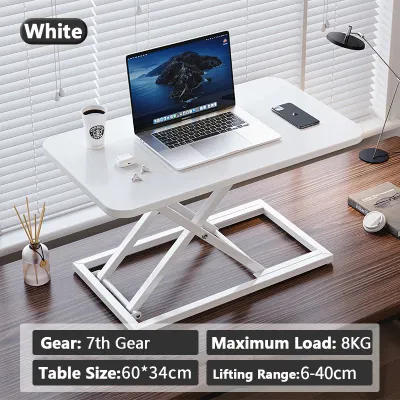
Standing desks occupy a permanent rectangular footprint on your floor, requiring you to dedicate a fixed area of your room to your workspace. While they do not fold away, their open-frame design—typically consisting of two slender motorized legs—creates a lighter visual profile than bulky traditional desks. This open space beneath the desktop provides excellent legroom and allows you to slide an ergonomic office chair completely underneath when not in use. The primary spatial challenge with standing desks lies in cable management. Because the desktop moves up and down, you must arrange your power strips and device cords with enough slack to prevent them from pulling loose or snagging on nearby furniture during height adjustments.
Products mentioned in this guide
![[NEW] TTRacing Tacto Portable Standing Desk Ergonomic Height Adjustable Table](https://img.lazcdn.com/g/p/8f16283bc24f4912079347f44535040b.jpg_400x400q80.jpg_.webp)
Prices are valid at publication and may change. Please refer to the product page for the latest price.
L-shaped desks are designed to maximize corner spaces that might otherwise go unused, turning awkward room angles into highly productive work zones. By fitting snugly into a corner, these desks provide an expansive workspace without protruding directly into the center of the room. However, their large physical presence can easily dominate a small bedroom or living area, potentially obstructing walkways and restricting the flow of natural light. If your room layout forces you to place an L-shaped desk away from the wall, it can act as a physical room divider, which works well in open-concept spaces but can feel incredibly cramped in smaller, enclosed rooms.
Ergonomics and Daily Comfort
An adjustable-height standing desk offers the most dynamic ergonomic benefits by allowing you to transition between sitting and standing throughout your workday. This movement helps alleviate the physical strain on your lower back, neck, and shoulders that often accumulates during consecutive hours of sitting. If you choose a fixed-height desk, such as a standard L-shaped model or a wall-mounted Droptop desk, you must rely entirely on a highly adjustable ergonomic chair to achieve the correct posture. Fixed desks require you to measure your sitting elbow height carefully beforehand to ensure your forearms can rest parallel to the floor while typing, preventing wrist strain and shoulder tension.

Desk depth and edge profiles play a critical role in long-term comfort and eye health. A shallow desk surface forces your computer monitor too close to your eyes, which can lead to persistent eye strain and headaches over time. To maintain a proper viewing distance of at least 50 to 70 centimeters, look for a desk depth of at least 60 centimeters. Additionally, pay close attention to the front edge of the desktop; sharp, 90-degree edges can press uncomfortably into your forearms and wrists, restricting blood flow during long typing sessions. Desks with rounded, beveled, or gently sloped edges offer a much more forgiving surface for daily use.
Stability is another essential factor that directly impacts your focus and comfort. Standing desks can experience a slight sway or wobble when extended to their maximum height, especially during vigorous typing or when supporting heavy monitor arms. To minimize this, look for standing desk frames constructed from heavy-gauge steel with wide, stable feet. For wall-mounted Droptop desks, stability is entirely dependent on the structural integrity of your wall and the quality of the mounting hardware. If mounted to a weak partition wall or installed with substandard anchors, a fold-down desk can flex or sag under the weight of your arms, leading to an unstable and frustrating typing experience.
Surface Area and Workflow Needs
Your daily tasks and the complexity of your computer hardware should dictate the surface area of your chosen desk. If your WFH setup consists solely of a slim laptop, a mouse, and a notepad, a compact Droptop desk provides a highly focused, distraction-free environment. These minimalist desks discourage the accumulation of unnecessary clutter, helping you maintain a clean and organized workspace. However, they offer very little room for expansion, making them less suitable if you eventually need to add a secondary monitor, a dedicated keyboard, or external storage drives.
For professionals who manage complex workflows, an L-shaped desk provides the ultimate surface area for multitasking. The dual-surface design allows you to establish distinct functional zones within your workspace. For example, you can dedicate one side of the “L” entirely to your computer screens and keyboard, while keeping the other side clear for reviewing physical documents, sketching, or handling paperwork. This physical separation of tasks can improve mental focus and keep your digital workspace free from physical clutter.
Standing desks offer a versatile middle ground, typically providing a single, spacious rectangular surface that can comfortably accommodate one or two monitors alongside your essential peripherals. Because the entire desktop moves as a single unit, you must keep the surface relatively organized to ensure that items do not slide or tip over during height transitions. This natural limitation encourages a clean, modern aesthetic that fits well with contemporary home office designs.
Budget and Value Considerations
When planning your home office budget, it is helpful to understand the general price tiers and cost drivers associated with each desk type in the local market. Basic wall-mounted folding desks and simple fixed-height desks are generally the most accessible options, with entry-level models starting under ₱3,000. Motorized standing desks represent a more significant financial investment, with reliable single-motor models starting around ₱8,000, while heavy-duty dual-motor frames can easily range from ₱15,000 to over ₱25,000. L-shaped desks span a wide price spectrum, where simple engineered wood options can be found for around ₱4,000, while large, solid wood executive corner desks can exceed ₱20,000.
The primary drivers of these price differences are the complexity of the hardware and the quality of the construction materials. For standing desks, the cost is heavily influenced by the number of motors, the lifting capacity, and the sophistication of the electronic control keypad. For all desk types, the desktop material itself plays a major role in the final price. In the humid tropical climate of the Philippines, budget-friendly particle board is highly susceptible to swelling, warping, or sagging over time if exposed to high humidity or accidental spills. Investing in higher-quality materials, such as high-pressure laminate (HPL), treated medium-density fiberboard (MDF), or solid hardwood, ensures your desk can withstand daily wear and environmental moisture.
To assess the true value of your purchase, balance the upfront cost against your expected daily usage hours and the long-term durability of the furniture. A cheap, poorly constructed desk that sags within a year will ultimately cost more in replacements and physical discomfort than a sturdier, mid-range option. If you spend eight or more hours a day at your desk, investing in a high-quality standing desk or a durable L-shaped desk is a practical decision that supports both your productivity and your physical well-being over several years.
Which Desk Type Should You Choose?
Selecting the perfect WFH desk requires a realistic assessment of your space, your physical comfort needs, and your daily work habits. A wall-mounted Droptop or foldable desk is the ideal choice if you live in a compact apartment where space is at a premium and you want your work area to completely disappear at the end of the day. This setup is highly suited for laptop-centric professionals, students, or casual users who appreciate a minimalist aesthetic and do not require a permanent array of bulky computer peripherals.
You should opt for an adjustable standing desk if you prioritize physical health, suffer from sedentary fatigue, or spend long, uninterrupted hours at your computer. The ability to easily transition between sitting and standing postures keeps your energy levels high and reduces physical strain. This desk type is perfect for users with a dedicated wall space who want a modern, clean setup that can comfortably support a standard dual-monitor configuration.
An L-shaped desk is the clear winner if your daily workflow demands maximum surface area, heavy multitasking, or the use of multiple large monitors and specialized creative equipment. It is the best fit for writers, designers, financial analysts, or anyone who needs to spread out physical documents and reference materials while working on a computer. However, this option requires a dedicated room or a spacious corner where the desk can remain a permanent, dominant fixture in your home.
Before finalizing your choice, always verify that your daily routine aligns with the physical characteristics of the desk. For instance, if you choose a wall-mounted folding desk but use a complex setup with external monitors, keyboards, and docking stations, the daily chore of packing and unpacking your equipment will quickly become tedious. Ensure that the desk you select simplifies your workflow rather than adding unnecessary steps to your daily routine.
Pre-Purchase Checks for Your Home Office
Before placing your order, it is essential to perform a few practical checks to ensure your new desk can be delivered, assembled, and used safely in your home. First, carefully measure the dimensions of your doorways, hallway corners, stairwells, and elevator cabins. Many condominium buildings and townhouses feature narrow corridors and tight turns that can make transporting a large, single-piece L-shaped desktop or a heavy standing desk frame incredibly challenging. Confirming these measurements beforehand prevents the frustration of a delivery that cannot physically enter your home.
Next, evaluate your floor leveling and the structural capacity of your walls. Uneven floors can cause standing desks to wobble noticeably when extended, or prevent the joints of an L-shaped desk from aligning correctly. Look for desks equipped with adjustable leveling feet to compensate for minor floor imperfections. If you are planning to install a wall-mounted Droptop desk, you must verify the construction of your wall. Solid concrete walls provide excellent support for standard anchors, whereas hollow drywall partitions require specialized heavy-duty toggle bolts or mounting directly into wooden studs to prevent the desk from pulling away from the wall under load.
Finally, review the assembly requirements and the manufacturer’s warranty terms before making your purchase. Most WFH desks are delivered flat-packed and require self-assembly, so check if the package includes all necessary tools or if you will need to provide your own screwdriver, drill, and level. Pay close attention to the warranty coverage, especially for the electronic components and motors of standing desks. A reliable warranty ensures that you can easily source replacement parts if a motor or control keypad experiences issues, protecting your investment and keeping your home office running smoothly.

Community discussion
Share your experience or ask a question. Comments are reviewed before publication.