
Finding the right workspace setup is a common challenge for remote professionals in the Philippines, where urban living spaces like condominiums and shared apartments often require multi-functional furniture. A high-quality foldable table offers an elegant solution, allowing you to establish a dedicated, productive workstation during office hours and quickly reclaim your living area once the workday ends. However, selecting a folding desk involves more than simply picking the first compact option you find online. To ensure your remote work setup supports your productivity rather than causing daily frustration, you must evaluate how a table handles the physical demands of typing, supporting equipment, and resisting the local tropical climate.
A successful work-from-home desk must balance portability with structural integrity. Unlike static office desks, foldable models rely on joints, hinges, and folding legs that can introduce unwanted movement if poorly designed. By understanding the key engineering features, material properties, and spatial requirements of these versatile tables, you can make an informed decision that protects your physical health, secures your expensive computer equipment, and fits seamlessly into your home layout.
Core Features to Evaluate When Choosing a Foldable WFH Desk
When you type, write, or rest your forearms on a desk, you exert dynamic downward and lateral forces. A table that sways or bounces with every keystroke will quickly cause eye strain and physical fatigue. To verify stability, look for frames that incorporate triangular support structures, crossbraces, or reinforcing bars beneath the tabletop. These design elements distribute weight evenly and prevent the legs from splaying or buckling under pressure. If you plan to use a heavy setup, such as a desktop computer or multiple monitors, prioritize frames made of thick-walled steel tubing rather than thin aluminum.
Products mentioned in this guide



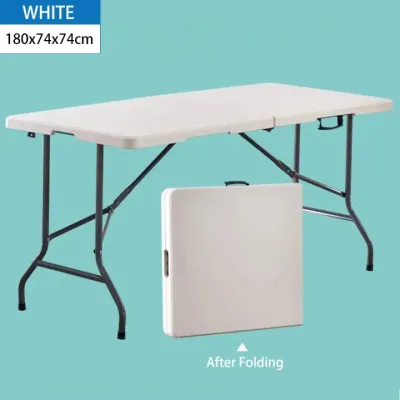
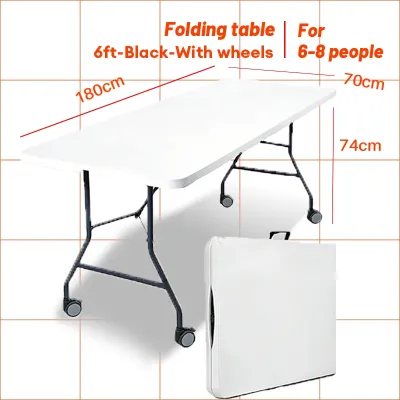
Prices are valid at publication and may change. Please refer to the product page for the latest price.
The safety of your laptop, monitor, and personal accessories depends entirely on the integrity of the folding mechanism. High-quality tables feature positive locking systems, such as spring-loaded locking pins, gravity locks, or manual latching brackets that secure the legs firmly in the open position. Avoid designs that rely solely on friction or basic tension hinges to stay upright, as these can wear down over time and lead to sudden, unexpected collapses. Before purchasing, check the manufacturer’s instructions to see if the locking mechanism requires manual engagement or if it engages automatically upon deployment.
The tropical climate of the Philippines presents unique challenges for wooden and composite furniture. High relative humidity can cause unsealed engineered wood, such as low-grade particle board, to absorb moisture from the air, leading to swelling, warping, and structural softening. To prevent this, look for tabletops made of high-density fiberboard (HDF) or medium-density fiberboard (MDF) that are fully encased in a protective melamine or laminate layer. Pay close attention to the edge banding; seamless PVC or ABS edge bands applied with high-temperature adhesive prevent moisture from penetrating the inner core. Alternatively, solid bamboo or treated hardwoods with a water-resistant polyurethane finish offer excellent longevity, though they require periodic inspections to ensure the protective coating remains intact.
There is a direct trade-off between a table’s stability and its ease of transport. A heavy steel-framed desk with a thick solid wood top provides an incredibly stable typing surface, but moving it between rooms or carrying it up a flight of stairs can be physically taxing. Conversely, an ultra-lightweight table is easy to slide under a bed or tuck behind a wardrobe, but it may wobble when you type vigorously or use a heavy external keyboard. Consider your daily routine: if you must pack up your workspace every single evening, prioritize a medium-weight table with an integrated carrying handle or a design that folds down to a thickness of under ten centimeters. If your desk will remain set up for weeks at a time, prioritize structural weight and stability over ease of folding.
Matching Foldable Table Designs to Your Workspace Needs
For those living in compact studio units or micro-apartments, floor space is at an absolute premium. Wall-mounted drop-leaf tables mount directly to the wall and feature a hinged top that folds flat against the wall surface when not in use. This design completely eliminates the footprint of table legs, leaving your floor space entirely clear. However, because these tables rely on wall anchors for support, they are semi-permanent installations. You must ensure you have permission from your landlord to drill into the walls, and you must mount the brackets into solid concrete or structural wall studs to prevent the table from tearing away under load.

Freestanding tables offer the ultimate flexibility because they can be placed anywhere in a room and moved at a moment’s notice. These tables typically feature either X-leg or Z-leg frame configurations. X-leg frames are highly stable and fold incredibly flat, making them easy to store, but the intersecting legs can severely restrict your legroom and prevent you from pulling your office chair close to the desk. Z-leg and T-leg frames, on the other hand, position the vertical supports further back or to the sides, providing ample clearance for your knees and allowing you to sit in an ergonomically correct position.
If you prefer to change your working environment throughout the day—perhaps moving from a quiet bedroom during morning calls to a breezy living room in the afternoon—a mobile folding desk is an excellent choice. These models are equipped with small caster wheels on the base of the legs, allowing you to glide the desk across tile or hardwood floors without lifting it. When selecting a mobile model, it is critical to verify that at least two of the casters feature robust, independent locking mechanisms. Unlocked wheels can cause the desk to drift slightly while you type, creating a highly frustrating work experience and putting strain on your wrists.
While many foldable tables feature a fixed height, some advanced models offer adjustable height settings. These adjustable designs allow you to customize the table height to match your physical proportions, or even transition between sitting and standing positions throughout the day. However, keep in mind that height-adjustable mechanisms introduce additional moving parts, joints, and telescoping segments. Each joint is a potential source of play or wobble. If you opt for an adjustable model, ensure the locking collars or pins are heavy-duty and fit tightly within the frame to minimize movement when the desk is extended.
Space Planning and Ergonomics Checklist for Your Home
Before ordering any furniture online, you must measure both your active workspace and your intended storage area. Use a physical tape measure to map out the footprint of the table when fully deployed, ensuring there is at least 80 centimeters of clear space behind the desk for your office chair and your body. Next, measure the storage gap—whether it is the space beneath your bed, behind a sofa, or inside a utility closet. Do not forget to measure the width of your doorways, narrow hallways, and any tight staircase turns to guarantee you can easily carry the folded table from the delivery point to its final destination.
Standard office desks typically stand between 70 and 75 centimeters tall, which is designed to accommodate average adult heights. If you purchase a fixed-height foldable table that proves too high for your frame, your shoulders will shrug and your wrists will bend upward, leading to repetitive strain injuries. You can compensate for a high table by using an adjustable office chair to raise your seating position, combined with a sturdy footrest to keep your thighs parallel to the floor and your feet fully supported. If the table is too low, avoid unsafe modifications like stacking books under the legs; instead, use an adjustable laptop riser on the desk surface paired with an external keyboard and mouse to keep your screen at eye level.
Many homes in the Philippines feature tiled floors, polished concrete, or slightly uneven hardwood planks. Even a minor subfloor variation of a few millimeters can cause a four-legged folding table to wobble annoyingly. To address this common issue, look for foldable tables equipped with adjustable leveling feet. These are threaded plastic or rubber pads on the bottom of each leg that can be screwed in or out to compensate for dips in the floor. If your chosen table lacks leveling feet, you can place a dense, low-pile area rug or a heavy-duty rubber utility mat beneath the desk to absorb floor imperfections and dampen typing vibrations.
Because foldable tables are designed to be packed away, they rarely feature built-in cable grommets, routing channels, or under-desk power strip trays. Letting your laptop charger, monitor cables, and mouse wires hang loose not only looks cluttered but also poses a tripping hazard that could pull your expensive electronics off the desk. To keep your workspace organized without compromising the table’s folding ability, use adhesive-backed cable clips and hook-and-loop straps to secure cords along the metal frame legs. Alternatively, look for lightweight, clip-on mesh cable organizers that can be quickly detached when it is time to fold the table down.
Pre-Purchase Verification and Buying Channels
Purchasing a foldable table online offers unparalleled convenience and access to a vast array of designs, but it deprives you of the opportunity to test the product’s physical stability beforehand. If you choose to buy from an e-commerce platform, rely heavily on detailed customer reviews, paying close attention to photos and videos uploaded by actual buyers that show the table in use. If possible, visit physical furniture showrooms in your local area to physically shake the display models, inspect the hinge welds, and feel the texture of the tabletop. This hands-on evaluation is the most reliable way to verify build quality before committing to a purchase.
Product listings on online marketplaces frequently use digitally altered lifestyle images that can make a small table look deceptively spacious. Never base your purchase decision on these promotional photos. Instead, scroll down to the technical specifications section of the listing and locate the exact numerical measurements for the unfolded height, width, and depth, as well as the folded dimensions. Compare these numbers against the measurements you took during your space planning phase to ensure the table will fit both your body and your storage space perfectly.
Returning large, heavy furniture items can be an expensive and logistically challenging process. Before finalizing your order, carefully read the seller’s return policy regarding assembled furniture, manufacturing defects, and transit damage. Verify who is responsible for covering the return shipping costs if the table arrives with bent metal frames, chipped laminate edges, or missing assembly hardware. Choosing sellers who offer robust buyer protection and clear, hassle-free return windows provides essential peace of mind when buying furniture online.
Every foldable table has a maximum static weight capacity specified by the manufacturer. Ensure this limit comfortably exceeds the combined weight of your laptop, external monitors, keyboard, desk mat, and any personal items, while leaving a safe margin for the downward pressure of your hands. Additionally, review the material care instructions. To protect the surface from the high humidity and heat of the Philippines, always use coasters under cold drinks to prevent condensation from pooling on the laminate seams, and avoid placing the table in direct sunlight near open windows, which can cause the protective finishes to fade or crack over time.
Frequently Asked Questions (FAQ)
Can I use a monitor arm on a foldable table?
Using a clamping monitor arm on a foldable table requires careful structural verification. Many foldable tables feature a thin tabletop reinforced by a metal support frame that runs directly along the outer edge. This metal frame can block the C-clamp of the monitor arm from making flush, secure contact with the underside of the table. Furthermore, if the tabletop is made of hollow-core material or thin plastic, the concentrated pressure of a tightened clamp can crush or crack the surface. If you want to use a monitor arm, ensure the table has a solid wood or high-density composite top with a flat, unobstructed edge profile. If clamping is unsafe, a freestanding desktop monitor stand is a much more secure alternative that distributes the weight safely across the desk surface.
How do I prevent a foldable table from wobbling during video calls?
A shaky camera during video calls is a common sign of an unstable desk. To eliminate wobbles, start by checking if your table has adjustable leveling feet and adjust them until all four legs make firm, even contact with the floor. Next, inspect the table’s hardware; folding joints, hinge bolts, and locking brackets can loosen slightly over time with regular use, so use a wrench or screwdriver to tighten them periodically. Finally, placing your table on a dense, low-pile rug or a heavy-duty anti-fatigue mat can significantly reduce vibrations. The textured backing of the mat improves the legs’ grip on slippery tile or hardwood floors, while the material absorbs the kinetic energy of your typing before it can travel up to your webcam.
Is a wall-mounted foldable table safe for heavy equipment?
A wall-mounted drop-leaf table can safely support standard office equipment, but its load-bearing capacity depends entirely on the installation quality and the wall material. In the Philippines, residential walls are commonly constructed from hollow concrete blocks (CHB) or drywall over metal studs. Mounting a table directly into drywall with basic plastic anchors is highly unsafe for heavy equipment. For concrete walls, you must use heavy-duty masonry anchors, often referred to as tox screws or sleeve anchors, drilled deep into the solid portion of the wall. It is crucial to understand that the weight limit printed on a metal bracket package only reflects the strength of the steel bracket itself, not the pull-out strength of your wall. If you plan to place heavy monitors or multiple devices on a wall-mounted desk, or if you are unfamiliar with masonry drilling, always consult a qualified professional carpenter to handle the installation safely.

Community discussion
Share your experience or ask a question. Comments are reviewed before publication.