
Choosing between a foldable and a standing portable laptop table depends on whether you prioritize working from relaxed spaces like a bed or sofa, or require an elevated, posture-friendly setup that mimics a traditional desk. Foldable tables excel in ultra-compact storage and low-profile comfort, while standing portable tables offer height adjustability to reduce physical strain during long working hours.
In many modern work-from-home setups, especially in compact urban apartments or shared family spaces, finding the right balance between comfort, storage, and stability is essential. High humidity and warm tropical weather also mean that how your laptop dissipates heat on these surfaces matters just as much as how easily the table tucks away after your shift. By evaluating your daily work habits and physical space, you can select a table that enhances your productivity without cluttering your home.
Understanding Foldable vs. Standing Laptop Tables
Foldable laptop tables feature collapsible legs that fold flat against the underside of the tabletop. This design creates an incredibly streamlined profile, making them easy to slide out of sight when your workday ends. They are primarily engineered for low-clearance environments, allowing you to work comfortably while sitting on a bed, lounging on a couch, or even sitting on a floor cushion.
Products mentioned in this guide
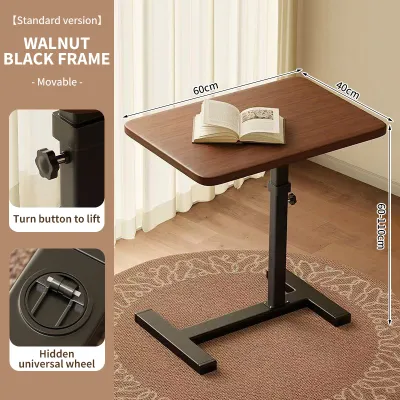
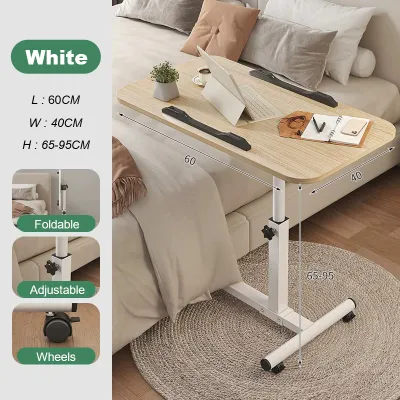
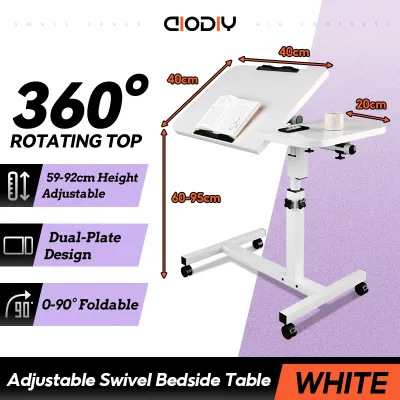
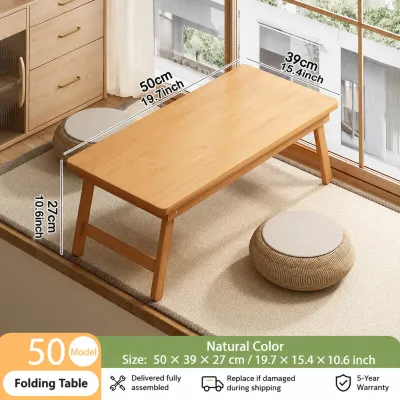


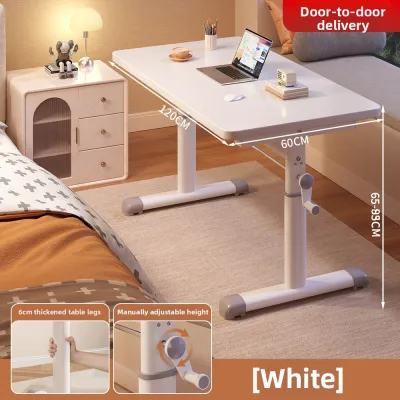

Prices are valid at publication and may change. Please refer to the product page for the latest price.
Standing portable tables, on the other hand, are designed with an elevated column or adjustable legs that raise the work surface to standing height. These units are intended to sit directly on the floor or act as an adjustable riser on top of an existing desk or dining table. They serve as a height-adjustable workstation that allows you to transition between sitting and standing positions throughout the day.
While foldable tables are ideal for casual, short-duration tasks or relaxed evening work sessions, standing tables function as a more active, dedicated workspace that supports a structured professional routine. Some hybrid models attempt to combine both features, offering collapsible legs alongside height-adjustable columns. When considering these hybrid options, it is important to check the manufacturer’s specifications for the exact adjustability ranges and the specific folding mechanisms to ensure they fit your physical space.
Evaluating Space and Storage Requirements
Foldable tables are highly space-efficient, often collapsing down to a thickness of just a few centimeters. This flat profile allows you to slide them under a bed, behind a wardrobe, or inside a narrow closet, which is highly beneficial in compact living areas where floor space is at a premium. They require virtually no dedicated floor space when stored, making them excellent for multi-purpose rooms.

Standing tables, even when designed to be portable, typically have a larger storage footprint. While some models feature folding bases or telescoping columns, they often require a dedicated corner of the room or a spot next to your main desk when not in use. If you choose a standing model, you must plan for where it will stand during non-working hours.
Weight and portability are also key factors when moving your workstation between rooms. Foldable tables are generally lightweight and easy to carry with one hand, allowing you to transition from the living room to the bedroom effortlessly. Standing tables, especially those with weighted bases designed to prevent tipping, are heavier and may require more effort to transport across different floor surfaces.
Before purchasing any laptop portable table, it is practical to measure your available floor clearance and storage gaps. Check the height of your sofa or bed frame to ensure the table’s legs can slide underneath or fit comfortably around your seating area. Additionally, verify doorway widths if you plan to move a fully assembled standing table between rooms regularly.
Matching Ergonomics to Your Work Habits
Standing tables are highly effective for promoting regular posture changes during long shifts. Elevating your screen to eye level helps reduce neck strain and shoulder tension, allowing you to alternate between sitting and standing to keep your circulation active. This is particularly beneficial for professionals who spend eight or more hours a day at their computers.
Foldable tables are designed for relaxed, seated, or reclined positions. To maintain ergonomic comfort on a bed or sofa, look for models that offer tilt adjustments and built-in edge stops. These features prevent your laptop from sliding off when the surface is angled, allowing you to keep your wrists at a neutral, comfortable angle while typing.
Because physical dimensions and body proportions vary widely, always verify the height increments, maximum tilt angles, and wrist rest availability directly on the product labels or specification sheets. This ensures the table can be adjusted to align with your specific elbow height and eye level, preventing slouching or reaching.
Verifying Stability and Weight Capacity
Portable tables are designed for light computing, but their load limits vary significantly. Always check the manufacturer’s stated maximum weight capacity against the combined weight of your laptop, external keyboard, mouse, and any daily accessories like a coffee mug or notebook. Exceeding these limits can compromise the structural integrity of the table.
The structural design of the base directly impacts stability and typing comfort. Wide-stance, four-legged designs common in foldable tables offer excellent balance on flat surfaces, whereas single-column standing tables rely heavily on a weighted or wide T-shaped base to prevent wobble during active typing. A wobbly table can cause screen shake, leading to eye strain over time.
To ensure long-term safety, inspect the locking mechanisms, joint tightness, and anti-slip pads according to the product’s assembly and safety instructions. Loose joints or worn rubber feet can lead to sudden slipping, especially on smooth tile or polished wood floors common in tropical homes. Regular checks of these components help maintain a secure work platform.
How to Choose the Right Portable Table for Your Setup
To finalize your choice, evaluate your primary working environment and physical comfort priorities. Your decision should align with how you naturally work and the physical constraints of your home.
Choose a foldable table if:
- You prioritize working from a couch, bed, or floor cushion.
- You require ultra-compact flat storage that can slide under furniture.
- You need a lightweight, highly mobile surface for casual, short-duration tasks.
Choose a standing table if:
- You need an elevated surface to prevent neck strain and improve posture.
- You prefer to alternate between sitting and standing during long working hours.
- You have dedicated floor space or an existing desk to accommodate a larger base.
If you are considering a hybrid adjustable model, verify first that it meets both your height requirements and folding needs without compromising the stability of the base. Ensure the locking joints are robust enough to handle daily adjustments and that the footprint fits comfortably within your designated workspace.
Frequently Asked Questions (FAQ)
Can I use a portable laptop table on a soft surface like a bed?
Yes, but you must choose a table with a wide, stable leg design to prevent tipping on uneven mattresses or soft cushions. Additionally, check the table’s ventilation design; a solid surface with built-in cooling vents or a dedicated fan clearance is essential to prevent your laptop from overheating when placed on soft bedding that blocks natural airflow.
How do I clean and maintain the joints of an adjustable table?
To maintain the moving parts, regularly wipe the table surfaces and joints with a dry or slightly damp microfiber cloth to remove dust and moisture, which is particularly important in humid tropical climates. Avoid using harsh chemical cleaners that can degrade plastic joints or strip protective coatings, and consult the manufacturer’s manual for specific joint lubrication or tightening schedules.

Community discussion
Share your experience or ask a question. Comments are reviewed before publication.