
Choosing the right heavy duty desk for your work-from-home (WFH) setup is not about finding a single, universally perfect model. Instead, the ideal choice depends on your specific spatial constraints, the weight of your equipment, and your daily workflow habits. A heavy, multi-monitor setup with a desktop tower demands a highly stable foundation, but the way you interact with that foundation can vary wildly.
In a tropical climate like the Philippines, where high humidity can affect materials over time, selecting a robust workspace is crucial. Whether you need a spacious executive table heavy duty setup to anchor a dedicated home office or a flexible option that can be tucked away in a shared living area, the configuration you choose dictates your daily comfort and productivity.
To find your ideal match, you must evaluate three primary configurations: standing, foldable, and L-shaped desks. Each type offers distinct structural advantages and trade-offs in terms of stability, footprint, and versatility. By analyzing your physical space and equipment load, you can select a desk that supports your gear safely while enhancing your daily work routine.
Products mentioned in this guide

Prices are valid at publication and may change. Please refer to the product page for the latest price.
Defining Your WFH Constraints and Load Requirements
Before browsing online marketplaces or visiting local furniture showrooms, you must establish the physical boundaries of your workspace. Start by measuring the exact floor space available in your room, keeping in mind the clearance needed for your office chair to glide backward comfortably. Do not forget to measure doorways, hallways, and stairwells to ensure the desk components can actually be delivered and maneuvered into your home.
Proximity to power outlets is another critical factor that dictates desk placement. A heavy duty setup often involves multiple power strips, monitors, and chargers, making cable management and outlet access a primary safety consideration. Placing your desk too far from an outlet can lead to hazardous trailing cables across high-traffic areas of your home.
Next, calculate the total weight of all the equipment you plan to place on the desk. This includes your computer tower, multiple monitors, heavy-duty monitor arms, studio speakers, and personal accessories. Knowing this total weight allows you to establish a minimum load requirement, ensuring you do not overload the frame and cause structural sagging or instability.
Finally, identify your daily workflow habits to determine how you use your workspace. If you find yourself sitting for ten hours straight, an adjustable option might help introduce movement into your day. Conversely, if your work involves sprawling physical documents alongside digital screens, a massive, static surface area will be your top priority.
Standing Heavy Duty Desks: Motorized Adjustability and Ergonomics
Motorized standing desks have become a staple of modern WFH setups, offering the ability to transition between sitting and standing at the press of a button. When evaluating a standing desk for heavy-duty use, the motor system is the most critical component to inspect. Dual-motor systems generally offer smoother transitions and higher weight capacities than single-motor alternatives, making them better suited for heavy equipment.

Before purchasing, check the manufacturer’s stated motor lift capacity and verify the desk’s stability at its maximum height. Many budget-friendly models experience significant monitor wobble when fully extended, which can be highly distracting during typing or video calls. Look for frames constructed from thick steel with wide, multi-stage legs that provide a solid footprint.
You must also ensure that your cables have enough slack to accommodate the desk’s full vertical travel. If a cable is too short, raising the desk can pull on ports, damage expensive equipment, or even yank plugs out of the wall. Utilizing under-desk cable management trays and flexible cable spines can help keep your cords organized and safe during transitions.
Because motorized desks rely on electronic components, the warranty terms for the motors and control boxes are highly important. These parts are the most common failure points in adjustable desks, especially in humid environments where moisture can affect electronics over time. A comprehensive warranty on the electrical components provides peace of mind and protects your investment.
Foldable Heavy Duty Desks: Space Optimization and Temporary Setups
For professionals working in compact apartments or multi-purpose rooms, a foldable heavy duty desk offers a practical way to reclaim living space after office hours. These desks are designed to fold flat, allowing you to store them against a wall, under a bed, or inside a closet when not in use. However, achieving true heavy-duty stability in a foldable design requires careful inspection of the structural joints.
When evaluating a foldable desk, pay close attention to the locking mechanisms and hinge reinforcements. The hinges must lock securely into place without any play or wiggle, as any movement in the joints compromises the desk’s overall rigidity. Look for frames that utilize heavy-gauge steel tubing and robust locking pins to ensure the desk remains stable under load.
You must also assess the folded dimensions of the desk against your available storage clearance. A desk that is too bulky when folded defeats the purpose of space optimization if it cannot fit into your designated storage area. Measure the depth and height of your closets or the gap behind your sofa to ensure a seamless fit.
Additionally, consider the physical effort and safety implications of folding and unfolding the desk daily. If your setup includes heavy monitors and clamped accessories, you may need to remove them before folding the desk to prevent damage or injury. If clearing your desk every evening feels too tedious, a static desk configuration may be a more practical choice for your daily routine.
L-Shaped Heavy Duty Desks: Corner Utilization and Multitasking
An L-shaped heavy duty desk is the ultimate solution for professionals who require maximum surface area and distinct working zones. By fitting snugly into a corner, these desks utilize space that often goes wasted in standard room layouts. This configuration is ideal for multitasking, allowing you to dedicate one side of the desk to computer work and the other to physical paperwork or secondary devices.
Before committing to an L-shaped layout, measure your room’s corner angles and leg placements carefully. Standard walls are not always perfectly square, and a slight deviation can make it difficult to push the desk flush against the corner. Ensure that the extended return of the desk does not block pathways, doorways, or access to windows and built-in cabinets.
Structural support at the inner corner of the “L” is critical, as this is where users often place their heaviest equipment, such as multi-monitor mounts. Check if the desk features a reinforced support frame or an extra leg at the junction to prevent the tabletop from sagging over time. A sagging joint can cause alignment issues and compromise the structural integrity of the entire desk.
Managing cables across an L-shaped desk requires careful planning due to the sheer distance between the outer edges. You will need longer power cables and strategically placed routing clips to guide cords along the underside of the frame. Keeping cables organized not only improves the aesthetics of your workspace but also prevents accidental snags when moving around the desk.
Final Decision Framework: Matching Desk Type to Your Setup
To finalize your decision, match your primary workspace constraints and equipment needs to the strengths of each desk configuration. If your priority is ergonomic movement and you have the budget for a reliable dual-motor system, a standing desk is the ideal choice. This setup is perfect for users who want to combat a sedentary lifestyle without sacrificing the stability of their heavy gear.
Choose a foldable desk if your workspace is strictly multi-purpose and you must clear the room at the end of the day. Before buying, verify the hinge weight limits and ensure you are comfortable with the daily routine of setting up and tearing down your equipment. This option works best for simpler setups, such as a laptop paired with a single external monitor.
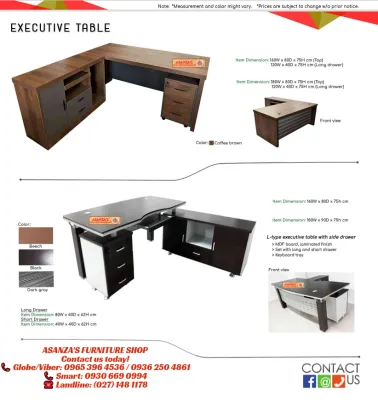
Opt for an L-shaped desk if you have a dedicated home office room and need separate zones for deep work, physical documents, or multiple computer systems. This configuration provides the most stable and expansive surface area for complex, heavy-duty setups. It is the closest equivalent to a traditional executive table heavy duty setup, offering unmatched storage and workspace.
Regardless of the type you choose, always verify if your floor is uneven, as a sloped surface can introduce instability to any desk. Look for desks equipped with adjustable leveling feet to compensate for uneven flooring. Finally, ensure your total equipment weight remains well below the manufacturer’s stated maximum limit to guarantee long-term safety and durability.
Frequently Asked Questions (FAQ)
How do I verify the actual weight capacity of an executive table?
To accurately assess the load limit of an executive table, check the manufacturer’s detailed specification sheet for the frame and the tabletop separately. Often, the advertised weight capacity refers only to the steel frame’s lifting or structural capacity, not what the tabletop material can safely support without bowing. If the tabletop is made of a softer or thinner material, its actual capacity may be significantly lower than the frame’s rating. Subtract the weight of the tabletop itself from the frame’s total capacity to find your true usable load limit, and consult the manufacturer if the documentation is unclear.
Are heavy duty desks compatible with standard monitor arms and clamps?
Heavy duty desks are generally compatible with standard monitor arms, but you must measure the thickness of the desktop edge before purchasing. Some heavy-duty desks feature reinforced metal frames or support bars running directly underneath the edge, which can block the clamp of a monitor arm from securing properly. If the edge is too thick or obstructed by structural steel, a standard C-clamp may not fit. In these cases, look for desks with pre-drilled grommet holes, or use a freestanding monitor base that sits directly on the desktop surface to avoid clamping issues entirely.

Community discussion
Share your experience or ask a question. Comments are reviewed before publication.