
Selecting an ergonomic chair within a ₱3,000 to ₱15,000 budget requires a clear understanding of your physical needs and the specific features available at different price points. In the Philippines, where high humidity and warm temperatures are daily realities, finding a chair that balances structural support with breathable materials is essential for maintaining comfort during long hours of work or study. By identifying which adjustments are critical for your posture and which are optional luxuries, you can make a practical investment that enhances your workspace without exceeding your budget.
Defining Your Ergonomic Priorities Within Your Budget
Before browsing through available models, take a close look at your daily routine and sitting habits. If you only use your home office for a couple of hours a day to check emails or complete quick tasks, a basic chair with standard height adjustments will likely meet your needs. However, if you spend eight or more hours a day sitting, your body requires a higher level of continuous support to prevent fatigue and long-term strain.
Distinguishing between essential ergonomic adjustments and secondary features is key to maximizing your budget. A reliable pneumatic gas lift is a non-negotiable feature, as it allows you to adjust the seat height so your feet rest flat on the floor, promoting proper blood circulation. Lumbar support is another critical element that helps maintain the natural curve of your lower spine, reducing pressure on your lumbar discs. Features like multi-directional armrests, deep recline angles, and adjustable headrests are highly beneficial but can be prioritized based on how much you are willing to spend.
Products mentioned in this guide
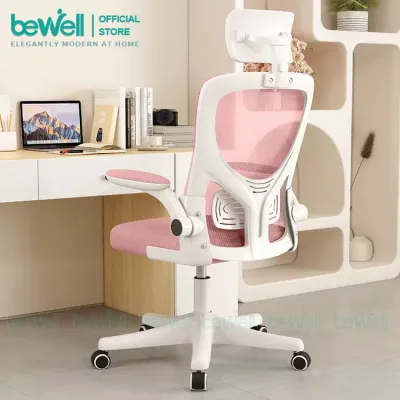
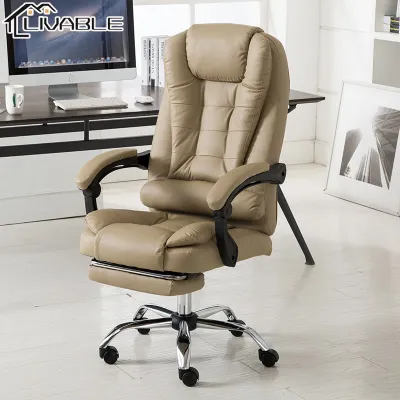
Prices are valid at publication and may change. Please refer to the product page for the latest price.
Build quality and weight capacity should serve as your baseline safety checks when evaluating any chair. Even at the lower end of the budget, the chair must feel stable and secure during daily movement. Pay attention to the materials used in the base, such as heavy-duty nylon or steel, and verify that the specified weight limit comfortably accommodates your body type. A sturdy base paired with smooth-rolling casters ensures that the chair remains safe and functional over years of regular use.
Evaluating Chasor Feature Tiers Across Your Price Range
As you explore the ₱3,000 to ₱15,000 price range, you will observe a distinct progression in both material quality and mechanical sophistication. Entry-level models typically feature standard high-density foam cushions paired with basic mesh backrests. As you move toward the higher end of the budget, the quality of the mesh improves significantly, offering better tension, elasticity, and breathability to keep you cool in tropical climates.

The mechanical components also become more advanced as the price increases. Lower-tier chairs usually employ a simple tilt lock mechanism, which allows the chair to rock or lock in a single upright position. In contrast, mid-range and premium models introduce synchro-tilt mechanisms, where the backrest and seat recline at a synchronized ratio. This advanced movement keeps your feet flat on the floor and minimizes pressure on the back of your thighs, offering a much more comfortable reclining experience.
When comparing different product descriptions, it is helpful to create a checklist of the specific adjustments offered. Note whether the armrests are fixed or adjustable, and check if the lumbar support can be adjusted vertically or horizontally. Understanding these distinctions allows you to compare models objectively and determine whether a higher-priced option offers genuine ergonomic benefits for your specific body shape.
Entry-Level Expectations (Lower End of the Budget)
At the lower end of the budget, typically ranging from ₱3,000 to ₱6,000, you can expect reliable, straightforward functionality designed for casual or intermittent use. These chairs generally offer standard pneumatic seat height adjustment and a basic tilt mechanism that allows for slight rocking. The armrests are often fixed to the frame or offer simple vertical height adjustment, providing basic support for your forearms during short typing sessions.
Material trade-offs are standard in this entry-level bracket. The seat cushion is usually constructed from standard foam covered in fabric, which provides decent initial comfort but may compress over time with heavy daily use. The mesh backrest is functional and breathable, though it may feel slightly stiffer and less contouring than the premium mesh found on more expensive models.
This tier is highly suitable for students, hybrid workers, or anyone who does not spend consecutive hours at their desk. If your daily routine allows you to take frequent breaks and move around, an entry-level chair offers a cost-effective way to establish a dedicated workspace without paying for advanced mechanical features you may not fully utilize.
Mid-Range and Upper-Tier Upgrades (Higher End of the Budget)
Investing closer to the ₱15,000 limit unlocks features engineered for intensive, full-time daily use. In this upper-mid range, you will find advanced ergonomic adjustments such as adjustable lumbar depth, which allows you to customize the firmness of the lower back support. Synchro-tilt mechanisms and adjustable headrests also become standard, allowing you to transition smoothly from an active typing posture to a relaxed recline.
The durability of the materials is significantly enhanced at this level. Manufacturers often use high-resilience molded foam that retains its shape for years, or fully mesh seats that distribute body weight evenly and maximize airflow in warm tropical climates. The structural bases are frequently reinforced with heavy-duty nylon or polished aluminum, offering superior stability and a higher weight capacity.
These upgrades are highly justified if you suffer from chronic back discomfort or work long, uninterrupted hours. The ability to fine-tune multiple contact points ensures that the chair adapts to your unique body proportions, reducing physical fatigue and preventing long-term strain on your joints and muscles.
Verifying Specifications and Avoiding Hidden Costs
Before finalizing your purchase, it is crucial to cross-reference the chair’s physical dimensions with your body measurements and your workspace. Check the minimum and maximum seat height to ensure your knees can maintain a 90-degree angle while your feet rest flat. Additionally, measure the width of the chair, including the armrests, to confirm it can slide easily under your desk and fit comfortably within your allocated floor space.
Do not overlook the practicalities of delivery and assembly. Ergonomic chairs are bulky and heavy, which can lead to substantial shipping fees, especially if you live outside major metropolitan areas. Verify whether the chair is delivered fully assembled or if it requires self-assembly. If you prefer not to assemble it yourself, check if the seller offers an assembly service and note any associated fees.
Always verify the warranty terms and return policies directly on the official product page or store listing. A reliable warranty is a strong indicator of build quality. Look for coverage that includes essential components like the gas lift cylinder, tilt mechanism, and frame. Understanding the return policy is equally important, as returning a heavy piece of furniture due to a mismatch in comfort can be difficult and costly.
Navigating Online Marketplaces for Your Purchase
When shopping on online marketplaces, prioritize official brand stores or highly rated authorized distributors. This ensures that you receive an authentic product and have access to legitimate warranty support. Be cautious of listings with unusually low prices from unverified sellers, as these may be counterfeit items or older models lacking updated safety features.
Take the time to read recent buyer reviews, focusing specifically on feedback regarding assembly, packaging quality, and long-term wear. Look for photos uploaded by actual customers to verify the color and material finish under natural lighting. Pay attention to comments about missing hardware or unclear instruction manuals, as these can turn a simple assembly process into a frustrating experience.
Finally, calculate the complete checkout total before clicking the purchase button. Factor in any local delivery surcharges, taxes, or optional assembly fees to ensure the final cost remains strictly within your ₱3,000 to ₱15,000 budget. Utilizing platform vouchers or shopping during major promotional events can also help you secure a higher-tier model while staying within your financial limits.
Frequently Asked Questions (FAQ)
Is an entry-level ergonomic chair safe for long hours of work?
While entry-level ergonomic chairs provide basic support, they are generally designed for shorter or intermittent sitting sessions. The standard foam cushions and limited adjustment options may not offer sufficient pressure relief or postural correction during an eight-hour workday. If you must use an entry-level chair for extended periods, it is highly recommended to take regular standing breaks, stretch, and adjust your posture frequently to prevent muscle fatigue.
How do I know if a Chasor chair will fit my desk height?
To ensure a proper fit, measure the distance from the floor to the underside of your desk. Compare this measurement with the chair’s listed seat height range and the height of the armrests at their lowest setting. Ideally, the armrests should slide smoothly under the desk when the chair is not in use, allowing you to save space in your room while keeping the chair close to your working position.

Community discussion
Share your experience or ask a question. Comments are reviewed before publication.