
Finding the right adjustable laptop table for a compact apartment or studio in the Philippines requires balancing space-saving design with ergonomic comfort. In dense urban areas where living spaces are often limited, a bulky desk can quickly overcrowd a room. A foldable, adjustable laptop table offers a flexible work-from-home setup that can be easily tucked away when the workday ends.
To make the most of your limited square footage, you must look beyond aesthetics and focus on physical dimensions, folding mechanisms, and structural stability. High humidity levels in tropical climates also mean you must pay close attention to material finishes to prevent warping or rusting over time. By systematically evaluating your space and matching it to the right table specifications, you can create a productive workspace without sacrificing your living area.
Assessing Your Available Space and Clearance
Before browsing online listings, grab a tape measure to map out the exact footprint where you plan to work. Measure the floor area next to your bed, sofa, or balcony door to ensure the table legs can extend fully without blocking primary walkways. It is equally important to measure the storage space where the table will rest when folded, such as the narrow gap between a wardrobe and the wall, or the space under a bed frame.
Products mentioned in this guide
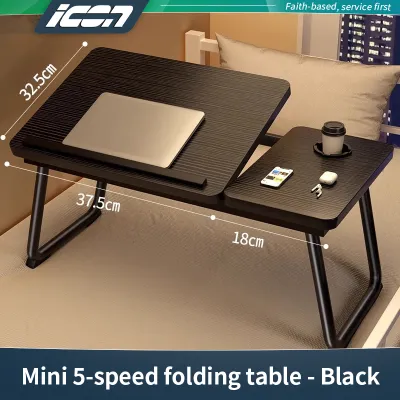
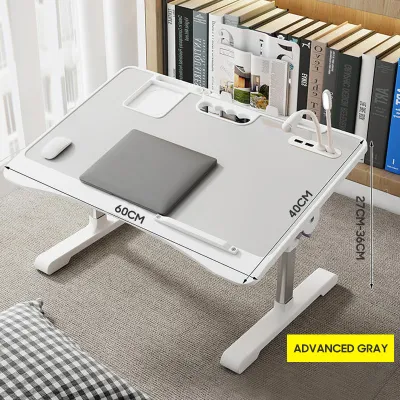
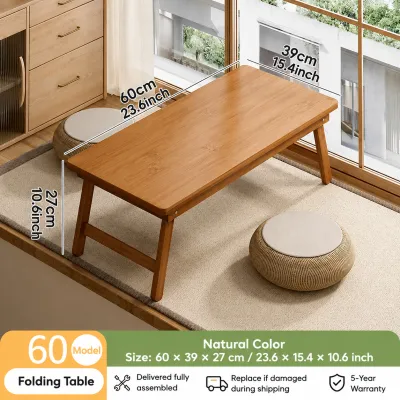
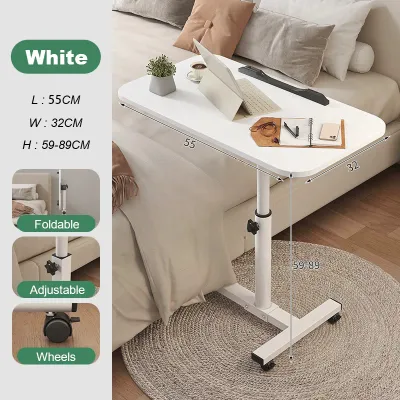
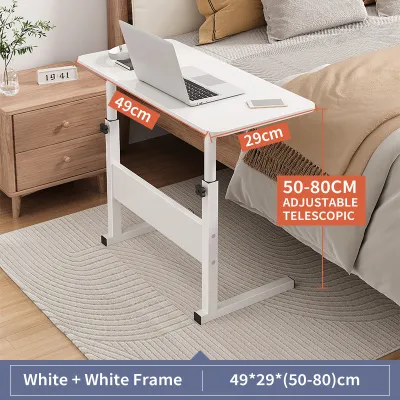
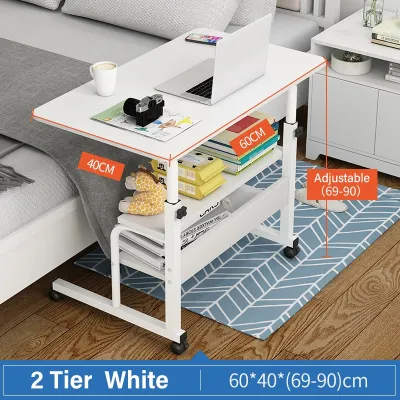
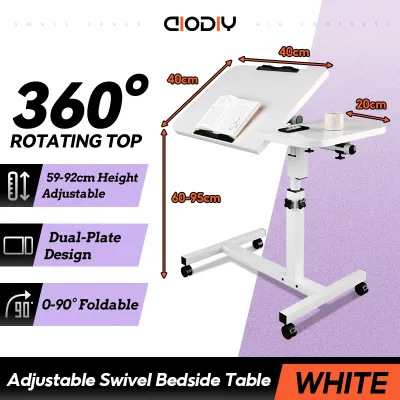
Prices are valid at publication and may change. Please refer to the product page for the latest price.
Do not overlook the path the table must take to reach its storage spot. Narrow hallways, tight doorways, and winding staircases in older apartment buildings can make transporting even slightly bulky furniture a challenge. Ensure the folded unit can be easily carried through these tight spots without scraping your walls or pinching your fingers.
Finally, account for your own movement and comfort during use. Leave at least 60 to 70 centimeters of clearance behind the table for your chair to slide back comfortably. If you plan to work on a bed or sofa, verify that the table’s base can slide underneath the furniture frame to bring the screen within a healthy viewing distance. Proper clearance also ensures adequate airflow around your laptop, preventing the device from overheating in warm tropical rooms.
Key Features to Evaluate for Compact Living
The folding mechanism of a laptop table directly determines how much space it occupies when not in use. Z-leg folding designs typically fold flat, allowing the legs to align parallel to the desktop surface for a highly compact profile. On the other hand, desktop flip-down styles may feature legs that fold inward, which can sometimes result in a thicker folded profile that requires more storage depth.

Height and angle adjustment mechanisms must be both secure and easy to operate within confined spaces. Look for tables with robust locking knobs, spring-loaded pins, or auto-locking joints that click firmly into place. In a small apartment, you may need to transition from a sitting position on a low sofa to a standing position at a kitchen counter, making smooth and reliable height adjustments essential.
The surface area of the desktop should match your specific device setup without excess bulk. Measure your laptop’s width and depth, leaving just enough room for a mouse or a notepad if needed. Choosing a table with an oversized desktop defeats the purpose of compact living, as it adds unnecessary weight and makes the unit harder to store in tight closets or behind doors.
Checking Stability, Weight Capacity, and Safety
A wobbly work surface can lead to neck strain and increase the risk of expensive devices sliding off the edge. When evaluating a table, check the manufacturer’s specified weight capacity and compare it to the combined weight of your laptop, external keyboard, mouse, and any personal items like a water bottle. Keep in mind that maximum weight capacities often apply only when the table is at its lowest, most stable setting.
Safety features are critical for preventing accidental damage to your electronics. Look for built-in anti-slip baffles or raised edges that keep your laptop secure when the desktop is tilted at an angle. Some models feature dedicated cup holders or recessed slots for tablets, which help prevent spills on your keyboard in a cramped workspace. A weighted or wide-span base also lowers the center of gravity, reducing the risk of the table tipping over if bumped.
Over time, frequent folding and adjusting can cause joints and hinges to loosen. Inspect the product details to see if the table comes with tightening tools, such as hex keys, or if it uses standard screws that you can easily tighten with household tools. Choosing a design with accessible, serviceable joints ensures your table remains stable and safe to use for years to come.
Common Sizing and Placement Mistakes to Avoid
One of the most common mistakes is ignoring the “folded thickness” of the table. While a table might have a small footprint when open, its folded profile might still be too thick to slide under a low-profile bed frame or behind a wardrobe. Always check the folded depth specification to ensure it fits your designated storage niche without blocking cabinet doors or drawers.
Another frequent error is failing to match the table’s lowest height setting with your existing seating. If you plan to work while sitting on a low sofa, a floor cushion, or a traditional banig, a table that does not adjust low enough will force you to raise your shoulders uncomfortably. Conversely, if the table’s maximum height is too low, you will find yourself slouching, leading to back discomfort during long working hours.
Knee clearance is another critical factor that is easily overlooked. Tables with central support pillars or low crossbars can restrict your leg movement, forcing you to sit in an awkward position. Ensure the space beneath the desktop is completely clear of structural obstacles so you can sit comfortably with your feet flat on the floor.
Building Your Shortlist: What to Verify Before Buying
Before finalizing your purchase on any online marketplace, carefully review the seller’s return and exchange policies. Because physical dimensions can sometimes vary slightly from online descriptions, you want the option to return the table if it does not fit your measured space. Check if the product requires complex assembly or if it arrives fully assembled and ready to use out of the box.
Upon delivery, do not immediately discard the packaging. Use your tape measure to verify that the physical dimensions of the desktop, height range, and folded thickness match the specifications listed on the product label. This quick check ensures you received the correct model before you begin setting up your workspace.
Before placing your laptop on the table for the first time, perform a thorough inspection of all adjustable joints, locking levers, and hinges. Tighten any loose screws and test the locking mechanisms at various heights and angles. Conducting a manual stability test with light pressure will give you confidence that the table can safely support your valuable devices.
Frequently Asked Questions (FAQ)
Can I use a foldable laptop table on a soft mattress?
Using a foldable laptop table on a soft mattress requires careful attention to the base design. Standard Z-shaped or T-shaped legs tend to sink unevenly into soft bedding, which can cause the table to tilt and your laptop to slide off. For bed use, look for tables with wide, flat sled-style bases or dedicated bed-tray designs that distribute weight evenly across the mattress surface. Always ensure the table is stable and balanced before placing any electronic devices on it.
How do I maintain the adjustable joints over time?
To keep your adjustable laptop table functioning smoothly, establish a routine of checking the joints and locking mechanisms every few weeks. Look for any signs of wobbling, loose screws, or plastic wear on the adjustment knobs. If you notice any play in the joints, use the appropriate tool to gently tighten the fasteners without over-tightening, which can strip the threads. If a joint becomes structurally compromised or fails to lock securely, stop using the table immediately and contact the manufacturer for replacement parts.

Community discussion
Share your experience or ask a question. Comments are reviewed before publication.