
Finding the right workspace for a compact condominium in the Philippines requires balancing functional surface area with floor space preservation. A foldable computer table offers a practical solution, allowing you to establish a productive work-from-home setup during the day and reclaim your living area once office hours end. The ideal choice depends on your specific condo layout, wall construction, and how often you intend to pack the desk away.
To make an informed decision, you must evaluate how a table transitions between its active and stored states. Rather than relying on generic marketing terms, focus on verifiable physical specifications, structural mechanisms, and your daily workflow requirements. This guide outlines the essential dimensions, structural types, and pre-purchase checks needed to select a reliable, space-saving desk that fits your home and lifestyle.
Key Dimensions and Features for Compact Condos
When space is at a premium, every centimeter counts. The first step in choosing a foldable computer table is comparing its fully expanded footprint against its folded dimensions. Measure the exact floor area where you plan to work, ensuring there is enough clearance for your office chair and comfortable movement. Simultaneously, measure your designated storage spot—whether it is a narrow gap beside a wardrobe, the space under a bed, or a utility closet—to ensure the folded unit fits without obstructing walkways.
Products mentioned in this guide

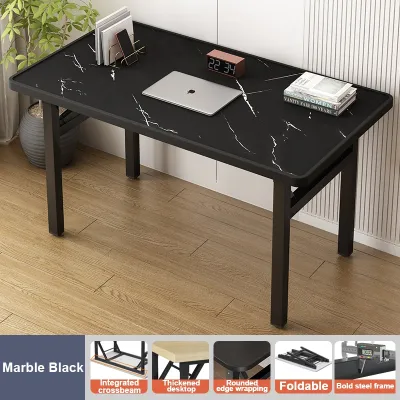
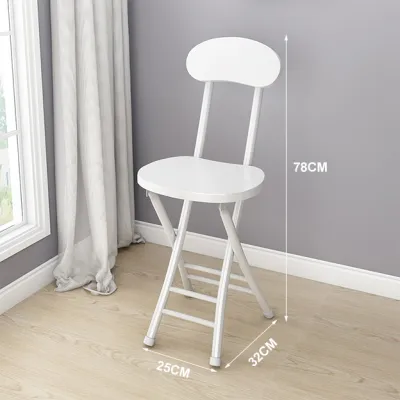
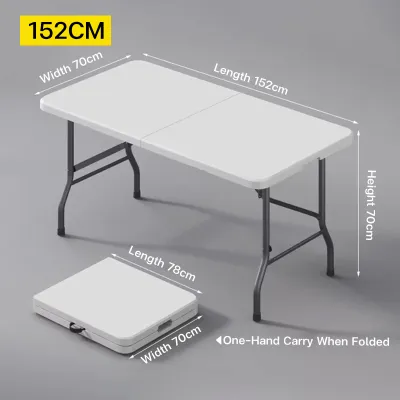
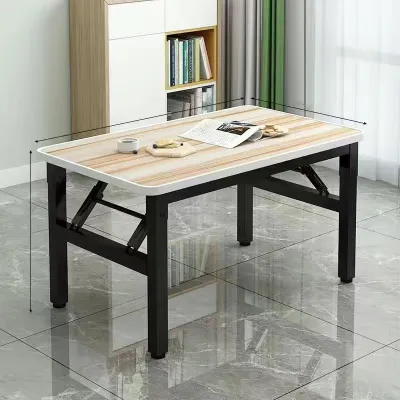
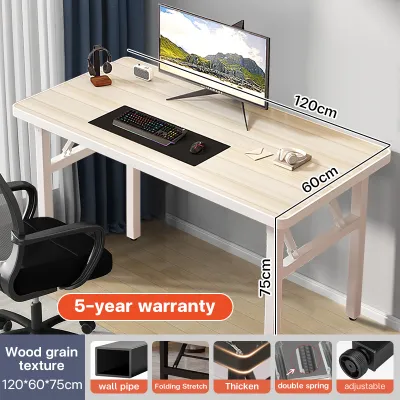
Prices are valid at publication and may change. Please refer to the product page for the latest price.
The transition between work and rest should not feel like a strenuous chore. Folding mechanisms vary significantly in their ease of deployment. Bi-fold designs typically require a simple release of a frame lock, while wall-mounted drop-leaf tables rely on manual brackets or gas struts. Rolling fold-out desks offer excellent mobility but require a clear path to glide open. Choose a mechanism that you can comfortably operate daily without straining your back or risking pinched fingers.
Structural stability is paramount when supporting expensive computer equipment like laptops, monitors, and external keyboards. Always check the manufacturer’s stated weight capacity before purchasing. A table might look sturdy in photos, but its actual load limit dictates whether it can safely support your setup. Look for designs that feature reinforced crossbars or triangular support frames, as these configurations distribute weight more evenly and minimize lateral movement while typing.
Consider how the table’s height aligns with your existing seating. Standard desk heights range from 70 to 76 centimeters, which generally pairs well with standard office chairs. If you opt for a foldable model with non-adjustable legs, verify that the clearance underneath allows your knees to move freely and accommodates your chair’s armrests. A desk that is too low or too high can lead to poor posture and physical discomfort during long working sessions.
Finally, pay close attention to the depth of the tabletop. A depth of at least 50 to 60 centimeters is recommended to maintain a healthy viewing distance from your screen and provide adequate wrist support. Shallower desks may force your keyboard too close to your monitor, leading to eye strain and restricted arm movement. Balancing a compact folded profile with a functional, ergonomic working depth is the key to long-term satisfaction with your purchase.
Matching Foldable Table Types to Your Space
Different condo layouts and daily routines call for distinct furniture configurations. Understanding the strengths and limitations of each foldable desk category allows you to select a model that integrates seamlessly into your living space.

Wall-Mounted and Drop-Leaf Desks
Wall-mounted drop-leaf desks are the ultimate space-savers because they completely eliminate the need for floor legs when folded down. These units mount directly to your wall, with the desktop surface swinging upward or downward on hinges when needed. This setup is particularly beneficial in narrow hallways or tiny studio units where floor space must remain entirely unobstructed during non-working hours.
However, wall-mounted installations require careful structural verification before assembly. In many Philippine condominiums, interior walls are made of lightweight gypsum board, hollow concrete blocks, or fiber cement panels rather than solid concrete. You must locate the structural studs or use specialized heavy-duty wall anchors to ensure the desk does not pull away from the wall under load. Always consult your condo association’s property management office regarding drilling guidelines and structural restrictions before proceeding.
Clearance is another critical factor for drop-leaf designs. You must ensure there is sufficient vertical and horizontal clearance for the support brackets to swing open and lock securely. Additionally, because these desks are permanently fixed to the wall, they lack the height adjustability of freestanding furniture. Carefully measure and test your preferred working height against your office chair before drilling any mounting holes to ensure proper ergonomic alignment.
Freestanding Bi-Fold and Rolling Tables
If you prefer a flexible layout or rent your condo and cannot drill into the walls, freestanding bi-fold and rolling tables offer an excellent alternative. Bi-fold desks typically feature a metal frame that folds flat against the wooden or plastic tabletop, allowing the entire unit to be stored behind a door, inside a closet, or flat against a wall. This portability makes it easy to change your working view or clear the room for guests.
When evaluating these portable options, check the exact folded thickness and height. A desk that folds down to a thickness of 5 to 10 centimeters can easily slide into narrow gaps that would otherwise go unused. For rolling models, inspect the quality of the caster wheels. Ensure at least two of the wheels feature reliable locking mechanisms to prevent the desk from shifting or rolling away while you are typing or resting your arms on the surface.
The base width and center of gravity are crucial for preventing tipping, especially on tiled or uneven floors. A wider base generally provides better stability, but it also increases the desk’s active footprint. When unfolding the unit, pay attention to the hinge locking mechanisms. High-quality models feature safety pins or auto-locking latches that prevent the frame from accidentally collapsing during use, protecting both your equipment and your hands.
Convertible and Multi-Functional Designs
Convertible folding desks serve multiple purposes, making them highly efficient investments for small spaces. These designs might transform from a compact sideboard or shelving unit into a full-sized desk, or double as a small dining table for two. By consolidating multiple functions into a single piece of furniture, you reduce visual clutter and maximize the utility of your limited square footage.
The primary trade-off with multi-functional designs is weight and portability. Because these units often include built-in shelves, drawers, or heavier structural frames, they are significantly heavier than simple bi-fold tables. This added weight makes them more difficult to move when cleaning your condo or rearranging your layout. If you plan to move the desk frequently, look for models equipped with heavy-duty, lockable casters to ease the physical effort required.
Because convertible furniture relies on multiple moving parts, inspect the quality of the hinges, gas struts, and sliding tracks. These components bear the brunt of daily transitions and are the most common points of wear. Ensure that when the unit is fully converted into its desk state, the primary workspace remains flat, stable, and free of obstructive gaps or raised seams that could interfere with your mouse or keyboard placement.
Essential Pre-Purchase and Installation Checks
Before finalizing your purchase, you must verify several physical and logistical constraints to ensure a smooth delivery and setup process. In high-rise condominium buildings, delivery logistics can be challenging. Always compare the manufacturer’s packaged dimensions against the physical limits of your building’s service elevator, tight stairwell turns, and your unit’s front door frame. A desk that cannot fit through the elevator or entryway will result in costly return shipping fees and unnecessary frustration.
Assembly requirements vary widely among foldable tables. Some freestanding models arrive fully assembled and ready to unfold, while wall-mounted or convertible designs require extensive installation. Review the manufacturer’s instruction manual online to identify the necessary tools, such as drills, levels, or specific screwdrivers. If you are installing a wall-mounted desk, ensure you purchase the correct anchor types suited for your specific wall material, as standard plastic wall plugs may not provide sufficient holding power in hollow blocks.
The materials used in the desk’s construction directly impact its durability, especially in the humid, tropical climate of the Philippines. Many affordable folding tables utilize medium-density fiberboard (MDF) or particle board finished with a laminate veneer. While budget-friendly, these materials are susceptible to moisture damage and swelling if exposed to high humidity or accidental spills. Check that the edge banding is tightly sealed and free of gaps where moisture could penetrate.
For enhanced longevity, consider tables with powder-coated steel frames and water-resistant surfaces, such as high-pressure laminates or solid wood. These materials are easier to clean and maintain, requiring only a simple wipe-down with a damp microfiber cloth. Avoid using harsh chemical cleaners that can degrade the protective finish or weaken the adhesive holding the edge banding in place.
Building Your Shortlist: Evaluation Criteria for Online Shopping
Shopping for furniture on an online marketplace or ecommerce platform requires a systematic approach to filter out low-quality products. Avoid relying on generic search terms like “space-saving” or “compact,” as these labels are highly subjective. Instead, use the platform’s search filters to input your exact maximum folded and unfolded dimensions. This ensures that every product on your shortlist physically fits your designated space.
User reviews are an invaluable source of real-world performance data. When browsing reviews, look past the overall star rating and search specifically for keywords like “wobble,” “shake,” “hinge,” “scratch,” or “alignment.” Pay close attention to feedback from buyers who have used the table for several months, as this reveals how well the folding mechanisms hold up under daily wear and tear. Be skeptical of reviews that only praise the delivery speed without commenting on the product’s actual build quality.
Verify the seller’s return and warranty policies before checking out. Bulky furniture items can be expensive to ship, and returning a defective or poorly fitting desk can be a logistical headache if the seller does not offer free return shipping. Look for reputable local sellers or official brand stores that provide clear warranty coverage for mechanical parts, such as hinges and locking pins, for at least six months to a year.
Finally, compare the total cost of ownership, including shipping fees to your specific region. Heavy metal frames and solid wood tops can incur high shipping surcharges, which may significantly increase the final price. Balancing the product’s base price, shipping cost, and warranty protection will help you find a high-quality foldable computer table that fits both your condo and your budget.
Frequently Asked Questions (FAQ)
Can I use a monitor arm with a foldable computer table?
Using a monitor arm with a foldable table is possible, but it requires careful verification of the desk’s material and structural limits. First, measure the thickness of the tabletop against the clamp range of your monitor arm. Many folding tables have thin surfaces (under 1.5 centimeters) or hollow-core construction, which can crack or warp under the concentrated clamping force of a heavy monitor arm.
Second, calculate the combined weight of your monitor and the arm itself. This total dynamic load must remain well below the table’s maximum weight capacity. Finally, consider the center of gravity. Extending a heavy monitor far forward or backward on a lightweight, folding frame increases the risk of the desk tipping over. To ensure safety, position the monitor arm directly over a main support leg or structural crossbar.
How do I prevent a freestanding folding desk from wobbling?
To minimize wobble on a freestanding folding desk, start by inspecting all mechanical connections. Ensure that all leg locking pins, crossbars, and hinge tension screws are fully engaged and tightened according to the manufacturer’s instructions. Loose joints are the primary cause of lateral movement and instability during typing.
Next, check the levelness of your condo’s floor. Many tiled or concrete floors have slight imperfections. If your desk features adjustable leveling feet, screw them in or out to compensate for uneven ground. If your model lacks adjustable feet, placing small felt pads or non-slip rubber grips under the legs can improve stability. Lastly, distribute your equipment evenly across the surface, keeping heavy items away from the outer edges to maintain a balanced center of gravity.

Community discussion
Share your experience or ask a question. Comments are reviewed before publication.