
Selecting the ideal small nightstand organizer with built-in charging ports requires balancing physical space constraints, storage capacity, and electrical safety. In tropical climates like the Philippines, where high humidity and frequent power fluctuations are common, choosing the right small cabinet organizer involves checking material durability and surge protection alongside basic port configurations. By focusing on how a unit fits your bedroom layout, handles your devices, and manages cables, you can transform a cluttered bedside into a streamlined, safe charging hub.
Measure Your Bedside Space and Storage Needs
Before browsing online marketplaces, you must determine the exact physical footprint your bedroom can accommodate. In many homes, particularly urban condominiums and townhouses, bedroom layouts are compact, making every centimeter of floor space valuable. Start by measuring the clearance between your bed frame and the adjacent wall. This measurement establishes the maximum width of your new organizer.
Additionally, measure the height of your mattress from the floor. A bedside organizer should ideally sit level with or slightly below the top of your mattress, allowing you to reach your phone, glasses, or a glass of water easily in the dark without straining. If the unit is too high, it can block light or pose a hazard if you bump into it overnight.
Products mentioned in this guide
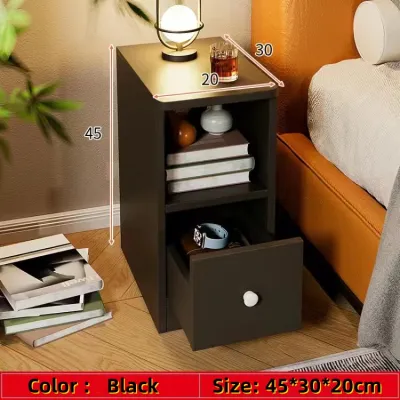
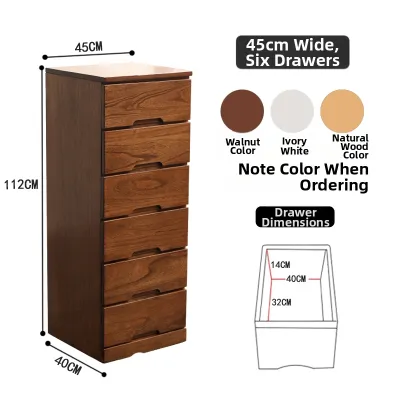
Prices are valid at publication and may change. Please refer to the product page for the latest price.
Next, take a detailed inventory of the items you keep by your bed each night. If your bedside routine involves multiple devices, such as a smartphone, a tablet, and a smartwatch, you will need an organizer with dedicated slots or a flat top surface large enough to hold them simultaneously. Consider your non-electronic storage needs as well, such as physical books, eyeglasses, maintenance medications, or personal journals.
If you prefer to keep these items out of sight to maintain a clean aesthetic, prioritize a small cabinet organizer that features closed drawers or cabinets. If you prefer quick, unobstructed access, open shelves or multi-tiered compartments are more practical.
Finally, evaluate the depth of the unit to ensure it does not obstruct walking paths or door swings. A bedside table that protrudes too far can block closet doors, prevent bedroom doors from opening fully, or create a tripping hazard in a dark room. Ensure there is at least a comfortable walking clearance between the edge of the organizer and any surrounding furniture. If space is exceptionally tight, look for slim-profile designs that maximize vertical storage rather than floor depth.
Verify Charging Specifications and Electrical Safety
An organizer with integrated power is only as good as its electrical components. When selecting a unit, you must verify that the built-in charging module is compatible with your devices and safe for overnight operation. Begin by identifying the types and quantities of ports available. Modern devices increasingly rely on USB-C connections for faster power delivery, so look for a module that offers a mix of traditional USB-A ports and high-output USB-C ports. Check the manufacturer’s stated wattage for each port; a port with a low output may charge your phone slowly, whereas a port rated for 15W, 20W, or higher can support rapid charging.

The physical placement of your wall outlets dictates the required power cord length for your organizer. In many residential layouts, outlets are not positioned directly behind the bed, meaning the organizer’s cord must stretch to a nearby wall. Measure the distance from your planned bedside location to the nearest outlet and ensure the organizer’s cord is long enough to reach without tension. Avoid using cheap extension cords or daisy-chaining multiple power strips, as these practices increase electrical resistance and pose significant fire hazards, especially in older homes with legacy wiring.
Electrical safety is paramount, particularly in regions prone to power grid instability and frequent tropical storms. Look for organizers that feature built-in surge protection, overload protection, and short-circuit prevention. These safety features protect your expensive smartphones and tablets from sudden voltage spikes. Additionally, verify that the housing of the electrical module is constructed from flame-retardant materials.
Always consult the product manual or manufacturer specifications to confirm the voltage compatibility of the built-in power strip. In the Philippines, the standard electrical grid operates at 220V and 60Hz. Ensure the organizer’s electrical components are rated for this standard to prevent overheating, electrical shorts, or permanent damage to your devices.
Inspect Material Finishes and Cable Management
The tropical climate of the Philippines introduces unique challenges for furniture durability. High relative humidity can cause poorly sealed materials to warp, swell, or harbor mold over time. When evaluating a small cabinet organizer, translate generic material names into practical quality checks. If the unit is constructed from engineered wood or medium-density fiberboard (MDF), verify that all surfaces, including the back panel and edges, are sealed with a water-resistant and scratch-resistant laminate or melamine finish. This finish protects the core material from moisture in the air and accidental spills from a bedside water glass.
Cable management is another critical factor in maintaining a clutter-free environment. Inspect the organizer’s design for dedicated cable routing holes, hidden wire channels, or integrated cord clips. A well-designed unit allows you to route charging cables from the internal power strip to your devices without leaving a tangled mess on the top surface. Look for models with a recessed charging bay or a hidden compartment beneath the top lid, which keeps cords organized and out of sight while your devices charge.
Structural stability is essential for both safety and longevity. Assess the sturdiness of the legs or base, ensuring the unit does not wobble when you open a drawer or place a heavy book on top. If the organizer features drawers, check that the drawer glides operate smoothly without sticking. A wobbly or unstable bedside table increases the risk of tipping, which can damage your electronics or cause liquids to spill directly onto active electrical ports.
Build a Shortlist Using Key Selection Criteria
To make an efficient decision when shopping on e-commerce platforms, compile a structured comparison matrix of your top candidates. Focus your evaluation on four core dimensions: overall physical footprint, charging port configuration, storage partition types, and cable management solutions. By comparing these specifications side-by-side, you can easily identify which small cabinet organizer offers the best balance of functionality and space efficiency for your bedroom.
Weight these criteria based on your personal daily habits. For example, if your primary goal is to charge multiple high-powered devices overnight, you should prioritize a unit with multiple fast-charging USB-C ports and built-in surge protection, even if it has fewer storage drawers. On the other hand, if you need to store personal items, books, and medications out of sight, you should prioritize a model with spacious drawers and a smaller, simpler charging dock. Whether you are budgeting ₱2,000 or ₱5,000 for your bedside upgrade, comparing these specifications side-by-side helps you find the best value.
Before adding any item to your cart, cross-reference the product descriptions with downloadable user manuals or detailed manufacturer specifications. Do not rely solely on promotional images, which can sometimes make an organizer appear larger or more robust than it is in reality. Checking the exact dimensions and electrical ratings in the manual ensures that the product you receive matches your expectations and safety requirements.
Confirm Pre-Purchase Details and Assembly Requirements
Before finalizing your purchase, consider the logistics of delivery and assembly to avoid unexpected frustrations. Check the packaged dimensions and weight of the organizer. If you live in a high-rise condominium or an apartment building with narrow stairwells and small elevators, ensure the package can be easily transported to your unit.
Review the assembly requirements of the furniture. Some organizers are delivered fully assembled, while others arrive as flat-packs that require self-assembly. Check if the manufacturer includes all necessary assembly tools, such as hex keys, or if you will need your own screwdriver. Look for product listings that provide clear, step-by-step illustrated instructions or video guides to ensure a smooth setup process.
Verify the manufacturer’s return policy and warranty terms, paying close attention to how they apply to the electrical components. While the wooden or metal frame of the organizer may have a standard furniture warranty, the integrated charging module may be subject to a different, shorter warranty period. Ensure you understand the process for claiming a replacement if the electrical ports fail.
Finally, plan a thorough post-delivery inspection. As soon as the package arrives, unbox it carefully and inspect all structural joints, panels, and hardware for damage sustained during transit. Before fully assembling the unit or placing it in your bedroom, plug in the power module and test every USB port and AC outlet with your devices to confirm they are functioning correctly.
Frequently Asked Questions (FAQ)
Can I replace the built-in charging module if it stops working?
You should never attempt unauthorized disassembly or DIY electrical modifications on a built-in charging module. Modifying the wiring or forcing a non-compatible power strip into the furniture’s custom cutout can void your warranty, damage the organizer, and create severe fire or electrical shock hazards. If the charging module stops working, check the manufacturer’s warranty terms to see if the electrical components are covered for replacement. If the warranty has expired, contact the brand’s customer service or a qualified professional to inquire about authorized replacement parts designed specifically for your organizer model.
Is it safe to leave my phone charging on the nightstand all night?
Modern smartphones and tablets are designed with internal battery management systems that automatically stop drawing power once the battery is fully charged, making overnight charging generally safe. However, you must ensure that you are using certified, undamaged charging cables. Additionally, because tropical climates can cause electronics to run warmer, keep the charging area well-ventilated. Avoid covering your phone or the organizer’s power module with pillows, blankets, or books, as trapped heat can degrade your device’s battery health. As an extra precaution, unplug the organizer’s main power cord from the wall outlet during severe electrical storms or when you plan to be away from home for an extended period.

Community discussion
Share your experience or ask a question. Comments are reviewed before publication.