
Finding the right ergonomic chair is a critical step in building a comfortable, productive workspace. When evaluating the Olome product lineup, the decision comes down to matching your physical proportions, your desk setup, and your daily sitting habits with the specific adjustments each model offers. In the Philippines, where tropical heat and varying home office layouts present unique challenges, choosing a chair requires looking beyond aesthetics. Whether you are looking at entry-level models or premium options within the ₱3,000 to ₱15,000 price range, a systematic approach ensures you invest in a chair that supports your body throughout the workday.
Assess Your Body Type and Desk Environment
Before browsing specific Olome models, you must measure your physical workspace and understand your body’s unique dimensions. Start by measuring your desk height and the under-desk clearance. Many standard desks stand at around 75 centimeters, but built-in drawers or keyboard trays can significantly reduce the clearance available for your chair’s armrests. You need to ensure that the chair you select can slide fully under your desk when not in use, which saves valuable floor space in compact rooms. Additionally, measure the available floor area around your desk to ensure the five-star caster base can rotate and glide freely without hitting walls or nearby furniture.
Your personal body metrics are equally critical. Take note of your thigh length, torso height, and shoulder width. The distance from the back of your knee to your lower back determines the required seat depth, while your torso height dictates how high the backrest and headrest must sit to provide proper support. If a chair is too deep, you will find yourself slouching forward, which completely bypasses the lumbar support.
Products mentioned in this guide
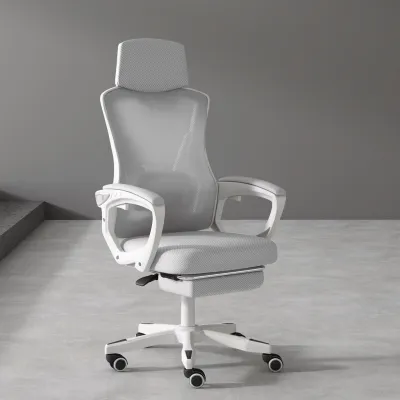
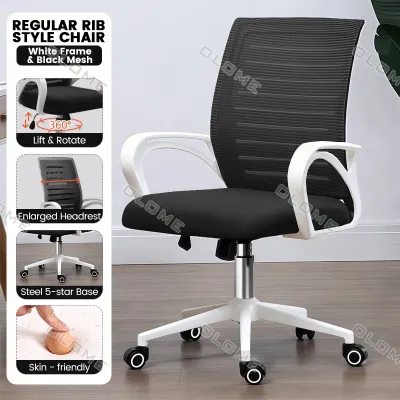
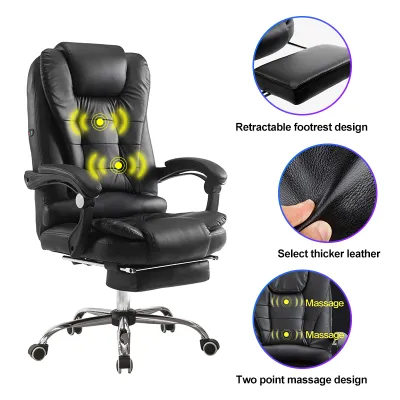
Prices are valid at publication and may change. Please refer to the product page for the latest price.
Finally, examine the flooring in your workspace. Hardwood, ceramic tile, and polished concrete are common in local homes, and each interacts differently with chair casters. Standard nylon casters can sometimes scratch delicate wooden surfaces or slip too easily on smooth tiles. If you have hard floors, check if the model comes with polyurethane-coated casters, or plan to use a protective floor mat to ensure controlled movement and prevent surface wear.
Core Olome Ergonomic Features to Compare
Once you have your measurements, you can begin comparing the adjustable features listed on Olome product specification sheets. The lumbar support mechanism is one of the most vital components to evaluate. Some models feature a fixed lumbar curve, while others offer adjustable depth and height. An adjustable lumbar support allows you to align the cushion precisely with your natural spinal curve, preventing lower back fatigue during long sessions.

Next, examine the seat pan dimensions and its adjustability. Look for models that feature a seat depth slider, which allows you to move the seat forward or backward independently of the backrest. This adjustment ensures that users with longer thighs can get full support under their legs, while shorter users can sit all the way back against the lumbar support. Additionally, check for a waterfall seat edge—a downward slope at the front of the cushion—which reduces pressure on the back of your thighs and helps maintain healthy blood circulation.
Armrest configurations are another key differentiator across the Olome range. Armrests are typically categorized as 2D, 3D, or 4D. A 2D armrest adjusts for height and depth; a 3D armrest adds angle rotation; and a 4D armrest includes width adjustment. To keep your elbows at a comfortable 90-degree angle while typing, you need armrests that can align with your desk height and shoulder width, reducing strain on your neck and upper shoulders.
Lastly, compare the recline tension controls and locking positions. A reliable tilt mechanism allows you to tilt back comfortably when reading or taking calls, and then lock the chair upright when you need to focus on typing. Check the product specifications to see how many locking angles the chair offers and whether the tilt tension can be adjusted to match your body weight.
Aligning Chair Features with Daily Work Duration
Your daily usage patterns should directly dictate the level of adjustability and material durability you choose. If your desk tasks are short-duration, typically lasting under four hours a day, an entry-level Olome model with basic ergonomic adjustments may be sufficient. These models often feature standard mesh backrests and fabric-covered foam cushions that provide adequate comfort for casual browsing, studying, or part-time remote work.
For full-time desk work exceeding eight hours a day, your body requires a much higher level of dynamic support. In this scenario, look for models equipped with advanced dynamic lumbar support that automatically adjusts to your movements. Material choice also becomes critical for long-duration sitting, especially in warm, humid tropical climates. Highly breathable mesh on both the backrest and the seat pan allows for maximum airflow, helping to keep you cool and dry in rooms without continuous air conditioning. Alternatively, if you prefer a padded seat, verify that the model uses high-density molded foam, which retains its shape and support over years of heavy use, rather than low-density cut foam that flattens quickly.
Always check the manufacturer’s stated weight capacities and recommended daily usage limits on the product manual or specification sheet before making a decision. A chair rated for eight hours of daily use is built with more robust joints, gas lifts, and adjustment mechanisms than one rated for light, occasional use. Ensuring your weight falls well within the recommended limits guarantees the chair’s adjustment mechanisms will function smoothly and safely over time.
Decision Framework: Selecting Your Ideal Olome Model
To finalize your choice, use a conditional decision framework that aligns your daily tasks with the verified specifications of the Olome models available within your budget. If your daily routine involves switching frequently between typing on a keyboard, reading printed documents, and using a mobile device, prioritize a model with 3D or 4D adjustable armrests and a seat depth slider. These features allow you to quickly reposition the chair to support your forearms and lower body as your posture shifts between different tasks.
If your work setup involves frequent video calls, phone conversations, or periods of deep thought where you prefer to recline, opt for a high-back model equipped with an adjustable headrest. The headrest should adjust for both height and angle to support your neck when leaning back, preventing you from straining your neck muscles during long virtual meetings.
Before purchasing on any online marketplace or authorized retailer, double-check the exact finished dimensions, materials, and weight capacity listed on the official product specification sheet. Ensure that the chair’s maximum height, armrest range, and base width are compatible with your desk and doorway access. If you live in a multi-story building, verify if the package dimensions can easily fit through your doorways or elevator.
If the listed specifications do not clearly cover your physical requirements, or if you have specific musculoskeletal concerns, stop and consult the manufacturer or a qualified ergonomic specialist. Investing in a chair that does not match your physical needs can lead to discomfort, so verifying these details beforehand is essential for a successful setup.
Frequently Asked Questions (FAQ)
Do Olome chairs require professional assembly?
Review the included instruction manual for required tools, part lists, and step-by-step guidance. Most ergonomic chairs require basic assembly using the provided Allen keys and standard hardware. It is helpful to assemble the chair on a soft surface, like a rug or cardboard packaging, to prevent scratching the components. If you find that parts are missing, damaged, or if the structural stability of the chair is in question after assembly, stop using it and contact the seller or manufacturer immediately.
How can I verify the warranty coverage for an Olome chair?
Check the official brand website or authorized online retailers for specific warranty periods covering the frame, adjustment mechanisms, gas lift, and upholstery. Keep your original proof of purchase, such as an invoice or digital receipt, and register the product if required by the manufacturer to activate the warranty. Keep in mind that warranty terms and return policies can vary depending on the specific model and the authorized seller you choose.

Community discussion
Share your experience or ask a question. Comments are reviewed before publication.