
To replicate the focused, enclosed feel of an office cubicle at home, you need a desk configuration that establishes clear physical and visual boundaries. The most effective options are L-shaped desks, wraparound (U-shaped) desks, and desks with integrated partition panels. These designs block out domestic distractions, define your personal work territory, and help you transition into a deep-focus mindset even in a busy household. If you want to replicate this setup at home, finding a suitable table cubicle configuration is key to maintaining your daily productivity.
Signs You Need an Enclosed Workspace at Home
Working from home in the Philippines often means sharing your living space with family members, household helpers, or pets. If your eyes constantly drift to people walking past, household chores, or the television, a standard open table leaves you completely exposed to these visual triggers. High distraction levels can quickly derail your workflow, making a simple task take twice as long to complete.
A physical boundary helps signal to your brain—and to everyone else in the household—that you are actively at work. When you step inside an enclosed desk area, it creates a psychological shift that separates your professional duties from your domestic life. This clear boundary is especially crucial if you do not have a dedicated room for an office and must work from a bedroom or living room.
Products mentioned in this guide
Prices are valid at publication and may change. Please refer to the product page for the latest price.
Different tasks require different levels of isolation. If your daily routine consists of deep-focus work like coding, writing, or analyzing complex data, an open-concept desk might be actively hindering your productivity. These tasks require uninterrupted cognitive flow, which is much easier to maintain when your peripheral vision is shielded from the surrounding environment.
Standard flat desks offer no barrier against ambient light changes, peripheral movement, or the general clutter of a shared room. When a simple table fails to keep you anchored in your tasks, it is time to look at configurations that mimic the isolation of a traditional office cubicle. Investing in a more enclosed setup can transform even a small corner into a highly productive zone.
Comparing Desk Configurations for a Cubicle Feel
A classic office cubicle relies on three main elements: physical enclosure on multiple sides, a dedicated personal territory, and visual barriers that block peripheral sightlines. These features work together to minimize external stimuli and keep your attention directed entirely on your screen and work materials.

In a residential setting, you can achieve these traits without building permanent drywall or installing commercial-grade office systems. Different furniture footprints, such as corner units, or modular add-ons like clamp-on acoustic panels, allow you to customize your level of enclosure based on your room’s layout and your personal comfort.
L-Shaped and Wraparound Desks
An L-shaped or wraparound desk naturally hugs your seating position, creating a clear physical boundary on at least two sides. This configuration makes you feel nestled within your workspace, immediately establishing a sense of personal territory. By placing the desk in a corner, the surrounding walls act as the remaining sides of your cubicle, giving you a highly secure and private feel.
While these desks are excellent for utilizing unused corners, they require a significant amount of floor space. Before purchasing, you must check that there is enough clearance behind the desk for your office chair to glide, swivel, and recline safely. A cramped corner can make it difficult to get in and out of your seat, defeating the ergonomic benefits of the setup.
A major benefit of a wraparound setup is the optimized reach zone. You can place your primary computer directly in front of you while keeping secondary tasks, notebooks, or reference documents on the side wing. This layout allows you to transition between different tasks simply by swiveling your chair, keeping everything within arm’s reach without needing to stand up or stretch excessively.
Multi-piece L-shaped desks rely heavily on secure joints and brackets to maintain a level surface. You should verify the manufacturer’s assembly instructions and check the quality of the connecting hardware before buying. Ensuring that the joints are robust is essential, especially if you plan to place heavy monitors, printers, or multiple books across the corner seam.
Partitioned and Panel Desks
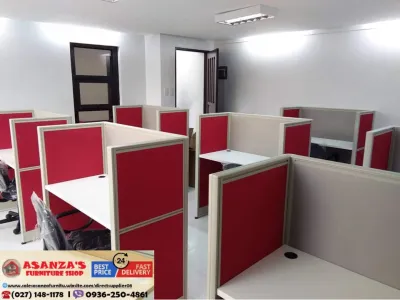
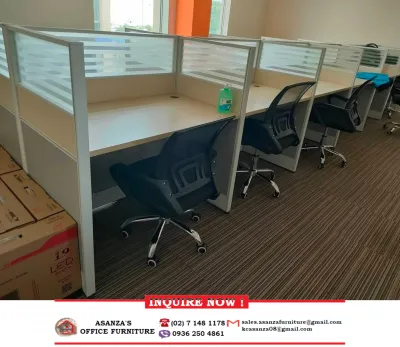
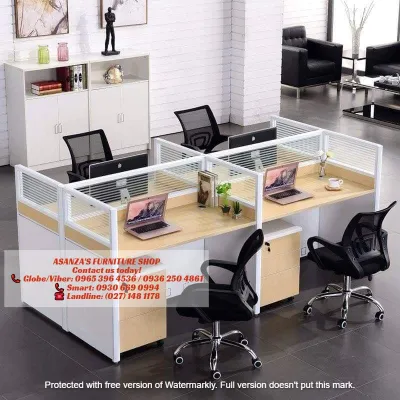
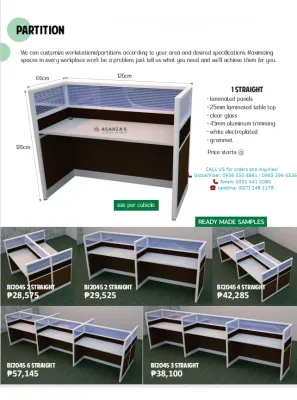
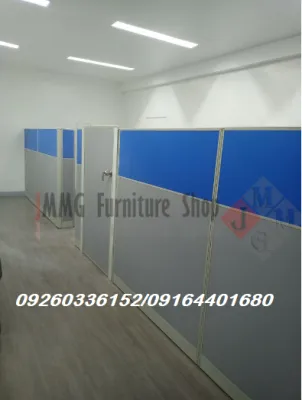
Desks with built-in privacy panels offer the most direct replication of a traditional table cubicle. Fixed wooden or laminate panels provide a permanent, sturdy barrier that completely blocks out peripheral distractions. On the other hand, modular fabric or felt screens allow you to adjust or remove the partitions if your workflow or room layout changes over time.
In a tropical climate, high solid partitions can block natural airflow from fans or air conditioning units, potentially making your workspace feel warm and stuffy. They can also cast deep shadows across your work surface. To counter this, you should plan to install dedicated task lighting, such as an adjustable desk lamp or a monitor light bar, to keep your workspace bright.
If you choose modular screens, check the attachment clamps carefully before installation. Ensure the clamps are compatible with your desktop’s thickness and material. Tightening heavy metal clamps onto fragile tempered glass or thin hollow-core particleboard can cause permanent damage, so always verify the desk’s structural integrity first.
High, solid partitions can look bulky and visually overwhelming in a small bedroom or living room. For smaller spaces, consider lighter materials like acoustic felt or semi-translucent acrylic panels. These options block direct sightlines and dampen ambient noise without making your room feel cramped or dark.
Space and Ergonomic Checks Before You Buy
Before ordering a large partitioned desk, measure your home’s entry points carefully. Ensure the packaging or pre-assembled components can safely pass through narrow doorways, tight hallway turns, and stairwells. This is particularly important for high-rise apartments or condominiums where elevator dimensions and stairwell clearances can limit the size of furniture you can bring inside.
Do not just measure the desk itself; calculate the total operational footprint required for daily use. You need to leave at least 75 to 90 centimeters of clear space behind the desk to comfortably push back your chair, open drawers, and stand up without restriction. If the desk is placed in a high-traffic area, ensure it does not restrict the natural flow of the room.
Enclosed desks can easily trap cords, leading to a cluttered and potentially hazardous tangle of wires. Look for desks with built-in grommet holes, under-desk cable trays, or routing channels to keep power strips and device chargers organized. Proper cable management not only looks cleaner but also prevents dust buildup and makes cleaning much easier.
Position your desk so it does not block essential room ventilation, air conditioning vents, or natural light sources. Most importantly, ensure the bulky structure does not obstruct emergency exit paths or access to windows and doors. A safe workspace must always prioritize room accessibility and emergency preparedness.
Alternatives if a Cubicle Desk Does Not Fit
If a dedicated cubicle desk is too large or permanent for your space, you can place a freestanding room divider, a tall bookshelf, or a folding screen directly behind or beside your existing table. This setup creates a temporary wall that you can easily move or fold away when your workday is over, restoring your room’s original layout.
You can easily convert your current writing table into a semi-enclosed station by adding aftermarket clamp-on privacy panels. This is a highly cost-effective and reversible solution for renters or those with limited space. These panels come in various materials, including acoustic felt, which helps absorb sound while blocking visual distractions.
Sometimes, simply changing the orientation of your desk can mimic the feel of a cubicle. Facing your desk directly into a wall, placing it inside a natural alcove, or positioning it under a staircase can instantly provide a cozy, enclosed sensation. This approach requires no additional furniture purchases and makes excellent use of existing architectural features.
If visual distractions are manageable but noise is your primary issue, consider adding soft furnishings to your room. Placing a thick rug under your desk, hanging heavy curtains, or mounting acoustic wall panels can help dampen household sounds. Reducing echo and ambient noise can significantly improve your focus, even without high physical partitions.
Frequently Asked Questions (FAQ)
Can I add a cubicle partition to my existing table?
Yes, you can retrofit most standard desks with clamp-on or freestanding privacy panels. However, you must check your desk’s material and edge profile first. Avoid clamping heavy panels onto glass, thin plastic, or desks with beveled edges that prevent a secure grip. Always refer to the panel manufacturer’s weight and thickness compatibility guidelines to ensure a safe and stable installation.
How high should a desk privacy panel be to block distractions?
To effectively block visual distractions, the top of the panel should sit slightly above your seated eye level, which typically requires a height of 45 to 60 centimeters above the desktop surface. If you want to maintain a sense of openness and allow natural light to filter through, a lower panel of 30 to 40 centimeters may be sufficient to block peripheral movement while keeping your workspace bright and airy.

Community discussion
Share your experience or ask a question. Comments are reviewed before publication.