
Finding the right work-from-home (WFH) desk can be a challenge when space is limited. If you live in a compact condominium or a shared apartment, a small folding table might seem like the ultimate space-saving solution. It offers the flexibility to set up a workspace quickly and pack it away when your shift ends, helping you reclaim your living area.
However, whether a folding table is the right choice depends on your specific room layout, the weight of your equipment, and your ergonomic needs. While highly convenient, these tables have distinct structural limitations compared to permanent desks. Understanding these factors will help you decide if a folding design fits your daily workflow.
Assessing Your Room Size and Layout Constraints
Before purchasing a small folding table, it is essential to measure your physical floor space accurately. Do not just measure the area where the table legs will rest. You must also account for the clearance needed for your office chair and your own movement.
Products mentioned in this guide
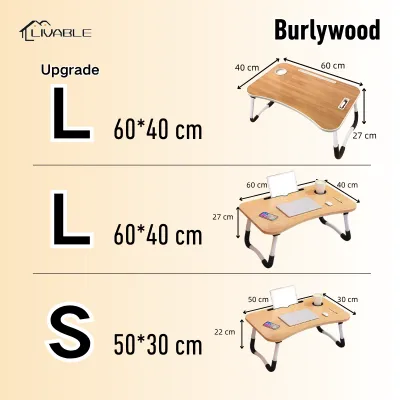
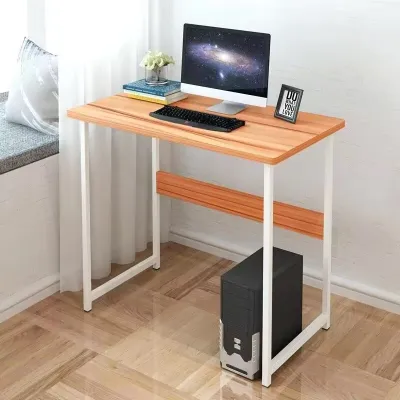

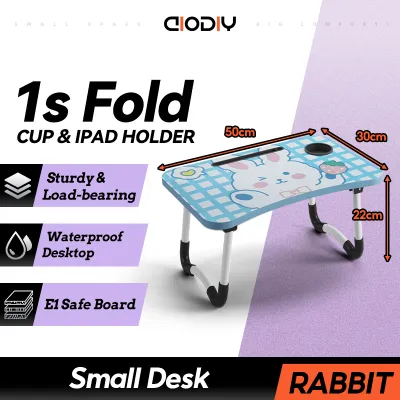
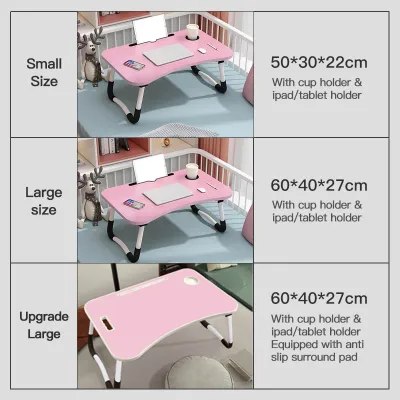
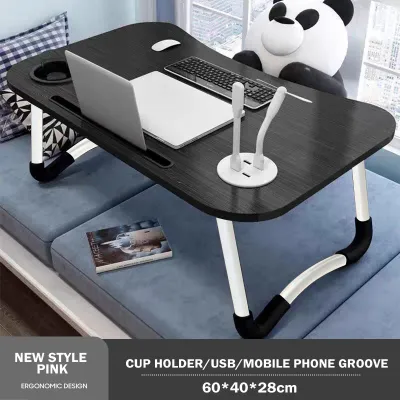

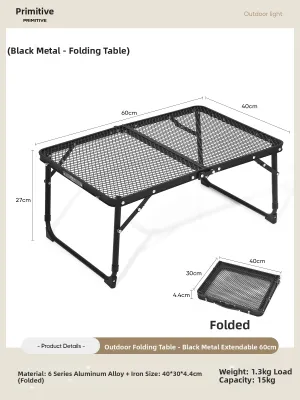
Prices are valid at publication and may change. Please refer to the product page for the latest price.
A standard office chair requires a generous amount of space behind the desk to slide back comfortably. Use masking tape to outline the desk’s potential footprint on your floor, then sit in your chair to ensure you can move without hitting walls or wardrobes.
Consider the walking paths in your room. If the desk blocks a major pathway to the doorway or closet, a folding design is highly beneficial because you can pack it away. However, if you plan to leave the table unfolded permanently, a small fixed desk might offer better stability in the same footprint.
Check the delivery and movement path within your home. Measure your doorways, narrow hallways, and staircase turns. Even a folded table has a flat profile that must clear these tight corners during delivery or when moving it between rooms.
Finally, evaluate your storage options. When the table is folded, where will it live? Measure the gap beside your wardrobe, under your bed, or behind a door to ensure the folded thickness fits perfectly into your designated storage spot.
Evaluating Your Work-From-Home Setup Needs
Your daily workflow dictates the physical surface area you require. If you work solely on a lightweight laptop, a compact folding surface is highly manageable and provides ample room for a mouse.

If you use an external monitor, a separate keyboard, and a notebook, map out these items first. A small surface can quickly become crowded, leaving little room for your wrists or essential documents.
Weight capacity is a critical safety check. Check the manufacturer’s specified weight limit before loading multiple devices, heavy monitor mounts, or desktop organizers. Exceeding this limit can cause the table to sag or tip over.
Ergonomics require careful attention during long working hours. Many folding tables have fixed heights that might not align perfectly with your chair’s armrests, potentially leading to wrist or shoulder strain.
Check the legroom clearance beneath the table. Some folding mechanisms use cross-braces or diagonal support bars that can restrict your knees or prevent you from tucking your chair in fully when you take a break.
Storage for office supplies must be managed externally. Since folding tables lack built-in drawers, you will need a separate organizer, a rolling cart, or a backpack to store your documents and chargers when the desk is folded away.
Weighing the Trade-Offs of a Folding WFH Desk
A folding desk offers unmatched flexibility for temporary setups. If you work in a shared living room or a dining area, being able to fold the desk and hide it away helps maintain a healthy work-life boundary.
This portability is highly advantageous for renters who move frequently or hybrid workers who only need a dedicated desk a few days a week. It is a budget-friendly way to establish a workspace, with many reliable options available for under ₱2,000.
However, the primary trade-off is structural stability. Folding joints, hinges, and locking pins naturally introduce small amounts of play, which can translate into a slight wobble during intense typing sessions.
Permanent cable management is also difficult. Unlike a fixed wooden desk where you can screw in cable trays or run wires permanently, a folding desk requires you to unplug and wrap your cables every time you pack up.
Surface durability is another factor to consider. Lightweight folding tables often use laminate or plastic surfaces that may wear down faster under heavy daily use compared to solid wood permanent desks.
Essential Specifications to Verify Before You Buy
To ensure your purchase is successful, verify the exact unfolded height, width, and depth against your physical measurements.
Check the folded thickness. A table that folds down to a slim profile of under 10 centimeters is much easier to slide under a bed or behind a sofa.
Examine the structural bracing design. Look for models with triangular support brackets, cross-beams, or locking rings that secure the legs firmly in place.
Review the surface material and edge finishing. Rounded edges are much more comfortable for your forearms during long typing sessions than sharp, square plastic edges.
Verify the locking mechanism type. Ensure the table features a positive lock—such as a spring-loaded pin or a sliding ring—that prevents the legs from accidentally folding while you are working.
Consider the local climate. In humid tropical environments, look for powder-coated steel frames to resist rust and moisture-resistant laminate tops to prevent warping over time.
Frequently Asked Questions (FAQ)
Can I use a monitor arm with a small folding table?
Using a clamp-on monitor arm on a small folding table requires extreme caution. Many folding tables feature thin, hollow-core tops or plastic surfaces that cannot withstand the concentrated clamping force of a heavy monitor arm.
Before attempting this, verify the table’s edge thickness and material strength against the monitor arm’s specifications. If the manufacturer permits it, always use a reinforcement plate to distribute the weight, or opt for a freestanding monitor riser instead.
How do I prevent a folding table from wobbling while typing?
To minimize wobble, always ensure the table is placed on a completely level floor. If you are working on tiled floors or uneven surfaces, look for a folding table equipped with adjustable leveling feet.
Double-check that all locking hinges and safety rings are fully engaged and pushed into their secure positions. Distribute your heavy equipment, like laptops or monitors, toward the center or directly over the leg supports rather than on the outer edges to maintain a stable center of gravity.

Community discussion
Share your experience or ask a question. Comments are reviewed before publication.