
Deciding whether to add an adjustable podium desk to your work-from-home setup depends heavily on your daily tasks, physical comfort, and available floor space. An adjustable podium desk is not a universal replacement for a traditional computer desk; rather, it is a highly specialized ergonomic tool. It is designed primarily for professionals who spend their days reading physical documents, delivering virtual presentations, or working on tablets and light laptops. If your workflow revolves around these activities, a podium desk can transform your posture and efficiency. However, if you rely on multiple monitors, heavy typing, or extensive desk storage, a standard flat standing desk remains the more practical choice.
While a standard standing desk provides a large, flat surface that moves strictly up and down, an adjustable podium desk introduces a tilting desktop and a compact footprint. This design mimics a traditional classroom or lecture hall lectern, allowing you to position your work materials at an angle that matches your natural line of sight. Understanding these structural differences is the first step in determining if this furniture piece will solve your specific work-from-home pain points or simply introduce new layout frustrations.
Podium Desk vs. Standard Standing Desk: Understanding the Differences
To make an informed purchase, you must understand how an adjustable podium desk differs structurally and functionally from a standard flat standing desk. A standard standing desk features a large, rectangular desktop—typically ranging from 120 to 180 centimeters in width—that remains perfectly horizontal as it moves vertically. These desks are built to support heavy setups, including multiple monitors, desktop computer towers, external speakers, and various office accessories. They rely on dual or single electric motors, or manual hand cranks, to lift loads that often exceed 70 to 100 kilograms.
Products mentioned in this guide
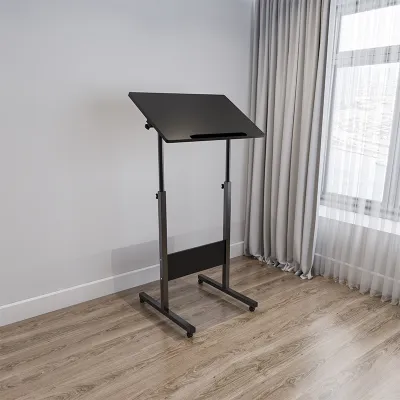
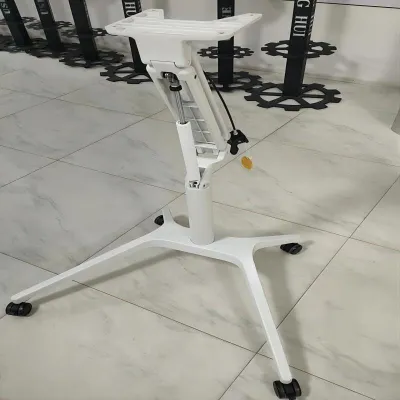
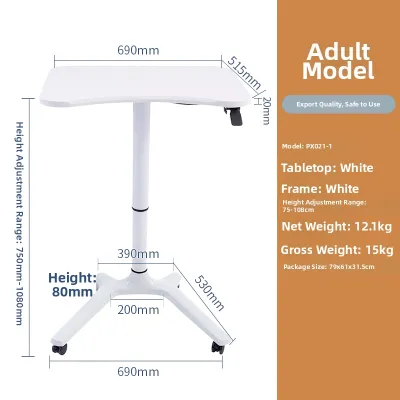
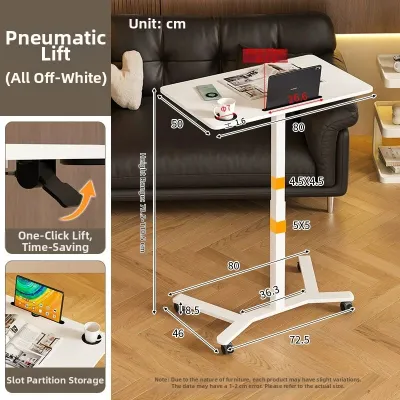
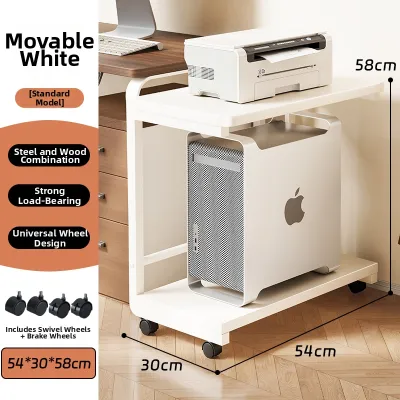
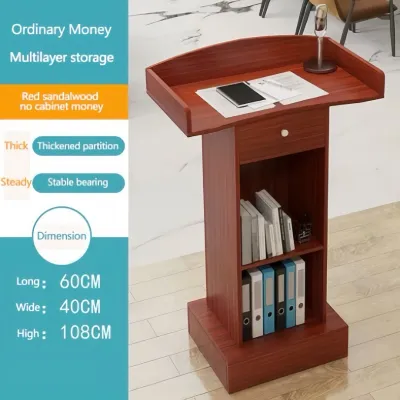
Prices are valid at publication and may change. Please refer to the product page for the latest price.
In contrast, an adjustable podium desk features a much smaller, lecture-style desktop, often measuring between 50 and 80 centimeters in width. The defining characteristic of a podium desk is its tilting mechanism, which allows the user to angle the work surface from a completely flat position up to a steep incline, sometimes reaching 45 degrees or more. To prevent items from sliding off when tilted, these desks are equipped with a raised front lip or edge stopper. Additionally, podium desks usually feature a single-column frame, often supported by a heavy-duty pedestal base or a mobile caster system, making them highly portable but limiting their overall weight capacity to between 10 and 20 kilograms.
These structural differences dictate how each desk aligns with your daily workflow. A standard flat desk is designed for high-intensity computer work, data entry, and multi-screen multitasking. The adjustable podium desk is engineered for focused, single-task activities such as reading, speaking, sketching, or presenting. By tilting the surface, the podium desk brings your work closer to your eyes, eliminating the need to lean forward or hunch your shoulders. It is a tool designed to support your body during active, upright tasks rather than serving as a static storage hub for all your office gear.
Self-Assessment: Signs an Adjustable Podium Desk Fits Your Workflow
Determining if an adjustable podium desk is right for your home office requires a close look at your daily work habits, physical comfort, and the physical constraints of your living space. If you find yourself constantly adjusting your posture or struggling to find a comfortable angle for your work materials, you may benefit from a specialized workspace.

You Frequently Review Documents or Read
If your daily responsibilities involve grading papers, reviewing legal contracts, reading physical books, or editing printed manuscripts, a flat desk surface can quickly become uncomfortable. Looking down at a flat surface for hours forces your neck into a forward-flexed position, which increases the strain on your cervical spine. An adjustable podium desk allows you to tilt the reading material upward, bringing the text directly into your natural line of sight. This adjustment allows you to keep your head up and your shoulders back, reducing muscle fatigue during long reading sessions.
You Experience Neck or Posture Fatigue with Flat Surfaces
Working on a flat desk often leads to a slouched posture, especially when using a laptop or tablet. Over the course of an eight-hour workday, this slouching can cause tension in your upper back, shoulders, and neck. A tilted podium surface encourages a more neutral spine alignment by changing the angle of interaction. Instead of reaching down to type or write, your hands and wrists can rest at a more natural, upward angle. While this ergonomic adjustment can significantly improve daily comfort, it is important to remember that furniture is not a medical cure; if you suffer from chronic back or neck pain, you should consult a healthcare professional for a comprehensive treatment plan.
Your Work Involves Presentations or Video Calls
For remote teachers, virtual trainers, sales professionals, and corporate leaders, the home office is a digital stage. Standing while presenting naturally increases your energy levels, improves your breathing, and allows for more dynamic hand gestures. An adjustable podium desk serves as a professional lectern, keeping your laptop camera at eye level so you do not look down at your audience. The tilted surface keeps your presentation notes, tablet, or reference books easily visible just below the camera line, allowing you to glance at your materials without losing your connection with the camera.
You Need a Compact Standing Solution
In many Philippine homes, especially metropolitan condominiums and shared apartments, space is at a premium. A full-sized standing desk can easily overwhelm a small bedroom or a corner of a living room. Because adjustable podium desks utilize a single-column design and a compact base, they require a fraction of the floor space. Many models feature built-in wheels, allowing you to roll the desk from your bedroom to the living room or balcony depending on the time of day. When choosing a model for a humid tropical climate, look for powder-coated steel frames and moisture-resistant desktop finishes to ensure long-term durability against ambient humidity.
When to Skip the Podium and Choose a Standard Desk Instead
While the adjustable podium desk offers unique ergonomic benefits, it is not the right choice for every work-from-home professional. Certain hardware configurations and work habits are fundamentally incompatible with a tilting, compact surface. Recognizing these limitations beforehand will save you from a frustrating purchase.
Heavy Multi-Monitor Setups
If your job requires two or three monitors, a podium desk is highly impractical. The tilting mechanism of a podium desk is designed to pivot the entire desktop surface. If you attempt to mount a dual-monitor arm to a tilting desktop, the weight distribution will become highly unstable, risking a tip-over. Furthermore, when you tilt the desk to read or write, your monitors will tilt along with it, creating awkward viewing angles that defeat the purpose of an ergonomic setup. For multi-screen setups, a standard, heavy-duty adjustable standing desk is essential.
Extensive Writing or Drafting
While a slight tilt is excellent for reading, a steep incline is highly frustrating for extensive handwriting, sketching, or manual drafting. When you write on a tilted surface, your pens, pencils, and erasers will constantly roll down toward the front lip. Additionally, your forearms require a stable, flat surface to rest on during long writing sessions; a compact podium desk simply does not offer the depth required to support your arms comfortably, which can lead to wrist strain over time.
Heavy Equipment Storage
If your home office setup includes a desktop computer tower, a printer, large studio monitor speakers, an uninterruptible power supply (UPS) to guard against local power fluctuations, or external hard drives, a podium desk will run out of space immediately. These desks lack under-desk cable management trays, drawers, or shelves. Attempting to overload a single-column podium desk with heavy equipment compromises its lifting mechanism and increases the risk of the desk tipping over if bumped.
Actionable Alternative
If you want the ergonomic benefits of a tilted reading surface but cannot give up the space and stability of a flat desk, you do not have to buy a podium desk. Instead, invest in a standard, high-quality adjustable standing desk and pair it with a separate, adjustable laptop stand or a heavy-duty document holder. This hybrid setup allows you to keep your monitors and keyboard on a stable, flat surface while elevating your reading materials or tablet to a comfortable, tilted viewing angle.
Practical Space and Ergonomic Checks Before You Buy
If you have decided that an adjustable podium desk matches your workflow, you must perform several practical checks before making a purchase. Verifying these spatial, structural, and ergonomic specifications will ensure the desk integrates smoothly into your home without safety risks.
Space and Clearance
Before ordering, use a measuring tape to map out the exact floor area where the desk will stand. If you are choosing a mobile model with caster wheels, ensure your flooring is suitable; low-pile carpets and hard tile floors are ideal, while thick rugs can make moving the desk difficult. Additionally, measure the doorways, hallways, and elevator clearances in your building to ensure the delivery box can easily reach your unit. If you live in a high-humidity coastal area, check that the desk’s hardware consists of rust-resistant materials, such as stainless steel or treated aluminum.
Weight Capacity and Stability
Always check the manufacturer’s specified weight limit for both the static load and the lifting mechanism. A typical high-quality podium desk can support between 10 and 15 kilograms. Calculate the total weight of your laptop, tablet, power bricks, and books to ensure you do not exceed this limit. Exceeding the weight capacity can damage the gas spring or electric motor, causing the desk to drift downward or fail entirely. Furthermore, check the design of the base; a wider, heavier base provides better stability and prevents the desk from wobbling when you type.
Tilt Mechanism Safety
When evaluating different models, inspect the design of the tilting mechanism and the front stopper. The tilt adjustment should lock securely into place using a heavy-duty friction lever or a locking pin system; avoid models that rely on cheap plastic knobs that can slip under pressure. The front lip or stopper must be tall enough to secure your specific laptop or tablet. If the lip is too shallow, a thick laptop or a tablet in a bulky protective case may slide over the edge when the desk is tilted to a steep angle.
Ergonomic Alignment
To ensure the desk supports your body properly, compare its minimum and maximum height specifications against your own physical measurements. When standing, your elbows should rest at a 90-degree angle on the desk surface, and your eyes should align with the top third of your laptop screen. If you are exceptionally tall or short, many standard podium desks may not adjust low or high enough to accommodate your frame. Take these measurements while wearing your typical working footwear to ensure complete accuracy.
Frequently Asked Questions (FAQ)
Can I mount a monitor arm on a tilting podium desk?
Generally, you should not mount a monitor arm on a tilting podium desk. Most tilting desk surfaces are constructed from medium-density fiberboard (MDF) or lightweight plastics that cannot withstand the concentrated clamping force and leverage exerted by a heavy monitor arm. Furthermore, tilting the desktop would force the monitor into an unusable viewing angle and shift the center of gravity, making the entire podium highly unstable and prone to tipping over. If you must use an external monitor, keep the podium desk completely flat, or check the manufacturer’s specifications to see if they explicitly support VESA mounts on a non-tilting section of the desk.
Is a podium desk stable enough for heavy typing while standing?
An adjustable podium desk will typically exhibit more wobble during heavy typing than a dual-post standing desk. Because podium desks rely on a single central column, any force applied to the edges of the desk can cause slight lateral movement. If you are a heavy typist or use a mechanical keyboard, this vibration can cause your laptop screen to shake. To minimize this issue, look for models that feature a heavy steel base, a thicker central column, and manual locking pins that secure the height in place, rather than relying solely on a gas spring mechanism.

Community discussion
Share your experience or ask a question. Comments are reviewed before publication.