
Setting up a home office or a dedicated gaming station requires careful consideration of ergonomics, stability, and physical space. When transitioning to an active workspace, choosing the right adjustable pc table is one of the most critical decisions you will make. A high-quality standing desk must do more than simply transition between heights; it must support your valuable electronics without wobbling, withstand daily wear, and fit comfortably within your room’s physical limits. To build a reliable, comfortable setup, you must evaluate specific features like motor configurations, height ranges, weight capacities, and desktop materials.
Quick Answer: Must-Have Features for a Home PC Standing Desk
To establish a baseline for your search, focus on these critical specifications and features for daily PC work:
- Motor System: A dual-motor drive system is highly recommended for balanced lifting, quieter operation, and long-term reliability.
- Height Adjustment Range: Look for a minimum range of 65 cm to 125 cm (typically found in 3-stage frames) to accommodate both sitting and standing postures comfortably.
- Weight Capacity: A minimum transit weight capacity of 80 kg to 100 kg is ideal to handle heavy monitor setups, desktop towers, and accessories safely.
- Desktop Depth: A minimum depth of 70 cm to 80 cm is essential to maintain a safe monitor viewing distance and prevent eye strain.
- Safety Features: Integrated anti-collision sensors are mandatory to protect your equipment, furniture, and household members during height transitions.
While these specifications provide an excellent baseline, the ideal configuration for your workspace depends entirely on the weight of your specific PC hardware, your physical height, and the layout of your room.
Products mentioned in this guide

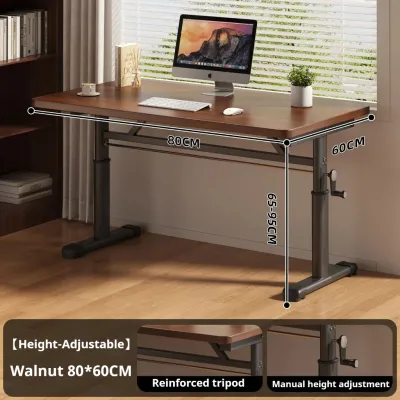
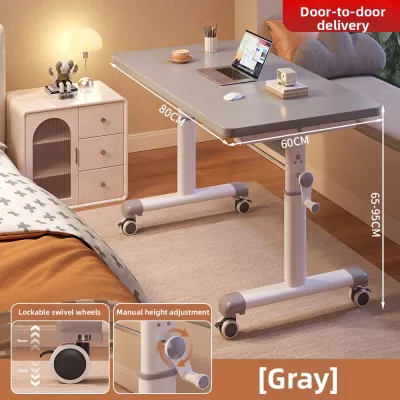
Prices are valid at publication and may change. Please refer to the product page for the latest price.
Motor Systems: Choosing Between Single and Dual Drives
At the heart of every electric standing desk is its motor system, which dictates how smoothly, quickly, and quietly the desk transitions between sitting and standing heights. Electric desks generally fall into two categories: single-motor systems and dual-motor systems. Understanding the mechanical differences between these two options is essential for choosing a frame that matches your daily workflow.

Single-motor systems utilize a single motor mounted to one leg, which drives the opposite leg using a hexagonal rotating transfer rod running underneath the desktop. While single-motor options are generally more budget-friendly, they come with distinct performance trade-offs. They typically offer a slower lifting speed (often averaging 20 mm to 25 mm per second) and can produce a louder, higher-pitched whine as the single motor works harder to lift the load. Furthermore, because the mechanical force is transferred across a rod, any misalignment or uneven weight distribution can cause the legs to lift unevenly, leading to binding, increased wear, and potential mechanical failure over time.
In contrast, dual-motor systems feature an independent motor housed inside each leg column. These motors are synchronized electronically by a central control box, which monitors the revolutions of each motor to ensure they rise and descend at the exact same rate. Dual-motor systems provide significantly faster lifting speeds (typically 30 mm to 40 mm per second) and operate with a much lower, quieter hum (often under 50 decibels), which is a major advantage in shared home environments or quiet residential spaces. By distributing the lifting workload across two points, dual-motor desks handle heavier, off-center loads—such as a heavy PC tower sitting on one side of the desk—with ease, ensuring smoother transitions and a longer overall lifespan.
When evaluating motor systems, pay close attention to the manufacturer’s warranty terms. A reliable frame should offer a warranty that covers the motors, control box, and handset for at least 3 to 5 years. Be sure to verify whether the warranty is supported by a local distributor or service center. In the Philippines, purchasing from a retailer with local parts support is highly advantageous, as it avoids the long wait times and high shipping costs associated with sending heavy electronic components overseas for replacement.
Ergonomic Adjustability: Height Range and Control Panels
Ergonomic comfort is the primary reason to invest in an adjustable desk. However, a standing desk can only provide ergonomic benefits if its physical limits align with your body measurements and your seating equipment.
Matching Height Range to Your Posture and Chair
To ensure a desk will fit you perfectly, you must measure your personal ergonomic heights before purchasing. To do this, wear your typical working footwear (or go barefoot if you prefer working without shoes at home). Sit in your office chair and adjust it so your feet are flat on the floor and your thighs are parallel to the ground. Bend your elbows at a 90-degree angle, keeping your shoulders relaxed. Measure the distance from the floor to the underside of your elbows; this is your ideal sitting desk height. Next, stand naturally with your elbows bent at 90 degrees and measure from the floor to your elbows; this is your ideal standing height.
Many standard standing desks utilize 2-stage lifting columns, which typically adjust from approximately 72 cm to 118 cm. While this range works well for average-height individuals, it often fails to accommodate shorter or taller users. If you are under 5’4″ (163 cm), a minimum height of 72 cm is actually too high for ergonomic sitting, which can lead to shoulder strain and wrist fatigue. Conversely, if you are over 6’0″ (183 cm), a maximum height of 118 cm may not be tall enough for comfortable standing. For these scenarios, look for a 3-stage lifting column frame. These frames offer a wider adjustment range—often from 60 cm to 125 cm—ensuring a perfect ergonomic fit for both sitting and standing postures across a wider demographic.
Memory Presets and Control Panel Usability
An adjustable desk is only effective if you actually use it. Desks that rely on simple “up” and “down” buttons require you to manually hold the button and guess your preferred height every time you transition. This minor inconvenience often deters users from changing positions regularly. To maximize your investment, look for a digital control panel that features programmable memory presets. These panels allow you to save your exact sitting and standing heights, enabling you to transition between positions with a single touch of a button.
Safety is another critical factor when selecting a control panel, especially in active household environments. Ensure the desk is equipped with built-in anti-collision technology. This feature uses electronic sensors to detect sudden resistance or tilt if the desktop hits an obstacle—such as an office chair armrest, a mobile filing cabinet, a curious pet, or a child—while moving. When an obstruction is detected, the desk immediately stops its movement and reverses direction by a few centimeters, preventing costly damage to your hardware and avoiding physical injuries.
Desktop Dimensions and Surface: Sizing Your PC Table for Hardware
Choosing the right desktop size and material is essential for accommodating your hardware safely while ensuring long-term durability and physical comfort.
Calculating the Right Width and Depth
When choosing the dimensions of your desktop, the depth is just as important as the width. A shallow desktop (60 cm or less) forces your monitors too close to your eyes, which can cause significant eye strain and limit your usable workspace. For a comfortable setup, a minimum desktop depth of 70 cm to 80 cm is highly recommended. This depth provides a proper viewing distance of 50 cm to 80 cm from your screens while leaving ample space for a full-sized keyboard, a wrist rest, and your mouse.
For desktop width, consider your current hardware and potential future upgrades. If you use a single laptop or a single monitor, a compact width of 120 cm may suffice. However, if you use dual monitors mounted on clamping arms, a width of at least 140 cm to 160 cm is preferred. This extra width ensures that your monitor mounts do not overhang the edges of the desk and provides sufficient space if you prefer to place a heavy desktop PC tower directly on the desk surface. If you plan to keep your PC tower on the desktop, remember to subtract 25 cm to 30 cm of usable width from your keyboard and mouse area when planning your layout.
Surface Materials and Edge Finishes
Your desktop surface must be durable enough to withstand daily contact, coffee spills, and heavy equipment. Look for high-pressure laminate (HPL) or melamine-faced chipboard (MFC) with a thick, protective wear layer. These surfaces offer excellent scratch resistance and are easy to clean with a damp cloth. Avoid cheap, thin vinyl wraps, which tend to peel at the corners and bubble over time under heavy use.
The shape of the desktop edges also plays a major role in daily comfort. Sharp, 90-degree edges can press into your forearms during long typing sessions, restricting blood flow and causing discomfort. To prevent this, look for desktops with chamfered, beveled, or gently rounded (post-formed) front edges, which provide a smooth resting surface for your wrists and arms.
In tropical, high-humidity climates like the Philippines, material selection requires extra care. High humidity can cause low-quality, unsealed particleboard to absorb moisture, leading to swelling, warping, and mold growth. When choosing a desktop, check the manufacturer’s care instructions and ensure that all edges are completely sealed with thick PVC or ABS edge banding. For maximum humidity resistance, consider high-quality medium-density fiberboard (MDF) with a seamless powder-coated finish, or solid wood options (such as kiln-dried rubberwood or mahogany) that have been thoroughly sealed with a protective polyurethane topcoat. Always ensure your workspace has adequate ventilation and avoid placing the desk in direct sunlight or directly beneath a dripping air conditioning unit.
Stability and Weight Capacity: Preventing Wobble and Overload
A standing desk must remain rock-solid, especially when extended to its maximum standing height. Any instability can result in frustrating monitor wobble every time you type, which disrupts your focus and can cause physical fatigue.
Several frame design elements directly influence stability at higher elevations:
- Column Orientation: Look for legs with wider columns at the bottom (often called inverted or "big-bottom" designs), which provide a more stable foundation.
- Foot Length and Weight: Heavy steel feet measuring at least 60 cm to 70 cm in length help lower the desk's center of gravity, reducing front-to-back rocking.
- Crossbars: Some heavy-duty frames include a structural crossbar connecting the two legs beneath the desktop. This crossbar significantly reduces lateral (left-to-right) wobble, though it can slightly reduce under-desk legroom.
- Stage Count: As mentioned, 3-stage legs offer superior stability at high extensions because there is a greater overlap between the telescoping steel tubes when the desk is fully raised.
To ensure your desk can lift your gear safely, you must calculate the total weight of your setup. Do not guess these values; instead, refer to the manufacturer specifications for your equipment. A standard 27-inch monitor typically weighs 5 kg to 7 kg, a dual-monitor arm weighs 4 kg to 6 kg, a mid-tower PC gaming rig can weigh 15 kg to 25 kg, and miscellaneous accessories (including studio monitors, keyboards, and desk mats) can add another 5 kg to 10 kg.
Once you have calculated your total hardware weight, add a 20% to 30% safety margin. For example, if your gear weighs 50 kg, target a desk frame with a transit weight capacity of at least 60 kg to 65 kg. This safety buffer ensures that the motors do not constantly run at their absolute limit, which prevents overheating, minimizes operational noise, and protects the gears from premature wear. Operating a desk near or above its rated weight limit will void the manufacturer’s warranty and can cause the motors to burn out prematurely.
Cable Management and Assembly: Practical Setup Details
Transitioning a desk between sitting and standing heights introduces unique cable management challenges. Without proper planning, cables can easily become taut, catch on surrounding furniture, or pull out of your PC ports when the desk rises.
To prevent these issues, look for a desk frame that includes built-in cable management solutions. A spacious under-desk cable tray is essential for housing bulky power strips, surge protectors, and large laptop power bricks. Desktop grommets (plastic or metal-lined holes in the surface) allow you to route monitor and peripheral cables directly beneath the desk, keeping the surface clean. For a truly professional setup, consider adding a flexible cable spine channel. This accessory anchors to both the underside of the desk and the floor, guiding your main power cables safely through a structured pathway that expands and contracts smoothly as the desk moves.
Before purchasing, also consider the physical logistics of assembly and installation. Standing desk frames are constructed from heavy-gauge steel to ensure stability; a dual-motor frame alone can easily weigh 25 kg to 35 kg. Because of this weight, assembling the frame and mounting the desktop is a two-person job. You will need to assemble the desk upside down and then flip it over once completed. Ensure you have a helper available to assist with lifting and positioning the desk to prevent personal injury or damage to your flooring and walls. Additionally, if you live in a high-rise condominium or apartment, verify the dimensions of your building’s elevator, stairwells, and doorways to ensure that a large, one-piece desktop can be transported to your unit safely.
Finally, check whether the desktop and frame are sold as a matched set with pre-drilled holes. Pre-drilled desktops feature metal threaded inserts or pilot holes that align perfectly with the frame’s mounting plates, making assembly straightforward with basic hand tools. If you choose to pair a custom solid wood or aftermarket desktop with a standalone frame, you will need a power drill, measuring tape, and appropriate wood screws. Always measure multiple times and use drill stops to avoid accidentally drilling through the top surface of your new desktop.
Decision Matrix: Matching Features to Your Specific PC Setup
To help you identify the right combination of features for your specific needs, use this decision matrix to match your user profile with the recommended specifications:
| User Profile | Recommended Motor Type | Minimum Weight Capacity | Recommended Desktop Depth | Key Feature Focus |
|---|---|---|---|---|
| Minimalist Laptop User<br>(Single laptop, light accessories, compact space) | Single Motor | 50 kg – 70 kg | 60 cm – 70 cm | Compact frame footprint, basic up/down controller, budget-friendly price point |
| Standard Dual-Monitor WFH<br>(Two 24-27" monitors, laptop dock, external keyboard/mouse) | Dual Motor | 80 kg – 100 kg | 70 cm – 80 cm | 3-stage legs for wide height range, digital controller with memory presets, spacious under-desk cable tray |
| Heavy Gaming / Editing Rig<br>(Multiple large monitors, heavy PC tower on desk, studio monitors) | Dual Motor (Heavy Duty) | 100 kg – 125 kg+ | 80 cm | Heavy-duty steel frame with wide feet, anti-collision sensors, robust cable spine, humidity-resistant solid wood or sealed MDF top |
| Budget-Conscious User<br>(Basic PC setup, prioritizes mechanical simplicity) | Manual Crank | 40 kg – 60 kg | 60 cm – 70 cm | No electrical components, lower cost, relies on manual physical effort to adjust height |
Frequently Asked Questions (FAQ)
Is a manual crank standing desk a viable alternative to an electric one?
Yes, manual crank standing desks are a viable, budget-friendly alternative. They eliminate the risk of motor or electrical failure and do not require proximity to a wall outlet, giving you more freedom in room placement. However, they require significant physical effort to adjust, often requiring 30 to 50 turns of a hand crank to transition from sitting to standing. Because of this manual effort, many users find themselves leaving the desk in a single position, defeating the purpose of an active workstation. Manual desks also lack memory presets, meaning you must visually estimate your correct ergonomic height during every transition.
How much weight capacity do I actually need for a standard PC setup?
For a standard home office setup consisting of a laptop, one external monitor, a keyboard, and a mouse, a weight capacity of 50 kg to 70 kg is more than sufficient. If your setup includes dual monitors on a clamping arm and a dedicated desktop PC tower, you should look for a desk with a capacity of at least 80 kg to 100 kg. Always calculate the exact weight of your specific equipment and add a 20% to 30% safety buffer to accommodate future hardware upgrades, heavy desktop accessories, or the natural tendency to lean your forearms on the desk surface while working.

Community discussion
Share your experience or ask a question. Comments are reviewed before publication.