
The Musso D5 pneumatic table offers a cord-free, manual approach to height-adjustable working, making it a compelling option for dynamic home office setups. Unlike electric standing desks that require a constant power source, this model utilizes a gas-spring mechanism to transition between sitting and standing heights. For remote professionals in the Philippines, where power interruptions can disrupt work and high humidity demands resilient furniture materials, understanding the technical specifications of this desk is crucial. By looking closely at its lifting mechanism, load limits, and physical dimensions, you can determine if this pneumatic table aligns with your daily workflow, equipment safety needs, and ergonomic comfort.
Understanding the Pneumatic Lifting Mechanism
A pneumatic lifting mechanism relies on a pressurized gas cylinder to assist with height adjustments. When you engage the desk’s lever, the gas inside the cylinder expands or compresses, counterbalancing the weight of the desktop and your equipment. This manual operation allows you to raise or lower the surface in seconds, much faster than the motorized crawl of an electric desk. Additionally, the adjustment process is virtually silent, free from the mechanical hum of electric motors, which is highly beneficial if you share your workspace or take frequent calls.
One of the most significant advantages of a pneumatic system is its complete independence from electrical outlets. Without power cords trailing across the floor, you have the freedom to position the desk anywhere in your room. In regions prone to seasonal power fluctuations or brownouts, a cordless desk ensures that your ability to transition from sitting to standing remains completely unaffected.
Products mentioned in this guide
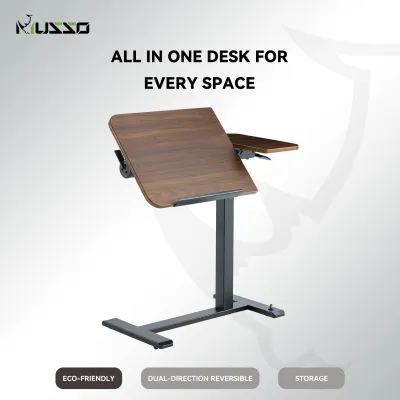
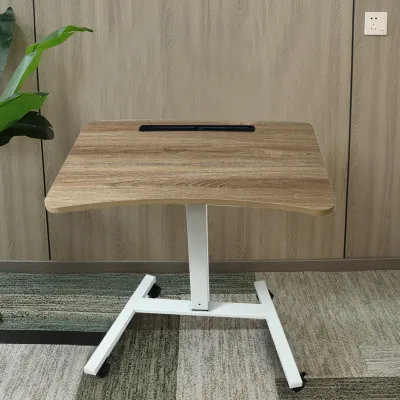
Prices are valid at publication and may change. Please refer to the product page for the latest price.
However, this manual freedom means there are no programmable memory presets. With the Musso D5, you must manually guide the desk to your desired height each time you adjust it. This requires physical feedback, as you will need to apply downward pressure to lower the desk or gently guide it upward as the gas spring assists the lift. Finding your ergonomic sweet spot becomes a tactile process of trial and error.
Evaluating Desktop Dimensions and Ergonomic Fit
Before purchasing any standing desk, you must carefully measure your available floor space and compare it against the official desktop dimensions of the model you are considering. The surface area needs to comfortably accommodate your primary work tools—such as a laptop, external monitors, a keyboard, and a mouse—without feeling cramped. If you use a multi-monitor setup, check the manufacturer’s specifications for the exact length and width of the desktop to ensure your equipment will fit safely within its boundaries.

Desktop depth and edge profile are equally critical for maintaining long-term ergonomic comfort. A desk that is too shallow forces your monitor too close to your face, which can lead to eye strain and limit the space available for proper forearm support. Look for a depth that allows you to position your screen at least an arm’s length away while leaving ample room for your wrists. Additionally, rounded or beveled edges offer a gentler transition for your forearms, while a matte or lightly textured finish prevents your skin from sticking to the desk during humid days.
Weight Capacity and Stability Considerations
To ensure the safety of your expensive work equipment, you must understand how to calculate the desk’s usable payload. Start by identifying the net weight of the desk itself and comparing it to the gross capacity of the pneumatic cylinder. The usable payload is the remaining weight capacity available for your monitors, laptop, mounts, and personal items. Exceeding this limit can strain the gas-spring mechanism, making it difficult to raise the desk or causing it to drift downward unexpectedly.
Structural stability is equally important, especially when the desk is fully extended to its maximum standing height. At higher elevations, any inherent instability in the frame or leg joints can manifest as a noticeable wobble while you type or move your mouse. When researching the desk’s design, look for features like a heavy steel base, wide foot stabilizers, and secure crossbar placements. Additionally, distribute your devices evenly across the surface to prevent off-center loading, which puts lateral stress on the lifting columns and the internal seals of the gas spring.
Build Quality, Materials, and Daily Maintenance
The durability of a standing desk depends heavily on the quality of its materials and how well they are maintained over time. When evaluating the desktop material, look for specific surface treatments on the product label that indicate resistance to scratches, impacts, and moisture. In humid environments, condensation from a cold glass of water can easily damage untreated wood or low-quality laminates, leading to swelling or peeling edges. Verifying that the surface has a protective, moisture-resistant barrier will help preserve its appearance and structural integrity.
The metal frame and mechanical components also require periodic inspection to ensure they remain in optimal working condition. Over time, the vibrations from daily adjustments and typing can cause fasteners and joints to loosen slightly. It is a good practice to inspect the frame periodically and tighten any loose bolts to maintain maximum stability. When cleaning your desk, always follow the manufacturer’s explicit instructions, avoiding harsh chemical solvents or excessive water that can degrade the protective coatings on both the desktop and the metal frame.
Deciding if the Musso D5 Fits Your WFH Routine
Determining whether the Musso D5 is the right addition to your home office depends on your specific workspace constraints, equipment setup, and personal preferences. This pneumatic table is highly suited for professionals who value mobility and flexibility, such as those who frequently rearrange their room layout or work in spaces with limited wall outlets. The rapid, cordless adjustment allows you to transition between sitting and standing seamlessly, without being tethered to a specific spot in your home.
However, if your WFH setup involves multiple heavy monitors and desktop accessories, you may find that the manual lifting effort required to overcome the weight exceeds your comfort level, or that the total weight approaches the cylinder’s limits. Furthermore, if you share the desk and require precise, repeatable height settings at the touch of a button, the manual adjustment process of a gas-spring desk may feel less convenient than an electric alternative. Ultimately, the key to a successful purchase is verifying the exact specifications of the model on the official product label or manufacturer documentation before finalizing your decision.
Frequently Asked Questions (FAQ)
Is a pneumatic desk safer than an electric standing desk?
Pneumatic desks offer a high level of safety because they are entirely manual and provide immediate physical feedback. Unlike electric desks, which require built-in anti-collision sensors to stop the motor if an obstacle is detected, a pneumatic desk only moves when you actively engage the lever and apply physical force. This direct control makes it highly unlikely to pinch cables or trap objects accidentally. To ensure safe operation, always verify that the gas cylinder carries recognized safety certifications and strictly adhere to the manufacturer’s recommended weight limits.
Can I install a monitor arm on a pneumatic table?
Yes, you can generally install a monitor arm on a pneumatic table, but you must verify a few critical specifications first. Check the desktop’s material and thickness to ensure it can withstand the concentrated clamping force of a monitor mount without cracking or bending. Additionally, you must factor the combined weight of the monitor arm and your screens into the desk’s total usable payload. If the total weight of your mounted accessories is too close to the desk’s maximum capacity, it will require significantly more physical effort to lift.

Community discussion
Share your experience or ask a question. Comments are reviewed before publication.