
Finding the right office chair with a laptop table in the Philippines requires balancing space efficiency, ergonomic support, and budget constraints. Whether you are setting up a compact study corner in a Manila condominium or upgrading a home office to handle long remote work shifts, a built-in table attachment eliminates the need for a bulky desk. Between ₱3,000 and ₱15,000, the market offers a wide variety of options, ranging from basic training chairs with folding tablets to highly adjustable ergonomic chairs featuring multi-axis laptop mounts. Making the right choice depends on understanding how materials hold up in tropical humidity, verifying structural weight limits, and knowing which features are essential for your daily comfort.
Setting Your Budget Priorities and Non-Negotiables
When shopping for an office chair with a laptop table, you must first distinguish between essential ergonomic supports and optional comfort features. A non-negotiable priority is lumbar support that aligns with your lower back, as sitting for hours without proper spinal alignment leads to fatigue and discomfort. Look for chairs that offer at least basic height adjustment and a breathable backrest, especially in warm tropical climates where airflow is crucial for comfort. Nice-to-have features, such as adjustable headrests, 3D armrests, or deep reclining angles, can be prioritized based on how much room remains in your budget.
Space constraints are another critical factor when evaluating these specialized chairs. A built-in laptop table extends the overall footprint of the chair, both when in use and when folded away. Measure your designated workspace carefully, ensuring there is enough clearance for the chair to rotate and for the table arm to swing open without hitting nearby walls or furniture. If your room is particularly tight, look for models where the table can fold completely flat against the side or be detached entirely when not in use.
Products mentioned in this guide
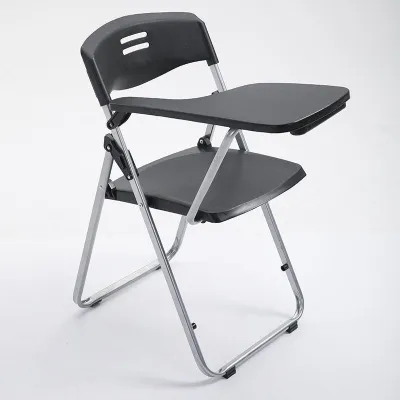
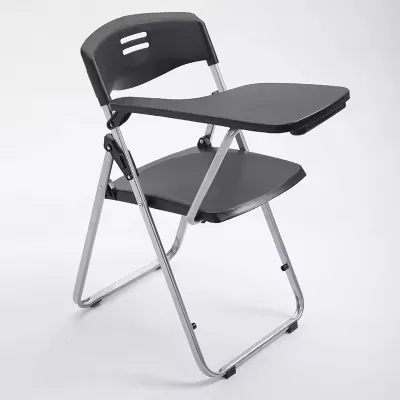
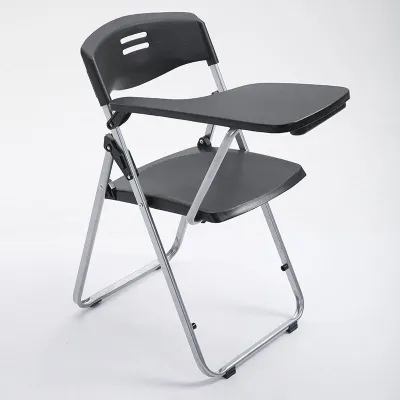
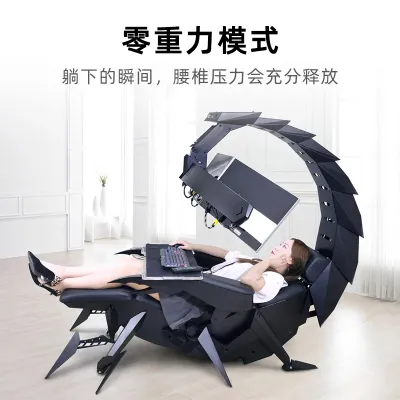
Prices are valid at publication and may change. Please refer to the product page for the latest price.
Weight capacity is a safety-critical specification that you must verify before purchasing. You need to check both the maximum weight limit of the chair itself and the specific load capacity of the attached laptop table. Standard entry-level chairs often support up to 90 to 100 kilograms, while mid-range and premium models may handle 120 kilograms or more. The laptop table attachment typically has a much lower weight limit, often ranging from 5 to 15 kilograms; exceeding this limit can cause the arm to sag, slip, or snap, potentially damaging your device.
What to Expect Across the ₱3,000 to ₱15,000 Range
Navigating the price spectrum from ₱3,000 to ₱15,000 requires a clear understanding of how material quality and mechanical complexity scale with cost. In the Philippines, high humidity can accelerate the wear of low-grade plastics, cheap faux leather, and untreated metal parts. Reading product labels carefully is essential; look for specifications detailing frame materials, such as nylon glass fiber or steel, and upholstery types like high-density mesh or polyurethane foam.

The design of the table attachment mechanism is one of the most significant differentiators across these price tiers. Lower-priced models generally feature fixed, rotating plastic tablets attached to a single armrest, similar to traditional lecture hall chairs. As you move up the price scale, these attachments transition to sturdy aluminum or steel arms with multi-angle tilt adjustments, slide-out stoppers, and secure locking clamps.
If your budget sits closer to the lower limit of ₱3,000, you will need to make strategic compromises. It is wiser to sacrifice cosmetic features, such as colorful accents or built-in footrests, in favor of structural stability and a breathable mesh backrest. Prioritize a solid base and a reliable gas lift over complex adjustment mechanisms that may fail prematurely under daily use.
Entry-Level Tier (₱3,000 – ₱6,000)
In the ₱3,000 to ₱6,000 price range, you will primarily find training-style chairs and basic mesh task chairs equipped with integrated writing tablets. These models are designed for light-duty or intermittent use, making them suitable for students or casual home office setups. The padding on the seat cushion is typically standard foam, which may compress over time, and the backrest is usually a fixed mesh frame with minimal built-in lumbar adjustment.
The laptop table in this tier is almost always a fixed-height plastic board that rotates on a single pivot point. Because these mechanisms are basic, you must strictly verify the manufacturer’s specified weight limits and inspect the joint stability. Avoid placing heavy gaming laptops or leaning your forearms heavily on the table, as the plastic joints can flex or crack under excessive pressure. Ensure the chair base is wide enough to prevent tipping when the table is extended forward.
Mid-Range Tier (₱6,000 – ₱10,000)
Stepping up to the ₱6,000 to ₱10,000 bracket introduces a noticeable upgrade in structural durability and ergonomic adjustability. Chairs in this tier transition from basic training models to dedicated ergonomic office chairs featuring integrated, adjustable laptop desks. You can expect denser, molded seat foam that retains its shape over years of use, along with reinforced nylon or steel frames that offer better overall stability.
The laptop table attachments in this mid-range tier often feature adjustable angles and distances, allowing you to position your screen closer to eye level. Additionally, these chairs frequently include upgraded nylon or polyurethane casters that glide smoothly across tiled or wooden floors without scratching. You will also find more robust lumbar support mechanisms, such as height-adjustable lumbar pads, which help maintain a healthy sitting posture during extended work sessions.
Upper-Budget Tier (₱10,000 – ₱15,000)
At the upper end of the budget, from ₱10,000 to ₱15,000, you enter the premium territory of highly adjustable ergonomic chairs with heavy-duty laptop mounts. These models are engineered for full-time professional use, featuring high-tensile mesh backrests and seats that promote maximum airflow in warm Philippine environments. The frame construction is typically reinforced with aluminum or heavy-duty nylon glass fiber, providing a solid, wobble-free foundation.
The laptop tables in this tier offer sophisticated multi-axis adjustments, enabling you to tilt, slide, and lock the platform at precise angles to match your typing posture. Many of these chairs also incorporate synchronized tilt mechanisms, where the backrest and seat recline at a supportive ratio, keeping your feet flat on the floor while you stretch. When purchasing in this price range, look for extended warranty terms of two to five years, which serve as a strong indicator of the manufacturer’s confidence in the moving parts and structural joints.
Ergonomic and Structural Checks for Laptop Tables
To ensure your office chair with a laptop table supports healthy posture and remains safe to use, you must perform several ergonomic and structural checks. First, verify the table’s height and tilt adjustability. When typing, your elbows should rest comfortably at a 90-degree angle, and your wrists should remain straight rather than bent upward or downward. If the table is too low or cannot tilt, you may find yourself hunching forward, which puts immense strain on your neck, shoulders, and upper back over time.
Next, check the physical clearance between the front edge of the seat cushion and the support arm of the laptop table. There must be adequate space for your thighs and knees to move freely without bumping into the metal or plastic support structure. If the clearance is too tight, getting in and out of the chair becomes awkward, and you may find your legs pressed uncomfortably against the frame, restricting blood circulation during long sitting sessions.
Finally, carefully inspect the locking mechanisms of the table arm. A reliable laptop table must feature a secure clamp, pin, or tension dial that prevents the platform from slipping or tilting downward under the weight of your hands while typing. If the lock feels loose or slips easily during a manual test, it is highly likely to fail under daily use, risking damage to your laptop and causing constant frustration.
Verifying Total Costs and Avoiding Quality Traps
Before finalizing your purchase on any online marketplace or at a local furniture retailer, it is crucial to calculate the total cost of ownership. The listed price of the chair often excludes shipping fees, which can be substantial in the Philippines due to the bulk and weight of furniture shipments, especially if you live outside Metro Manila. Additionally, check if assembly services are included or if you need to purchase separate tools, as assembling a complex ergonomic chair with a table attachment can be challenging without proper equipment.
Be cautious of misleading marketing terms like “heavy-duty” or “fully ergonomic” without verifying the actual adjustable specifications. Always look past the promotional descriptions and read the detailed specification sheet to confirm the exact range of seat height, armrest adjustment, and table tilt. If a product listing lacks clear measurements or diagrams showing the table’s dimensions and weight capacity, treat it as a red flag and contact the seller for clarification before buying.
Lastly, review the return policies and warranty conditions thoroughly, paying close attention to how they cover moving parts. The hinges, joints, and locking clamps of a built-in laptop table are subject to constant friction and stress, making them the most common points of failure. A reputable brand should offer a clear warranty that specifically covers these mechanical components, ensuring you can obtain replacement parts or repairs if a joint becomes loose or breaks within the warranty period.
Frequently Asked Questions (FAQ)
Can I add a laptop table to my existing office chair?
Yes, you can find aftermarket clamp-on laptop tables designed to attach to standard office chairs, but you must verify compatibility before purchasing. These attachments typically clamp onto the cylinder of the gas lift or directly onto the armrests. However, you must check if your chair’s armrests are wide and flat enough to support the clamp, and be aware that adding heavy aftermarket accessories can shift the chair’s center of gravity, increasing the risk of tipping. Additionally, modifying your chair with third-party attachments may void its original manufacturer warranty.
How do I clean the laptop table surface without damaging it?
To clean the laptop table surface safely, always check the manufacturer’s care label or instruction manual first, as different materials require specific maintenance. For general cleaning, use a slightly damp microfiber cloth to wipe away dust, fingerprints, and sweat, which can accumulate quickly in humid tropical climates. Avoid using harsh chemical solvents, bleach, or abrasive scrubbing pads, as these can strip away protective coatings, scratch plastic surfaces, or damage wood laminates. If a deeper clean is necessary, a mild mixture of water and a few drops of dish soap is generally safe for most plastic, metal, and laminated wood surfaces.

Community discussion
Share your experience or ask a question. Comments are reviewed before publication.