
Finding a side table that balances modern charging capabilities with practical storage requires looking beyond aesthetics. In the Philippines, where tropical humidity and dust are constant factors, choosing a tech-integrated bedside table involves evaluating how electronic components are shielded within the furniture frame. The ideal unit keeps your devices powered, organizes your nighttime essentials, and withstands local environmental conditions without compromising electrical safety.
By focusing on structural durability, port specifications, and spatial compatibility, you can select a side table that serves as a reliable hub for your bedroom. This guide outlines the essential criteria to consider before making a purchase, ensuring your new furniture fits both your physical space and your daily routine.
Key Evaluation Criteria for Tech-Integrated Side Tables
When evaluating side tables with built-in electronics, structural integrity must remain the primary consideration. A table is furniture first; if the frame wobbles or the joints loosen over time, the integrated technology becomes difficult or unsafe to use. Look for robust construction methods, such as mortise-and-tenon joints or reinforced steel frames, which provide lateral stability when drawers are opened or devices are plugged in.
Products mentioned in this guide



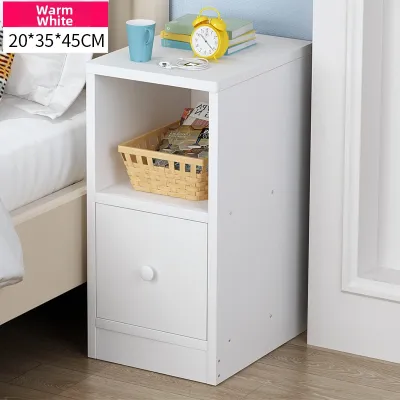

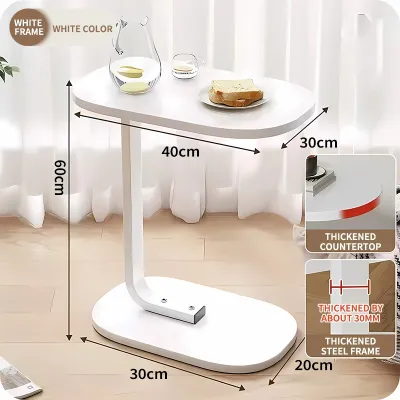
Prices are valid at publication and may change. Please refer to the product page for the latest price.
Material selection directly impacts longevity, especially in humid tropical climates. Solid wood and high-grade plywood coated with moisture-resistant finishes generally resist warping better than low-density particle board. If you select engineered wood like MDF, inspect the edge banding closely to ensure there are no gaps where moisture can seep in, which can cause the material to swell and pinch integrated electrical housing.
Cable management is another critical factor that separates high-quality designs from basic models. Well-engineered side tables feature dedicated channels, recessed back panels, or built-in grommets that guide power cords cleanly to the wall outlet. This prevents cables from being pinched between the furniture and the wall, reducing wear on the wires and keeping the area behind your bed tidy.
Price points in the Philippine market vary significantly based on materials and electronic features. Budget-friendly options, often found under ₱3,000 on online marketplaces, frequently utilize basic laminated particle board and standard USB-A ports. Mid-range to premium selections, ranging from ₱5,000 to over ₱15,000, typically offer solid wood accents, silent drawer glides, USB-C fast charging, wireless pads, and comprehensive manufacturer warranties that cover both the frame and the electrical components.
Comparing Built-in Charging Technologies
Understanding the specifications of built-in charging ports ensures compatibility with your device ecosystem. Many older or budget-friendly side tables feature only USB-A ports, which charge modern smartphones and tablets slowly. For faster power delivery, look for tables equipped with USB-C ports that support higher wattage outputs, such as 15W or 20W, which are necessary for rapid charging.

Port placement and orientation affect both usability and safety. Ports mounted flat on the top surface of the table are easy to access but are highly vulnerable to dust accumulation and accidental liquid spills. Side-mounted ports or those recessed within an open shelf or drawer compartment offer better protection against spills while keeping charging cables tucked out of sight.
Wireless charging pads integrated into the tabletop offer a clean, cable-free surface, but they require careful evaluation. Inductive charging (Qi standard) relies on precise alignment between the phone’s internal coil and the charging pad. Look for tables with subtle surface markings, non-slip silicone rings, or shallow recesses that help you align your phone in the dark. Additionally, verify that the wireless module has adequate heat dissipation, as charging generates heat that can degrade device batteries if trapped.
Electrical safety is paramount when introducing power sources into wooden or fabric-accented furniture. Ensure the integrated power strip or charging module carries recognized safety certifications, such as the Philippine Standard (PS) mark, Import Commodity Clearance (ICC) certification, or international equivalents like UL, CE, or FCC. These certifications verify that the components have been tested for surge protection, overcurrent prevention, and flame resistance.
Storage Configurations for Bedroom Essentials
Selecting the right storage layout depends on what you need to keep within arm’s reach. Open shelving is highly convenient for quick access to books, glasses, or tablets, but it exposes your items to dust, which accumulates quickly in many Philippine households. Closed drawers provide privacy and protect personal items from dust, maintaining a clean visual appearance.
Inspect the drawer mechanics to ensure smooth operation over years of daily use. Metal ball-bearing drawer glides are highly recommended over simple wooden slots, as wood can swell and stick during the humid rainy season. Check the internal depth and weight capacity of the drawers; deeper drawers are useful for bulkier items like medication organizers or journals, while shallow drawers are ideal for cables and small accessories.
Balance the visual weight and physical proportions of the side table with your bed and room scale. The height of the table should sit flush with or slightly below the top of your mattress, usually within a range of two inches. A table that is too tall makes reaching for items awkward, while one that is too low can lead to accidental spills when reaching for a glass of water in the dark.
Consider the surface area relative to your lighting needs. If you plan to place a large table lamp on the nightstand, ensure there is still enough remaining surface area for your phone, a cup, and other nighttime essentials. Tables with built-in LED under-cabinet lighting or integrated reading lamps can free up valuable surface space, though they require additional power connections.
Pre-Purchase Space and Clearance Checks
Before purchasing a tech-integrated side table, precise spatial measurements are necessary to avoid installation issues. Measure the available floor footprint beside your bed, taking into account the swing of wardrobe doors, bedroom entryways, and the path required to walk comfortably around the room. Ensure there is enough clearance to pull drawers out fully without hitting the bed frame or other furniture.
Proximity to wall outlets is a critical factor that is often overlooked. Because these tables must plug into the wall to power their built-in ports, you must measure the distance from the table’s intended position to the nearest outlet. Ensure the table’s power cord is long enough to reach without being stretched taut, which can damage the cord or pull on the wall outlet. A flat, right-angle plug head is highly beneficial, as it allows you to push the side table closer to the wall without bending the cord excessively.
Wall baseboards can also affect how the table sits in your room. Many homes feature thick baseboards that prevent furniture with completely vertical back legs from sitting flush against the wall. This creates a gap where small items can fall behind the bed. To prevent this, look for side tables designed with slightly recessed back legs or a top surface that overhangs the back frame, allowing the unit to sit flush against the wall despite the baseboard.
Finally, consider doorway and elevator access if you live in a high-rise condominium or apartment. Measure the width of your doorways, hallways, and lift doors to ensure the fully assembled table or its packaging can be delivered to your bedroom without obstruction. If assembly is required on-site, verify that you have sufficient floor space to lay out the parts safely.
Safety, Maintenance, and Troubleshooting
Maintaining a tech-integrated side table requires a combination of standard furniture care and electrical safety practices. When cleaning the table, never spray liquid cleaners, water, or polish directly onto or near the charging ports, wireless pads, or power buttons. Instead, wipe the surfaces with a dry, lint-free microfiber cloth. For stubborn stains on non-electrical parts, use a slightly damp cloth and dry the area immediately with a towel.
Regularly inspect the electrical components for signs of wear, damage, or overheating. Feel the charging pad or USB ports during use; while mild warmth is normal during fast charging, excessive heat, a burning smell, or flickering power indicators are signs of malfunction. If you observe any of these issues, or if a port becomes loose and fails to hold a cable securely, unplug the table from the wall outlet immediately and contact the manufacturer.
Manage cord clutter behind and underneath the table to prevent safety hazards. Use cable ties, hook-and-loop straps, or adhesive clips to secure excess cord length, keeping wires off the floor where they can become tripping hazards or get caught in vacuum cleaners. Keeping cords organized also prevents pets from chewing on live wires and reduces dust accumulation around electrical connections.
Frequently Asked Questions (FAQ)
Can I replace a broken built-in charging port myself?
Attempting to replace a broken built-in charging port yourself depends entirely on how the module is integrated into the furniture frame. If the side table uses a modular design—where a standard power strip or USB hub is inserted into a pre-cut slot and secured with screws—you can often unscrew the module and replace it with a compatible unit of the same dimensions. Always unplug the table from the wall outlet before attempting any inspection or replacement.
However, if the charging ports are hardwired directly into the table’s internal frame or connected to custom touch controls and LED lighting systems, DIY repairs are not recommended. Modifying these integrated systems can void your manufacturer’s warranty and increases the risk of electrical short circuits or fire. In such cases, contact the manufacturer for replacement parts or consult a qualified electrician to handle the repair safely.
Do wireless charging side tables work through phone cases?
Most built-in wireless charging pads operate using Qi inductive technology, which can transmit power through non-metallic barriers up to a specific thickness, typically between 3mm and 5mm. Standard slim plastic, silicone, or rubber phone cases generally do not interfere with charging. However, thicker rugged cases, wallet cases containing credit cards, or cases with built-in kickstands may exceed this distance limit and prevent power transfer.
Materials also play a critical role in wireless charging compatibility. Metal cases, magnetic plates used for car mounts, and ring holders will block the electromagnetic field and can cause the charging pad to overheat or shut down as a safety precaution. If your phone fails to charge, remove the case to verify if the issue is caused by case thickness or material interference, and ensure the phone is aligned correctly over the charging coil.

Community discussion
Share your experience or ask a question. Comments are reviewed before publication.