
Choosing the right workstation is a critical decision for your daily productivity and physical comfort. The ideal Pony work table for your WFH setup depends on your available floor area, daily equipment load, and how often you need to change your working posture. If you have limited space in a shared room or condominium, a foldable table offers the flexibility to reclaim your living area after hours. For those managing multiple monitors and heavy workloads, an L-shaped desk provides the necessary surface area and separation of tasks. Meanwhile, a standing desk is ideal if you prioritize movement and want to reduce sedentary fatigue throughout the day. By evaluating your specific spatial constraints and work habits, you can select a configuration that supports both your productivity and physical well-being.
Assess Your Space and Layout Constraints
Before purchasing any furniture, you must accurately measure the physical boundaries of your intended workspace. Start by mapping out the exact floor footprint where the desk will sit, keeping in mind that you need at least 80 to 100 centimeters of clearance behind the desk for your office chair to glide back smoothly. It is equally important to measure the width of your doorways, hallways, and stairwells to ensure the packaged components can be safely delivered and maneuvered into your room during assembly.
Consider the placement of electrical outlets and natural light sources in your room. Positioning your desk too far from a power outlet can lead to hazardous trailing cables, while placing it directly opposite a window might cause distracting screen glare. Look for integrated cable management features or plan to install under-desk trays to keep power strips and cords organized and off the floor, especially in high-humidity tropical environments where dust and moisture can accumulate quickly.
Products mentioned in this guide


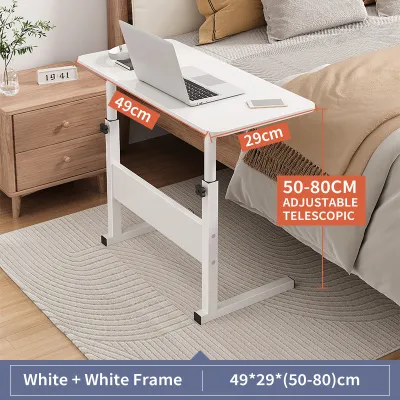
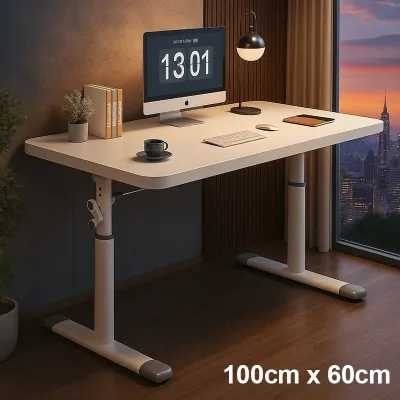
Prices are valid at publication and may change. Please refer to the product page for the latest price.
If your WFH setup is located in a shared living area, such as a condominium living room or a bedroom corner, you must evaluate how much permanent footprint you can realistically dedicate to a workstation. A permanent, bulky desk can disrupt the flow of a multi-use room, whereas a dedicated home office allows for larger, more permanent furniture installations. Determining this spatial boundary early prevents layout conflicts later.
Evaluate Your Daily Work Habits and Ergonomic Needs
Your daily work routine dictates the physical demands you place on your workstation. Track your typical screen time over a week; if you sit for more than six hours a day, incorporating posture variations can help manage physical fatigue. Understanding whether you prefer to work exclusively while seated or if you benefit from alternating between sitting and standing will guide you toward either a fixed-height or an adjustable-height model.

Take a detailed inventory of all the equipment you use daily. A single laptop requires minimal surface area, but a setup with dual monitors, a separate keyboard, a printer, or a drawing tablet demands a much larger and sturdier tabletop. Check the manufacturer’s specifications for the weight capacity of the desk to ensure it can safely support your entire hardware load without bowing or shaking.
Consider how you transition between different types of tasks throughout the day. If your job involves a mix of digital computer work and analog tasks, such as reviewing printed documents, sketching, or taking physical notes, you will benefit from a desk that offers distinct workflow zones. Separating these activities helps maintain mental focus and keeps your primary digital workspace free from clutter.
Match Your Profile to the Right Pony Work Table Configuration
To simplify your decision, you can align your spatial constraints and daily work habits with the specific strengths of each desk type. The following sections break down how the standing, foldable, and L-shaped configurations perform under different home office conditions, helping you identify the ideal match for your daily routine.
Standing Desks for Active and Flexible Routines
A standing desk is highly suited for professionals who experience physical discomfort from prolonged sitting and want to integrate movement into their workday. By allowing you to transition smoothly between sitting and standing, this configuration helps maintain energy levels and reduces physical strain during long editing or writing sessions.
When evaluating standing options, compare motorized and manual adjustment mechanisms. Motorized desks offer convenient, push-button transitions and often include programmable height presets, but they require proximity to a power outlet and produce a mild motor hum. Manual hand-crank models operate independently of electricity and are generally quieter, though they require more physical effort and take longer to adjust.
Before purchasing, verify the manufacturer’s stated weight capacity and check user reviews or product specifications regarding stability at maximum height. Some desks can experience minor lateral movement or monitor wobble when fully extended, especially on carpeted floors or under heavy equipment loads. Ensuring a robust frame design and secure locking joints is essential for a stable typing surface.
Foldable Tables for Compact and Multi-Purpose Spaces
For those living in compact apartments or utilizing shared family spaces, a foldable work table provides an excellent temporary workstation. This configuration allows you to set up a dedicated office during working hours and completely reclaim your living space once the laptop is closed, making it ideal for maintaining a healthy work-life boundary in a limited area.
Because foldable tables are subjected to frequent setup and teardown, you must carefully inspect the durability of the hinges and locking mechanisms. Look for robust steel brackets and secure safety locks that prevent the legs from accidentally collapsing under load. The table legs should feature non-slip feet to maintain stability on tiled or wooden floors common in tropical homes.
Assess the physical effort required to fold, transport, and store the table on a daily basis. A table that is too heavy or awkward to fold can quickly become a permanent fixture, defeating its original purpose. Check the folded thickness to ensure it can slide easily under a bed, behind a sofa, or inside a utility closet when not in use.
L-Shaped Desks for Heavy Workloads and Dual Monitors
An L-shaped desk is the ultimate solution for power users, creative professionals, and gamers who require extensive desktop real estate. The dual-surface design allows you to place multiple monitors on one side while keeping the adjacent side completely clear for paperwork, reference materials, or secondary devices like tablets and laptops.
When planning for an L-shaped configuration, check whether the desk features a reversible return, which allows you to assemble the shorter side on either the left or right to fit your room’s layout. Measure your corner walls carefully to ensure the desk fits snugly against the baseboards without blocking access to windows or electrical outlets. Be mindful of the corner junction to ensure the entire surface area remains usable and does not become a hard-to-reach dead zone for your daily tools.
Pay close attention to the under-desk clearance, particularly in the inner corner where the two sections meet. Ensure there is adequate legroom to swing your chair from one side to the other without hitting support legs or storage pedestals. You must also verify that your office chair has enough clearance to pull out and rotate fully within the L-shaped nook without bumping into nearby walls or other furniture.
Pre-Purchase Checks: Dimensions, Clearance, and Stability
Before finalizing your purchase, perform a final verification of the product’s exact dimensions against your physical workspace. Use painter’s tape on the floor to outline the desk’s footprint, including the space required for your chair and your body when seated. Ensure there is a clear walking path around the desk so that other household members can move through the room without disrupting your work.
Review the manufacturer’s specifications regarding maximum load capacity and surface care instructions. In warm, humid climates, wooden or laminate surfaces can be sensitive to moisture from cold drinks or high ambient humidity; check if the finish requires coasters or specific cleaning agents to prevent warping or peeling. Additionally, review the warranty terms to understand what components, such as motors or structural joints, are covered over time.
Plan your assembly process carefully before the delivery arrives. Heavy desks may require two people to assemble safely, and you should use a soft mat or cardboard on the floor to prevent scratching your tiles or wooden floorboards during setup. For tall or top-heavy units, check if the manufacturer recommends wall anchoring to prevent accidental tip-overs, and ensure you have the appropriate tools or consider hiring professional installation services if the assembly process is complex.
Frequently Asked Questions (FAQ)
Can I convert a standard Pony work table into a standing desk later?
Yes, you can convert a standard fixed-height table using an aftermarket desktop converter, but there are key differences to consider compared to a dedicated standing desk. A desktop converter sits on top of your existing table and uses a gas-spring or manual lift to raise your monitor and keyboard. While this is a cost-effective way to introduce movement, it reduces your remaining flat desktop space and adds significant weight to your table.
Before purchasing a converter, check the maximum weight capacity of your base table. The table must be sturdy enough to support both the heavy converter mechanism and your computer equipment without wobbling or tipping. Additionally, verify that the table’s surface material and joints can handle the concentrated pressure of the converter’s base, especially if the table is made of lightweight hollow-core materials.
What is the minimum room size needed for an L-shaped Pony work table?
There is no single minimum room size, as the required space depends on the specific dimensions of the desk and how you navigate around it. To calculate the necessary space, take the outer dimensions of the L-shaped desk and add at least 80 to 100 centimeters of clearance along the working edges for your chair to pull out. You should also factor in an additional 60 centimeters of walking clearance behind the chair zone to ensure comfortable movement through the room.
To avoid layout mistakes, always consult the specific product’s assembly manual and floor plan guides before purchasing. These documents provide exact measurements of the desk’s depth, return length, and leg placement, allowing you to map out the configuration precisely against your room’s architectural features, such as doors, windows, and built-in closets.

Community discussion
Share your experience or ask a question. Comments are reviewed before publication.