
Finding the right Sanyang desk for your work-from-home (WFH) setup comes down to balancing your available floor space, your daily work habits, and your equipment weight. If you are working in a tight, shared condominium, a foldable desk that packs away after hours offers the ultimate spatial flexibility. For those with dedicated office rooms or heavy multi-monitor setups, an L-shaped desk provides the expansive surface area needed to spread out documents and devices. Meanwhile, if you suffer from physical fatigue during long shifts, a standing desk introduces crucial posture variation. By systematically evaluating your room layout and ergonomic needs, you can select a configuration that enhances your productivity without cluttering your home.
Assess Your Room Layout and Space Constraints
Before browsing any online marketplace, grab a tape measure and map out your designated workspace. It is not enough to measure the desk’s raw width and depth; you must also account for the clearance required to pull out your office chair comfortably, which typically requires at least 75 to 90 centimeters of unobstructed space behind the desk. Consider how door swings, wardrobe doors, and high-traffic walking paths interact with the proposed desk location. In tropical climates, positioning your desk to maintain proper airflow from electric fans or air conditioning units is also essential for daily comfort.
For multi-purpose rooms, studio apartments, or shared bedrooms, a foldable desk serves as an excellent space-saving solution. These models allow you to establish a temporary workspace during office hours and reclaim your living area once the laptop is shut. When folded, these desks can easily slide behind a sofa or stand against a wall, keeping your home free of visual work clutter.
Products mentioned in this guide
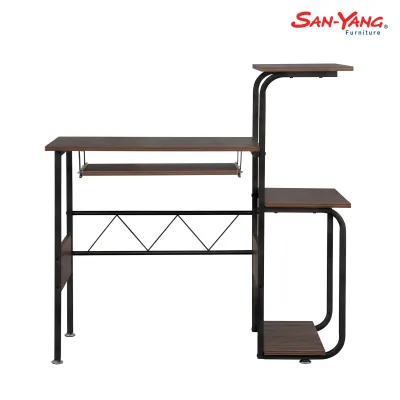
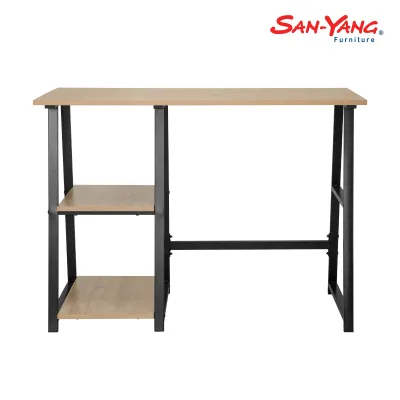
Prices are valid at publication and may change. Please refer to the product page for the latest price.
If you have a dedicated corner or a larger room, an L-shaped desk maximizes underutilized corner space. This configuration provides two distinct work zones within arm’s reach, making it ideal for professionals who manage physical paperwork alongside their digital tasks. However, because L-shaped desks have a large, permanent footprint, you must verify that the desk’s return side does not block windows, power outlets, or natural light sources.
Standing desks require a unique spatial assessment. While their floor footprint is fixed and comparable to a standard writing desk, you must ensure there is adequate overhead and lateral clearance. Check that the rising desktop will not collide with wall-mounted shelving, picture frames, window treatments, or low-hanging light fixtures. Additionally, ensure that nearby wall outlets are positioned so that power cords do not stretch or unplug when the desk reaches its maximum height.
Evaluate Your Work Habits and Ergonomic Needs
Your daily professional routine and physical comfort should dictate your desk’s mechanical features. If your job requires sitting for eight to ten hours a day, a sit-stand desk allows you to transition between sitting and standing throughout your shift. This movement helps reduce physical fatigue and keeps you active, especially during warm afternoons when sitting in one position can feel particularly draining.

Your hardware setup is another critical factor in this decision. If you use multiple monitors, a laptop dock, external keyboards, and heavy reference books, a standard foldable desk may feel cramped and unstable. An L-shaped desk is highly suited for multi-screen setups, offering the structural depth and width needed to position screens at a comfortable viewing distance of about 50 to 70 centimeters from your eyes.
For freelancers, students, or hybrid workers who only need a laptop for a few hours a day, a foldable desk offers sufficient utility without dominating a room. It provides a stable, flat surface for light tasks and can be put away when not in use, making it perfect for those who do not require a permanent, complex desktop arrangement.
Regardless of the Sanyang model you choose, ergonomic alignment is vital for preventing long-term strain. Your desk height should allow your elbows to rest at a 90-degree angle while typing, with your wrists remaining flat and neutral. If your desk height is fixed, you may need to pair it with an adjustable office chair or a footrest to achieve an ergonomically sound posture that protects your neck, shoulders, and lower back.
Compare Sanyang Desk Configurations for Your Setup
To help you visualize how these options compare, the table below outlines the key differences in space efficiency, equipment capacity, and ideal user profiles for each desk type.
| Desk Type | Space Efficiency | Equipment Capacity | Ideal User Profile |
|---|---|---|---|
| Standing Desk | Moderate (Fixed footprint, vertical movement) | Moderate to High (Check motor weight limits) | Users seeking posture variation and active movement |
| Foldable Desk | High (Collapsible, easy to store) | Low to Moderate (Best for laptops and light gear) | Hybrid workers, students, and small-space dwellers |
| L-Shaped Desk | Low (Requires dedicated corner or large space) | High (Spacious surface for multiple monitors) | Professionals with heavy setups and paperwork |
When comparing these configurations, always verify the specific product labels and manufacturer specifications for weight limits. This step is especially critical if you plan to mount heavy dual-monitor arms or place heavy desktop towers on the surface. Foldable desks generally have lower weight capacities compared to fixed L-shaped desks, and overloading them can compromise their folding joints or cause the surface to bow.
Consider the trade-offs between structural stability and spatial flexibility. A fixed L-shaped desk offers robust stability and zero moving parts, meaning it will not wobble during intense typing sessions. On the other hand, standing and foldable desks trade some of this absolute rigidity for dynamic movement and space-saving capabilities. Choosing the right model means deciding whether physical flexibility or rock-solid stability is your primary priority.
Final Delivery and Assembly Checks
Before finalizing your purchase, confirm that the packaged dimensions of your chosen Sanyang desk can safely navigate the journey into your home. Measure the height and width of your building’s elevators, tight stairwell corners, and your apartment’s front door. Large L-shaped desks or heavy motorized standing desks often arrive in flat packs that require two people to carry and assemble safely.
Electrical planning is crucial, particularly for motorized standing desks. Ensure your workspace has a nearby wall outlet that can accommodate the desk’s power cord without requiring hazardous extension cords. Implement a clear cable management plan using under-desk trays or spine organizers to prevent cords from tensioning, snagging, or pulling out of the wall as the desk moves up and down.
Inspect your flooring before assembly. Uneven tiles, warped wooden planks, or thick rugs can cause a desk to wobble, which is amplified when a standing desk is raised to its highest point. Check if your chosen Sanyang model includes adjustable leveling feet to compensate for minor floor irregularities. Always assemble the desk on a soft surface, like a cardboard box or a blanket, to protect both the desk finish and your floors from scratches.
If you encounter unclear instructions, missing hardware, or structural questions during assembly, stop immediately. Do not attempt to force joints or make unapproved modifications to the frame. Consult the manufacturer’s official customer support or hire a qualified local assembly professional to ensure your desk is safely and securely constructed.
Frequently Asked Questions (FAQ)
Can I add a monitor arm to a Sanyang foldable or standing desk?
Yes, but you must verify the desk’s edge profile, thickness, and material composition in the product manual before clamping any accessories. Many standing desks easily accommodate standard grommet or C-clamp monitor mounts. However, you should avoid clamping heavy dual-monitor arms onto thin or hollow-core foldable desk surfaces, as the concentrated pressure can crack or warp the material. If allowed by the manufacturer, use a reinforcement plate to distribute the weight safely.
How do I maintain the moving parts of a Sanyang standing desk?
To ensure the longevity of your adjustable desk, keep the lifting columns and tracks free of dust, pet hair, and debris by wiping them down regularly with a dry microfiber cloth. In humid tropical environments, dust can easily mix with moisture and clog the moving mechanisms. Always follow the manufacturer’s specific maintenance instructions regarding lubrication and screw-tightening schedules, and avoid using generic household oils or harsh chemical solvents that could damage the motor or glide pads.

Community discussion
Share your experience or ask a question. Comments are reviewed before publication.