
When comparing the Yueji H8 standing desk to other electric standing desks in the same price range, the true value lies in how well its specific engineering matches your daily work habits and physical space. While budget-friendly electric desks often look identical in online listings, subtle differences in frame thickness, motor reliability, and structural stability under load can dramatically affect your long-term satisfaction. To determine if the Yueji H8 table is the right investment for your home office, you must look beyond the marketing photos and systematically evaluate its technical specifications, build quality, and local support options against competing models.
Core Specifications to Verify on the Product Page
Before committing to any electric standing desk, your first step should be a rigorous comparison of the baseline technical specifications listed on the official product pages. Start by checking the stated weight capacity of the Yueji H8 table and comparing it directly to the actual combined weight of your current setup. Weigh your monitors, monitor arms, computer tower, keyboard, and any desk accessories you plan to keep on the surface. Keep in mind that operating a motor near its maximum rated capacity can accelerate wear and tear, so choosing a desk with a comfortable weight buffer is always a safer strategy.
Next, verify the minimum and maximum height range of the desk frame. A desk that does not go low enough can cause shoulder strain during seated work, while one that does not rise high enough will force you to slouch when standing. Measure your elbow height while sitting in your preferred ergonomic chair and while standing naturally. Compare these measurements to the adjustment range of the Yueji H8 and its competitors.
Products mentioned in this guide
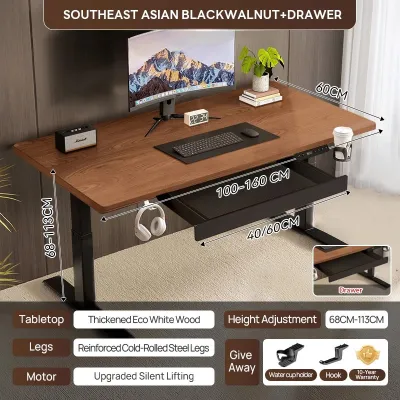
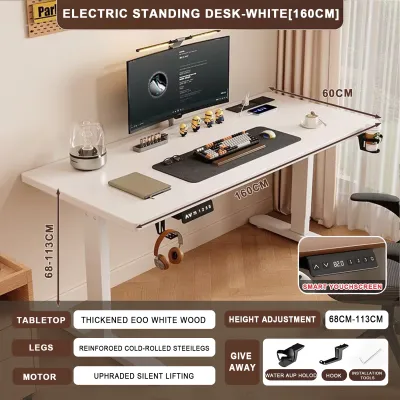
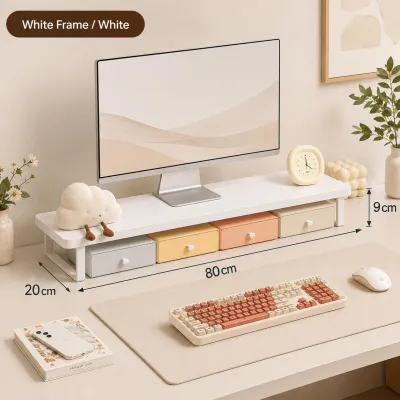
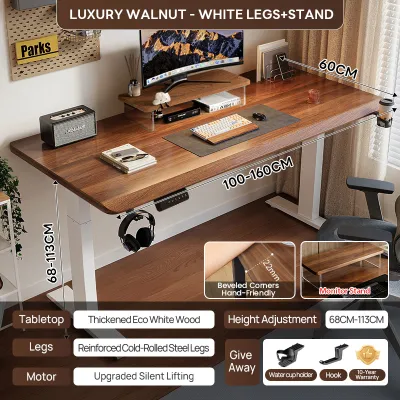
Prices are valid at publication and may change. Please refer to the product page for the latest price.
Finally, pay close attention to the frame material and the telescopic leg design. Standing desk legs typically come in either two-stage or three-stage configurations. Two-stage legs consist of two telescoping segments, which generally offer a narrower height range and are common in entry-level models. Three-stage legs feature three segments, providing a wider range of motion and often greater stability at higher extensions. Confirming whether the Yueji H8 or its same-price competitors use a two-stage or three-stage frame will give you a clear indication of which model offers better mechanical versatility for your height.
Evaluating Build Quality and Wobble at Max Height
Structural stability is the single most critical factor for any standing desk, especially when it is fully extended to standing height. Budget and mid-range electric desks are particularly susceptible to lateral sway and front-to-back wobble, which can cause your monitors to shake annoyingly while you type. When evaluating the Yueji H8 table against its competitors, look closely at the structural design of the frame.

Check the product diagrams for the presence of wedge gussets or reinforced top plates where the legs meet the desktop frame. Some desks utilize a traditional crossbar running between the legs to minimize lateral movement, while others rely on heavy-duty steel brackets and precision-engineered joints to maintain stability without cluttering the under-desk space. If a desk lacks these structural reinforcements, it is highly likely to experience noticeable wobble at heights above 100 centimeters.
Since you cannot always test these desks in person before buying, leverage user reviews and video demonstrations to assess real-world stability. Look specifically for footage of users typing vigorously or pushing on the desk surface at its maximum height. Additionally, inspect the specifications of the desk feet. Desks with longer, heavier steel feet provide a lower center of gravity, which significantly improves grounding and reduces shifting on both hard tile floors and thick carpets.
Motor Configuration, Lift Speed, and Noise Levels
The drive system is the heart of any electric standing desk, dictating how smoothly, quickly, and quietly your workspace transitions between sitting and standing. When comparing desks in this price bracket, determine whether the models you are considering use a single-motor or dual-motor configuration. A single-motor desk uses a hex rod to transfer power from a single motor to the opposite leg, which can result in slower lift speeds and lower weight capacities. Dual-motor desks feature an independent motor housed inside each leg, offering faster, more synchronized lifting and quieter operation.
Lift speed is typically measured in millimeters per second. While a difference of a few millimeters might seem negligible on paper, a faster lift speed means you are more likely to transition between sitting and standing throughout the day rather than leaving the desk in one position. Check the manufacturer’s stated lift speed under full load, as some single-motor desks slow down significantly when loaded with heavy equipment.
Acoustic performance is another vital consideration, particularly if you work in a shared household or a quiet office environment. Look for the manufacturer’s stated decibel rating during operation. A quiet motor typically operates below 50 decibels, which is comparable to a quiet library.
Furthermore, compare the features of the control panel. A basic controller may only offer simple up and down buttons, requiring you to hold the button until you reach the desired height. More advanced controllers in this price range feature programmable memory presets, allowing you to save your exact sitting and standing heights for one-touch adjustment. Look for safety features like child locks to prevent accidental operation and sensitive anti-collision mechanisms that automatically stop and reverse the desk if it encounters an obstacle like a chair armrest or a filing cabinet.
Desktop Surface, Edges, and Cable Management
While the frame and motor handle the heavy lifting, the desktop surface is the part of the desk you interact with constantly. In tropical climates like the Philippines, high humidity and temperature fluctuations can take a toll on wood-based materials. When comparing the Yueji H8 table to other options, evaluate the desktop material and its surface finish carefully.
Most desks in this price range use medium-density fiberboard (MDF) or particleboard finished with a melamine or laminate veneer. Check the manufacturer’s care instructions to verify the surface’s resistance to scratches, stains, and moisture. A high-quality laminate finish will resist water rings from cold drinks and prevent the core wood from swelling in humid conditions.
The design of the desktop edges also plays a major role in daily comfort and durability. Straight edges can sometimes feel sharp against your forearms during long typing sessions, whereas an ergonomically curved front edge provides a more comfortable resting place for your arms. Examine the quality of the edge banding—the protective strip sealed around the edges of the desktop. Poorly applied edge banding is prone to peeling or chipping over time, especially in warm, humid environments where adhesives can degrade.
Additionally, compare the built-in cable management solutions provided by each desk. A cluttered mess of hanging power cords and monitor cables not only looks untidy but can also pose a safety hazard when the desk moves up and down. Look for desks that include under-desk cable trays, built-in grommets on the desktop surface, or integrated power strip mounts. If these are not included, factor in the additional cost of purchasing third-party cable management accessories to keep your workspace clean and safe.
Warranty Coverage and Local After-Sales Support
Investing in an electric standing desk involves moving parts and electronic components that can fail over time. Therefore, shifting your value assessment from the upfront purchase price to long-term reliability and local support is essential. Compare the warranty terms of the Yueji H8 table against its competitors, paying close attention to how the warranty is structured.
Many manufacturers offer split warranties, providing a longer warranty period for the steel frame and a shorter warranty period for the motor, control box, and electronic keypad. Be wary of brands that offer a vague, blanket warranty without specifying which components are covered.
Equally important is the availability of local after-sales support in the Philippines. Shipping a heavy steel desk frame back to an overseas seller for repairs or replacement can be prohibitively expensive and logistically challenging. Verify if the brand has an official local distributor, a dedicated customer service center, or a reliable supply of replacement parts within the country.
Finally, consider the assembly process. Electric standing desks are heavy, freight-delivered items that require careful assembly to ensure safe operation. Review the assembly instructions or online video guides to estimate the setup time and identify any required tools. Check if the seller offers professional assembly services in your area, or if you will need to recruit a friend to help you lift and flip the heavy frame once assembled.
Decision Framework: Choosing the Right Desk for Your Setup
To make your final decision, synthesize your findings into a personalized decision framework based on your specific workspace conditions.
You should choose the Yueji H8 table if its verified height range perfectly accommodates your ergonomic sitting and standing postures, its weight capacity comfortably supports your equipment, and it offers robust local warranty coverage with accessible customer service in your region. It is an excellent choice for users who prioritize a reliable, straightforward standing desk experience backed by dependable local support.
On the other hand, you may want to choose a competing alternative if you require highly specialized features that are not offered by the H8. This includes scenarios where you need a custom-sized desktop to fit a tight corner, a specific dual-motor configuration for heavy lifting, or specialized ergonomic desktop cutouts.
Before clicking the buy button on any model, perform a final physical check of your home office. Measure your available floor space to ensure the desk’s footprint fits comfortably without blocking walkways. Additionally, verify that your doorways, hallways, and elevator or stair access can accommodate the shipping box dimensions, as standing desk frames are shipped in large, heavy packages that can be difficult to maneuver through tight spaces.
Frequently Asked Questions (FAQ)
Is a 3-stage leg frame always better than a 2-stage frame?
A three-stage leg frame is generally superior to a two-stage frame because it offers a wider range of height adjustments and greater structural stability. Because the legs consist of three overlapping columns, they can collapse lower for shorter users and extend higher for taller users. Additionally, the extra overlap between the column segments provides better resistance to shaking and wobbling when the desk is raised to its higher limits. However, if you fall within the standard height range and do not require extreme adjustments, a high-quality two-stage frame can still provide a stable and cost-effective solution.
How do I prevent an electric standing desk from wobbling?
To minimize wobble without modifying the desk’s structure or voiding your warranty, start by ensuring the desk is placed on a completely level surface. Most electric desks feature adjustable leveling glides on the bottom of the feet; turn these glides to compensate for uneven tile or wooden floors. Next, periodically check and tighten all assembly bolts, especially the screws connecting the desktop to the frame and the bolts securing the legs to the feet. Finally, place heavier items, such as your computer tower or heavy books, closer to the center or rear of the desk directly over the leg columns rather than on the outer edges, which helps stabilize the center of gravity.

Community discussion
Share your experience or ask a question. Comments are reviewed before publication.